Best AI for Translation in 2026: Four Jobs, Not One Tool
The best AI for translation depends on the job: DeepL for text and documents (from $8.74/month billed annually, free plan available), Google Lens for free camera translation, Crowdin for ongoing app localization (free plan with 60,000 hosted words), and Translate.video or UnmarkAI for dubbing video. Index-Translate is an open-weight option for developers.
The short version
AI translation isn't one product category. DeepL leads on text and documents, Google Lens is the free default for live and visual translation, Crowdin sells the software localization workflow and now has a free plan, and Translate.video or UnmarkAI dub spoken video. Developers get a new open-weight option, Index-Translate.
Want this decided for your own case? Find your tools with Smart Match, starting from this guide's question.
In September 2026, DeepL, Google Lens, Crowdin, Translate.video and UnmarkAI all rank under a "best AI for translation" search. Only one of them, DeepL, is actually a translation engine you'd compare head to head with another translation engine.
The other four solve four different problems that happen to involve moving words between languages. A support lead translating a help-center article, a product manager localizing app buttons, a founder dubbing a demo video into Spanish, and a traveler pointing a phone camera at a menu are not shopping for the same tool, even though they typed a nearly identical query.
Static text and documents go to DeepL, and when a mistranslation would cost money, MachineTranslation.com checks DeepL's answer against a panel of other engines. Live and visual translation, the kind you'd use once and never pay for, goes to Google Lens. A software product that ships new strings every sprint needs Crowdin's workflow, not a one-off translation. Spoken video needs a dubbing tool, and the two catalogued here price and gate their free tiers very differently. Get the job right first, and the vendor choice mostly picks itself.
What changed since October 10, 2026
Re-checked on 14 October 2026, and the lineup holds. Two newer catalog entries that mention translation, Recastia (a PDF-to-nine-formats tool) and Lynote (a study and humanizer workspace), treat translation as a side feature, so neither beats a current pick on this guide's criteria (job fit, usable free tier, published price). Three facts moved, and on 5 November one pick was added.
- A cross-check pick joined the text job (5 November 2026). MachineTranslation.com sends one text to many engines, DeepL included, and keeps the answer the majority share. It suits high-stakes documents rather than everyday text, so DeepL stays the default; the section after DeepL sets out where each one wins.
- DeepL is one product, priced in dollars. Hokai had listed DeepL twice; the duplicate was merged on 13 October. The single DeepL record now carries the USD prices from DeepL's pricing page, and the euro figures quoted before are what a German visitor sees, VAT included.
- DeepL's free plan is weaker on privacy than the paid ones. The "no data training" promise covers paid plans only, and DeepL's own pricing page says it does not extend to free-plan text.
- Crowdin's prices are now stated in dollars. The Crowdin record reads USD annual prices of $50, $150 and $450 a month for Pro, Team and Team+. The euro figures quoted earlier (from €46 a month) were the same plans in a regional view.
Re-read on 6 November 2026, the DeepL, Crowdin, Translate.video and UnmarkAI prices below are unchanged. The 30 September Bilibili release, Index-Translate-35B-A3B (preview), is the one open-weight option and now has its own table row and section below. On 5 November Bilibili also added an Omni family with speech input.
How to choose the right AI translation tool for your job
Ask what you're actually translating before you ask which vendor is "best." Four questions do most of the sorting:
- Is the source text static, or does it change every week?
- Is the content written or spoken?
- Do you need this once, or continuously?
- Is this a support or documentation workload specifically?
A one-time document (a contract, a whitepaper, a support ticket) is a single translation job. A product's UI strings, changing with every release, is a translation workflow problem, and a plain translation engine will not manage that for you on its own; that is what software localization tools exist for.
Text and documents are DeepL's and Google Lens's territory. Spoken video needs a dubbing pipeline that separates voice from background audio, times the new voice track, and optionally clones the original speaker's voice, closer to what our AI video editing guide covers than to a text translator.
If the source is a recorded meeting or interview rather than a document, transcribe it first; our AI voice recorders guide covers devices that do that, and the transcript can then go to DeepL.
A traveler or a one-off document doesn't need a subscription. A company shipping a product into new markets every quarter does, and the cheapest per-task tool is usually the most expensive choice once you count the time spent re-doing the same integration by hand, the same lesson our guide to automating repetitive work with AI makes about workflow tools generally.
Multilingual customer support has its own tooling question, separate from translating a one-off document; our AI customer support guide covers the platforms built around that job.
If your team is comparing AI vendors more broadly, not just for translation, Smart Match matches the requirement to the catalog instead of asking you to read five more listicles like this one.
The shortlist, by job
| Job | Tool | Starting price | Free tier that's actually usable |
|---|---|---|---|
| Text and documents | DeepL | $8.74/mo (Individual, billed annually) | Yes, 50,000 characters/month |
| Text and documents, high stakes | MachineTranslation.com | $19/mo (Pro) | Partly, long texts come back as previews |
| Live and visual translation | Google Lens | Free | Yes, no paid tier exists |
| Software and app localization | Crowdin | Pro from $50/mo, billed annually | Yes, 60K hosted words, 1 private project |
| Dubbing spoken video, budget | Translate.video | $9/mo (Basic) | No, 0 minutes allocated |
| Dubbing spoken video, cleanup + dub | UnmarkAI | $9.90/mo (Starter, 300 points) | No, 10 points covers 30 seconds, watermarked |
| Self-hosted or developer API | Index-Translate-35B-A3B (preview) | Free public API; Apache-2.0 weights | Yes, no limit stated on the page |
Read from each vendor's pricing page between 13 October and 5 November 2026; DeepL and Crowdin are billed annually. Google Lens has no paid plan.
Text and documents: DeepL sets the bar
DeepL is the one tool on this list built purely as a translation engine. The prices below are the ones on DeepL's Hokai record, taken from DeepL's own pricing page on 13 October 2026.
Four paid tiers are billed annually, and the page advertises 16% savings against paying monthly, so month-to-month billing costs more:
| Plan | Price (billed annually) | Characters | File translations a month |
|---|---|---|---|
| Individual | $8.74/month | 300,000 | 3 |
| Team | $28.74 per user | 1,000,000 per user | 20 |
| Business | $57.49 per user | Unlimited (fair usage) | 100 |
| Enterprise | Custom | Negotiated | Negotiated |
Business adds translation memory, and Enterprise carries a 99.9% availability commitment. DeepL prices by region: a German visitor saw €7.49, €24.99 and €49.99 for the first three plans, VAT included.
The Individual, Team and Business plans each list 30 minutes of DeepL Voice per user per month, Individual and Team come with a 30-day free trial, and the pricing page marks every paid plan "No data training."
The free plan, separate from all four, allows 50,000 characters a month, one file translation (5 MB cap), and a five-term glossary per language pair. That's genuinely enough to translate a handful of real documents before you'd need to pay, unlike most of the other tools in this piece. The catch is privacy: the no-data-training promise does not extend to free-plan text.
DeepL covers document formats directly (PDF, Word, PowerPoint, Excel), offers an API for developers, and supports glossaries and translation memory so repeated terms stay consistent across a project. What its own pricing page does not offer is a quantified accuracy claim. DeepL markets itself as "market-leading quality" without publishing a benchmark score, so treat any specific percentage you see elsewhere as third-party, not vendor-confirmed.
If your work is mostly writing rather than translating, and you're deciding between an AI writing assistant and a pure translator, our AI writing assistant guide covers that adjacent decision. DeepL is not trying to draft your copy, only carry it between languages.
High-stakes text: MachineTranslation.com checks DeepL against the rest
DeepL gives you one engine's answer. When a wrong word in a contract, a refund email or a product label would cost real money, MachineTranslation.com takes a different route: it sends the same text to 22 engines, DeepL among them, alongside Google, Microsoft and chat models such as ChatGPT, Claude and Gemini, and returns the wording most of them agree on.
Tomedes, the translation agency behind it, reports that this cuts error risk by 90% against trusting one model. It publishes no test method for that number, so read it as a vendor claim.
The part that earns its place is the comparison view. Each engine's version sits beside the consensus, and the words where they split are the ones a person should check before the text goes out. A professional translator can also review any result from inside the app.
Prices below were read in US dollars on 5 November 2026; the pricing page shows local currency by visitor location.
| Plan | Price | What you get |
|---|---|---|
| Free | $0, no account | Previews of long texts, full result $2.50 per 300 words |
| Pass | $6 for 1 day, up to $12 for 5 days | Pro features, no auto-renewal |
| Pro | $19/month or $190/year | Unlimited text and files, 2,000 words of human review |
| Team | $19 per seat, 5 to 15 seats | Pro for a shared team |
Where DeepL still wins: its Individual plan costs less than half as much, and for everyday text in a well-covered language pair one strong engine is usually enough. MachineTranslation.com's own trust page also lists SOC 2 Type II as still in progress, which matters if your customers run vendor security reviews.
Live and visual translation: why Google Lens is the free default
Google Lens translates text in real time from over 100 languages, verified directly on Google's own product page in October 2026.
Point a phone camera at a menu, a sign, or a document, and the translated text overlays the original. It works inside the Google app on Android and iOS, inside Google Camera and Google Photos, and inside Chrome for text on a webpage. There is no paid tier, no subscription, and no character limit published anywhere.
This is the job most "best AI translation" articles bury under general-purpose tools, but it's arguably the most common one: a person who needs to read something in another language once, right now, and never again. Paying a subscription for this job, when DeepL or any other paid translation tool could handle it, is money most people don't need to spend.
Our AI search engines guide covers Google Lens as part of a wider look at free Google AI tools, if that's the comparison you're actually making.
Software and app localization: Crowdin sells the workflow
This is the distinction most buyers miss, and it's the one this article exists to make clear.
Crowdin is not the thing you compare against DeepL. Its own pricing page, read directly in October 2026, lists every plan with a "Crowdin AI" feature, and sells machine translation "(e.g., DeepL, Google Translate)" as a prepaid add-on through Managed Balance. Whichever engine does the translating, the product you are buying is the workflow around it.
What Crowdin actually sells is the workflow around that translation. That includes a project structure for source strings, translation memory and glossary tools, an online editor for human review, quality-assurance checks, and over-the-air content delivery for mobile apps. More than 700 integrations let a new UI string flow from your codebase to a translator and back, without anyone manually exporting a spreadsheet.
That makes Crowdin the right buy only if you're shipping software with strings that change on every release. The free plan now makes it cheap to find out.
A one-time document translation does not need a workflow tool at all. It needs a translation, which is DeepL's job, not Crowdin's.
Crowdin now publishes flat plan prices, a change since our September read, when the page showed a calculator and a trial only. Cost is still set by "hosted words," the words to be translated multiplied by target languages.
| Plan | Price (billed annually) | Hosted words | Integrations |
|---|---|---|---|
| Free | $0 | 60K | 1 |
| Pro | from $50/mo | 60K | 2 |
| Team | from $150/mo | 100K | 3 |
| Team+ | from $450/mo | 500K | Unlimited |
| Business | Contact sales | Custom | Custom |
The free plan keeps unlimited public projects and one private project, with one catch printed on the page: free-plan users donate their translations to Crowdin's translation memory. Pro adds two private projects. Team adds five managers and unlimited private projects. Team+ is annual billing only at $5,400 a year and adds data residency and project groups.
Prices are in USD before tax (the page can show local-currency views, where Pro appeared at €46), and machine translation, AI content generation and professional translation are prepaid separately through Managed Balance, so the plan price is not the whole bill. A flat price with a word cap is easier to audit than a quote, the kind of check our checklist for verifying any AI vendor's pricing walks through.
Dubbing spoken video: Translate.video and UnmarkAI
Spoken video is its own job. It needs tools that separate voice from background audio, retime the new language track to match mouth movement, and optionally clone the original speaker's voice rather than replacing it with a generic narrator, the same production concerns covered in our guide to AI video generators.
**Translate.video**, verified on its own pricing page in October 2026, splits into four tiers:
| Plan | Price | Languages | Lip sync included |
|---|---|---|---|
| Free | $0/mo | 2 | 0 minutes |
| Basic | $9/mo (down from $29) | 2 | 0 minutes |
| Pro | $99/mo | 81 | 10 minutes |
| Premium | $299/mo | 81 | 30 minutes |
Voice cloning is included on every tier. Language coverage is the real gate: Free and Basic are capped at 2 languages, while only Pro and Premium include the full 81-language library. Extra lip-sync minutes beyond the plan allowance cost $3 to $5 each. The Free plan carries zero minutes of dubbing, captioning, or export allowance, which makes it a demo rather than a usable free tier.
UnmarkAI: editing the picture before dubbing it
**UnmarkAI** does a related but different job. Its pricing page describes updating authorized subtitles and owned on-screen text, then translating the video, adding narrator voiceover and reviewing timing. In practice it edits the picture before it dubs the sound, which the other tool here does not.
Its pricing, read live from its own pricing page in October 2026, runs on a points system rather than flat monthly minutes:
| Plan | Price | Points |
|---|---|---|
| Starter | $9.90/mo | 300 |
| Creator | $19.90/mo | 1,000 |
| Pro 10,000 | $159/mo | 10,000 |
| Pro 50,000 | $759/mo | 50,000 |
| Team Starter | $69/mo | 3,000 (shared) |
A free tier exists on paper: ten points covering the first 30 seconds of a clip, and free downloads carry a watermark.
Text cleanup costs 5 to 10 points per 30 seconds. Video translation costs 10 points per 30 seconds on the base workflow, plus 8 for each additional language, so the free allocation does not survive a single real edit. By our arithmetic, Starter's 300 points cover about 15 minutes of base-workflow video in one language. The page also sells one-time point packs, from $4.90 for 100 points to $99 for 5,600, for people who do not want a subscription.
For a wider ranking of the dubbing category, including tools this guide leaves out, see our AI dubbing and video translators guide.
If video is your main content format rather than a one-off dubbing job, our AI video editing guide and our guide to creating images and video with AI cover the wider category these two tools sit inside. And if the video you're localizing is long-form, a podcast or a YouTube upload rather than a short clip, our guide to summarizing YouTube videos and podcasts with AI covers the adjacent job of getting the source content down to something worth dubbing in the first place.
For developers: an open-weight option arrived
If you run translation inside your own product, there is a fifth route that is neither a subscription nor a localization platform. On 30 September 2026 Bilibili's Index team released Index-Translate, a family of translation models built on Qwen3.5. The flagship is Index-Translate-35B-A3B (preview), a mixture-of-experts model with 35B total and about 3B active parameters. The README lists 2B, 9B and 35B-A3B text weights covering 150 languages under the Apache-2.0 license.
Two ways in, both free. The weights are on Hugging Face and ModelScope, with GGUF builds for running models locally with llama.cpp, and vLLM or SGLang serving scripts for a server. Or call the free OpenAI-compatible public API at index-translate.bilibili.com, live since 4 October.
The README says any string works as the key and the page states no rate limit or terms, so treat it as a demo service, not a production commitment. Since 10 October the whole family also translates text inside images without a separate OCR step, and on 5 November Bilibili added an Omni line that takes Chinese and English speech as input.
How good is it? Bilibili reports a FLORES COMET-22 score of 0.8794 for the 35B-A3B preview, and 76.76 on its WMT26 Judge scale. These are the team's own figures from its own technical report, and no independent evaluation exists yet, so read them as vendor claims. The same report puts GPT-5.6 Sol at 89.10 on that judge scale, so closed models still lead there.
Two more cautions. The 35B-A3B model is still labelled a preview. And this is a model you host or call, with no document upload, glossary interface or support desk, so DeepL remains the practical pick for most readers of this guide. If the text is sensitive, self-hosting is the only route here that keeps it on your own machine; our private AI guide covers that trade-off.
What it actually costs across all four jobs
The headline price on a pricing page is rarely the number you'll actually pay. That's the same problem our pricing-verification checklist exists to catch across every AI category, not just translation.
Four costs are easy to miss here specifically.
DeepL's advertised rate is the annual price, and the page itself advertises 16% savings against paying monthly. Monthly billing costs more per month, the same pattern AI app builders with published pricing has to account for in a completely different category.
Crowdin's plans cap hosted words (60K on Free and Pro, 100K on Team), and a hosted word is a source word multiplied by target languages, so each added market uses the allowance faster.
MachineTranslation.com's free tier only previews long texts and charges per text for the full result, so a regular free user can end up paying more than the Pro plan without noticing. For a single deadline, one of its day passes is the cheaper route.
Both dubbing tools charge extra for the specific feature that makes dubbing convincing: lip sync. Budget for the add-on minutes, not just the base plan, before you commit to either.
A "free tier" can also change under you after you've already built a workflow around it. Qodo's decision to drop its permanent free tier the same month it open-sourced a different product is a reminder that a free plan is a business decision a vendor can reverse, not a fixed feature of the product.
Who should skip AI translation tools entirely
If you need legally binding, certified, or diplomatic-grade translation, none of the seven options here replaces a certified human translator on its own. MachineTranslation.com comes closest, since it can pass a result to a professional translator inside the app, but confirm the reviewer's work carries the certification your filing needs before you rely on it.
If your translation volume is a handful of sentences a month, Google Lens or a general chatbot covers it for free, and a paid subscription to anything else is money you don't need to spend.
And if you're translating between two languages that DeepL, Google Translate, and Google Lens all cover thinly (some lower-resource languages still have weak coverage across every mainstream engine), a specialist agency or a language-specific model will outperform any of the generalist tools named here.
The same logic applies one level up the stack: don't buy a dedicated tool for a job a platform you already pay for does adequately. A team already running an AI customer support platform or an AI chatbot may find multilingual replies are already included, which makes a separate translation subscription redundant for that specific workload even though it's still worth paying for elsewhere in the business.
What happens to your data
Pasting a client contract or unreleased product copy into a translation tool is still sending that text to a third party, and the terms differ by vendor.
DeepL's pricing page, read on 13 October 2026, marks each paid plan "No data training" and says the promise does not extend to free-plan text, so keep confidential material off the free plan. Retention terms are a separate question the page does not answer, so verify them for your tier before sending anything under an NDA.
MachineTranslation.com's trust page, read on 5 November 2026, is the most detailed of the six. It hosts on AWS in the US East region, deletes uploaded files on registered accounts after 30 days, and lists the data terms of every engine it calls. A Business Associate Agreement for health data is available on request.
Two of those engines, DeepSeek and Moonshot's Kimi, publish terms that allow training on content. The vendor says it runs every engine under no-training settings, but its Secure Translation mode, which keeps text inside its own AWS environment and away from outside engines, is the one to use for anything confidential.
Crowdin's workflow tools mean your source strings live inside its platform continuously, not as a one-off upload, so its access and retention policies matter more than a single-use tool's would.
For a one-off document you can't risk exposing, translating a redacted version, or using a tool with a written zero-retention guarantee for your specific plan, costs less than a breach does. Self-hosting an open model such as Index-Translate is the other way out, since nothing leaves your servers. The same caution applies to any AI content workflow that touches unreleased material, not just translation specifically.
The case against this four-way split
The strongest objection to organizing translation by job is that general-purpose AI chatbots increasingly do a competent job of translation without needing any dedicated category at all. You can paste a paragraph into a chatbot like the ones covered in our AI chatbots guide, or weigh two of the biggest in ChatGPT vs Gemini, and get a reasonable translation for free, no dedicated tool required.
That's a fair point for casual, low-volume text, and it's part of why Google Lens's live-camera use case has largely taken over the market for one-off phrase lookups that used to go to a dedicated app.
But the chatbot answer breaks down exactly where the job-based split matters. A general chatbot doesn't manage glossaries across a thousand-document project the way DeepL's translation memory does. It doesn't wire a translation into a release pipeline the way Crowdin's 700-plus integrations do. And it doesn't separate a speaker's voice from background music or time a dub to lip movement the way a dedicated video tool does.
"Good enough for one paragraph" and "good enough for a product localization workflow shipping every two weeks" are different bars. The tools that clear the second one are the ones worth paying for, the same distinction our guide to AI content creation tools draws between a quick draft and a repeatable production line.
What would change this
This breakdown holds only as long as no single vendor credibly does all four jobs at once.
Crowdin already hints at where that could go, now with an AI feature on every plan. If DeepL or Google shipped a first-party localization workflow layer, with the glossary and release-pipeline integrations Crowdin currently owns, the reason to run two separate subscriptions would disappear.
On the video side, if a dubbing tool matched DeepL's text accuracy while keeping a genuinely usable free tier, that would collapse the current split between translating the words and translating the speech.
Neither has happened as of October 2026. Until it does, matching the tool to the job beats picking one brand and hoping it covers everything.
The fastest way to waste money in this category isn't picking the wrong vendor. It's paying for a translation workflow tool to do a one-off job, or a one-off tool to do a job that repeats every sprint.
Translation, localization, and dubbing aren't the same purchase
It's worth saying plainly, since vendors rarely do: "AI translation," "AI localization," and "AI dubbing" are three different purchases wearing one marketing label, and this guide has covered all three under a single search query because that's how people actually search.
DeepL is translation: words in, words out, in a different language, and MachineTranslation.com is translation with a cross-check of many engines layered on top. Crowdin is localization: the ongoing pipeline that keeps a shipping product's strings translated as they change, built on top of a translation engine rather than replacing one. Translate.video and UnmarkAI are dubbing: replacing spoken audio, not just subtitling it, which is a harder and more expensive problem than either translation or localization alone.
If you only remember one thing from this piece, remember which of those three purchases you're actually making before you compare a single price across all six tools. A $9-a-month dubbing plan and an $8.74-a-month translation plan are not competing for the same budget line, no matter how similar they look on a comparison table.
Further reading on the adjacent decisions
A few of the adjacent decisions above are worth their own read if they're also open questions for your team. Our AI writing assistant guide covers general-purpose writing tools, separate from translating existing text. Our AI search engines guide covers free alternatives to a plain Google search, the same free-by-default territory Google Lens occupies here. Our AI video generators guide covers video creation beyond dubbing an existing clip, and our AI chatbots guide covers the general-purpose assistants this piece's turn section already leaned on.
For pricing transparency specifically, our AI app builder pricing guide covers the same free-tier-that-isn't pattern in a different category entirely. Our pricing-verification checklist is the general-purpose version of the same four-minute audit this piece just ran on seven translation options. And if translation is just one line item inside a larger AI buying decision, Smart Match handles the rest of that comparison.
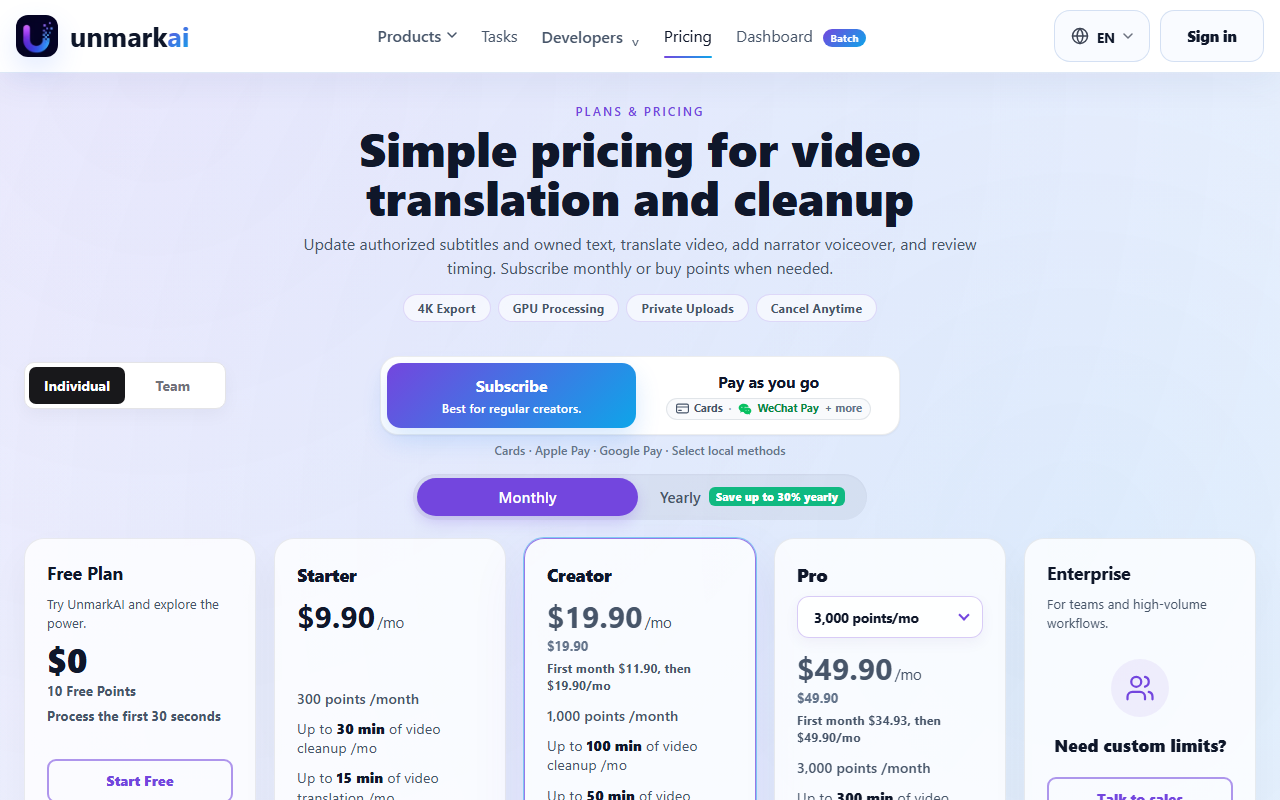 UnmarkAI prices by points rather than flat minutes, captured 22 Sep 2026. The Free plan's 10 points cover roughly 30 seconds of a real edit, and Starter starts at $9.90/month for 300 points.
Frequently asked questions
What is the best AI for translating documents?
DeepL is the best AI tool specifically for translating documents in 2026. It handles PDF, Word, PowerPoint, and Excel files directly, supports glossaries and translation memory for consistency across a project, and its free tier (50,000 characters, one file translation, one glossary per month) is enough to test real documents before paying.
Is Google Translate or Google Lens better for quick translation?
Google Lens is built for live, visual translation: point a camera at a sign, menu, or document and see the translation overlaid in real time, across more than 100 languages, for free on Android, iOS, and Chrome. It's the better fit for one-off, in-the-moment translation rather than translating written documents at your desk.
Does Crowdin have its own AI translation engine?
Crowdin lists a "Crowdin AI" feature on every plan and sells machine translation from engines such as DeepL and Google Translate as a prepaid add-on. Its core product is the localization workflow: project structure, glossaries, translation memory, an online review editor and 700+ integrations that route new software strings to translators and back.
What's the best AI for translating and dubbing a video?
Translate.video and UnmarkAI both dub spoken video into other languages with voice cloning. Translate.video starts at $9/month but caps free and Basic plans at 2 languages, with the full 81-language library included only from the $99/month Pro plan up. UnmarkAI additionally edits on-screen text and subtitles before dubbing, priced on a points system starting at $9.90/month for 300 points.
Are any of these AI translation tools actually free to use?
Google Lens is fully free with no paid tier. DeepL's free plan (50,000 characters a month) is usable for casual document translation, though its no-data-training promise covers paid plans only. Crowdin now has a permanent free plan with 60,000 hosted words and one private project, though free users donate translations to Crowdin's memory. Translate.video's free plan includes 0 dubbing minutes and UnmarkAI's free tier is 10 points with watermarked downloads, so both work as demos.
Covered in this guide
- Crowdin: Crowdin is a localization platform with deep integrations, AI pre-translation, and a free plan for small and open-source projects.
- DeepL: AI translation platform for text, documents and live speech, with a free plan and paid Translator plans billed annually. DeepL says more than 200,000 businesses use it.
- Google Lens: Google's AI-powered visual search tool that identifies objects, translates text in 100+ languages, matches products against the Shopping Graph, and provides homework help. Free on Android, iOS, and Chrome, with a Windows desktop app that launched in 2026.
- Index-Translate-35B-A3B (preview): Open MoE translation model from Bilibili with 35B total and 3B active parameters, image translation and downloadable weights, released in 2026.
- MachineTranslation.com: AI translator from Tomedes that runs your text past DeepL, Google, ChatGPT, Claude and other engines and returns the majority answer, in 330+ languages.
- Translate.video: AI video dubbing and translation tool with voice cloning and lip sync in 81 languages, from $9/mo, used by 250,000+ creators.
- UnmarkAI: AI video cleanup and localization platform: removes hardcoded captions, on-screen text and objects from footage you are authorized to edit, then translates and dubs it via web app, API or MCP.
Sources
Still deciding?
This guide covers a handful of options. Smart Match checks every listing in the directory against how you actually work and what you can spend, then hands you the shortlist and the reason behind each pick.
Find your toolsRelated guides
- Two Kinds of Picture: How Hokai Illustrates Its GuidesInside HokaiHow the directory works, verified in the open
- Best AI Dubbing and Video Translation Tools in 2026Buyer's guideHow to pick, across a category
- Best AI Search Engines in 2026: 6 Free Alternatives to GoogleBuyer's guideHow to pick, across a category
- Best AI Search Tools for Work in 2026: Company Search and Agent Search APIsBuyer's guideHow to pick, across a category
- The Best AI to Use for School in 2026, and What It Actually CostsBuyer's guideHow to pick, across a category
- Best AI Writing Assistant in 2026: How to Actually ChooseBuyer's guideHow to pick, across a category