Best Private AI in 2026: Who Keeps Your Prompts, Read From Their Own Policies
Private AI means an assistant whose vendor limits what happens to your prompt. Local apps such as Ollama send nothing off your device. Hosted options differ: Venice offers hardware-verified encryption on Pro, Duck.ai anonymizes requests, and Proton Lumo encrypts stored history. Read each vendor's retention page before pasting sensitive text.
The short version
For private AI, run a local model with Ollama, LM Studio or Jan: nothing leaves your machine. Among hosted options, Venice Pro ($18 a month) offers end-to-end encryption, and Duck.ai is the free default. ChatGPT, Claude and Gemini keep copies in their private modes.
Want this decided for your own case? Find your tools with Smart Match, starting from this guide's question.
Andreessen Horowitz's seventh Top 100 Gen AI Consumer Apps list, published on 5 October 2026, put Venice at number 43 on its web ranking with private AI as the pitch.
The list shows demand. It does not show what "private" means, and the vendors do not agree. Five products on this page use the word, and each makes a different promise about your prompt: it never leaves your machine, it leaves and is not stored, it is stored but sealed from the vendor, or it is stored and used unless you switch it off.
This guide ranks private AI by which of those promises the vendor's own pages make. Every policy, price and retention figure was read on the vendor's site on 6 November 2026. Hokai ran no network captures or audits, so the ranking rests on what each company publishes. When a page says nothing, the guide reports a gap instead of guessing.
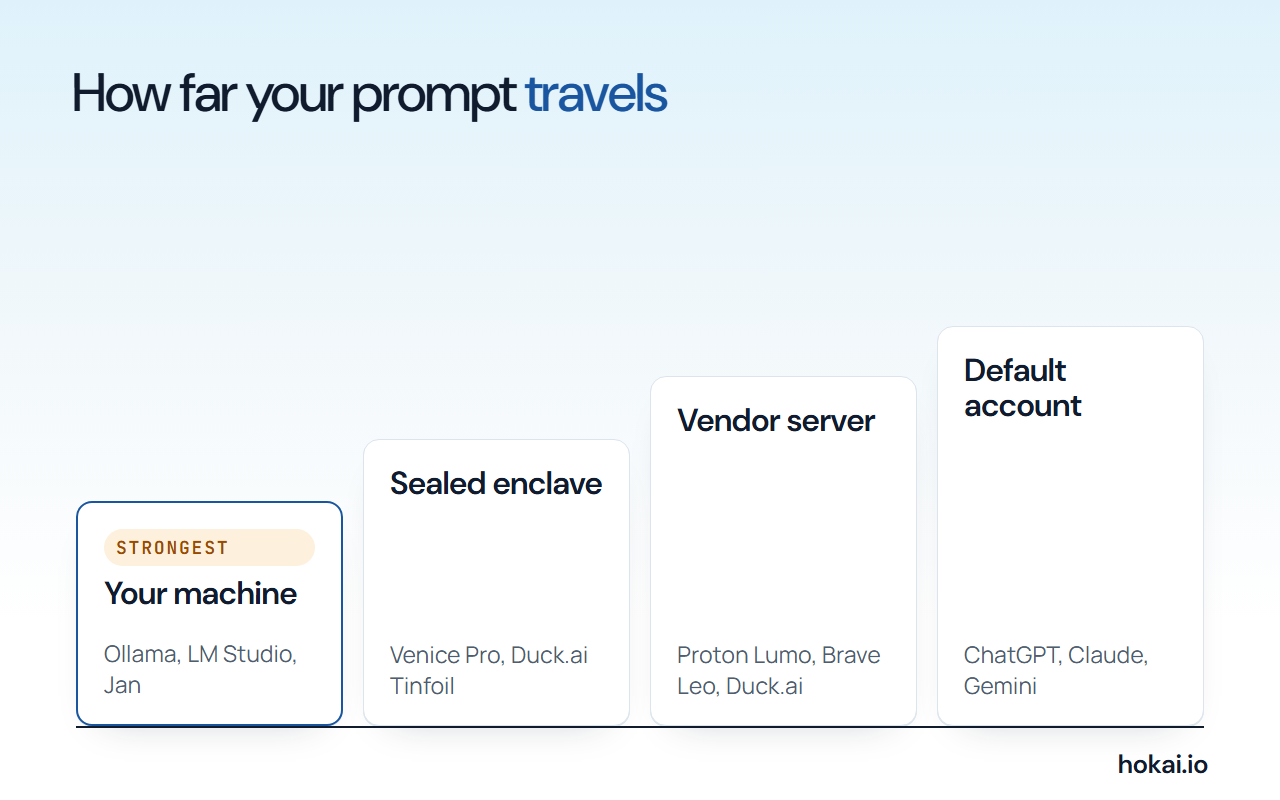 Hokai chart of how far a prompt travels, from each vendor's privacy pages as checked on 6 November 2026.
- Prompts that leave your machine
- 0
- Local apps with cloud features off
- Gemini copy of a temporary chat
- 72 hours
- Google's own retention page
- OpenAI safety copy of a temporary chat
- 30 days
- OpenAI help center
- Venice Pro, per month
- $18
- Adds end-to-end encrypted models
How to choose a private AI: four tests
Take these in sequence. The first removes most of the field in a minute, and the last two separate the survivors.
- Where does the prompt go? Your own machine, an anonymizing relay, or the vendor's server in plain text.
- What is kept? Nothing, a copy for days, or a history only you can open.
- Who may train on it? The vendor, its model suppliers, or nobody.
- What can you check? A signed contract, open source code, or a hardware attestation anyone can verify.
The fourth test is the one most buyers skip. A promise in a policy is a promise. A promise backed by open code or a hardware enclave can be tested by someone other than the vendor.
The table below applies the first two tests to the five picks. Each row is expanded in its own section further down.
| Pick | Prompt goes to | History kept | Paid entry |
|---|---|---|---|
| Local apps | Your own machine | On your disk | Free |
| Venice | Venice or partner GPUs | On your device | $18 a month |
| Duck.ai | Model provider, anonymized | On your device | Free |
| Proton Lumo | Proton's model server | Encrypted, Proton cannot read it | $9.99 a month |
| Brave Leo | Brave's servers | On your device | Price not stated |
If you would rather describe your situation than read five policies, Smart Match takes your constraints and returns a shortlist from the directory.
1. Local apps keep the prompt on your machine
Nothing beats software that never sends the prompt anywhere. Ollama, LM Studio and Jan all run open models on your own computer, and on privacy they tie. Order them by what you want to click.
LM Studio's desktop privacy policy, effective June 2026, says that if you run models locally, none of your messages, chat histories or documents are ever transmitted from your system. The only traffic it names is model search and download, update checks and email to the company. Ollama's FAQ says the same in plainer words: it does not see your prompts or data when you run locally.
Jan's privacy page goes further on defaults. It says Jan collects zero data until you say so, and that you pick tracking preferences at first launch. Anything it counts is tied to a random ID, and it lists no chat snooping, no file scanning and no prompt logging.
One caveat applies, and few guides mention it. Each of these apps now offers cloud models next to local ones.
- Ollama processes cloud prompts to answer them, says it does not store, log or train on them, and lets you turn cloud off with
disable_ollama_cloudin~/.ollama/server.json. - LM Studio's paid cloud features are US-hosted and described as zero data retention, per its pricing page.
- Jan says cloud models such as GPT and Claude need to see your messages, because that is how they work.
Keep the cloud switches off, or the promise breaks
The rule is simple. Pick a local model, leave the cloud toggles alone, and the promise holds. The guide to running AI locally covers hardware and setup, and Ollama versus LM Studio settles which of the two to install first.
The model you load matters as much as the app. Open-weight models trail the frontier by a margin that changes monthly, and the open-weight models guide ranks them, so this page does not repeat it. Developers weighing local coding models can start with Hokai's local coding models ranking.
Cactus is an open-source engine for phones and wearables; its site says its smallest models run with no data leaving the device, but it also routes low-confidence requests to the cloud. GPT4All and Msty are two other local apps in the directory. This guide did not read their privacy pages, so it does not rank them. Browse the full set under edge AI platforms.
2. Venice is the only hosted pick with end-to-end encryption
Venice sells privacy as a ladder, and its own privacy page names four rungs. Reading them in order is the fastest way to see what you are buying.
- Anonymous. Venice relays your request to a frontier provider with your identity hidden. Venice's page says to assume the provider is storing your content.
- Private. The default. Inference runs on Venice-controlled GPUs or zero-data-retention partners, and the page calls the protection contractual and trust-based.
- TEE. A Pro mode. The model runs in a hardware-isolated enclave run by NEAR AI Cloud or Phala Network, with remote attestation.
- E2EE. A Pro mode. The prompt is encrypted on your device and decrypted only inside a verified enclave.
The first rung is the one to watch. Venice's frontier models, including GPT, Claude and Gemini, sit there, so choosing the smartest model quietly picks the weakest privacy. Venice says as much on its own page.
Conversation history stays on your device. Venice's privacy policy, effective 2 June 2026, says the company will not have access to or store the content of your prompts or outputs. It keeps generated videos only until you download them. The policy text contains no statement about training, so this guide records that as not stated.
Pricing, read on 6 November: the free plan allows 10 text prompts a day, and Pro costs $18 a month for unlimited text and the two stronger privacy modes. The higher tiers add credits rather than privacy. E2EE loses web search and memory, which Venice lists as the cost.
Venice also states that it collects time zone, browser type and IP address without an account, and an email address on a free account. That is ordinary, and it is worth knowing.
3. Duck.ai is the best default for most people
Duck.ai is free, needs no account and has the most detailed provider table of any product here. DuckDuckGo's help page says it does not record or store your chats by default, and that neither DuckDuckGo nor the underlying model providers train on them.
The mechanism is anonymization plus contracts. DuckDuckGo strips metadata such as your IP address before calling a provider, so requests to Anthropic, OpenAI, Mistral, Azure and Tinfoil look as if they come from DuckDuckGo. Every provider has agreed to delete prompts and responses right after the reply, never to train on them and never to resell the data.
Two exceptions are written into the table:
- OpenAI and Anthropic may hold a chat in short-term memory for up to one hour for prompt caching, and the page says it is never written to disk.
- Anthropic may retain chats where the law requires it or to combat malicious use.
Two open models, gpt-oss 120B and Gemma 4 31B, run on Tinfoil inside a trusted execution environment. DuckDuckGo labels them "zero provider visibility" and says that setup means Tinfoil cannot read your prompts or the replies. Those are the only Duck.ai models with a hardware guarantee.
Chats you want to keep live in Recent Chats, stored on your device. If you use Sync and Backup, DuckDuckGo says the chats are stored end-to-end encrypted and that it cannot read them. If you send a conversation as feedback, DuckDuckGo stores and reviews it.
Duck.ai's paid Plus and Pro plans add the larger models. The help pages read for this guide do not state a price for either plan, so none is given here.
Hokai's directory lists the wider field under AI chatbots, and the ChatGPT alternatives guide ranks mainstream replacements by function rather than privacy.
4. Proton Lumo seals the history but reads the prompt
Proton's own security post is the most candid document in this field. It says true end-to-end encryption that bypasses the model server would be far too slow, so the model has to receive plain text. Proton calls its design user-to-Lumo encryption and says outright that this is not the regular definition of end-to-end.
What that means in practice has two halves.
The first half is transit and processing. The message travels encrypted to the model server, which decrypts it, answers and, per Proton, forgets the request as soon as the reply is generated. The server does not log or retain it.
The second half is storage. Conversation history is zero-access encrypted with keys opened by your account password, so Proton says no system at Proton can read it. The post adds that a cached copy in your browser follows the same scheme.
The product page adds three claims: Lumo's code is open source, Proton never uses your data to train models, and the service is based in Europe and follows GDPR. Open source is a real advantage, because outsiders can check the client code. The page's comparison table against Gemini, Copilot, OpenAI and DeepSeek is Proton's own, so treat it as a claim.
Lumo has a free plan. Lumo Plus is $9.99 a month on an annual bill, per the pricing block on the Lumo page, which makes it the cheapest paid plan in this guide.
It ranks below Duck.ai and Venice for one reason. For a single prompt, Proton asks you to trust the model server. Venice's Pro tier replaces that trust with an attestation, and Duck.ai's Tinfoil models do the same.
5. Brave Leo is private by policy, inside one browser
Brave's Leo page states that Leo does not retain or share chats or use them for additional model training, and that no account or login is required. The browser sends your latest prompt, the conversation context and, when needed, page context to Brave's servers. Brave says it collects no identifiers linked to you, such as your IP address, and retains no personal data.
History is stored locally on your device. A Premium account exists only to verify paid access, and Brave calls it unlinkable to any use of Leo.
Leo has one trick the others lack: bring your own model. You can point it at a local model or a remote API, which turns the browser into a front end for the local setups in section 1.
The limits are real. Leo exists only inside the Brave browser, on desktop and mobile. Its page lists models from Mixtral, Anthropic's Claude and Meta's Llama, and does not describe how those suppliers handle data. It also does not state a Premium price, so none is given here.
Leo ranks fifth because the promise rests on policy alone and the page is thinner than the others. For browsing help, it is a fine fit. Hokai's AI browsers guide covers the wider category.
What ChatGPT, Claude and Gemini do with a private mode
The three mainstream assistants all offer a private-ish mode, and none of them is built around privacy. Read the table for the common thread: each keeps a copy anyway.
| App | Trains on chats by default | Private mode | Copy kept anyway |
|---|---|---|---|
| ChatGPT | Yes, on Free, Plus and Pro | Temporary chat | Up to 30 days, safety |
| Claude | Setting; default not stated on page | Incognito chat | Not stated on page |
| Gemini | Reviewed chats improve Google services | Temporary chat | 72 hours, then deleted |
OpenAI's data controls page says data sharing is enabled by default on personal ChatGPT Free, Plus and Pro workspaces, and that you can turn off "Improve the model for everyone" without losing history. Temporary chats stay out of history and are not used to improve models. OpenAI may still keep a copy for up to 30 days for safety. Feedback matters too: a thumbs up or down can send the whole conversation into training even if you opted out.
Anthropic's consumer privacy pages, dated March and July 2026, say chats are used for training if you allow it, if they are flagged for safety review, or if you join a program such as the Trusted Tester Program. Incognito chats are not used for improvement. Deleted chats leave the back end within 30 days, and flagged chats can be retained for up to 2 years. The training page does not say which way the setting starts, so this guide does not either.
Google's Gemini Apps privacy notice says human reviewers read some chats and warns you not to enter confidential information. The default auto-delete period is 18 months, and reviewed chats stay for as long as three years. A temporary chat is retained with your account for 72 hours and is not used to train Google's models.
Compare the products head to head in ChatGPT versus Claude. For Google's side, read ChatGPT versus Gemini or Claude versus Gemini. For privacy, the pattern is the same. ChatGPT, Claude and Gemini can all be used more privately, but the privacy is a setting you maintain.
What it costs
Privacy is cheap here. Four of the five picks are free to start, and the paid tiers cluster between $10 and $20 a month.
Prices from each vendor's pricing page. Lumo's price is on an annual bill.
| Product | Free tier | Paid plans, per month |
|---|---|---|
| Venice | 10 text prompts a day | Pro $18, Plus $68, Max $200 |
| Proton Lumo | Yes | Plus $9.99 on annual billing |
| Ollama | Local use, no cap | Pro $20, Max $100, Team $500 |
| LM Studio | App and local models | Bionic+ $20, Pro $100 |
| Duck.ai | Six models | Plus and Pro, price not stated |
| Brave Leo | Yes | Premium, price not stated |
Ollama and LM Studio charge only for their cloud features, and both keep the local app free. Venice's free plan leaves out the TEE and E2EE models. Jan is free to download and its site shows no price.
The price that matters most is the one you do not see. A local setup costs your hardware. If your laptop cannot run a decent model, a $18 Venice Pro plan is cheaper than a new machine.
Who should skip a hosted private AI
Some readers should not use any of the hosted options for their most sensitive work.
- Regulated data. If your employer or the law bars sending client files to a third party, a privacy page changes nothing. Use a local model or an approved enterprise tool.
- Teams. Langdock is a company chat platform whose security page lists ISO 27001, SOC 2 Type II, EU hosting and no training on customer data. Hokai's AI governance and security tools guide covers the wider field.
- People who need frontier quality. The strongest models sit on the weakest privacy rung in Venice and behind provider contracts in Duck.ai. If you pick them, you take the provider's side of the bargain.
- Anyone who wants search and memory. Venice's E2EE mode drops both. Features that remember you need data to remember from.
Casual users have the opposite problem. They do not need a local model to ask for a recipe, and a free Duck.ai chat already beats a default account on a mainstream app.
The strongest objection: a policy is not privacy
The best argument against this ranking is that four of the five picks are promises, and promises change. Venice's own page calls its default mode trust-based. Proton admits the model sees plain text. DuckDuckGo documents exceptions for caching and legal retention. Only the local row is free of company trust.
That is right, and it is why local sits first. It is also why the hosted picks are ordered by what a reader can check rather than by who sounds most private.
- Venice Pro and Duck.ai's Tinfoil models offer a hardware attestation that outsiders can verify.
- Proton's code is open source, so the client is inspectable, though the model server is not.
- Leo and the plain Duck.ai models offer written policy alone.
For a reader who must never expose a document, the answer is not a better vendor, and Venice Pro does not change that. Run the model on your own machine. For everyone else, a hosted tool with a written no-retention policy beats a default account, and the gap is large.
Policies also move quickly. Duck.ai's provider table already lists model names that did not exist a year ago, and ChatGPT's data controls page was updated the day before this guide was written. Reread the page before you paste something you cannot take back.
What would change this ranking
Three things would reorder the list. A published third-party audit of Venice's enclaves or of Duck.ai's anonymization would move either up. Proton shipping a verifiable-enclave mode would close the gap with Venice. And Anthropic or Google stating plainly that consumer chats are not used for training by default would move the mainstream apps off the bottom.
Until then, the order is local first, Venice Pro for verifiable hosted privacy, Duck.ai for free everyday use, Lumo for an encrypted history, and Leo for people already in Brave. Every price and policy here carries the date it was read, 6 November 2026.
Frequently asked questions
What is the most private AI chatbot?
A model you run on your own machine with Ollama, LM Studio or Jan. LM Studio's June 2026 privacy policy says local chats, histories and documents are never transmitted from your system. Cloud features in those apps break that promise, so leave them off.
Is Duck.ai really private?
DuckDuckGo says Duck.ai does not record or store chats by default and that neither it nor the model providers train on them. It strips your IP address before calling a provider. OpenAI and Anthropic may hold a chat in memory for up to one hour for caching.
Does Venice AI store my prompts?
Venice's privacy policy, effective 2 June 2026, says it will not have access to or store the content of your prompts or outputs, and history stays on your device. Its Anonymous mode relays to outside providers, and Venice says to assume those providers store your content.
Can ChatGPT, Claude or Gemini be used privately?
Partly. ChatGPT temporary chats are kept up to 30 days for safety, and Gemini temporary chats for 72 hours. Claude incognito chats are not used for training. All three keep copies.
Is Proton Lumo end-to-end encrypted?
Not in the strict sense. Proton says the model server must see plain text to answer, so it calls the design user-to-Lumo encryption. Your saved history is zero-access encrypted, and Proton says no system at Proton can read it.
Covered in this guide
- Cactus: Open-source engine that runs LLM, speech and vision models on phones and wearables, with 6 language bindings and cloud handoff.
- ChatGPT: ChatGPT is OpenAI's AI assistant, with 1.2 billion weekly users by OpenAI's count, the GPT-6 model family and plans that run from a free tier to a premium Pro tier.
- Claude: Claude is Anthropic's AI assistant, with a free tier, Pro, Max and Ultra personal plans, and Team and Enterprise seats. Opus access starts at Pro.
- Gemini: Google's multimodal AI assistant and model family, sold as a free app, tiered subscriptions and a pay-per-token API
- GPT4All: Free MIT-licensed desktop app that runs open-weight LLMs offline, with LocalDocs chat over your own folders. About 77K GitHub stars.
- Jan: Open-source desktop app that runs open LLMs offline on Windows, macOS and Linux, with optional cloud models through your own API keys.
- Langdock: Model-agnostic AI platform for companies with chat, agents and workflows; the vendor says 13,000+ companies use it, hosted in the EU.
- LM Studio: Free desktop app that runs open LLMs locally on llama.cpp and MLX, with an OpenAI-compatible local server and an optional $20 cloud plan.
- Msty: Desktop AI workspace that runs local and online models side by side. Free Studio plan and paid Aurum tier. For Windows, macOS and Linux.
- Ollama: MIT-licensed runtime that runs open-weight LLMs on macOS, Windows and Linux with a local API, plus an optional paid cloud for larger models.
- Venice: Private AI chat, image and video app serving open and frontier models, with four privacy modes, a free tier and an OpenAI-compatible API.
Sources
Still deciding?
This guide covers a handful of options. Smart Match checks every listing in the directory against how you actually work and what you can spend, then hands you the shortlist and the reason behind each pick.
Find your toolsRelated guides
- Abacum Alternatives in 2026: FP&A Tools for Mid-Market Finance TeamsBuyer's guideHow to pick, across a category
- The AI 80s Photo Trend: How to Make Yours (and Turn It Into a Video) in 2026AnalysisWhat changed and who it affects
- Attio vs HubSpot in 2026: Which CRM for a Startup?ComparisonHead-to-head, with a verdict
- Best Agentic AI in 2026: Manus, Genspark and the Platforms That Finish Whole TasksBuyer's guideHow to pick, across a category
- Best AI Agent Builders in 2026: Automate, Build or Self-HostBuyer's guideHow to pick, across a category
- The Best Android AI Assistant in 2026, Free and Paid, Now That Google Assistant Is GoneBuyer's guideHow to pick, across a category