
Last updated: 2026-10-05
LM Studio is a desktop app for macOS, Windows and Linux that runs open-weight language models locally on llama.cpp and MLX, and it has been free for work use since July 2025. A local server on port 1234 exposes five OpenAI-compatible endpoints, and the Bionic release adds an agent plus optional cloud models.
About LM Studio
LM Studio is a desktop application from Element Labs, Inc. that downloads open-weight language models and runs them on your own computer. It launched in May 2023, and since 8 July 2025 the vendor has allowed use at work as well as at home, so a team no longer needs a separate commercial licence. The app is proprietary freeware, while the lms command line tool and the JavaScript and Python SDKs are published separately, with lms under the MIT licence on GitHub. The current release line is called Bionic (version 1.1.7 shipped on 1 October 2026).
Under the hood it runs models on llama.cpp and Apple's MLX, and it has a built-in browser for finding models, a chat window and a local server. That server listens on port 1234 and exposes /v1/models, /v1/responses, /v1/chat/completions, /v1/embeddings and /v1/completions, so code written for OpenAI's client libraries usually works after changing the base URL. The same app handles the download, the load into memory and the endpoint, which is the practical difference from a command-line runtime such as Ollama. A search-first workflow also pairs naturally with the model catalogue at Hugging Face, where many of the files originate.
Bionic adds an agent that creates and edits documents, runs coding and automation tasks and can control the computer, plus offline voice transcription that the vendor says never leaves the device. LM Link connects up to 5 of your devices on the free plan. For models too large for a laptop, the optional cloud tiers serve open models such as Kimi K3, GLM 5.3 and DeepSeek V4 Flash from US-hosted servers with zero data retention, according to the vendor. Smaller models such as Gemma 4 or Qwen 3.8 27B can run entirely on local hardware.
It suits people who want to try local models without a terminal: analysts, developers testing an OpenAI-compatible endpoint, and teams with data that cannot leave the building. It is a poor fit for a headless server, because the product is built around a desktop app. If you would rather call many hosted models through one key instead of running them, compare OpenRouter. The app supports Apple Silicon Macs on macOS 14 or newer, Windows on x64 and ARM, and Linux on x64 and ARM64 as an AppImage.
Screenshots
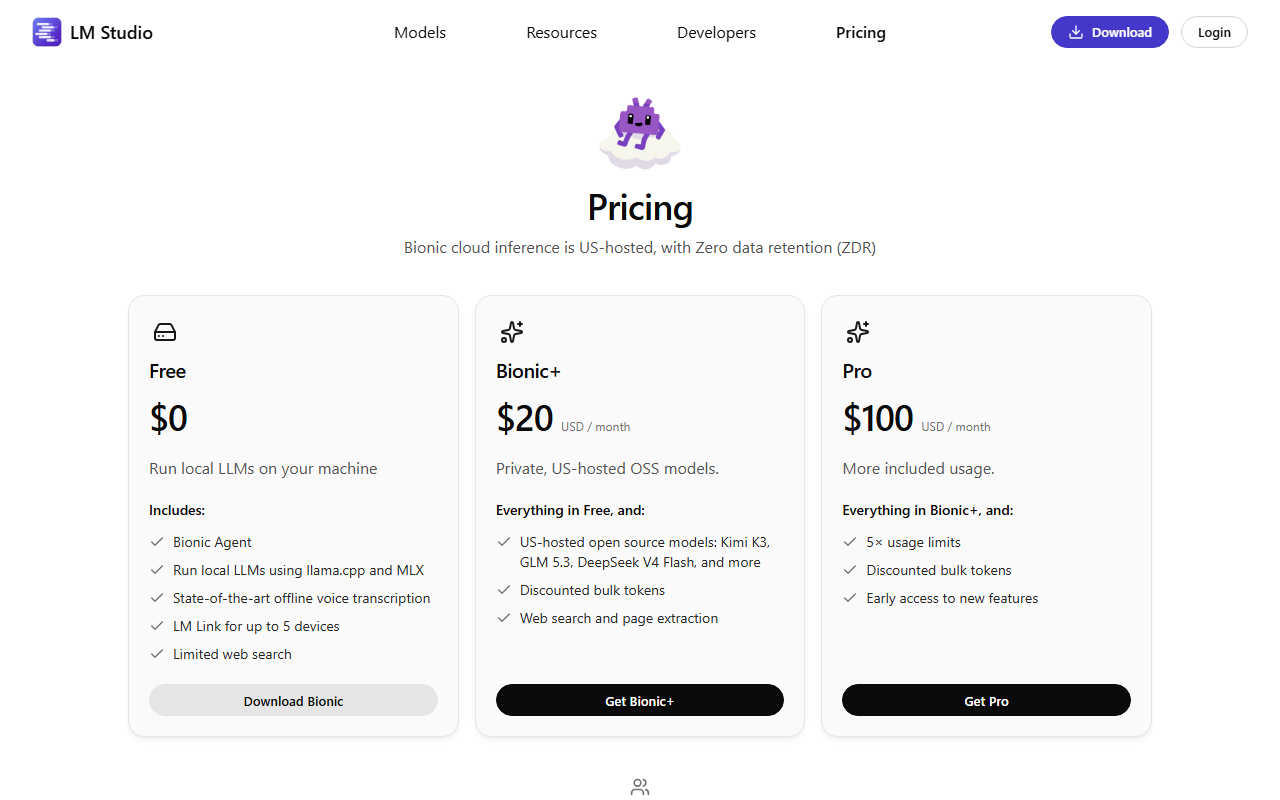
Pricing
The app and local models are free, including at work. Bionic+ costs $20 per month and adds US-hosted open models, web search and page extraction. Pro costs $100 per month with 5 times the usage limits.
Teams can set up an organization with centralized billing for inference credits, and subscription plans for teams are listed as coming soon. Cloud credits cover usage beyond a plan's allowance.
| Tier | Monthly price | What it includes |
|---|---|---|
| Free | Free | The Bionic agent, local models, on-device voice transcription, device linking and a small web search allowance |
| Bionic+ | $20/mo | The Free plan plus cloud-served open models, discounted bulk tokens and full web search with page extraction |
| Pro | $100/mo | The Bionic+ plan with a fivefold higher usage allowance, plus early access to new features |
Key Features
- Local model runner: Downloads open-weight models and runs them on your own hardware through llama.cpp and Apple MLX, with no usage cap on local use.
- OpenAI-compatible server: Serves /v1/chat/completions, /v1/responses, /v1/embeddings, /v1/completions and /v1/models on a local port, so existing OpenAI client code works after a base URL change.
- Bionic agent: Drafts and edits documents with every change saved automatically, and takes on scripting jobs and desktop control from a chat prompt.
- Offline voice transcription: Transcribes speech in real time on the device in multiple languages, and the vendor says the audio never leaves the machine.
- LM Link: Connects up to 5 devices on the free plan so a model loaded on one machine can serve the others.
- lms CLI and SDKs: Provides an MIT-licensed lms command line tool plus lmstudio-js and lmstudio-python SDKs to start the server and load models from scripts.
Pros
- Free for personal and work use since 8 July 2025, with no form or commercial licence to request.
- One app covers model discovery, download, chat and a local API, which removes the terminal step that command-line runtimes need.
- Cloud models are zero data retention per the vendor, and local runs keep prompts on your own machine.
Cons
- The app is proprietary freeware, so you cannot audit or fork it, unlike the MIT-licensed lms CLI.
- Intel Macs are unsupported, and the vendor recommends 16 GB of RAM, so older laptops are limited to small models.
- It is built around a desktop app, which makes it a weaker fit than a daemon for headless servers and scripted fleet installs.
Data Handling
- Training-data policy
- Vendor states cloud inference is zero data retention; local runs process data on your machine.
- Data retention
- Zero retention
Frequently Asked Questions
What does LM Studio Bionic cost?
Running models on your own machine is free. Bionic+ is billed at $20 a month and Pro at $100 a month. Larger teams can create an organization and pay for inference credits centrally.
Can you use LM Studio for free at work?
Yes. The vendor removed the commercial licence requirement on 8 July 2025, so individuals and teams can use the app at work without a form. The free plan keeps the agent and local models, while cloud-hosted models and full web search sit behind a paid plan.
What are the main alternatives to LM Studio?
Ollama is the usual pick for a command-line runtime with a local API and scripted installs. Hugging Face suits people who want to browse model repositories and fine-tune. OpenRouter is the choice when you want hosted models behind one API key and no local hardware at all.
LM Studio or Ollama: which one should you run?
Pick LM Studio if you want a graphical app that finds, downloads and chats with a model, then serves it on port 1234. Pick Ollama if you prefer a terminal-first runtime that is easy to script on a server. Both expose OpenAI-compatible routes, so switching later mostly means changing one base URL.
What computer do you need to run LM Studio?
Macs need Apple Silicon and macOS 14 or newer. Windows needs AVX2 on x64 or a Snapdragon X Elite ARM chip, with a graphics card holding 4 GB of VRAM suggested. The vendor suggests 16 GB or more of memory on every platform. Linux ships as an AppImage for Ubuntu 20.04 or newer. Intel Macs are not supported.
Top Alternatives
- Ollama: Pick LM Studio for a graphical model browser and chat; pick Ollama for a terminal-first runtime that scripts easily.
- Hugging Face: Choose LM Studio to run a downloaded model in one app; choose Hugging Face for the full model hub and training tools.
- OpenRouter: Pick LM Studio when hardware you own makes inference free; pick OpenRouter for hosted models behind one key.