
Last updated: 2026-10-05
Ollama is an MIT-licensed runtime with more than 180,000 GitHub stars that runs open-weight language models on macOS, Windows and Linux. It serves a local API at localhost:11434, includes OpenAI-compatible routes, and sends larger models to its own cloud when a computer lacks the memory to run them.
About Ollama
Ollama is an open-source runtime that downloads open-weight language models and runs them on your own computer, then serves them through a local API. The code is published under the MIT licence at github.com/ollama/ollama, where the project has passed 180,000 stars. It installs as a native app on macOS and Windows and as a one-line script on Linux, and a single command such as "ollama run gemma4" pulls a model and opens a chat in the terminal. The vendor's homepage reports more than 9 million installs a month.
The mechanism is simple. Ollama bundles the inference engine, a model downloader, a model library and an HTTP server into one program. Once it is running, anything on the machine can call http://localhost:11434, including through an OpenAI-compatible route at /v1 and an Anthropic-compatible route, so tools built for hosted APIs usually work after a one-line base URL change. The default context window depends on memory: 4k tokens under 24 GiB of VRAM, 32k from 24 to 48 GiB and 256k at 48 GiB or more, which is why coding agents are told to raise it to at least 64k. Nvidia GPUs, AMD Radeon cards and Apple silicon are supported, and Intel Macs run on CPU only.
Ollama also runs its own paid cloud. Models too large for a laptop, such as Kimi K3, GLM 5.3, DeepSeek V4 Pro and Mistral Large 3, run on Ollama's servers through the same CLI and API, and the vendor says prompts are never stored or trained on. Smaller models such as Gemma 4 run locally with no usage limit and no account. That split is the practical reason to pick Ollama: one interface for the private, free local path and a metered path for frontier-size open models.
The documented integrations are mostly coding agents and developer tools: Claude Code, OpenClaw, Hermes Agent, Cline, Codex CLI, VS Code, JetBrains, Zed, Xcode and n8n. Frameworks such as LangChain and LlamaIndex also ship Ollama connectors. If you only want to compare hosted routes for the same open models, look at OpenRouter, Together AI or the Hugging Face hub. For model picks by hardware, start with our guide to the best AI models for local coding.
Ollama is a command-line and API product first. The desktop app is a thin chat window, not a full workspace with document libraries or visual model management, so beginners who want a point-and-click interface often pair it with a separate front end. Quality also depends entirely on the model you pull and the memory you have: a model that does not fit in graphics memory spills to the processor and slows down, and Ollama will not change that. Treat it as the plumbing that makes local models usable, and judge the results by the model sitting on top of it.
Screenshots
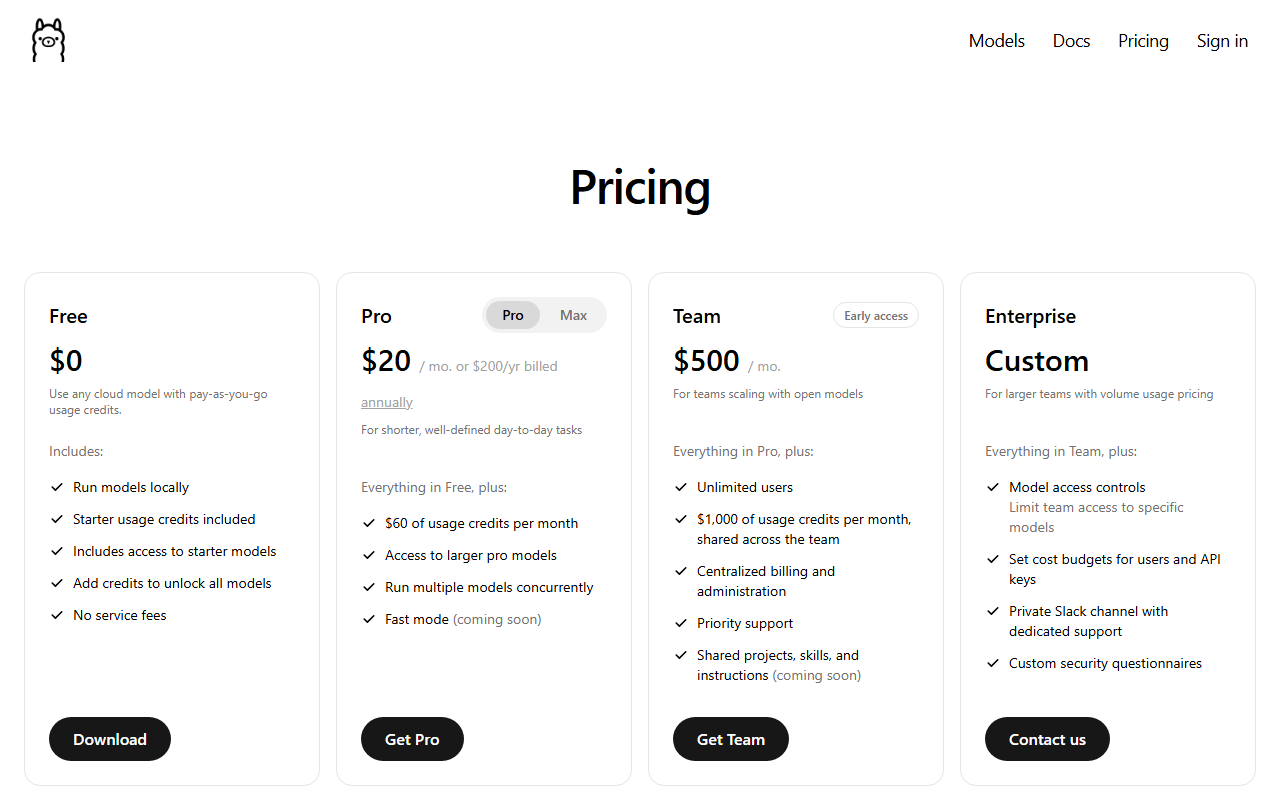
Pricing
Local use is free with no cap. Cloud plans: Pro $20 monthly ($200 on a yearly bill), Max $100, Team $500 for unlimited users, and custom Enterprise. Cloud tokens are billed per million, and some models cost half outside 12:00 to 18:00 UTC on weekdays.
| Tier | Monthly price | What it includes |
|---|---|---|
| Free | Free | Run models locally with no usage limit, starter cloud credits, access to starter cloud models, 1 concurrent cloud request |
| Pro | $20/mo | $60 of cloud usage credits a month, larger pro models, several models at once, 3 concurrent cloud requests; $200 a year when billed annually |
| Max | $100/mo | $300 of cloud usage credits a month, early access to the newest models, 10 concurrent cloud requests |
| Team (early access) | $500/mo | Unlimited users, $1,000 of cloud usage credits a month shared across the team, centralized billing, priority support |
| Enterprise | Custom | Custom volume pricing, model access controls, cost budgets per user and API key, dedicated support channel |
Key Features
- Local model runner: Pulls a model with one command and runs it on your own CPU, Nvidia GPU, AMD Radeon GPU or Apple silicon, with no usage cap.
- Local REST API: Serves a native API at localhost:11434/api, so scripts and apps call a local model the way they would call a hosted one.
- OpenAI and Anthropic compatibility: Exposes /v1 routes for OpenAI clients and an Anthropic-style endpoint, which lets existing SDK code switch by changing the base URL.
- Ollama Cloud: Runs models too big for a laptop on Ollama servers through the same CLI and API, billed per million tokens against plan credits.
- Tool calling and structured output: Supports function calling, JSON-schema structured outputs, vision input and embeddings on models that offer them.
- Agent and editor integrations: The docs carry setup pages for more than 20 tools, spanning terminal agents, code editors and workflow apps.
- Modelfile customization: A Modelfile sets the base model, system prompt and parameters such as context length, so a tuned variant becomes a reusable named model.
Pros
- Local runs have no per-token fee and no usage cap, so cost is hardware and electricity only, and prompts stay on the machine.
- The OpenAI-compatible endpoint means agents and editor plugins built for hosted APIs often work against a local model after changing one base URL.
- MIT licence and an active repository (last push 2026-10-04) mean no vendor lock-in on the runtime itself.
- One interface covers both the free local path and the paid cloud path, so a project can start on a laptop and move up without rewriting API calls.
Cons
- Default context is 4k tokens below 24 GiB of VRAM, so agents and long documents need a manual setting and more memory.
- The desktop app is a basic chat window, so anyone wanting a model browser, document workspace or visual settings needs a separate front end.
- Intel Macs run on CPU only, and older Windows 10 builds before 22H2 are not supported.
- Cloud usage is metered, and heavy agent workloads can exhaust plan credits well before the end of the month.
Data Handling
- Training-data policy
- Vendor states cloud prompts are never stored or trained on. Local runs send nothing to Ollama.
Frequently Asked Questions
How much do you pay for Ollama?
Running models on your own hardware costs nothing. The paid plans only cover Ollama Cloud: Pro is $20 a month ($200 billed yearly) with $60 of usage credits, Max is $100 with $300, and Team is $500 with $1,000 shared across unlimited users. Enterprise is custom, and cloud models are billed per million tokens, with off-peak rates cut for some models.
Is Ollama free to use?
Yes for local use: the runtime is MIT licensed and has no usage cap. The free account adds starter cloud credits for a small set of cloud models and allows 1 concurrent cloud request. You pay only to unlock the full cloud model list.
What should you use instead of Ollama?
LM Studio suits people who want a desktop app for browsing and chatting with models, and its runtime builds on MLX and llama.cpp. Hosted routes such as OpenRouter or Together AI fit teams that would rather not own a GPU. Hugging Face is the better stop when you need the model hub itself.
Is Ollama better than LM Studio?
It depends on how you work. Ollama is a CLI and API first, with an MIT-licensed repository and documented hooks into coding agents. LM Studio leads with a graphical app and its own Bionic agent. Developers wiring agents tend to pick Ollama; people who want a visual interface tend to pick LM Studio.
How long does it take to get going with Ollama?
About five minutes on a fast connection: install the app or script, then run one command to pull a model. The download is the slow part, since models range from a few GB to hundreds of GB. You need Windows 10 22H2 or newer, macOS 14 or newer, or a current Linux distribution.
Top Alternatives
- OpenRouter: Pick Ollama to run models on your own hardware; pick OpenRouter when you want one hosted API across many vendors.
- Hugging Face: Choose Ollama for a ready local runtime; choose Hugging Face when you need the full model hub and training tools.
- Together AI: Pick Ollama if hardware you own makes inference free; pick Together AI when you need hosted throughput without buying a GPU.