ChatGPT Alternatives in 2026: Seven Reasons to Leave and the Pick for Each
The main alternatives to ChatGPT in November 2026 are Claude for writing, Gemini for Google apps, Perplexity for cited answers, Venice AI and local models such as Ollama for privacy, Microsoft Copilot for Office files, and DeepSeek for cheaper API calls. Entry prices run from free to $20 a month.
The short version
Pick the alternative that fixes your specific complaint, not the one with the best reputation. Claude suits writing, Gemini suits Google users, Perplexity gives cited answers, Venice or a local model protects privacy, Copilot suits Microsoft 365, and DeepSeek cuts API bills. ChatGPT's free plan is hard to beat otherwise.
Want this decided for your own case? Find your tools with Smart Match, starting from this guide's question.
ChatGPT's own free plan now lists unlimited text chats with GPT-6, so a good reason to leave is rarely the price of the chat box. It is a job the chat box does badly, a company you would rather not hand your files to, or a bill that arrives per token. This guide is sorted by that reason, and each section ends with what you give up by switching.
You probably landed here with one irritation, not a general wish to shop. Maybe ChatGPT writes in a voice you keep editing out. Maybe your documents live in Google or Microsoft. Maybe a paid tier now carries ads, or you want your prompts to stay on your own laptop. Pick the sentence that sounds like you.
Each one maps to a different exit, a different price and a different thing you will miss afterwards, and the answer that suits a student on a free plan is rarely the one that suits a founder with a client folder full of contracts. Jump to that section.
Figures come from the sellers' own pricing pages, opened on 5 November 2026. Where a page would not load or would not say, the text says so. For a wider survey of everyday chatbots, the best AI chatbots guide is the list; this page only asks why you are leaving and what each exit costs.
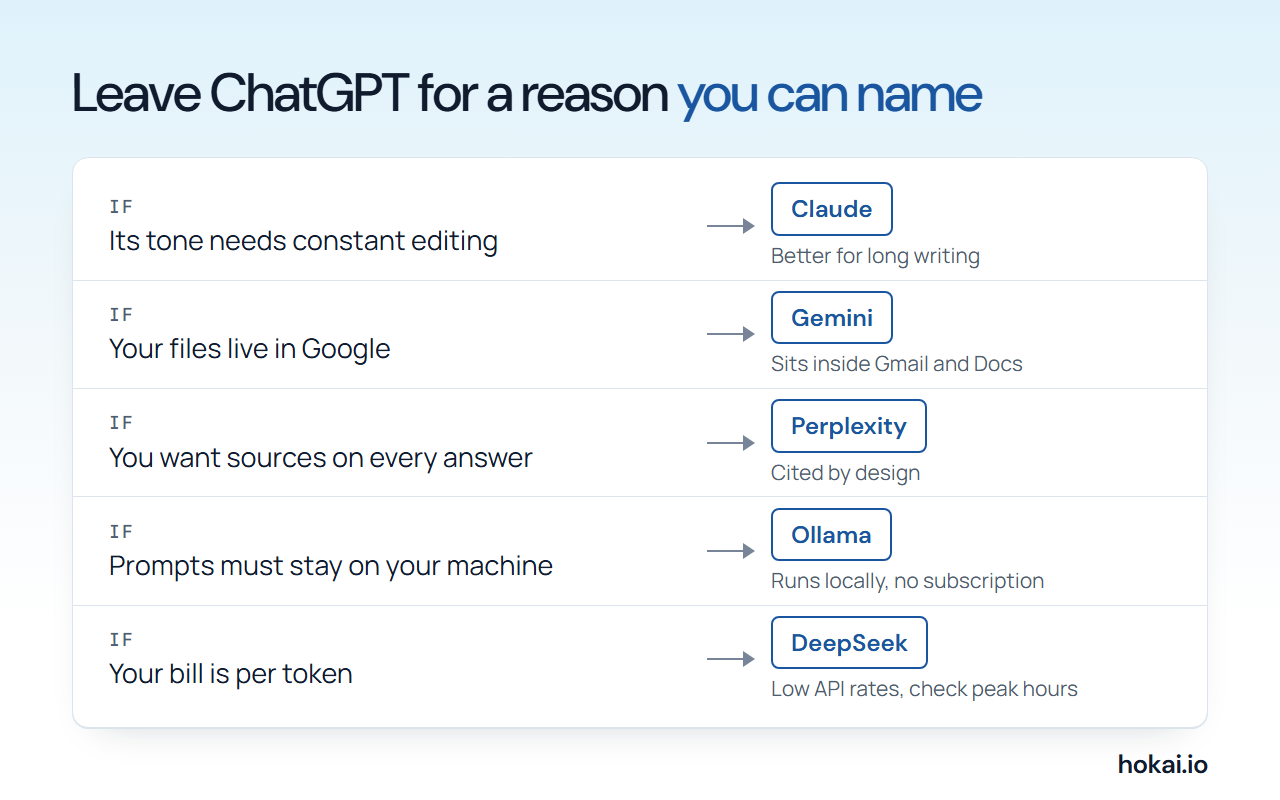 Hokai chart of five reasons to leave ChatGPT and the pick for each, from the vendors' own pricing pages as checked on 5 Nov 2026.
How to choose before you compare prices
Four questions settle most switches. None is "which model is smartest".
- What job fails today? Name one task, such as drafting a client email or summarising a 200-page PDF. Test the alternative on that task only.
- Where do your files live? Google, Microsoft or your own disk each point to a different pick.
- What can leave your machine? A public blog draft and a client contract are not the same risk.
- Who pays, and how? A flat monthly plan and a per-token bill behave differently once you scale.
You can test question one for free. Arena is a free site where two anonymous models answer your prompt and you vote on the better reply. Its home page lists Battle, Side by Side and Direct modes. Use your own failing task as the prompt. It takes five minutes. Do it first.
Seven reasons, seven picks
The table pairs each reason with one pick and the single thing the vendor's own page shows you losing.
| Your reason | Pick | Entry price (5 Nov 2026) | What you give up |
|---|---|---|---|
| Better writing, long documents | Claude | Free; paid from $17 a month annual | Opus is not on Free |
| You live in Google | Gemini | Free; AI Plus $4.99 | Newest model is Pro and Ultra only |
| Answers with sources | Perplexity | Free; Pro $17 a month annual | Free has 3 Pro searches a day |
| Privacy | Venice, or a local model | Free; Venice Pro $18 | Venice Free is 10 text prompts a day |
| You live in Microsoft 365 | Copilot | Microsoft 365 Personal $9.99 | Excel needs AutoSave on OneDrive |
| Cheaper API | DeepSeek | Pay per token | Peak hours cost double |
| Coding | Claude Code, Cursor | Claude Pro or Cursor plan | Claude Code is not on Free |
Two of these have a head-to-head already. If your whole question is "should I move from ChatGPT to Claude", read ChatGPT vs Claude. For the Google side, read ChatGPT vs Gemini. This page does not repeat either argument. It gives you the short reason and the exit cost, then sends you there.
Better writing and long documents: Claude
If your complaint is tone, the standard move is Claude. Anthropic's pricing page lists a Free plan and a Pro plan. Pro costs $17 a month billed annually, or $20 billed monthly.
| Plan | Price | Usage |
|---|---|---|
| Pro | $17 annual, $20 monthly | Base for paid features |
| Max | $100 a month | 5x Pro usage |
| Ultra | $200 a month | 10x Pro weekly usage |
The model line on that page is Fable 5.1, Opus 5.5, Sonnet 5.5 and Haiku 5.5. Context goes up to 1M tokens depending on the model.
Free is more generous than you would expect. It includes web search, code execution, Artifacts and memory, according to the same page. What it lacks is the top model. Opus starts at Pro, so the version of Claude people praise in comparisons sits behind the paywall. You can read what Claude Opus 5.5 does on its own record before paying.
On data, Anthropic's page says model training is opt-out on individual plans. The default is yours to change. Change it if the files you upload are not yours to share. Simple as that.
What you lose by switching: whatever ChatGPT has that Claude's pricing page does not list. This guide did not run a side-by-side test of image generation or voice, so do not read a missing line as a missing feature. The head-to-head goes deeper on which one to pay for.
You live in Google: Gemini
The second reason is a calendar, an inbox and a drive that all belong to Google. Gemini is the assistant that sits inside them. Google's subscriptions page lists a free plan on a Flash-Lite model.
| Plan | Price | What the page adds |
|---|---|---|
| AI Plus | $4.99 a month | Flash model, 2x Free usage |
| AI Pro | $19.99 a month | Pro model, Gmail and Docs, 5TB |
| AI Ultra | From $99.99 | 5x the usage of Pro |
The cheap rung is the surprise. It is cheap. At $4.99, AI Plus costs less than ChatGPT Go. You get the Flash model, though, not the best one. Google's release notes say Gemini 4 Argon began rolling out to Pro and Ultra users in the app on 13 October 2026. It is not on Free or Plus.
The same page promises 1M tokens of context and a file upload ceiling of 1,500 pages. Long documents. That is the practical argument, and if your working day means pushing contracts, reports and research packs into a chat window all week, it may be the only one that matters to you.
What you lose: the Argon model unless you pay for Pro or above, and some tidiness if your work and personal accounts sit with different Google logins. ChatGPT vs Gemini has the plan-by-plan comparison.
You want answers with sources: Perplexity
Perplexity is a different product with ChatGPT's shape. Its own Pro page describes it as an answer engine with real-time web search and inline citations on every response, and describes ChatGPT as a conversational chatbot. That is the whole pitch.
On Free you get basic searches with no practical cap, but only three Pro Searches per day and a single Research query per month. That is thin. Pro is listed at $17 a month when billed annually. The page does not show a monthly price, so this guide does not quote one. Max runs $200 a month.
The Pro page lists several models you can choose between, including GPT-6.1 Sol, Claude Sonnet 5.5, Gemini 3.8 Flash, Kimi K3 and Grok 4.7. On Pro you are buying access to several labs' models through one search interface, not a rival to them. The help centre also says you can opt out of AI training on Pro and Max.
What you lose: a general-purpose companion. If you mostly draft, brainstorm or write code, a search engine with citations is the wrong shape. The full test of the pair is in Perplexity vs ChatGPT Search, which also covers ChatGPT's own cited search. The Comet browser is the other half of the pitch; its page lists Mac, Windows, iOS and Android, and it has its own Comet record.
You want privacy: Venice, a local model or a company platform
Privacy has the widest spread of answers, because the right one depends entirely on who you are afraid of seeing your prompts, whether that is an advertiser, an employer, a data broker or a court. Four tiers exist.
- A hosted service that stores less: Venice AI.
- A local app that runs open models on your hardware: Ollama, Jan or LM Studio.
- A company platform: Langdock, which describes itself as model-agnostic and EU-hosted.
- A privacy setting on a mainstream chatbot, such as the opt-outs described above.
Venice's pricing page lists a Free plan with 10 text prompts a day and 15 image prompts a day.
| Venice plan | Price | Text and images |
|---|---|---|
| Free | $0 | 10 text, 15 image prompts a day |
| Pro | $18 a month | Unlimited text, 1,000 images a day |
| Plus | $68 a month | Higher image limits, 7,500 credits |
| Max | $200 a month | Highest limits, 22,500 credits |
The comparison table on that page lists local-only conversation storage and a zero-data-retention Private mode among its privacy rows. Those are the vendor's claims. This guide did not audit them, and a retention claim is only as good as the company's word.
Local is stricter. Much stricter. Ollama's pricing page says its pay-as-you-go tier costs $0 and includes running models locally, with no subscription. The same page shows 186K GitHub stars. The cost is hardware. Your laptop does the work, and a small model on a thin machine will feel slower and weaker than a hosted one. Ollama also sells cloud models by the token, so check which one you are running before you assume a prompt never leaves your computer.
Langdock is the team answer. Its pricing page lists a Standard seat at €23.20 per user a month excluding VAT, with €5 of free credits to test it. That is a company decision. Not a personal one. The page does not by itself prove where your data sits. Ask for the hosting terms in writing.
What you lose: quality and speed on the hardest tasks, plus features that need a vendor's servers. If the worry is one work document, a local app for that file and a hosted chatbot for everything else is a sensible split.
You live in Microsoft 365: Copilot
If your day is Word, Excel and Outlook, the pick is Microsoft Copilot, and the plan is the Microsoft 365 subscription you may already hold. Microsoft's individual pricing page lists Microsoft 365 Personal at $9.99 a month. Family is $12.99 a month.
Both include Copilot chat with higher usage than the free tier, plus Copilot in the desktop apps for Word, PowerPoint, Outlook and Excel. One condition is stated on that page. Copilot in Excel requires AutoSave, which means the file must be saved to OneDrive. For anyone who keeps spreadsheets on a local drive, that is the real switching cost.
For teams the question is different, and the office-work assistant guide covers it. For one person, the test is whether you already pay Microsoft. If you do, the Copilot in your subscription costs nothing extra. If you do not, the suite price undercuts most single-purpose chatbot plans.
What you lose: freedom of model choice. Copilot is built around Microsoft's apps, not around a chat window you can point at anything. Expect to adapt to its way of working rather than the other way round, and expect the best results when your files already sit in OneDrive.
You want cheaper API calls: DeepSeek
Developers leave ChatGPT for a bill, not a chat. DeepSeek publishes its prices in a docs page, and they are low. DeepSeek V4.1 Flash, sold under the API name deepseek-flash, costs $0.30 per million input tokens at peak. Output is $1.20. Off-peak, both halve.
The larger DeepSeek V4 Pro costs more, at $1.32 per million input tokens at peak.
Now set both against OpenAI on its pricing page, at the first default rate listed there. GPT-6.1 Sol is $2.00 for input and $10.00 for output.
GPT-6.1 Terra is $1.00 in. GPT-6 Luna, the smallest, is $0.10 in.
Read from OpenAI's and DeepSeek's own pricing pages.
Look at the last row. Surprised? DeepSeek is not the cheapest line on this table; OpenAI's own Luna model is. The honest reading is that DeepSeek beats the mid and flagship OpenAI tiers on price, while OpenAI's smallest model undercuts both. Price is not the only filter. DeepSeek's page lists a 1M context window and up to 384K of output, and defines peak as weekday mornings in UTC, with weekends and Chinese public holidays billed off-peak. Check the page for the exact hours before you schedule batch jobs.
A second route is Kimi, covered against ChatGPT in Kimi vs ChatGPT. If you want one key that reaches many models, the answer is a router rather than a rival, and the Poe alternatives guide walks through that choice.
What you lose: the finished product around the model. You pay per token and write the integration. You also accept DeepSeek's data-handling terms, which you should read before sending it anything your compliance team cares about. This guide did not audit them.
You want live posts from X: Grok
Grok has one distinct selling point: it searches the web and X as it answers. Its own page says it is free to try on the web and in the apps, and that SuperGrok brings higher limits and multi-agent reasoning. Plan prices were not readable on that page, so this guide leaves them out. xAI also sells an always-on agent, Grok Bot, on its higher plans.
The full comparison, including benchmarks and the trust gap, is in ChatGPT vs Grok.
What you lose: a polished app ecosystem outside X, and the cleanliness of an answer you do not have to check against the posts it drew from, which matters a great deal when the topic is a breaking story and half the posts are rumour.
For coding: Claude Code and Cursor
For code, the leaving reason is usually that a chat box is the wrong interface. Claude Code is not on Claude's Free plan; Anthropic lists it as included on Pro, Max and Ultra. Cursor is an editor rather than a chat box, which is the point.
The decision between them is not a chatbot decision. The AI coding assistants guide is built for it. If you were using ChatGPT only to paste in a function and get a fix back, you do not need to leave at all.
What it costs to leave, side by side
Almost every paid plan sits at one of a few levels. The table collects the entry price for each exit on its monthly rate, because annual discounts vary and are not comparable across vendors.
| Plan | Monthly price | Plan covers |
|---|---|---|
| Gemini AI Plus | $4.99 | Flash model, 2x free usage |
| ChatGPT Go | $8 | May include ads |
| Microsoft 365 Personal | $9.99 | Copilot in desktop apps |
| Venice Pro | $18 | Unlimited text, 1,000 images a day |
| Claude Pro | $20 | Opus, Claude Code |
| ChatGPT Plus | $20 | Expanded deep research |
ChatGPT's own prices here come from the ChatGPT plans guide, checked on the same day. The Go tier "may include ads" per OpenAI's pricing page. ChatGPT Ads Explained lists which plans show them. If ads are your reason for leaving, the cheapest fix is staying on a tier without them, not changing vendor.
The Perplexity row is missing because its page shows only an annual-equivalent price, not a monthly one.
- Cheapest paid switch
- Gemini AI Plus at $4.99 a month
- Best price if you already pay Microsoft
- Copilot inside Microsoft 365 Personal
- Free and private
- a local model through Ollama, Jan or LM Studio
- Cheapest API listed here
- OpenAI's own GPT-6 Luna, then DeepSeek V4.1 Flash
The best case for staying on ChatGPT
The strongest counter to this whole page is simple. ChatGPT is one product that does most of these jobs adequately, and every exit above is better at one job and worse at the rest. Its free plan lists unlimited GPT-6 text chats. Search is on every plan, according to OpenAI's help page, which also admits that what it finds and cites may be partial, stale or wrong. Treat its sources as leads, then check them. Image creation is on every plan too, with limits that grow as you pay more.
So the answer to "should I leave" is often "add one, keep one". Many people end up paying for one assistant and using a free second one for the thing the first does badly. That costs less than switching outright and keeps your history where it is. For ideas of what to keep ChatGPT for, the ChatGPT use cases guide lists what it does well now.
The failure mode of that advice is subscription creep. It happens fast. Two $20 plans cost more per year than most people spend on the problem they were meant to solve. Use the free plan of the second tool for a month before paying.
Who should skip all of this
Some people should not switch. Really. If you use ChatGPT a few times a week on short tasks, nothing here repays the move. Stay put. If your company has approved ChatGPT and not the others, an unapproved tool is a bigger risk than the irritation you started with. And if the real problem is how you prompt, a new model will reproduce it.
Be honest about which of those describes you. It saves money. The switch that fixes a named, repeatable failure is the only one worth the setup time.
Still undecided? Match the tool to the job
If you cannot decide from the table, the match depends on your stack, your files and how much you will pay. That is what Smart Match is for: describe the job and it narrows the chatbot directory to the tools that fit. Start at Hokai Smart Match and bring the sentence you picked in the first section.
What would reorder these picks
Three developments would reshuffle the list. First, Google bringing Argon to its free plan would make the Google exit cheaper overnight. Second, OpenAI cutting the Go price or dropping ads from it would stop that row favouring anyone else. Third, a local model closing the quality gap with hosted ones on a thin laptop would end the privacy trade-off.
Argon on Google's free plan is the one to watch first. Google's release notes say it is rolling out to paid plans only, and nothing on its page promises more.
Frequently asked questions
What is the best free alternative to ChatGPT?
It depends on the job. Claude's free plan includes web search, code execution and Artifacts but not Opus. Gemini is free on a Flash-Lite model, Perplexity offers 3 Pro Searches a day, and Ollama runs open models on your own machine for $0. Venice limits Free to 10 text prompts a day.
Which ChatGPT alternative is best for privacy?
A local model is the strictest option, since Ollama, Jan and LM Studio run on your own hardware. Venice AI lists local-only conversation storage and a zero-data-retention Private mode, which are vendor claims this guide did not audit. Claude and Perplexity offer training opt-outs.
Is there a cheaper way to use ChatGPT-class models through an API?
On the default rates read on 5 Nov 2026, DeepSeek V4.1 Flash costs $0.30 per million input tokens at peak, against $2.00 for GPT-6.1 Sol. OpenAI's own GPT-6 Luna is cheaper still at $0.10, so price alone does not decide it.
Do I need to cancel ChatGPT to try an alternative?
No. Most alternatives have a free tier, so you can run one beside ChatGPT for a month and compare on your own tasks. Pay for a second plan only if the free tier keeps hitting its limit.
Which alternative works best if I use Google or Microsoft apps all day?
Gemini sits inside Gmail and Docs on the $19.99 AI Pro plan. Copilot is included in Microsoft 365 Personal at $9.99 a month and works in the desktop Word, Excel, PowerPoint and Outlook apps, with Excel needing AutoSave on OneDrive.
Covered in this guide
- ChatGPT: ChatGPT is OpenAI's AI assistant, with 1.2 billion weekly users by OpenAI's count, the GPT-6 model family and plans that run from a free tier to a premium Pro tier.
- Arena: Free site that puts your prompt to two unnamed AI models and asks you to vote; the votes build public leaderboards. Formerly LMArena.
- Claude: Claude is Anthropic's AI assistant, with a free tier, Pro, Max and Ultra personal plans, and Team and Enterprise seats. Opus access starts at Pro.
- Claude Opus 5.5: Anthropic's September 2026 flagship LLM with a 1 million token context window, built for long-running agentic coding and computer use.
- Comet record: Perplexity's Chromium-based AI browser with a built-in assistant, free on Mac, Windows, iOS and Android, with 7 headline features.
- Cursor: Cursor is an AI code editor built on VS Code, widely adopted across large enterprise engineering teams, with Agent Mode, Tab completion, and Cloud Agents.
- DeepSeek: DeepSeek is a Chinese AI research company developing frontier language and reasoning models, including DeepSeek V4-Pro. Founded by High-Flyer hedge fund CEO Liang Wenfeng in 2023, the company is known for achieving GPT-level performance at dramatically lower compute and API cost.
- DeepSeek V4.1 Flash: The MIT-licensed vision-and-text model, launched in September 2026 and refreshed with an October snapshot.
- Gemini: Google's multimodal AI assistant and model family, sold as a free app, tiered subscriptions and a pay-per-token API
- Gemini 4 Argon: Google DeepMind's Gemini 4 frontier model, generally available on the paid Gemini API: 1M-token context and output, text, image, video, audio and PDF input.
- Google: Google (Alphabet, NASDAQ: GOOGL) runs Search, Cloud and the Gemini models, including Gemini 4 Argon (October 2026).
- GPT-6.1 Sol: GPT-6.1 Sol is OpenAI's September 2026 mid-tier reasoning model for coding, computer use and document work, built to sit just below GPT-6 Astra.
- Grok: Chatbot from xAI that searches the web and X live, now sold with Grok Bot and Cursor inside The X Subscription.
- Grok Bot: xAI's always-on AI agents that sign into your existing apps and finish multi-step jobs, included in xAI's joint Grok and Cursor bundle from the Premium tier up.
- Jan: Open-source desktop app that runs open LLMs offline on Windows, macOS and Linux, with optional cloud models through your own API keys.
- Kimi: Moonshot AI's chat app and developer API running the open-weight Kimi K3 family, with agent tools, Swarm and up to 1M tokens of context.
- Langdock: Model-agnostic AI platform for companies with chat, agents and workflows; the vendor says 13,000+ companies use it, hosted in the EU.
- LM Studio: Free desktop app that runs open LLMs locally on llama.cpp and MLX, with an OpenAI-compatible local server and an optional $20 cloud plan.
- Microsoft: Microsoft, founded 1975, is a public company (NASDAQ: MSFT) and the Redmond maker of Windows, Azure, GitHub and the Copilot assistants, with $331.8B of fiscal 2026 revenue.
- Microsoft Copilot: Microsoft's AI assistant across Windows, Edge, Word, Excel, Outlook and Teams, from a free tier to per-seat work plans on OpenAI's latest GPT-5 models.
- Ollama: MIT-licensed runtime that runs open-weight LLMs on macOS, Windows and Linux with a local API, plus an optional paid cloud for larger models.
- OpenAI: OpenAI builds ChatGPT, the GPT-6 family (Astra, Sol, Luna), Codex and the OpenAI API. It reports 1.2B weekly ChatGPT users and an $852B valuation after its March 2026 round.
- Venice AI: Private AI chat, image and video app serving open and frontier models, with four privacy modes, a free tier and an OpenAI-compatible API.
- xAI: Elon Musk's AI company (roughly 4,000 to 4,900 employees) builds the Grok models and merged into SpaceX, taking the combined business public on Nasdaq as the largest IPO on record.
Sources
Still deciding?
This guide covers a handful of options. Smart Match checks every listing in the directory against how you actually work and what you can spend, then hands you the shortlist and the reason behind each pick.
Find your toolsRelated guides
- Abacum Alternatives in 2026: FP&A Tools for Mid-Market Finance TeamsBuyer's guideHow to pick, across a category
- The AI 80s Photo Trend: How to Make Yours (and Turn It Into a Video) in 2026AnalysisWhat changed and who it affects
- AI Development Services in 2026: Which Layer You Actually NeedBuyer's guideHow to pick, across a category
- The AI Tool Ecosystem in 2026: Buy the Meter, Not the CategoryBuyer's guideHow to pick, across a category
- The AI Tools That Do One Microsoft Copilot Job, CheaperBuyer's guideHow to pick, across a category
- Attio vs HubSpot in 2026: Which CRM for a Startup?ComparisonHead-to-head, with a verdict