Best AI Assistant for Office Work in 2026
The best AI assistant for office work depends on where your files live. Microsoft 365 Copilot suits Microsoft offices, Gemini in Google Workspace suits Gmail and Docs teams, and ChatGPT Business or Claude Team suit mixed offices. Email specialists Superhuman and Shortwave, and the meeting tool Fireflies, fix single jobs.
The short version
For most offices the best AI assistant is the one built into the suite you already use: Microsoft 365 Copilot for Microsoft shops, Gemini in Google Workspace for Google shops. Mixed offices should test ChatGPT Business or Claude Team at $20 a seat. Add one specialist only for email or meetings.
Want this decided for your own case? Find your tools with Smart Match, starting from this guide's question.
A ten-person office pays $140 a month for Gemini inside Google Workspace Standard, or $200 a month for ChatGPT Business, and the cheaper bill is not the whole story.
Pick the AI assistant that already sits where your mail, files and meetings live. That is the short answer for most offices in 2026. A standalone assistant wins only when your team is split across suites, or when one job (email, meeting notes, a shared wiki) matters more than the rest.
This guide is for an office manager, operations lead or founder choosing one assistant for a team of 5 to 50 people. It is built from the vendors' own pricing pages, read on 22 October 2026. Where a page left something out, the text flags the gap.
How to choose an AI assistant for office work
Office work is five jobs wearing one coat: writing and editing documents, working in spreadsheets, handling email and calendar, summarising meetings, and finding things across files and chats. No assistant is best at all five. So the first question is where your team already does the work.
Three tests narrow the field fast.
- Which suite holds your files? If it is Microsoft 365 or Google Workspace, the built-in assistant reads those files without a connector.
- Which job costs you the most hours? For many offices it is email. For others it is the meeting that needs a write-up.
- Who signs off on data? Check whether the vendor trains on your content by default, and who can see chat history.
If you want a shortlist matched to your own stack and budget, Smart Match asks those questions and returns a ranked list. The directory is the evidence behind that list, and this guide shows the work for one common case.
For a different slice of the same decision, the guide on how to choose an AI assistant across ChatGPT, Claude, Copilot, Grok and Poe covers the general chat products. A company with fewer than ten staff may prefer the small business assistant guide.
The shortlist: nine assistants for office work
The list splits into two groups. Four general assistants cover the whole day. Five specialists cover one job each, and three of them are rarely compared with the big four.
| Assistant | Best at | Weak spot |
|---|---|---|
| Microsoft 365 Copilot | Word, Excel, Outlook, Teams | Needs a Microsoft plan first |
| Gemini in Google Workspace | Gmail, Docs, Meet | Docs help starts at Standard |
| ChatGPT Business | Drafting, analysis, connectors | No suite of its own |
| Claude Team | Long documents, writing | No mail or calendar listed |
| Notion | Wiki, notes, project pages | Best only if you live in Notion |
| Superhuman | Fast email with AI drafts | Email only |
| Shortwave | AI search over a Gmail inbox | Email only |
| Fireflies | Meeting transcripts and notes | Meetings only |
| Copilot Studio | Custom office agents | Needs setup time |
The rest of the guide goes through them in that order, with the price from each vendor's own page.
Microsoft 365 Copilot: the pick for Microsoft offices
Microsoft sells Copilot two ways. You can buy a Microsoft 365 plan with Copilot built in, or you can add Copilot to a plan you already hold.
The add-on is called Microsoft 365 Copilot Business. Its terms, as listed:
- Price: $18 per user per month paid yearly, against a $21 list price.
- Discount window: 1 July to 31 December 2026, first year only.
- Eligibility: an existing Microsoft 365 Business plan.
- Bundles: Business Standard with Copilot at $23.50, and Business Premium with Copilot at $32.
Copilot works inside Word, Excel, PowerPoint, Outlook and Teams. Microsoft's page also lists agents for research and data analysis, a choice of language model, and what it calls Cowork and Autopilot for longer tasks.
One catch sits in the footnotes. Microsoft says some advanced AI experiences use usage-based billing on top of the licence fee. So the seat price is a floor, not a ceiling. Ask your reseller how the usage meter is capped before you sign.
Copilot is the right call when your team lives in Excel and Outlook and the files are already in Microsoft's cloud. It is the wrong call when half the office uses Google Docs.
If you only need one Copilot trick, the guide on AI tools that do one Microsoft Copilot job for less lists cheaper single-purpose options.
Gemini in Google Workspace: AI bundled into the suite
Google takes the opposite approach. There is no separate AI seat on the main business plans. Gemini comes inside Workspace, and what you get grows with the tier.
On the pricing page I read, per user per month:
- Business Starter: $7, with a limited version of Gemini in the apps.
- Business Standard: $14, which adds Gemini in Docs, Sheets, Slides, Drive, Meet and Chat.
- Business Plus: $22, with larger Meet rooms and more storage.
- Enterprise: contact sales.
Google shows introductory discounts for new customers on the first 20 users, with Standard at $9.80 for 12 months. It also notes that an annual commitment saves 16 percent, and that the three business plans cap at 300 users.
The tier matters more than the price. Gemini in Gmail is on every plan. The full Gemini app with expanded access starts at Standard. Google also sells an add-on called AI Expanded Access for heavier use, priced separately.
So the sensible Google plan for an office is Standard at $14. That price buys the whole suite, email, storage and meetings included, which is why a per-seat comparison with a bare AI subscription misleads. Google's plan layout can differ by region, so check the live page before you budget.
Gemini fits an office that already runs on Gmail and Docs and wants no new vendor. It fits poorly when the files are in Microsoft formats and mostly stay there.
ChatGPT Business: the general assistant with connectors
OpenAI prices ChatGPT Business by seat type:
- Standard seat: $20 per month billed annually, or $25 billed monthly.
- Premium seat: $100 annually or $125 monthly, with 5 times the usage and no 5-hour limit.
- Team size: 2 to 200 people, with seat types you can mix.
The page lists connections to the Google and Microsoft suites and to chat and code tools, plus SAML single sign-on, usage analytics and spend controls. Its terms say business data is kept out of model training by default.
ChatGPT is a strong choice for a mixed office, because it reads from both big suites through connectors rather than owning either. The cost of that neutrality is a setup step per connector, since the assistant sits outside your files rather than inside them.
Premium seats make sense for the two or three people who run long analyses all day. Everyone else can sit on Standard. For a full breakdown of the consumer tiers too, see ChatGPT plans compared.
Claude Team: the pick for long documents and writing
Anthropic uses almost the same price card for Claude Team, which is for 2 to 150 users:
- Standard seat: $20 a month on an annual plan, or $25 month to month.
- Premium seat: $100 on annual terms or $125 monthly, with 5 times the usage.
- Pooled credits: up to $500 a month of API credit across the team.
The plan lists Claude Code and Cowork, slides and docs tools, a Microsoft 365 connector, enterprise search across your organisation, single sign-on and admin controls.
Claude is the assistant to test first if your office produces long written work, such as policy documents, client reports or contracts under review. The Enterprise plan is priced differently: $20 per seat per month billed annually with a 20-seat minimum, plus usage at API rates, so the bill varies with how much the team uses it.
The Team page lists no email client or calendar. Pair it with the suite you already pay for. The guide to the best AI writing assistants compares it with writing-first tools.
Notion: the assistant for teams that live in a wiki
Notion is the odd one on this list, because it is a workspace first and an assistant second. Its pricing page lists three tiers per member per month:
- Free: $0, with a limited trial of the AI.
- Plus: $10, with the same limited trial.
- Business: $20, with the full AI.
The full AI on Business lists Notion Agent for multi-step work, AI Meeting Notes that need no bot in the call, enterprise search across connected apps (in beta), and Custom Agents. Custom Agents are free to try and then cost $10 per 1,000 monthly credits.
For data handling, Notion's table says its language-model providers keep data for 30 days on Free, Plus and Business, and use zero data retention only on Enterprise. If your policy needs zero retention, that is the line to read twice.
Choose Notion when the team's notes, project pages and wikis already sit there. It makes no sense to move a team into Notion just to get the assistant.
Superhuman and Shortwave: AI for the inbox
Email eats more office hours than any other task, and the two assistants that focus on it are the least compared in roundups.
Superhuman lists these plans:
- Starter: $25 per member per month billed annually, with Superhuman AI, calendar and scheduling.
- Business: $33, with 15 percent off for teams of 5 or more, adding auto drafts, Ask AI, an MCP connection for its mail and CRM integrations.
Shortwave lists three tiers per seat per month:
- Business: $30, with roughly 150 to 300 standard-level AI requests a day.
- Premier: $45, with twice the usage.
- Max: $120, with six times the usage.
Shortwave lets you pick an intelligence level, built on Claude models from Haiku 4.5 up to Opus 4.6. It searches your mail, reads attachments and remembers preferences. Its page points to Tasklet, a sister product, for round-the-clock workflow automation.
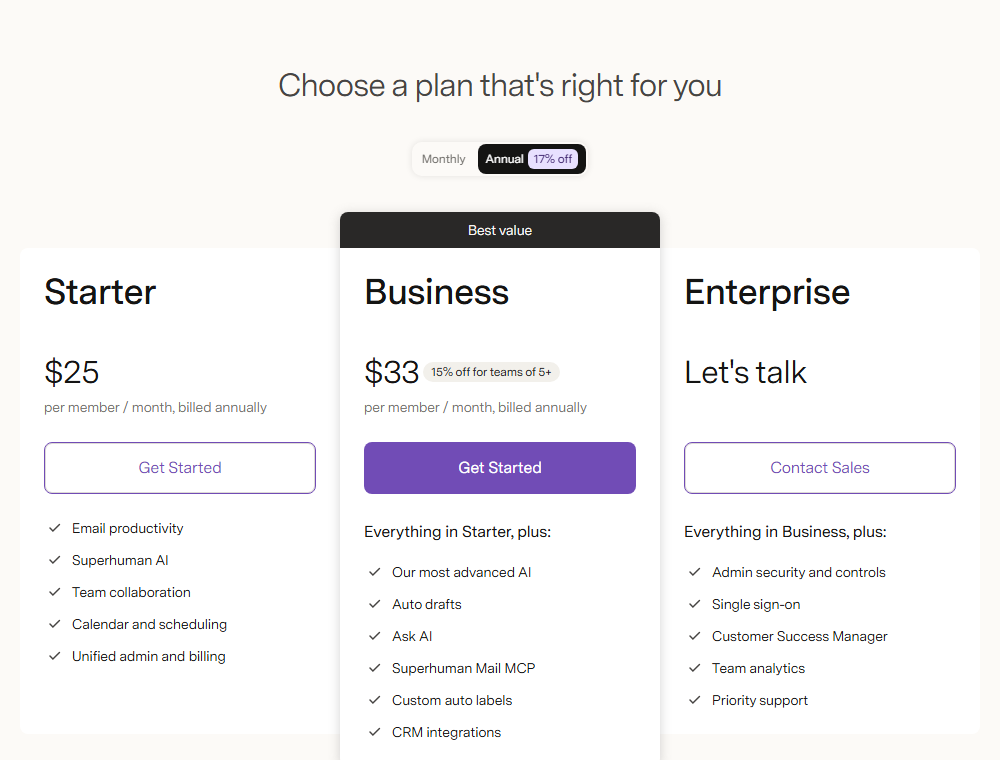 Superhuman's plan cards, captured 22 Oct 2026: the email-only tools cost more per seat than the general assistants.
Both cost more per seat than the general assistants, and both do only email. They earn the money when one or two people handle a heavy shared inbox, such as sales, support or an executive office. They do not earn it for the whole company.
Fireflies: the assistant for meetings
Fireflies joins Zoom, Google Meet and Teams calls, transcribes them in 100-plus languages and writes the summary. Its plans, per seat per month:
- Free: $0, with unlimited transcription, limited AI summaries and 400 minutes of storage per team.
- Pro: $10 billed annually, or $18 monthly.
- Business: $19 billed annually, or $29 monthly, with unlimited storage and team analytics.
- Enterprise: $39, annual billing only.
If meetings are your pain, this is the cheapest fix on the list. It is also the easiest to trial, because the free plan costs nothing. Other notetakers are compared in the meeting assistants guide, and the whole meeting assistants category is browsable.
Copilot Studio and agents: when an assistant is not enough
Some office work is a repeated chain: a form arrives, someone checks three systems, someone replies. An assistant answers questions about that chain. An agent runs it.
Microsoft's page points business buyers to Copilot Studio to build standalone agents. Other routes exist: Lindy and Manus for general agents, and Glean for search across company data. The broader field is covered in the agentic AI guide.
A fair warning: agents add a review burden. Start with one process, keep a human approving the output, and add a second only after the first has run clean for a month.
What it costs for a ten-person office
Seat prices hide the real bill because the products bundle different things. This table shows the monthly total for 10 people at the annual rate each page lists.
| Option | Per user | Ten users | What is included |
|---|---|---|---|
| Copilot add-on (promo) | $18 | $180 | AI only, needs a Microsoft plan |
| Business Standard with Copilot | $23.50 | $235 | Suite plus AI |
| Google Workspace Standard | $14 | $140 | Suite plus Gemini |
| ChatGPT Business Standard | $20 | $200 | AI only |
| Claude Team Standard | $20 | $200 | AI only |
| Notion Business | $20 | $200 | Workspace plus AI |
The Copilot add-on rises to $21 at list price, so a second-year budget should use $210.
The email tools sit outside the table:
- Superhuman Business: $330 a month for ten seats.
- Shortwave Business: $300 a month for ten seats.
Read the table by the last column. Google Standard at $140 is the lowest line, and it includes the whole suite. If you already pay Microsoft for the suite, the right comparison is the Copilot add-on against ChatGPT or Claude.
For model-level price and benchmark comparisons behind these assistants, the model leaderboard shows the current figures.
Who should pick which
The picks depend on the office, not on a universal ranking.
| Your office | Pick | Why |
|---|---|---|
| Microsoft shop, Excel-heavy | Microsoft 365 Copilot | Works inside the files |
| Google shop, Gmail-heavy | Google Workspace Standard | AI included in the suite |
| Mixed suites | ChatGPT Business | Connects to both |
| Long reports and contracts | Claude Team | Built for long documents |
| Notes and wikis in Notion | Notion Business | AI sits on your pages |
| Heavy shared inbox | Superhuman or Shortwave | Built for email |
| Meeting overload | Fireflies | Cheapest fix, free trial |
Two or three of these can run side by side. A common pairing is the suite assistant for daily work and one specialist for the job that hurts. Adding a third general assistant on top rarely pays off.
Who should skip this
Skip a paid team assistant for now when the office has two or three people, each already on a personal chat account. The team plans add value through admin controls, shared billing and training terms, and a tiny team may not need them yet.
Skip the agent route if you cannot name a process that repeats at least weekly. And skip the email specialists if your inbox volume is low, since the general assistants can draft replies well enough.
Data handling: read this before you buy
The vendors' pages give different assurances, and they are not equal.
- ChatGPT Business keeps business data out of training by default and offers SAML single sign-on and usage controls.
- Claude Team says your content is not used for model training by default and lists single sign-on and admin controls for connectors.
- Microsoft 365 Copilot Business lists Enterprise Data Protection, management, compliance and controls.
- Google Workspace lists enterprise-grade security and privacy on all four plans.
- Notion says its model providers retain data for 30 days on Business, and use zero retention only on Enterprise.
None of that replaces your own review. The pages state defaults and plan features, not contract terms. If you handle health, legal or financial records, get the vendor's data terms in a signed document before rollout.
The strongest case against this advice
The best objection is that a standalone assistant has better models and moves faster than the suite assistants, so you should buy ChatGPT or Claude for everyone and skip the suite add-on.
That is a fair argument, and for some teams it wins. Standalone assistants ship new features quickly, and the connectors close much of the gap. The suite assistants answer with one advantage that is hard to copy: they work inside the file you have open, under the permissions you already set, with no copy-and-paste step.
The model matters as much as the wrapper, so look at what sits underneath. Anthropic's newest family includes Claude Fable 5, and Google's Flash tier includes Gemini 3.6 Flash. Shortwave, for one, lets you pick an intelligence level.
So test the claim on your own work. Give five people one task each for two weeks, such as a monthly report, an inbox clear-out and a meeting write-up, and count hours saved. If the standalone tool saves clearly more, buy it. If the difference is small, the suite assistant's lower friction wins.
What would change this advice
Three things would change the picks before the end of the year. Microsoft's promotional price ends on 31 December 2026, so the add-on goes back to $21. Google's plan lineup can differ by region, so a tier change could shift where Gemini in Docs starts. And OpenAI and Anthropic keep adding seat features, which narrows the gap with the suites.
Re-check the live pricing pages before you sign anything. Prices in this guide were read on 22 October 2026.
For the next step, start Fireflies on its free plan for one week of meetings, and put the suite assistant on a single team before you roll it out to everyone.
Frequently asked questions
What is the best AI assistant for office work?
It depends on your suite. Microsoft 365 Copilot is the natural pick for Microsoft offices and Gemini in Google Workspace for Google offices. Mixed offices should trial ChatGPT Business or Claude Team, which both list a $20 per seat Standard plan billed annually.
How much does Microsoft 365 Copilot cost per user?
Microsoft lists the Copilot Business add-on at $18 per user per month paid yearly, down from $21, in a promotion that runs from 1 July to 31 December 2026. It needs an eligible Microsoft 365 Business plan. Some advanced features also bill by usage.
Is Gemini included in Google Workspace?
Gemini is included in the Workspace business plans, with no separate AI seat. Gemini in Gmail is on every plan, while Gemini in Docs, Sheets, Drive and Meet starts at Business Standard, listed at $14 per user per month.
Do ChatGPT Business and Claude Team train on my data?
Both vendors' pricing pages say they do not train on business content by default. That is a default, not a contract term. Ask for the data processing terms in writing if you handle regulated records.
Is a specialist email or meeting assistant worth it?
Only when one job dominates. Superhuman and Shortwave cost $25 to $33 per seat and do email only, so they suit shared inboxes. Fireflies has a free plan for meeting notes and is the cheapest thing to test first.
Covered in this guide
- ChatGPT: ChatGPT is OpenAI's AI assistant, with 1.2 billion weekly users by OpenAI's count, the GPT-6 model family and plans that run from a free tier to a premium Pro tier.
- Claude: Claude is Anthropic's AI assistant, with a free tier, paid personal plans, and Team and Enterprise seats. Opus access starts at the first paid plan.
- Gemini: Google's multimodal AI assistant and model family, sold as a free app, tiered subscriptions and a pay-per-token API
- Microsoft 365 Copilot: Your everyday AI companion powered by GPT-5.6 (preferred model July 2026), GPT-4o, and GPT-5 for productivity, creativity, and intelligent assistance
- Anthropic: Anthropic is a Public Benefit Corporation started by 7 ex-OpenAI researchers. It builds the Claude model family and counts Amazon and Google among its largest backers.
- Claude Fable 5: The first generally available Mythos-class Claude model, with 1M context and 95.0% SWE-bench Verified. Released June 2026 by Anthropic.
- Fireflies: AI Notetaker for Meeting Transcription, Summarization & Conversation Intelligence
- Gemini 3.6 Flash: Released July 21, 2026, Gemini 3.6 Flash is Google DeepMind's Flash-tier model built for agentic coding, computer use and long-context work.
- Glean: Enterprise AI search platform at $300M ARR in 2026, connecting 100+ apps with permissions-aware results, AI agents, and MCP support from ~$50/user/month.
- Lindy: AI teammate that handles email, meetings and workflows across 1,000+ apps; no free plan, just a 7-day trial then per-seat billing.
- Manus: Autonomous AI agent that plans and executes multi-step work from one prompt: research, documents, apps and video. The September 2026 release adds Cascade, Automations and Studio. Free tier available.
- Microsoft: Microsoft, founded 1975, is a $2.77T public company (NASDAQ: MSFT) with 228,000 employees and $245.3B FY2025 revenue. Copilot AI business run rate exceeded $37B in Q3 FY2026.
- Copilot Studio: Build custom AI agents, workflows and apps without code, with MCP servers and credit-based billing billed through Azure.
- Notion: Your AI everything app: All your tools and work in one unified workspace.
- OpenAI: OpenAI builds ChatGPT, the GPT-6 family (Astra, Sol, Luna), Codex and the OpenAI API. It reports 1.2B weekly ChatGPT users and an $852B valuation after its March 2026 round.
- Shortwave: The world's smartest AI email assistant: organize, write, and automate your inbox with natural language prompts
- Superhuman: AI that works everywhere you work: mail, docs, writing, and agents.
Sources
Still deciding?
This guide covers a handful of options. Smart Match checks every listing in the directory against how you actually work and what you can spend, then hands you the shortlist and the reason behind each pick.
Find your toolsRelated guides
- The AI 80s Photo Trend: How to Make Yours (and Turn It Into a Video) in 2026AnalysisWhat changed and who it affects
- The AI Tools That Do One Microsoft Copilot Job, CheaperBuyer's guideHow to pick, across a category
- Algolia and You.com Both Call Themselves AI Search Infrastructure. They Aren't Rivals.ComparisonHead-to-head, with a verdict
- Attio vs HubSpot in 2026: Which CRM for a Startup?ComparisonHead-to-head, with a verdict
- Best Agentic AI in 2026: Pick the Job, Not the GeneralistBuyer's guideHow to pick, across a category
- Best AI Agent Builders in 2026: Automate, Build or Self-HostBuyer's guideHow to pick, across a category