How to Choose an AI Assistant: ChatGPT vs Claude vs Copilot vs Grok vs Poe
There is no single best AI assistant. As of 2 October 2026, ChatGPT Plus and Claude Pro cost about $20 a month, ChatGPT Pro now has three usage tiers, and Claude's context window reaches 1M tokens on its newest models. Choose by ecosystem, task and the one constraint you cannot give up.
The short version
Five AI assistants dominate in 2026, and most people default to whichever is already open. This guide re-reads ChatGPT, Claude and Poe pricing from vendor pages on 27 October 2026, flags the Copilot and Grok figures it could not re-check, and gives a three-question framework for choosing.
Want this decided for your own case? Find your tools with Smart Match, starting from this guide's question.
In 2026 OpenAI split ChatGPT Pro into three usage tiers, Anthropic moved Claude's longer context onto its newest models, and Microsoft put a first-year discount on its Copilot add-on. Most comparison articles still describe one Pro plan, one fixed context window and last year's Copilot price. That drift is the real problem with picking an AI assistant: the market moves every few months, and the advice does not.
Five assistants cover almost every use case a working adult has for AI text chat: ChatGPT, Claude, Microsoft Copilot, Grok and Poe. None of them is the best one. Each has specialized since this guide first ran in March 2026, and the axis that separates them is no longer raw model quality.
It is which ecosystem you already work in, what task you are actually doing, and the one constraint you cannot compromise on. For a five-person team paying for two or three of these out of habit rather than reason, that is real monthly spend riding on a decision nobody has made. If you would rather have the shortlist built for you, Smart Match asks about the job and the budget and returns tools from the same directory this guide draws on.
All prices below were read from vendor pages on 27 October 2026 for ChatGPT, Claude and Poe. Microsoft's and xAI's pages could not be read on that pass, so the Copilot and Grok figures are the ones read on 2 October 2026 and are marked where they appear.
Choosing for a whole office instead of yourself? The AI assistant for office work and the AI assistant for small business compare seat prices and admin controls.
What changed since 2 October
Re-checked 27 October 2026: the five-assistant lineup holds, and no price moved on the pages that could be read. Four things did move:
- ChatGPT: the free plan now runs on a newer model, and the reasoning models are listed on Plus.
- Claude: the free plan lists far more, and Pro adds scheduled tasks.
- Poe: the headline models are newer. Prices are unchanged.
- New section: voice assistants and always-on agents, which this guide did not cover before.
The shortlist: plans side by side
| Assistant | Free tier | Typical paid plan | Top consumer plan |
|---|---|---|---|
| ChatGPT | Yes | Plus, $20 a month | Pro, three tiers up to $500 |
| Claude | Yes | Pro, $17 yearly or $20 monthly | Max, from $100 |
| Microsoft Copilot | Chat with a work account | Copilot Business add-on, $18 yearly | Business Premium bundle, $32 |
| Grok | Yes | SuperGrok, reported $30 | SuperGrok Heavy, reported $300 |
| Poe | Limited | Points plan from about $4.17 | Points plan up to $2,499.99 a year |
Read the table as a map of where each tool sits, not a verdict. Two of those prices carry caveats explained in the sections below: Grok's page no longer shows a price to logged-out visitors, and Microsoft's $18 is a first-year promotion.
How to choose, in three questions
Answer these before looking at a single feature list. This is the part that stays useful even after every price on this page changes again.
What ecosystem do you already live in? Microsoft 365 every working day, a terminal and GitHub, or just a browser tab? Your existing toolchain is the strongest signal for whether an assistant will feel native or bolted on.
What are you actually trying to do? A long contract review, a quick brainstorm and a live news check each favor a different assistant. Match the task type first, not the brand name.
What is the one thing you cannot give up? Cost, context length, real-time data, or how well a tool fits inside software you already pay for. Naming that constraint out loud eliminates half the list before you compare a single feature.
Most people skip this step and pick whichever tab was already open. That is how a five-person marketing team ends up paying for four overlapping chat subscriptions nobody audits.
ChatGPT: the broadest tool, now with four paid bands
ChatGPT, built by OpenAI, covers more ground than any other assistant here: drafting, brainstorming, coding, image generation, voice and a plugin ecosystem. OpenAI's pricing page, read on 27 October 2026, lists Free, Go, Plus and Pro for individuals. Free includes unlimited text chats on GPT-6 Luna under OpenAI's abuse guardrails.
OpenAI prices in local currency, so a visitor from Indonesia sees IDR 75,000 for Go and IDR 349,000 for Plus. In US dollars, HokAI's records of the same page put Go at $8 a month and Plus at $20. The Go plan may include ads, according to the page.
Pro is where the structure changed. The page now says Pro offers a choice of three usage tiers, starting from IDR 1,889,000 a month in Indonesia. HokAI tracks the US tiers in the table below.
| Pro tier | US price a month | What sets it apart |
|---|---|---|
| Pro 100 | $100 | Entry Pro usage |
| Pro 200 | $200 | Higher allowance |
| Pro 500 | $500 | Ultrafast option, 25x Plus |
The $500 tier arrived at OpenAI's DevDay on 29 September 2026, as reported in our chatbot roundup.
The page lists the newer GPT-6.1 Sol, GPT-6 Sol and GPT-6 Astra models on Plus, with expanded access on Pro, and says Pro reasoning is powered by GPT-6 Astra. Plus includes expanded access to ChatGPT Work on desktop, web and mobile, and Pro adds Dot, an always-on agent. That agent is covered as dots in the directory.
ChatGPT's context windows are published per plan: Free gets 27K tokens on its instant model, Go and Plus 54K, and Pro 128K, with reasoning windows of 256K on Plus and 400K on Pro. That is smaller than Claude's headline numbers, which is the honest weakness for long documents.
Claude: built for the seam ChatGPT hits
Claude, from Anthropic, lists three individual plans on its pricing page.
| Plan | Price a month | Note |
|---|---|---|
| Free | $0 | Chat, web search, files and code, Artifacts, memory |
| Pro | $17 yearly, $20 monthly | Claude Code, Science, Projects, Chrome |
| Max | From $100 | Choose 5x or 20x Pro usage |
Claude Code, Claude Science, scheduled tasks, Claude in Chrome and Claude for Microsoft 365 are listed on Pro and above. The pricing page, read on 27 October 2026, gives the free plan up to 5 Projects plus memory, connectors, Design, Slides and Docs.
Anthropic also sells Claude Duet, a separate proactive agent app for paid subscribers rather than a different chat assistant. It is a research preview from October 2026 with a US waitlist, and it asks before it sends, pays or signs.
The context window changed since March. This guide used to say every consumer tier ran 200,000 tokens. Anthropic's help center now lists the window by model for paid plans: 1M tokens on Claude Opus 5.5, Claude Sonnet 5.5 and Claude Fable 5.1, 500K on Claude Fable 5 and several older models, and 200K for anything not listed. The pricing page itself no longer states a window, and the help article covers paid plans only, so the free plan's window is not documented there.
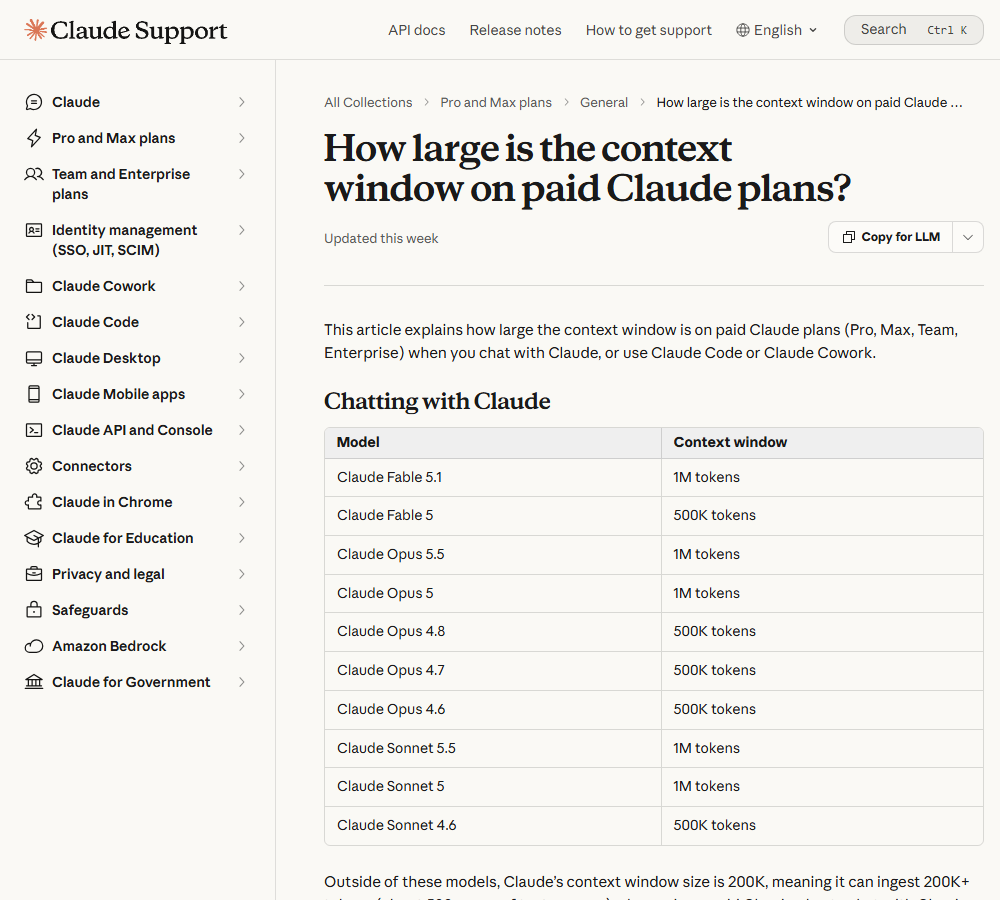 Anthropic's help center lists context windows by model for paid plans, captured 2 October 2026.
The practical sell is continuity rather than the raw number. Projects keep files and instructions persistent across a session, which matters more the longer a piece of work runs. A client deliverable spread over two weeks behaves differently in a tool that remembers the files on day twelve than in one that forgets them between logins.
Claude's weakness is fit for casual use. If your week is mostly quick drafts, voice chat and pictures, ChatGPT's broader feature list gives you more to use for the same money, and Claude's strengths in long projects go unused.
Microsoft Copilot: priced to work inside Office
Of the five tools here, Microsoft Copilot is the one built to disappear into software you already have open, rather than sit in its own tab. Microsoft's business page, as read on 2 October 2026 (it could not be re-read on 27 October), sets out three paths.
- Microsoft 365 Copilot Business add-on: $18 per user per month billed yearly, shown as a discount from $21. Microsoft says the offer runs from 1 July to 31 December 2026, applies to the first year only, and requires an eligible Business plan.
- Business Standard with Copilot: $23.50 per user per month billed yearly.
- Business Premium with Copilot: $32 per user per month billed yearly, which adds advanced identity and security features for up to 300 users.
That is roughly Claude Pro money, but it buys something different: a chat panel inside Word, Excel, Outlook and Teams, with no tab switch required to summarize an email thread or build a chart from a spreadsheet. The page also lists model choice and the latest OpenAI GPT models among the features.
For a team not already paying for Microsoft 365, there is little reason to start here. Every other tool on this list does general chat as well or better for less money. Copilot's pitch rests on a suite subscription most buyers hold already. Anyone signing in with a work account can try Copilot Chat before buying a license.
Grok: the plans page no longer shows a price
Grok is built by xAI, which merged with SpaceX in February 2026 and rebranded to SpaceXAI in July, according to ThePlanetTools. Grok's product name and apps did not change.
Grok's own plans page names three consumer tiers: SuperGrok Lite, SuperGrok and SuperGrok Heavy. It showed features but no prices to a logged-out visitor when read on 2 October, and could not be re-read on 27 October, so the figures here are secondhand. Third-party trackers and HokAI's July check report the figures in the table below; confirm on the checkout screen before paying.
| Tier | Reported price a month | Source |
|---|---|---|
| SuperGrok Lite | $10 | Trackers, July check |
| SuperGrok | $30 | Trackers, July check |
| SuperGrok Heavy | $300 | Trackers, July check |
The plans page says SuperGrok adds longer conversations, smarter answers in Expert mode, image and video generation with 720p, 30-second clips, and faster replies. Heavy adds the highest usage, a larger team of collaborating agents, and X Premium+ at no extra cost when you connect an X account. SuperGrok also lists exclusive access to Grok Bot, xAI's agent product.
Earlier this year, reports said the free tier included basic real-time web and X search. That claim is not on the plans page now, so treat it as unconfirmed rather than a reason to choose Grok.
Where Grok still stands out is live information. The newest model, Grok 4.7, launched on 21 September, and Grok 4.5 remains available. Treat Grok as a scanner for what is happening right now, not as the tool for deciding what to do about it.
Poe: not an assistant, a switchboard
Poe, run by Quora, does not have its own frontier model. It is an interface that gives one login to GPT-6-Astra, Claude-Opus-5.5, Grok-4.7, Gemini-4-Argon, Veo-3.1 and thousands of smaller bots, according to Poe's subscription page, read on 2 October 2026. The page read on 27 October 2026 now leads with newer models and lists thousands of other bots.
Pricing runs on points rather than a flat fee. The page, re-read on 27 October 2026, offers five plans, starting with a daily allowance of 10 thousand points and ending with a monthly pool of 8.25 million. HokAI's records of the US prices put the entry plan at $49.99 a year and the top plan at $2,499.99. European visitors see euro prices, such as 57.49 euros a year for the entry plan.
As a primary tool the switching overhead defeats the purpose. As a gut check, when you suspect a single model is not giving you its best output, it earns the login. Poe also suits people who want image or video models such as Veo alongside chat without opening separate accounts. If the points model is what puts you off, our Poe alternatives guide compares OpenRouter, Raycast and Msty.
Two more worth knowing but not carrying on their own: Perplexity does citation-backed web research better than any of the five above, and Gemini is the same lock-in play as Copilot for anyone living inside Google Workspace instead of Microsoft 365. Google's larger 3.5-generation model is tracked on the Gemini 3.5 Pro page.
ChatGPT vs Claude: the decision most people are actually stuck on
Most buyers are not really choosing between all five. They are choosing between ChatGPT and Claude, because those two cover the widest range of general work and cost almost the same at the entry tier, about $20 a month each.
Pick ChatGPT's Plus tier if the job changes daily: drafting, brainstorming, quick research, image generation and a plugin ecosystem most competitors do not match. Pick Claude's Projects setup if the job is the same large thing for days or weeks: a codebase, a compliance document, a research thread that keeps evolving, where a window of up to 1M tokens on the newest models holds the thread better than ChatGPT's published 54K to 256K on Plus.
For code specifically, both vendors now sell heavy-use tiers. Our coding assistants roundup compares them next to GitHub Copilot and Claude Code, which is the better place to settle a developer-only decision.
The ChatGPT side of the decision is also about reach: Free, Go, Plus and Pro give you four steps to climb without leaving the product, which suits someone whose needs grow slowly. The Claude side is about depth: Pro and Max suit someone who already knows the heavy work is coming and wants the long window and persistent Projects from day one.
Switching between them costs more than people expect. Custom instructions, saved chats, connected apps and any prompt library live on one side or the other, and none of it moves automatically. Anyone who has built a workflow over a few months should weigh that migration cost against the capability gap before jumping, not just the sticker price.
To compare model prices, benchmarks and data terms across all of these, the model leaderboard shows what each vendor publishes, and the model recommender narrows the list by a constraint such as budget.
Voice assistants and always-on agents
The five tools above are chat assistants you open on purpose. Two other kinds of product answer the same question from a different direction, and they matter if your day is spent talking to a device or if you want software that acts without being prompted.
Alexa+ is the voice option for households already on smart speakers. HokAI's Alexa+ page records it as included with a Prime membership in the US, or $19.99 a month without one. It is built to take actions such as reserving a table or ordering food, so treat it as a home assistant, not a work tool.
Siri AI is the phone-side equivalent. HokAI's Siri AI record, last checked on 19 August 2026, describes it as free on supported devices, built on a licensed Gemini model, and not available in the European Union at launch. Check availability for your country before planning around it.
If what you want is an agent that works while you are away rather than a voice on a speaker, the choice is a different one. Claude Duet, covered in the Claude section above, is one such product. Our always-on agent comparison covers the rivals, and the personal AI agents guide picks an agent by the kind of reader you are. This guide stays with the chat-assistant decision; those two pages answer the agent one.
Data handling: what the plans say about training
Privacy terms differ more than price does, and they are the part buyers check last. For ChatGPT, the comparison table on that page marks training on your content as opt-out available on Free, Go, Plus and Pro alike. Opting out is a setting you have to change yourself.
HokAI did not re-verify the other four vendors' training and retention terms in this review. Before putting client material into any of them, read the privacy settings of the exact plan you will use. Business plans from OpenAI, Anthropic and Microsoft are sold with their own data terms, which are separate from the consumer ones.
Who should skip the whole category
Anyone whose employer already pays for Microsoft 365 or Google Workspace, and who only needs occasional help with email or spreadsheets, should stop here. The tier bundled into that subscription covers the use case without a second bill. Buying a standalone ChatGPT or Claude plan on top of an unused Copilot seat is the most common waste in this category, and nobody notices until an expense audit finds it.
The same logic applies to light, occasional use. The free tiers of ChatGPT and Claude cover most one-off tasks without a subscription at all. A paid plan earns its cost once volume or context length outgrows what the free tier allows, not before.
There is a third group worth naming: anyone whose work cannot leave a specific compliance boundary. None of the five tools here is positioned as a self-hosted or air-gapped option for consumers. That decision belongs in a conversation with legal or security, not in a subscription comparison.
The counterargument: running three tools is not automatically smarter
The advice this guide gave in March was to run a primary tool plus one or two specialists. That advice has a real cost: three logins, three billing cycles, and the mental overhead of remembering which tool handles which task.
Most people who claim to run three tools strategically are paying for three and defaulting back to one out of habit, the exact failure this guide exists to fix. The advice still holds, with one condition: only add a second subscription if you can name the specific task the primary tool cannot do. If the honest answer is "just in case," stay on one tool and use the others' free tiers as the occasional fallback.
The case against that restraint is also real. A heavy user who hits usage limits on one tool mid-project loses more in an afternoon than a second subscription costs in a month. If limits are what you hit, a second plan is a fair purchase.
What would change the verdict by 2027
The constant in this category is not the leaderboard. It is ecosystem lock-in. OpenAI shipping shared workspaces, Anthropic extending long context across its newest models and Microsoft discounting its add-on for one year are all moves that reset a comparison overnight.
Before renewing any subscription on this list, revisit the three questions at the top of this guide rather than the brand name on the invoice. The tool that wins your ecosystem, task and constraint in 2027 is unlikely to be the one currently occupying the browser tab out of habit.
Key takeaways
- Answer three questions first: ecosystem, task and your one hard constraint
- ChatGPT Pro now has three usage tiers, and Claude's long context depends on which model you pick
- Microsoft's $18 Copilot add-on price is a first-year promotion that ends 31 December 2026
- Grok's plans page names three tiers but shows no price to logged-out visitors, so confirm at checkout
- Add a second paid tool only when you can name the task the first one cannot do
Frequently asked questions
Which AI assistant is best in 2026?
There is no single best AI assistant; it depends on ecosystem, task and budget. ChatGPT Plus and Claude Pro both cost about $20 a month. ChatGPT covers the widest range of daily tasks, while Claude's newest models offer up to a 1M-token context window on paid plans, which suits long documents and code.
What is the difference between ChatGPT and Claude?
ChatGPT is broader, covering brainstorming, image generation, voice and ChatGPT Work. Claude is narrower but deeper: Projects keep files and instructions persistent across a long task, and Anthropic lists a 1M-token window on its newest models for paid plans. ChatGPT's published window is 54K on Plus.
How much does ChatGPT Pro cost now?
OpenAI's pricing page says Pro offers a choice of three usage tiers. HokAI tracks the US prices as $100, $200 and $500 a month, with the $500 tier added at DevDay on 29 September 2026. OpenAI shows local currency, such as IDR 1,889,000 a month from Indonesia.
How much does Microsoft Copilot cost compared to ChatGPT or Claude?
Microsoft 365 Copilot Business is an add-on at $18 per user per month billed yearly, discounted from $21 for the first year through 31 December 2026, according to Microsoft. Business Premium with Copilot is $32. That is near ChatGPT Plus money, but only pays off inside Microsoft 365.
Is it worth paying for more than one AI assistant?
Only if a second subscription solves a specific task the first tool cannot. A single primary tool plus the free tiers of others covers most cases, but a heavy user who keeps hitting usage limits mid-project can reasonably justify a second plan.
Covered in this guide
- ChatGPT: ChatGPT is OpenAI's AI assistant, with 1.2 billion weekly users by OpenAI's count, the GPT-6 model family and plans that run from a free tier to a premium Pro tier.
- Claude: Claude is Anthropic's AI assistant, with a free tier, paid personal plans, and Team and Enterprise seats. Opus access starts at the first paid plan.
- Grok: Chatbot from xAI that searches the web and X live, now sold with Grok Bot and Cursor inside The X Subscription.
- Microsoft Copilot: Your everyday AI companion powered by GPT-5.6 (preferred model July 2026), GPT-4o, and GPT-5 for productivity, creativity, and intelligent assistance
- Poe: One subscription reaching 200+ models from every major lab plus community bots, with a free plan to start. Poe's paid plans have no names; each is sold by its compute-point allowance.
- alexa-plus: Amazon's LLM-based Alexa that books tables, orders food and runs your home, live in the US since February 2026 and launched in 12 countries.
- amazon: Amazon, founded in 1994, runs AWS, the cloud and retail company behind Bedrock, in-house Nova models and custom AI silicon.
- Anthropic: Anthropic is a Public Benefit Corporation started by 7 ex-OpenAI researchers. It builds the Claude model family and counts Amazon and Google among its largest backers.
- claude-duet: Anthropic's research-preview agent on Claude Opus 5.5 watches your connected apps, messages you first, and waits for your OK before it sends, pays or signs.
- Claude Fable 5: The first generally available Mythos-class Claude model, with 1M context and 95.0% SWE-bench Verified. Released June 2026 by Anthropic.
- Claude Fable 5.1: Anthropic's second Mythos-class model, released Sept 1, 2026, for long-horizon agentic coding and research at Fable 5's per-token rates.
- Claude Opus 5.5: Anthropic's September 2026 flagship LLM with a 1 million token context window, built for long-running agentic coding and computer use.
- Claude Sonnet 5.5: Anthropic's fastest Sonnet-class model, launched in September 2026, with a 1M context and output more than 30% faster than Sonnet 5.
- Gemini: Google's multimodal AI assistant and model family, sold as a free app, tiered subscriptions and a pay-per-token API
- Gemini 3.5 Pro: Google named Gemini 3.5 Pro at its May 2026 developer conference, but the model has not been released. Google has published no context window, price or benchmarks for it.
- GitHub Copilot: GitHub's AI coding assistant with agent mode and MCP support across 6 IDEs, plus a free plan with no credit card required.
- GPT-6 Astra: OpenAI's flagship model, launched September 2026 as the first ever rated at the Preparedness Framework's Critical cybersecurity level.
- gpt-6-luna: GPT-6 Luna (Sept 2026) is OpenAI's lowest-cost GPT-6 model, tuned for high-volume chat, extraction and classification with six adjustable reasoning-effort levels.
- GPT-6 Sol: OpenAI's mid-tier GPT-6 model (Sep 2026), 1.05M-token context, 68.8% on DeepSWE v1.1 coding, half GPT-5.6 Sol's price.
- GPT-6.1 Sol: GPT-6.1 Sol is OpenAI's September 2026 mid-tier reasoning model for coding, computer use and document work, built to sit just below GPT-6 Astra.
- Grok 4.5: xAI's Grok 4.5 targets coding and agentic tool-calling workloads, built alongside Cursor and priced well under rival flagship models for high-volume agent loops.
- Grok 4.7: xAI's September 2026 flagship model, built for coding and agentic work with a 500K token context window and a 46.3% CursorBench score.
- Grok Bot: xAI's always-on AI agents that sign into your existing apps and finish multi-step jobs, included in xAI's joint Grok and Cursor bundle from the Premium tier up.
- muse: Meta's AI agent runs tasks in its own cloud computer; open in the US, Canada, Japan and Singapore, with small-business skills for Shopify, QuickBooks and Meta ads in the US and Canada.
- OpenAI: OpenAI builds ChatGPT, the GPT-6 family (Astra, Sol, Luna), Codex and the OpenAI API. It reports 1.2B weekly ChatGPT users and an $852B valuation after its March 2026 round.
- dots: OpenAI's always-on agent in ChatGPT runs on GPT-6 Astra with its own cloud computer, and asks approval before consequential actions.
- siri-ai: Apple's free, rebuilt conversational assistant runs a custom 1.2 trillion-parameter Google Gemini model and ships with iOS 27 in fall 2026.
- Veo 3.1: Google DeepMind's Veo 3.1 generates 4, 6 or 8-second video clips with native synchronized dialogue and audio, rendering up to 4K.
- xAI: Elon Musk's AI company (roughly 4,000 to 4,900 employees) builds the Grok models and merged into SpaceX, taking the combined business public on Nasdaq as the largest IPO on record.
Sources
Still deciding?
This guide covers a handful of options. Smart Match checks every listing in the directory against how you actually work and what you can spend, then hands you the shortlist and the reason behind each pick.
Find your toolsRelated guides
- The AI 80s Photo Trend: How to Make Yours (and Turn It Into a Video) in 2026AnalysisWhat changed and who it affects
- What Happened When 7 AI Agents Got Real Bank Accounts and No SupervisionAnalysisWhat changed and who it affects
- The AI Tool Ecosystem in 2026: Buy the Meter, Not the CategoryBuyer's guideHow to pick, across a category
- The AI Tools That Do One Microsoft Copilot Job, CheaperBuyer's guideHow to pick, across a category
- Attio vs HubSpot in 2026: Which CRM for a Startup?ComparisonHead-to-head, with a verdict
- Best Agentic AI in 2026: Manus, Genspark and the Platforms That Finish Whole TasksBuyer's guideHow to pick, across a category