Best AI Meeting Assistants in 2026: Do You Even Need One?
An AI meeting assistant is software or a recorder that captures a meeting, transcribes it, and produces a summary with action items, either through a visible bot (Otter, Fireflies) or bot-free capture (Granola, Timeless, Plaud, and newer modes from Fathom and Otter). Pricing in 2026 ranges from free to roughly $40 per seat monthly.
The short version
Fathom, Fireflies.ai, Otter, tl;dv, Timeless, Granola and Plaud are the seven AI meeting assistants Hokai lists as of October 2026, and each caps its free tier differently. Fireflies and Fathom are the pair most teams compare directly. If every call already happens on Zoom or Teams, their bundled recaps may cover the job.
Not sure which one fits you? Describe your situation and Smart Match names three tools.Find my AI tools
In this guide14 sections
On August 13, 2026, a federal judge in San Jose let the core claims in a class-action lawsuit against Otter.ai move forward.
The order in *In re Otter.AI Privacy Litigation*, No. 5:25-cv-06911, allows federal wiretap and Illinois biometric-privacy claims to proceed against the industry's best-known AI notetaker, over allegations that it recorded and transcribed meeting participants who never personally consented. The case consolidates four separate 2025 suits, and the surviving claims turn on whether Otter acted as a neutral tool the host controlled, or independently collected and used the recordings for its own purposes.
The ruling lands in the same year Zoom and Microsoft folded meeting summaries into plans millions of teams already pay for, and quietly retired the "AI Companion" brand name in the process. For a team deciding whether to add a dedicated notetaker on top of the video platform it already owns, both facts matter more than one more feature-comparison chart.
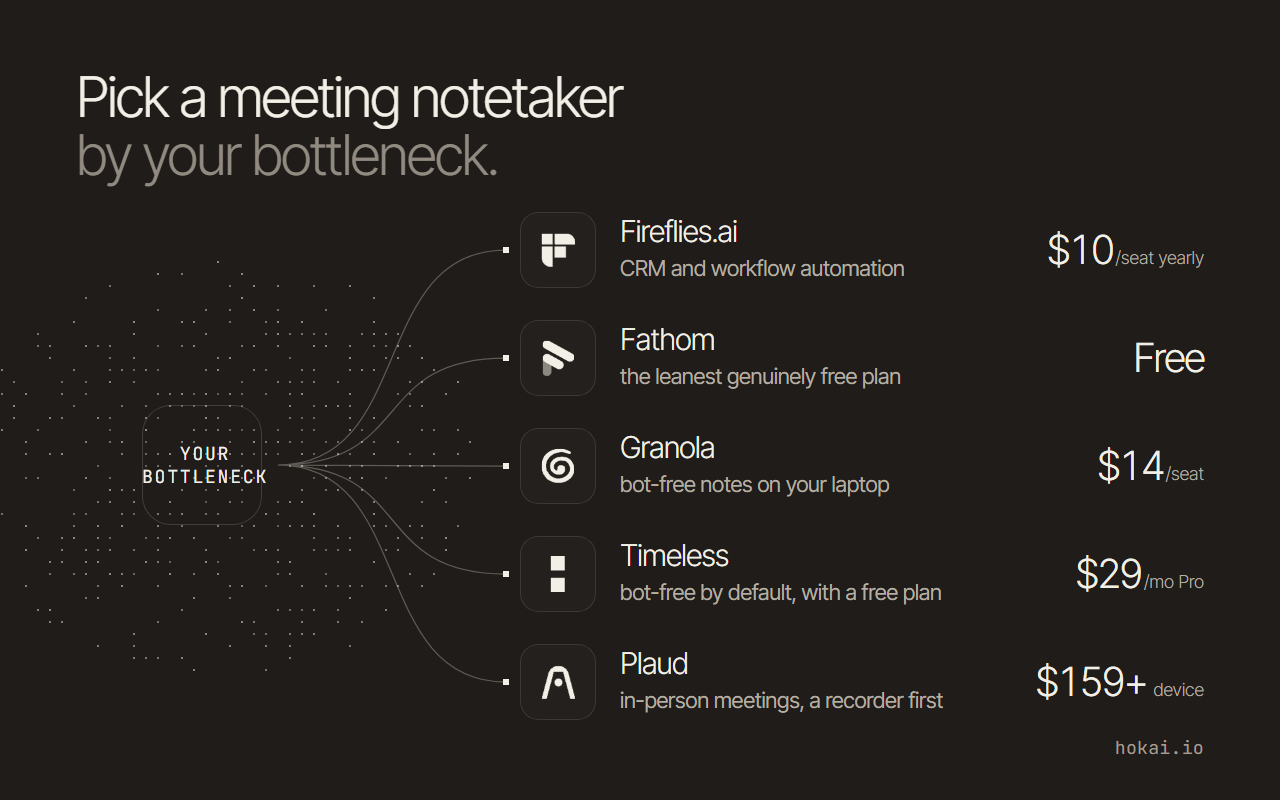 Hokai chart of the guide's notetaker picks by bottleneck, from each vendor's own pricing page as re-read on 31 Oct 2026.
What this guide covers
Hokai's directory covers seven tools that fit this job under AI meeting assistants: Fathom, Fireflies.ai, Otter.ai, tl;dv, Timeless, Granola and Plaud. Granola and Plaud are the two additions since the first version of this guide in August 2026, and they are the two ways to capture a meeting without a bot joining the call: Granola records from your computer's audio, Plaud from a physical recorder.
A category neighbour, MurmurCast, doesn't belong on the list: its own site describes it as a daily-brief digest for YouTube channels, podcasts and newsletters, built on Whisper transcription, with no live-meeting capture at all.
Avoma, which shows up often in this category, still isn't in Hokai's directory. If you're already using it, this guide won't tell you whether to switch. It compares what's actually catalogued here, with prices re-read on the vendors' own pages on 31 October 2026 unless a row says otherwise.
What changed since 24 August 2026
- Added: Granola as the bot-free software pick. Its pricing page shows a free Basic plan with limited meeting history, Business at $14 a seat a month and Enterprise at $35.
- Added: Plaud as the hardware-recorder pick for in-person meetings. Starter is free, Pro is $17.99 a month and devices are sold separately.
- Removed: Gistify. Its pricing page now returns a 404 and its homepage no longer describes a lecture, podcast or meeting summarizer; it now pitches "the trust layer for AI content." Both Obscura and Chrome read the same thing on 31 October 2026, so the $5 to $35 plans in the earlier version can no longer be confirmed.
- Changed: Fathom. A paid individual plan now exists (Premium, $16 a month billed annually), so "paid only at the team level" is no longer true.
- Changed: Timeless. Its pricing page now lists monthly prices only in the readable text ($29 Pro, $39 Max); the annual figures from August are dropped until they can be re-read.
- Unchanged after re-reading: Fireflies (Free, Pro $10 annual, Business $19, Enterprise $39), Otter (Pro $8.33, Business $19.99 annual) and tl;dv (Pro $18, Business $29 annual).
Re-checked 31 October 2026: the order of the top picks holds, with Fireflies for CRM work and Fathom for the free plan.
How to choose: four questions that separate these seven tools
Does it need a visible bot, or can it record without one? Granola and Plaud never send a bot: Granola captures your device's audio, and Plaud records in the room through a separate device. Fathom's pricing page lists a choice of bot-free capture (marked beta) or bot capture on its free plan, and Otter added a bot-free desktop mode in 2026 alongside its standard meeting bot. Timeless was built bot-free from the start.
A visible bot is also the thing plaintiffs' lawyers keep pointing to in the Otter litigation, so this isn't just an etiquette question anymore.
Consent, security and data handling
It's also a legal one in more places than most buyers assume. According to Recording Law's 2026 state-by-state breakdown, thirteen states, including California, Illinois, Massachusetts, Pennsylvania and Washington, require every participant's consent before a call can be recorded, not just the host's.
California's Penal Code Section 632 backs that with a fine of up to $2,500 for a first violation and $10,000 for repeat ones. Adding a bot to a call with a participant in one of those states, without asking everyone first, is close to the exact fact pattern behind the Otter complaint.
Free caps, automation and capture
What does the free tier actually cap? "Free forever" means wildly different things here: 300 transcription minutes a month on Otter's Basic plan, 400 minutes of team storage on Fireflies, five 90-minute meetings on Timeless, ten meetings with AI notes a month on tl;dv, 300 transcription minutes a month on Plaud's Starter plan. Granola's free Basic plan caps meeting history rather than minutes. Read the cap, not the word "free."
How far past the transcript does it go? Fireflies and Fathom both push into CRM sync, deal scoring and action-item automation on their paid tiers. Fireflies' HubSpot integration autofills contacts, companies and deals from a call, and creates a HubSpot contact when a participant is missing from the CRM. Otter and tl;dv stop closer to search and summary. Granola and Plaud stay on the capture-and-notes side, with Granola adding chat across meetings and a handful of CRM and workspace integrations on Business.
Is it a software notetaker or a physical recorder? Every tool here but one is software that listens to a call on your laptop or joins it as a bot. Plaud is a pocket recorder that captures in-person meetings, phone calls and anything said in the room, then sends the audio to an app for transcription. That is a real strength for interviews and site visits, and a real limit for a team whose meetings all happen on video.
The shortlist: seven tools, picked by bottleneck
| If your bottleneck is... | Pick | Price as of Oct 2026 | The catch |
|---|---|---|---|
| CRM and workflow automation | Fireflies.ai | Free; Pro $10/seat/mo annual | Free plan caps storage at 400 minutes per team |
| The leanest genuinely free plan | Fathom | Free (individual); Team $15/seat/mo annual | Team pricing needs a 2-seat minimum |
| Multilingual transcripts from meetings and recordings | HappyScribe | Free; Pro $19/mo annual | Free transcription of uploaded files stops at 10 minutes |
| Bot-free notes on your laptop | Granola | Free (Basic); Business $14/seat/mo | Free plan limits meeting history |
| Cheapest per-seat across Zoom, Meet and Teams | tl;dv | Free; Pro $18/seat/mo annual | Free tier capped at 10 meetings with AI notes a month |
| Bot-free capture by default, with a free plan | Timeless | Free (5 meetings); Pro $29/mo monthly | Team plans start at 3 seats |
| In-person meetings and calls, no bot at all | Plaud | Starter free; Pro $17.99/mo | You buy a recorder first ($159 to $189 for the Note line) |
| Biggest brand, widest third-party integrations | Otter.ai | Pro $8.33/seat/mo annual | Named defendant in active federal wiretap litigation |
Fireflies' pricing page, captured August 24, 2026 and re-read October 31, 2026, shows a free plan with 400 minutes of team storage and 20 AI credits, and a Pro plan with unlimited transcription, video recording and an email assistant added in 2026. The amounts are in the plan table below.
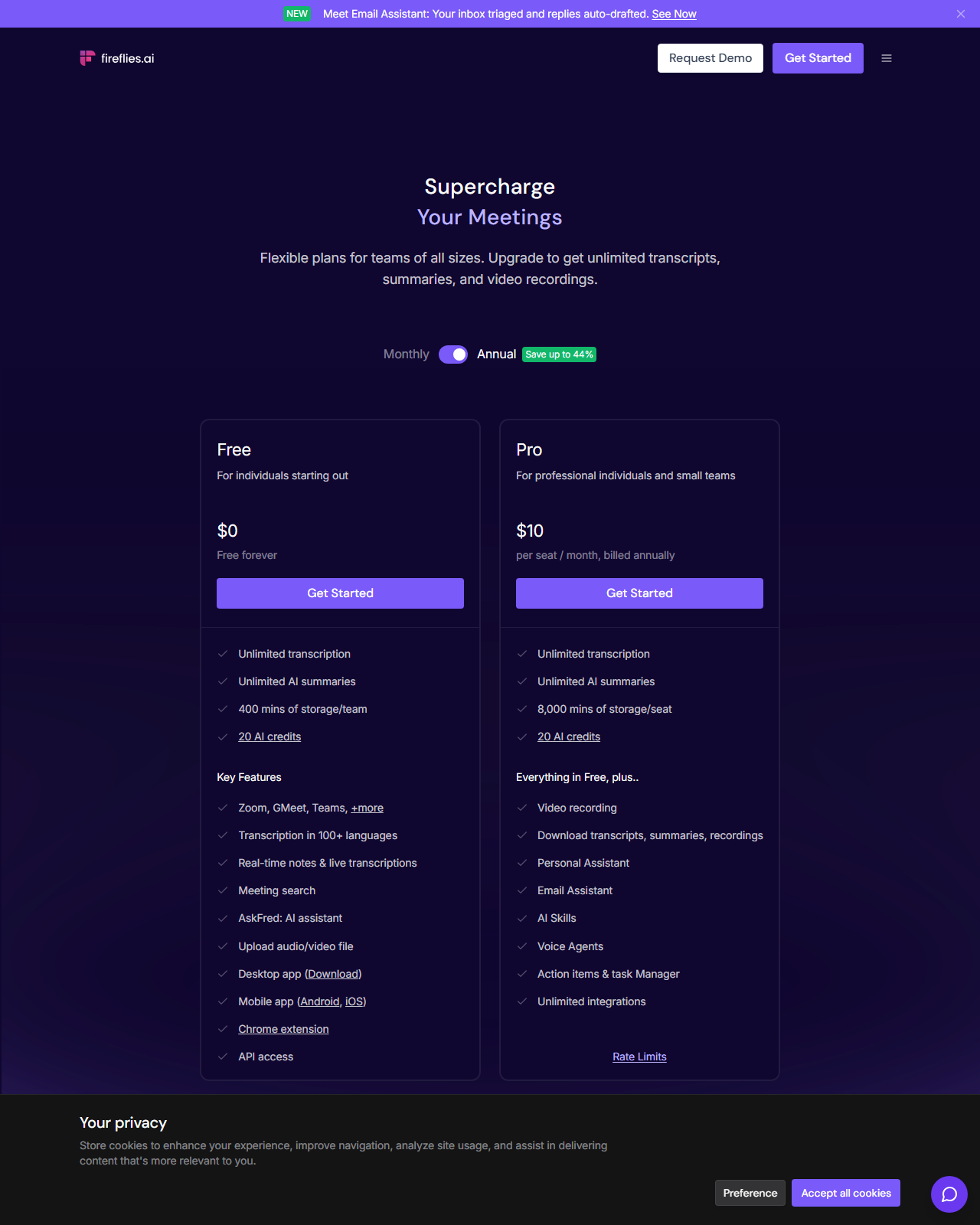 Fireflies.ai's Free and Pro tiers, captured 24 Aug 2026. Pro adds video recording, an email assistant and unlimited integrations on top of Free's 400-minute storage cap.
Fathom's pricing page puts the same trade differently: the individual plan is free with unlimited recordings and instant call summaries. A paid individual plan, Premium, now sits above it and adds advanced summaries and AI-generated action items, so the old line that Fathom charges only at the team level no longer holds.
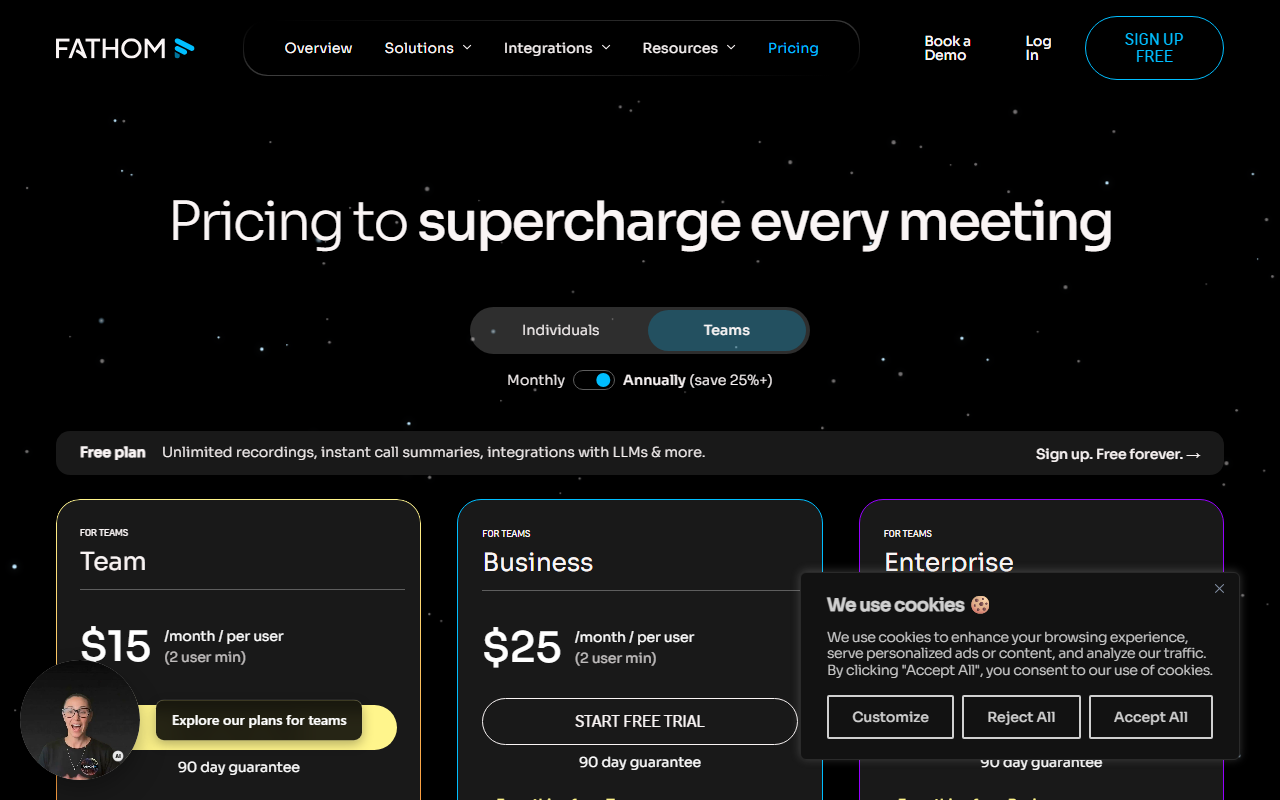 Fathom's Team and Business tiers, captured 24 Aug 2026. The individual plan above these (not pictured) is free with no seat minimum.
Plan prices, re-read 31 October 2026
| Tool | Plan | Billed annually | Billed monthly |
|---|---|---|---|
| Fireflies.ai | Pro | $10 | $18 |
| Fireflies.ai | Business | $19 | $29 |
| Fathom | Premium (individual) | $16 | $20 |
| Fathom | Team | $15 | $19 |
| Fathom | Business | $25 | $34 |
| Otter.ai | Pro | $8.33 | $16.99 |
| Otter.ai | Business | $19.99 | $30 |
| tl;dv | Pro | $18 | $29 |
| tl;dv | Business | $29 | $39 |
| Plaud | Pro | $8.33 equivalent ($99.99 a year) | $17.99 |
| Plaud | Unlimited | $20 equivalent ($239.99 a year) | $29.99 |
Prices are per seat per month in US dollars unless a row says otherwise.
What the other pricing pages actually show
Otter's four tiers are Basic (free), Pro, Business, and Enterprise on a custom quote. The page also shows starred promotional prices, which aren't used here.
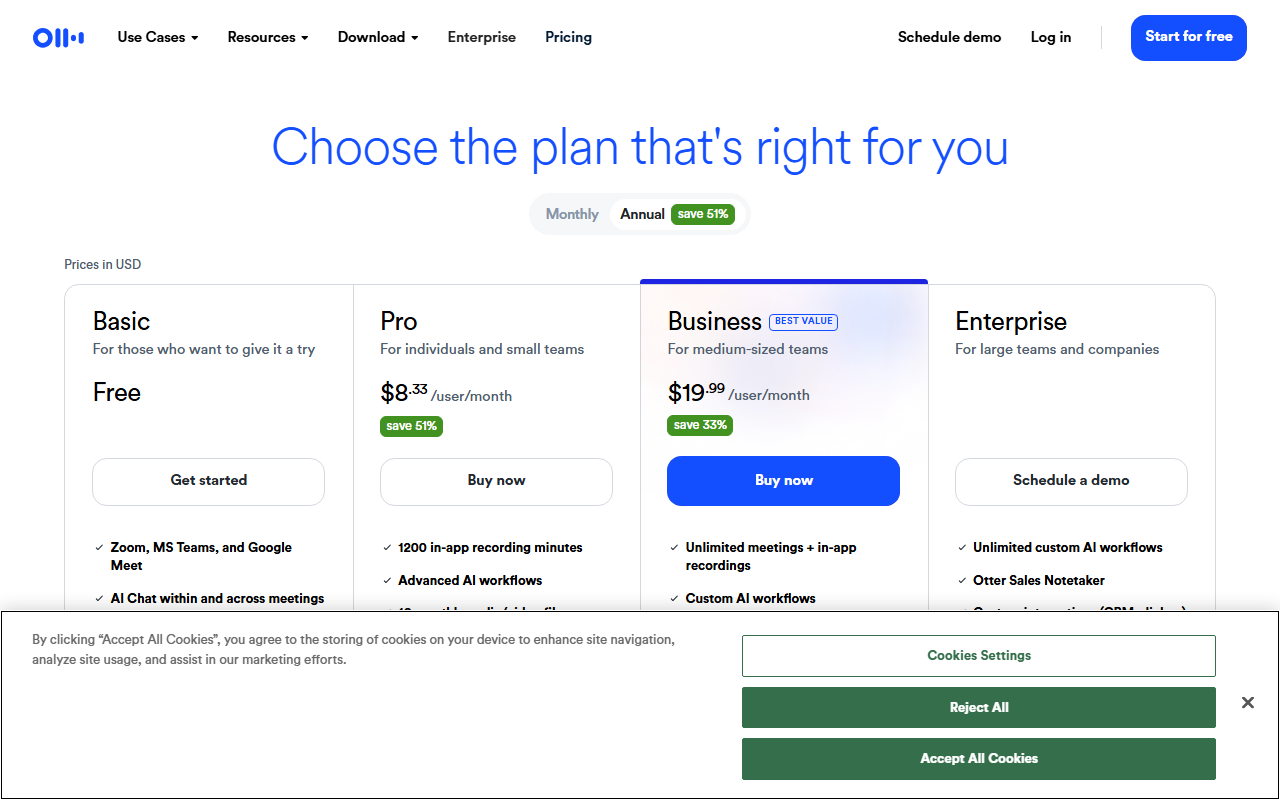 Otter.ai's four tiers, captured 24 Aug 2026 with the annual toggle selected. The free Basic plan caps out at 300 transcription minutes a month.
tl;dv's page lists Free, Pro and Business tiers with an Enterprise quote, re-read October 31, 2026. The free tier now includes unlimited recordings and transcription but only ten meetings with AI notes. The August capture was showing a geolocated 30%-off promo code, which isn't a stable list price and isn't used here.
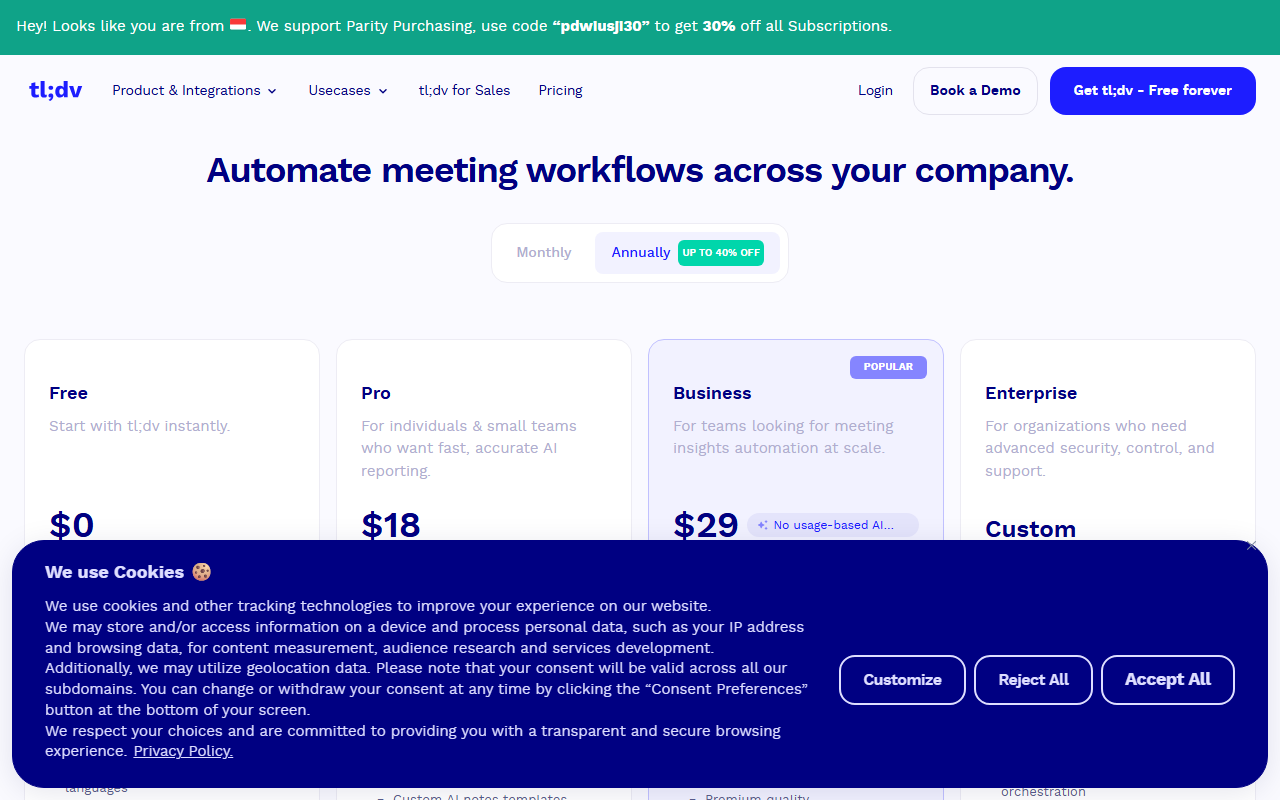 tl;dv's Free, Pro and Business tiers, captured 24 Aug 2026, shown here with annual billing selected. The free tier is capped at 10 AI summaries a month rather than a minutes limit.
Timeless, Granola and Plaud take different bets entirely
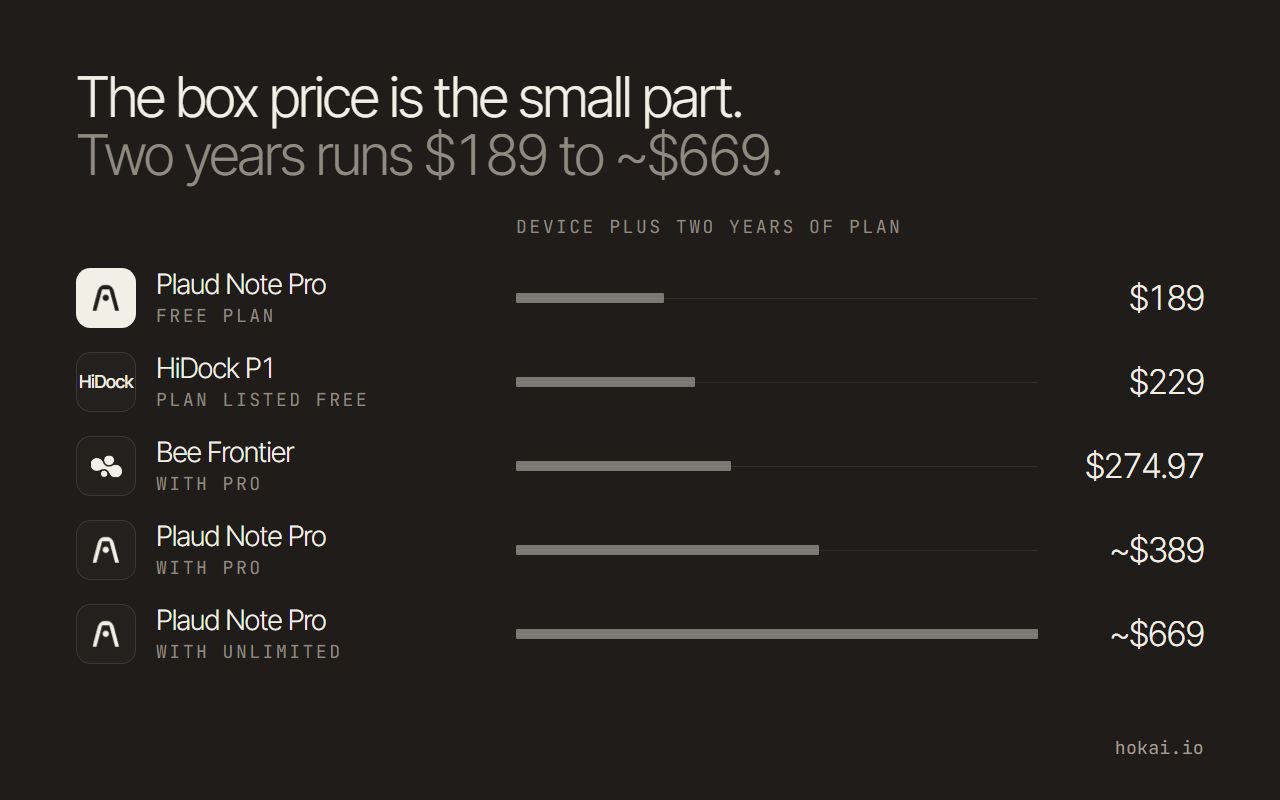
For the hardware side, with device prices, two-year cost and recording law, see our guide to AI voice recorders.
Timeless, rebranded from timeOS in 2025, keeps its free plan capped at five 90-minute meetings, then Pro at $29 a month and Max at $39 on monthly billing; its yearly toggle advertises savings of up to 34%, and the team plan starts at three seats. Its whole pitch is agentic follow-up rather than raw transcription: the free tier already includes AI-drafted follow-up emails and smart scheduling, features that sit behind a paid tier on every other tool in this list.
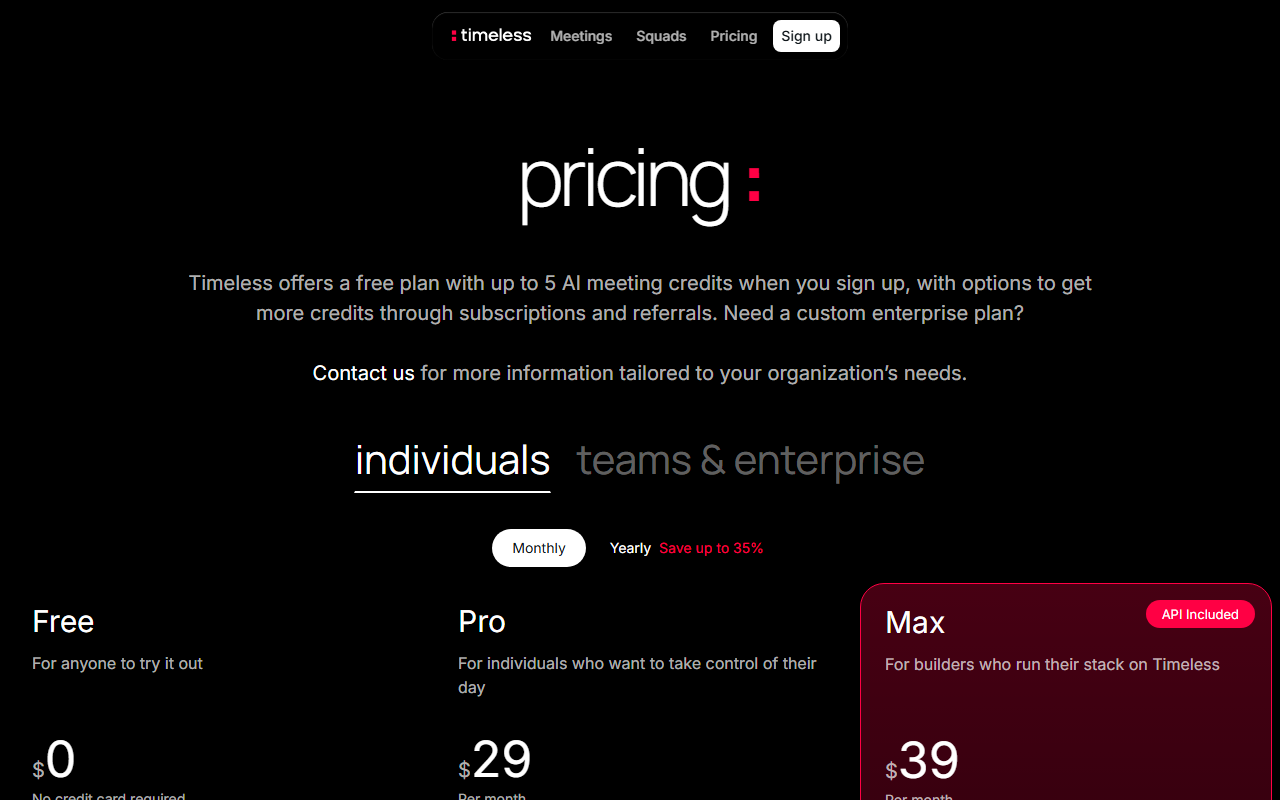 Timeless's individual tiers under monthly billing, captured 24 Aug 2026. The monthly prices were unchanged when re-read on 31 Oct 2026.
Granola is the software answer to the visible-bot problem. By its own description it records your microphone and computer audio instead of joining the call and keeps no audio recording. Basic is free with limited meeting history. Business is $14 a seat a month and adds unlimited history, CRM and workspace integrations, an API and MCP access. Enterprise is $35 and adds single sign-on, admin controls and an org-wide notice that Granola is in use, a pilot feature that speaks to the consent question above.
Plaud takes the opposite route and sells hardware. Its free Starter plan gives 300 transcription minutes a month and comes with every device; paid plans are in the table above. Recorders on the US store run from $159 to $189, so the first-year cost is the device plus a plan. It suits a consultant, recruiter or researcher who sits in rooms, not a team that lives in video calls.
Scaled to a 10-person team, the per-seat gap turns into a real budget line:
| Tool and plan | About per year, 10 seats |
|---|---|
| Fireflies Pro | $1,200 |
| Granola Business | $1,680 |
| Fathom Team | $1,800 |
| tl;dv Pro | $2,160 |
| Otter Business | $2,400 |
| Plaud Team, launch price | $2,400 |
| tl;dv Business | $3,480 |
Plaud's Team plan is priced at $20 a user on annual billing through November 30, 2026, then $25, and recorders cost extra. Timeless is left out because its team price could not be confirmed from a readable quote on 31 October 2026.
Fathom vs. Fireflies: the two most teams are actually deciding between
Both show up on nearly every shortlist search brings back, and the honest answer is that they split on what happens after the transcript, not on transcription quality. Neither one is clearly cheaper once a team scales past a couple of seats, so the deciding factor ends up being workflow fit rather than the number on the pricing page.
Fireflies wins for a team already living inside a CRM. Its Business tier adds multi-language mode, conversation intelligence and team analytics on top of Pro's action-item automation, and its 2026 Email Assistant extends the same triage logic to inboxes. Fathom wins for a team that wants to stay on the free tier as long as possible: its individual plan has no seat minimum, no storage cap, and both bot-based and beta bot-free capture, and it only asks for money once a second person needs collaboration features.
Pick Fireflies to remove manual CRM data entry. Pick Fathom to keep the bill at zero while the team is small. Pick Granola if nobody on the call should see a bot, and Plaud if half your meetings happen in a room. Teams that save notes into a wiki can also pair any of these with Notion, and broader office-work picks sit in the guide to AI assistants for office work.
If the right answer still depends on your budget, team size and platforms, answer a few questions in Smart Match and get a shortlist matched to your use, then compare it with the full meeting assistant list.
Who each pick is wrong for
No tool here fits everyone, and the catch column in the shortlist is only half the story. Fireflies is the wrong pick for a solo user who never touches a CRM, because its strengths sit behind paid tiers and the free plan caps team storage at 400 minutes. Fathom is a poor fit for bot-free work, since its bot-free mode is still marked beta.
Granola is a poor fit when a team wants a shared archive of recordings, since it keeps notes rather than audio. Plaud is wasted if you never leave your desk, because a recorder is an extra object to buy, charge and carry.
tl;dv suits a team that wants unlimited recordings on its free tier, but only ten meetings a month get AI notes, so heavy meeting loads will need Pro. Timeless suits a person who wants follow-up emails drafted for free, though its team price is harder to read than the others. Otter suits the team that already standardised on it, with the litigation caveat above. If you route notes into other apps with Zapier, check each tool's integration list before you pay, and browse the wider Hokai directory for adjacent categories.
Skip this category entirely if...
Your team takes every call inside Zoom or Microsoft Teams already. Zoom retired its "AI Companion" branding in June 2026: meeting summaries, transcription and chat compose now ship as "Zoom AI," bundled free with paid Workplace plans, while a separate agentic layer called ZoomMate launched the same month at $20 a user monthly for workflow automation across connected apps like Salesforce and Slack.
Microsoft's answer is Teams Premium at $10 a user monthly as of the August 2026 read (Microsoft's page would not render for a second read on 31 October, so treat the price as unconfirmed since), which adds Intelligent Recap: AI meeting notes, action items and speaker attribution, no separate notetaker required. If every call already happens on one of those two platforms, turn on what the subscription already includes before adding a fourth SaaS line item.
You're reviewing recordings that aren't meetings. Lectures, podcasts and legal depositions are a different job from a team call, and none of the software notetakers here is built around it. A recorder like Plaud picks up in-room audio that a laptop tool never hears, though you should test it on your own material first. The lecture-and-deposition summarizer this guide used to list, Gistify, no longer sells that service on its own site.
You need conversation intelligence at revenue-team scale, not general notetaking. Gong and similar revenue-AI platforms build call scoring, deal risk and rep coaching as the product, not an add-on tier; a general meeting assistant will always be a thinner version of that for a sales org large enough to need it. And if background noise, not note-taking, is the actual problem on your calls, Krisp AI's noise cancellation solves that specific complaint without replacing whatever notetaker the team already runs.
The case against buying a fourth notetaker seat
The obvious rebuttal to everything above is that if Zoom and Teams already do most of this for free, nobody needs a dedicated notetaker at all. That's true for a team that never leaves one platform, which is exactly the case the previous section describes.
It stops being true the moment a team's calls span more than one platform, which is the normal state for anyone doing sales on Zoom, standups on Meet and vendor calls on Teams. Zoom's summaries don't search alongside a Meet transcript, and Teams' Intelligent Recap doesn't either. Fathom, Fireflies, Otter, tl;dv and Timeless all record across all three, which means one search box instead of three separate archives. That cross-platform archive, not the transcript itself, is what a paid seat is actually buying.
What would change this
Judge Lee's August 13 order sends the wiretap and biometric-privacy claims into discovery, not away. Nothing about that ruling stops Otter, Fireflies or Fathom from adding features between now and whenever the next order lands, but it puts a legal cost on the visible-bot model that a pricing page doesn't show, and it applies to every vendor in this category that hasn't gone bot-free, not just the one currently being sued.
Whatever the docket looks like a year from now will do more to settle the bot-versus-bot-free argument than another changelog entry from any tool on this list.
Links marked Sponsored are paid spots. They never change a pick.
Frequently asked questions
What's the difference between Fathom and Fireflies.ai?
Fireflies pushes further into CRM sync, deal scoring and inbox triage on its paid tiers, while Fathom keeps a genuinely free individual plan with no storage cap and only charges once a second seat needs collaboration features. Pick Fireflies if reducing manual CRM entry matters most. Pick Fathom to keep the bill at zero for as long as the team stays small.
Is Otter.ai facing a lawsuit over AI meeting recordings?
Yes. A federal judge in the Northern District of California allowed the core claims in the consolidated class action In re Otter.AI Privacy Litigation (No. 5:25-cv-06911) to proceed on August 13, 2026, including federal wiretap and Illinois biometric-privacy claims. The suit alleges Otter recorded and transcribed meeting participants who never personally consented, only the host who added the bot.
Do I need a separate AI meeting assistant if my team already uses Zoom or Microsoft Teams?
Not necessarily. Zoom bundles meeting summaries and transcription free into paid Workplace plans under the "Zoom AI" name after retiring its "AI Companion" branding in June 2026, and Microsoft Teams Premium adds Intelligent Recap for $10 a user monthly. A dedicated tool mainly earns its keep when a team's calls span more than one video platform and it wants one searchable archive instead of several.
Which states require everyone's consent before an AI notetaker can record a call?
Thirteen U.S. states, including California, Illinois, Massachusetts, Pennsylvania and Washington, require all-party consent for recording under current state law, according to Recording Law's 2026 breakdown. California backs this with fines of up to $2,500 for a first violation and $10,000 for repeat violations under Penal Code Section 632.
Is MurmurCast an AI meeting assistant?
No, despite being listed in that category in some directories. MurmurCast's own site describes it as a daily-brief digest tool that summarizes YouTube channels, podcasts and newsletters, with no live-meeting capture at all.
Covered in this guide
- Fathom: AI notetaking for meetings - summarize conversations to focus on what matters
- Fireflies.ai: AI Notetaker for Meeting Transcription, Summarization & Conversation Intelligence
- Granola: Bot-free AI notepad that merges your typed notes with a device-audio transcript, with apps for Mac, Windows, iPhone and Android and a free plan.
- HappyScribe: AI notetaker and transcription platform that records Zoom, Meet and Teams calls and turns audio or video into text in 150+ languages.
- Otter.ai: AI Notetaker that builds your knowledge base with transcription, summaries, and AI Chat
- Plaud: AI voice recorders (Note, Note Pro, NotePin) that sync to an app for transcripts, summaries and action items, with a free Starter plan.
- Timeless: Agentic meeting platform (formerly timeOS) that turns spoken commitments into automated tasks, capturing video calls, WhatsApp, phone and in-person conversations, with an MCP server for Claude and Cursor.
- tl;dv: AI meeting notetaker turning every meeting into insights across your entire company
- Gong: Revenue intelligence platform with conversation AI, call analysis, and AI agents for sales coaching and forecasting for 4,500+ companies.
- Krisp AI: Removes background noise from calls in real time, with optional meeting recording, transcription, and summaries.
Sources
Still deciding?
This guide covers a handful of options. Smart Match checks every listing in the directory against how you actually work and what you can spend, then hands you the shortlist and the reason behind each pick.
Find your tools