Best AI for Godot in 2026: GDScript Help That Writes Godot 4, Not Godot 3
AI help for Godot in 2026 comes in three forms: terminal agents such as Claude Code and Codex, which scored 70.6% and 70.0% on the 333-task GameDevBench; free MCP add-ons such as Godot AI that connect them to a live Godot 4.7 editor; and plugins that run inside the editor, such as Ziva.
The short version
For Godot 4.7 GDScript work, use a terminal coding agent you already pay for, Claude Code or Codex, and connect it to the open editor with the free Godot AI add-on. Pin your Godot version in AGENTS.md. Pick the Copilot plugin for autocomplete only, or Ziva to stay inside Godot.
Not sure which one fits you? Describe your situation and Smart Match names three tools.Find my AI tools
In this guide9 sections
On 15 November 2026 the top entry on GameDevBench, the only public benchmark built on the Godot engine, solved 70.6% of its 333 tasks. It ran on Godot 4.4.1, three minor versions behind the 4.7.2 release the project shipped on 18 August 2026.
That gap is the whole story of AI help for Godot. The models that write the best GDScript are the ones inside terminal agents, and a free add-on now lets those agents work in your open editor instead of guessing from pasted code. For a solo developer or a two to four person team on Godot 4.7, the decision is less about which model and more about three things: which agent, how it reaches the editor, and how it learns which Godot you run.
Our pick for that reader: Claude Code or OpenAI Codex, connected to the editor through the free Godot AI add-on, with your engine version pinned in an AGENTS.md file. If you only want suggestions as you type, a community Copilot plugin puts them in the built-in script editor at no cost. If you want everything inside Godot and will pay for it, Ziva is the in-editor agent with the most Godot tools we found.
We read every vendor page, repository and Godot doc named in the sources on 15 November 2026. Prices come from those pages and from the matching Hokai records.
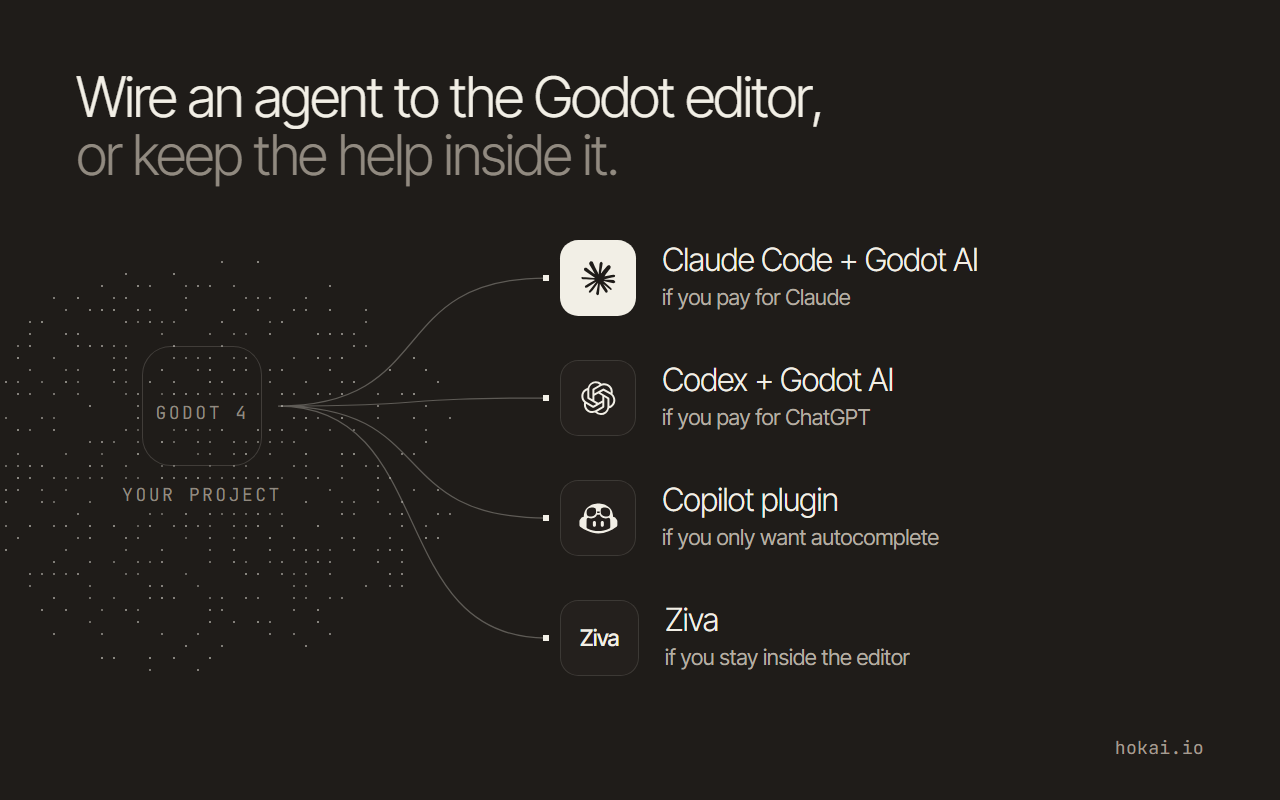 Hokai chart of which Godot AI setup fits which developer, from the vendor pages and Godot docs named in this guide as read on 15 Nov 2026.
- Top GameDevBench score
- 70.6%
- Claude Code with Claude Opus 5.5, 333 Godot tasks
- Current stable Godot
- 4.7.2
- Released 18 August 2026
- MCP tools in Godot AI
- 46
- Free, MIT licence, needs Godot 4.7+
- Copilot Free inside Godot
- $0
- 2,000 completions a month
How to choose an AI for Godot 4
None of the vendors we read publishes a GDScript accuracy score for its own product. These four tests separate the options instead, and each one can be checked before you pay.
- Does it know which Godot you run? Version 4 renamed classes and keywords, so an assistant that drifts to old syntax writes code that fails to load.
- Can it see the editor? Reading the scene tree stops it inventing node names.
- Can it run the game and read the error? Most bugs appear only at runtime.
- What does one task cost? Plans bill by usage window, by weekly dollars or by monthly completions.
If you have not settled which coding assistant to use at all, start with the broader roundup of AI coding assistants. The same tests give different answers on other engines:
- Unity: AI for coding Unity games
- Unreal: AI for Unreal Engine
The shortlist: six ways to get AI help in Godot
| Setup | Where you work | Godot access | From |
|---|---|---|---|
| Claude Code + Godot AI | Terminal | Live editor over MCP | $20/mo |
| Codex + Godot AI | Terminal or IDE | Live editor over MCP | $0 |
| Copilot plugin | Godot script editor | Inline completions | $0 |
| Cursor + godot-tools | Separate editor | Code and language server | $0 |
| Ziva | Godot dock | Scenes, errors, playtests | $0 |
| AI Assistant Hub | Godot dock | Code and scenes, local models | $0 |
"From" is the cheapest way in, not the plan you will end up on. The cost section below has the real monthly figures. Only the first two rows appear on GameDevBench, so the ranking of the other four rests on what each one can reach in the editor, not on measured output.
If none of these fits how you work, Smart Match can weigh your budget and setup against every coding tool Hokai tracks.
What GameDevBench measures, and what it leaves out
GameDevBench is an academic benchmark published at ICML 2026. Its 333 tasks are taken from web and video tutorials, and the repository splits them into 2D graphics and animation (33.3%), 3D (26.7%), user interface (20.1%) and gameplay. Every run must use exactly Godot 4.4.1.
From the leaderboard file in the GameDevBench GitHub repository.
We read the leaderboard file directly on 15 November 2026. Claude Opus 5.5 at its highest effort setting leads at 70.6%, with GPT-6.1 Sol in Codex at 70.0%. Each carries a 95% confidence interval of plus or minus 4.9 points, so the two are statistically tied. GPT-6 Astra passed 229 of the 333 tasks, which still leaves 104 unsolved by a frontier agent.
Two details matter more than the order. First, the researchers found that feeding agents editor screenshots and gameplay video raised GPT-5.4 from 41.1% to 52.0%, which is the strongest evidence that seeing the editor pays. Second, the benchmark tests only terminal agents. Behind the top two sit Muse Code at 61.0%, Kimi Code at 58.0%, Gemini CLI at 53.8% and OpenCode with GLM-5.2 at 38.4%, with OpenHands further down. Copilot, Cursor and every in-editor plugin are absent, so no public number compares them.
Claude Code or Codex: a tie you settle by the plan you already pay for
On capability the two are level. On price they are not: Claude Code needs a paid Claude plan, while Codex comes with every ChatGPT plan, including the free one. If you already pay for one, use it.
Both read an AGENTS.md file from your project root, which is where the Godot version goes. Codex reads it before doing any work, according to its documentation, and caps the combined files at 32 KiB by default. Claude Code reads AGENTS.md only when there is no CLAUDE.md in the project, and needs version 2.1.277 or later to do it, per its maker's memory docs.
Godot AI is what turns either one from a code writer into an editor operator. Its README lists 46 MCP tools: the agent can create nodes, write and patch GDScript, wire signals, press play, read the game log and take screenshots of the running game. Every GDScript file it writes is parse-checked on the spot, and the error comes back in the same response.
- Install uv OnceGodot AI's Python server runs through uv, installed once.
- Add the add-on Per projectInstall it from Godot's AssetLib tab and enable it under Project Settings, Plugins.
- Configure the client Per clientPress Configure next to your agent in the add-on's dock.
- Approve it OnceClaude Code asks for a one-time approval when run inside the project.
The catch is the floor: the add-on needs version 4.7 or later. On an older 4.x project, the smaller Coding-Solo godot-mcp server (6,660 GitHub stars when read) launches the editor, runs the project and captures debug output, but cannot edit scenes. Its last commit was on 16 April 2026, while the add-on's was on 14 November.
We also read the maintainers' public demo, a cyberpunk HUD built by Claude Code through the add-on. Its three GDScript files use @onready four times and the Signal-based connect() six times in the main script, with no Godot 3 forms. Its friction log, dated 15 April 2026, lists 12 snags hit on the way, two of which (scene instancing and game screenshots) the current tool list now covers.
Why AI writes Godot 3 code, and the changes a parse check misses
The author of godogen, a set of agent skills that builds whole games, put the cause plainly in a March 2026 Hacker News post: GDScript "has ~850 classes and a Python-like syntax" that lets a model slip into Python habits. A developer replying in the same thread reported clean GDScript from Claude models with a CLAUDE.md file, but still saw occasional Godot 3 output.
Godot 3 is not dead, which keeps the old code in circulation: the project still ships 3.x maintenance releases, the latest being 3.6.3. The renames are the easy part, because Godot's parser rejects them.
| Godot 3 | Godot 4 |
|---|---|
KinematicBody2D | CharacterBody2D |
Spatial | Node3D |
instance() | instantiate() |
yield(...) | await |
export var / onready var | @export var / @onready var |
| Tween node | create_tween() |
The harder part is what still parses. The official upgrade guide lists behaviour changes that throw no error at all:
_ready()and_process()no longer call the parent class's version, so a child class needssuper()at the top.call_group(),set_group()andnotify_group()now run immediately instead of deferred, which can stutter on large groups.randomize()runs automatically on project load, so seeded randomness needs an explicit seed in_ready().- Setter and getter syntax changed and is only partly converted by the official upgrade tool.
An assistant trained on Godot 3 tutorials can get every one of these wrong and still produce a script that loads. That is why running the game matters more than a syntax check, and why the version belongs in an AGENTS.md file in the project root, which the agent reads every time:
- Engine: Godot 4.7.2, GDScript 2.0. Never use Godot 3 syntax.
- Use @export, @onready, await and Signal.connect(callable).
- Child _ready() and _process() must call super() when the parent defines them.
- After editing a script, run the project and read the editor log before finishing.
For a fast check outside the editor, Godot's command line has a parse-only mode, documented as "Only parse for errors and quit":
godot --headless --check-only --script res://player.gdInside the editor: Copilot, Ziva and AI Assistant Hub
Not everyone wants a terminal. Three options keep you in the engine's own window, which matters if you write code in the built-in script editor rather than an external one.
Copilot through a community plugin. A community asset in the engine's Asset Library (version 2.1.0, MIT, Godot 4.1 or later) adds ghost-text completions to the script editor for .gd, .cs and .glsl files. It needs Node.js 20.8 or later and any Copilot plan, including GitHub Copilot Free with its 2,000 completions a month.
Ziva. A paid agent that runs as a dock inside Godot 4.2 or later. It reads the scene tree and editor errors, writes GDScript or C#, and on the Pro plan its Playtest Agent plays the game and reports what it saw. The free Hobby plan can run on your own Claude Code or Codex subscription.
Not every report is kind. One forum user wrote on 21 September 2026 that a request to fly several 3D ships in one direction came back with them flying backwards, costing $4 of usage plus $1 to fix.
AI Assistant Hub. A free, MIT-licensed plugin designed for local models first. It connects to local runners such as Ollama and llama.cpp, or to remote providers. Its tool mode, which edits scenes, needs a model that supports tool calls. For which local models are worth running, see Hokai's guide to local coding models.
Cursor sits between the two camps. It does not run inside Godot, but Godot's official godot-tools extension (version 2.7.1, 145,739 downloads on Open VSX when read) gives a VS Code-style editor GDScript support through Godot's language server. The engine's docs say that server needs an editor open on the project, listening on port 6005 by default.
For art rather than code, klad lets a terminal agent paint sprites through its command line and export them as sprite frames for the engine. It is early: no installers yet.
What each setup costs a month
| Setup | Cheapest plan | What it buys |
|---|---|---|
| Claude Code | $20 Pro | Opus, Sonnet and Haiku models |
| Codex | $0 Free, $8 Go | Usage set by your ChatGPT plan |
| Copilot plugin | $0 Free | 2,000 completions a month |
| Cursor | $8 Plus | Cursor's own models only |
| Ziva | $0 Hobby, $20 Basic | $60 of AI usage a month on Basic |
| Godot AI, AI Assistant Hub | $0 | Bring your own model |
Add the agent plan to Godot AI, since the add-on itself is free. The real stack for our pick is therefore $20 a month on Claude Pro or ChatGPT Plus, or $8 on ChatGPT Go if you accept tighter limits.
Watch Cursor's entry price. Its pricing page, read 15 November 2026, says only Grok models are available on the $8 Plus plan. Reaching the models that lead the benchmark needs the $30 Premium plan, where third-party models bill at API list price.
Ziva's paid plans also cap usage by the week, reset every Monday, so a heavy week can stop work before the month's allowance is spent.
When a terminal agent is the wrong pick
The obvious rebuttal is that GameDevBench is the only evidence for our pick, and it tests only terminal agents, and only on Godot 4.4.1 rather than the 4.7 line. That is true: no public score exists for any tool that runs inside the editor.
Three readers should ignore our pick anyway:
- You are learning GDScript. An agent that builds the scene teaches you little; inline completions keep you writing the code.
- Your project is in C#. Godot AI writes
.csfiles as text, with no .NET build. Ziva's developer said in June 2026 that it runsdotnet buildon C# it edits. - You are on Godot 4.6 or older. The free add-on needs 4.7, while Ziva reaches back to 4.2.
What would change this ranking
GameDevBench requires Godot 4.4.1 for every official run, and its leaderboard has never listed an in-editor plugin. The first run on Godot 4.7 that puts Ziva or a Godot AI setup beside Claude Code and Codex will be the first real test of whether seeing the editor beats raw model quality, and of whether the 70% ceiling moves. Until that run exists, choose by where you already write code and which plan you already pay for.
Frequently asked questions
Which AI writes the best GDScript?
The only public measure is GameDevBench, 333 Godot tasks run on Godot 4.4.1. On 15 November 2026 its leaders were Claude Opus 5.5 in Claude Code at 70.6% and GPT-6.1 Sol in Codex at 70.0%, a statistical tie. Copilot, Cursor and in-editor plugins such as Ziva have no score on it.
Why does AI write Godot 3 code in a Godot 4 project?
Godot 3 tutorials and code are still widespread, and Godot 4 renamed classes such as KinematicBody2D and replaced yield with await. Put your engine version and the Godot 4 forms in an AGENTS.md file, which Codex and Claude Code both read. Then run the game, because some Godot 4 behaviour changes, such as super() in _ready(), parse without any error.
Can GitHub Copilot work inside the Godot editor?
Yes, through a community plugin in Godot's Asset Library, not one made by GitHub. It adds inline completions to the built-in script editor for .gd, .cs and .glsl files. It needs Node.js 20.8 or later and any Copilot plan, including the free one.
Is there a free AI for Godot?
Several. Codex is included in the free ChatGPT plan, Copilot Free gives 2,000 completions a month, and Ziva's Hobby plan costs nothing. Godot AI and AI Assistant Hub are free, open-source plugins, and AI Assistant Hub can run local models through Ollama with no subscription at all.
How do I connect Claude Code to Godot?
Install the Godot AI add-on from the AssetLib tab in a Godot 4.7 project, enable it under Project Settings, Plugins, and install uv once. Then press Configure next to Claude Code in the Godot AI dock and approve it once when Claude Code asks. The agent can then create nodes, edit scripts, run the game and read its log.
Covered in this guide
- Claude Code: Anthropic's agent for the terminal, IDEs, desktop, web and mobile that edits files, runs tests and opens pull requests. There is no free plan.
- Claude Opus 5.5: Anthropic's September 2026 flagship LLM with a 1 million token context window, built for long-running agentic coding and computer use.
- Cursor: Cursor is an AI code editor built on VS Code, widely adopted across large enterprise engineering teams, with Agent Mode, Tab completion, and Cloud Agents.
- Gemini CLI: Google's open-source coding agent for the terminal, now limited to enterprise Code Assist licenses after its June 2026 consumer shutdown.
- GitHub Copilot: GitHub's AI coding assistant with agent mode, Copilot Fusion model routing and MCP support across 6 IDEs, plus a free plan with no credit card required.
- Godot AI: Open-source MCP server and Godot add-on with 46 tools that let Claude Code, Codex and Cursor edit and run a live Godot project.
- GPT-6 Astra: OpenAI's flagship model, launched September 2026 as the first ever rated at the Preparedness Framework's Critical cybersecurity level.
- GPT-6.1 Sol: GPT-6.1 Sol is OpenAI's September 2026 mid-tier reasoning model for coding, computer use and document work, built to sit just below GPT-6 Astra.
- klad: Source-available painting and animation app with 23 brushes that a coding agent drives through a command line, with no image model inside.
- Ollama: MIT-licensed runtime that runs open-weight LLMs on macOS, Windows and Linux with a local API, plus an optional paid cloud for larger models.
- OpenAI Codex: Clones a GitHub repo into a sandbox, writes and tests code, then opens a pull request; included in every ChatGPT plan, with the newest GPT-6 models from Plus.
- OpenCode: MIT-licensed coding agent for terminal, desktop and IDE that works with any model provider, from 208K GitHub stars.
- OpenHands: Open-source, model-agnostic coding agent with 9 million+ downloads that plans, writes, tests, and opens pull requests without per-step approval.
- Ziva: AI agent that runs as a panel inside the Godot editor, reading your scene tree and errors and writing GDScript or C#, for Godot 4.2 and later.
Sources
Still deciding?
This guide covers a handful of options. Smart Match checks every listing in the directory against how you actually work and what you can spend, then hands you the shortlist and the reason behind each pick.
Find your tools