How to Run AI Locally in 2026: The Apps, the Models and the Hardware You Need
Running AI locally means a language model executes on your own device, not on a vendor's servers. You need an app such as Ollama, LM Studio or Jan, plus a downloaded model file that fits in memory. LM Studio recommends 16GB of RAM on Windows and Mac. Prompts stay on your machine unless you enable cloud features.
The short version
Install LM Studio or Ollama, then download a model whose file size is under about two thirds of your memory: 4b for 8GB, 9b for 16GB, 27b for 32GB. Phones can use Google's free AI Edge Gallery. Local AI is private and free to run, but weaker than ChatGPT or Claude.
On 2 October 2026, PewDiePie showed off Ajax, a 9-billion-parameter assistant meant to run on your own computer, and searches for running AI locally jumped. Ajax has no download yet. The apps that run models like it have had one for years.
Here is the practical answer for Windows, Mac, Android and iPhone: which app to install, which model size fits which amount of memory, what it costs, and what you give up compared with ChatGPT or Claude. Every figure below carries a source and a date, and the gaps are marked where we could not find one.
Ajax is not downloadable yet, and its safety limits are untested
Start with what is actually known. According to tbreak's report of 2 October, Felix Kjellberg describes Ajax as a fine-tuned assistant built on Alibaba's Qwen3.5-9B, made to work inside Odysseus, his self-hosted AI workspace. It can search and browse the web, handle email, manage a calendar and keep to-do notes.
Here is where things stand, as of 2 October 2026:
- Stated by the creator: a 9B model built on Qwen3.5-9B, made for the Odysseus workspace.
- Claimed by the creator: an early version finished its intended tasks roughly nine times out of ten.
- Not published: weights, a model card, a licence, hardware requirements and supported runtimes.
- Not independently tested: how reliably its safety limits hold.
The same report says the "Download Ajax here" link in his video opens a page asking for training data, not a model file. As of 2 October there were no public weights, no final model card and no confirmed licence. Kjellberg has not published hardware requirements either. Treat any site offering an "Ajax download" today as suspect.
Two other claims travel with the story. Kjellberg says OpenAI suspended his account twice while he generated training data, and shows an email citing "Distillation". That is his account: tbreak notes the reports it reviewed contain no explanation from OpenAI. He also says Ajax is built to refuse fewer prompts, and that he kept limits around harming other people or himself.
That last point deserves one honest paragraph. Removing refusals from a model changes how it behaves when you ask for something risky, and a creator's stated boundary is not a test result. No public evaluation shows how well Ajax's limits hold, and nothing published explains what permissions it gets when wired to your email and calendar. Until weights and a model card exist, Ajax is a story, not a product. For a deeper look at the company behind the account dispute, see OpenAI's company page.
What your computer needs before you install anything
Parameter counts mislead. A "9B" model can occupy very different amounts of memory depending on how it is compressed. The number that matters is the download size, because the whole file has to sit in memory while the model runs, with room left for the conversation itself.
LM Studio's system requirements page, read on 7 October 2026, gives the vendor floor. On a Mac it recommends Apple Silicon with 16GB or more of RAM and says 8GB machines work with smaller models and modest context sizes. On Windows it recommends at least 16GB of RAM and 4GB of dedicated video memory.
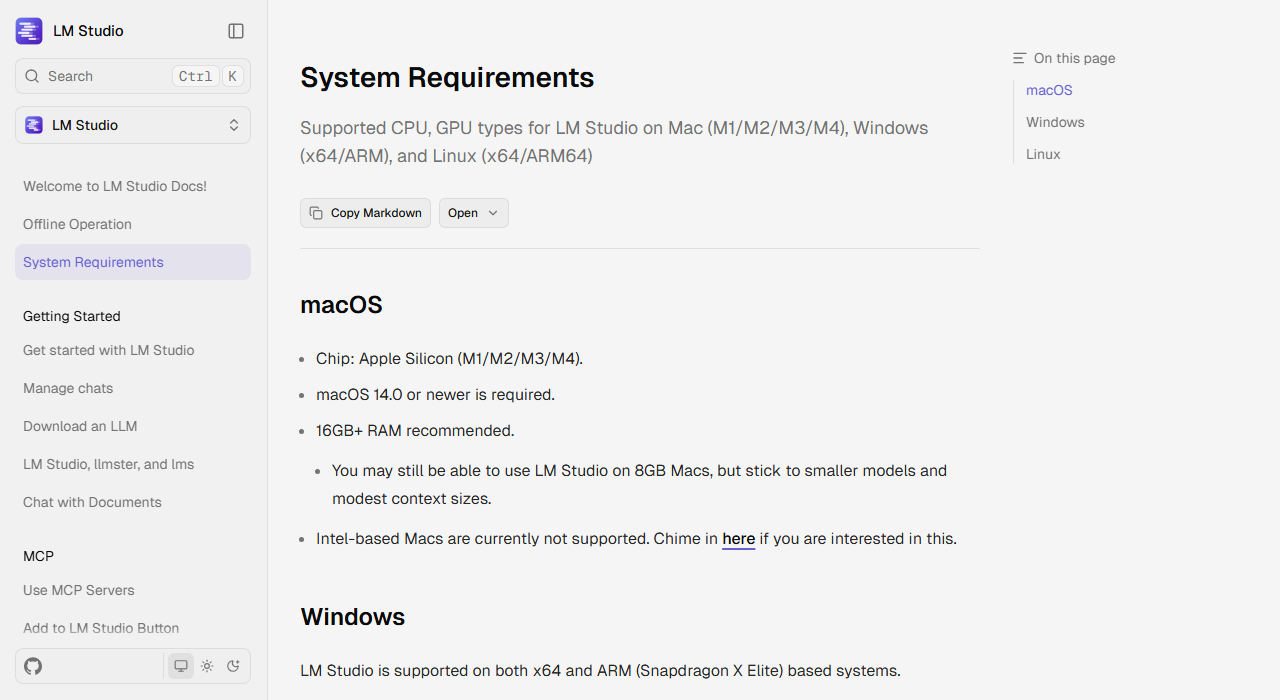 LM Studio's own hardware guidance, captured 7 October 2026.
To turn that into model choices, we used the sizes Ollama lists for Qwen3.5 on the same date. The fit column is our rule of thumb, not a vendor figure: keep the file under about two thirds of your memory so the conversation has room.
| Memory | Qwen3.5 size to try | Download size |
|---|---|---|
| 8GB | 4b | 3.3GB to 4.0GB |
| 16GB | 9b | 6.6GB to 7.6GB |
| 32GB | 27b | 17GB to 20GB |
| 128GB | 122b | 81GB |
The 35b build is 22GB, which is too tight for 32GB under that rule and comfortable at 48GB. The smaller 0.8b and 2b builds (1.2GB to 3.1GB) exist for weak hardware, and expect plain answers from them, not reasoning.
How to choose a local AI app in five questions
Pick by the job, not by the star count. Five questions sort the field quickly.
- Do you want a window or a terminal? Clickers should pick LM Studio or Jan. Comfortable typing commands? Ollama is lighter.
- Will you chat with your own files? AnythingLLM and GPT4All are built around document chat.
- Do others need to use it? A browser front end such as Open WebUI lets a household or team share one machine.
- Are you a developer? llama.cpp is the engine under several of these apps and gives you the most control.
- Do you want local and cloud side by side? Msty lets you compare both in one window.
If you cannot answer those, try the Smart Match tool. Describe your task and it points to the listing that fits.
The shortlist: eight apps that run models on your own machine
Platform and price details below come from each listing's page on HokAI, checked between 5 and 7 October 2026. Prices are what each vendor publishes, not what a business plan might cost after negotiation.
| App | Runs on | Best for | Price |
|---|---|---|---|
| Ollama | Windows, Mac, Linux | Command line and a local API | Free locally; cloud from $20/month |
| LM Studio | Windows, Mac, Linux | Point-and-click model browser | Free; optional $20 cloud plan |
| Jan | Windows, Mac, Linux | Offline chat with optional cloud keys | Free |
| GPT4All | Windows, Mac | Chatting with local folders | Free |
| Open WebUI | Browser, self-hosted | Shared chat for a household or team | Free software |
| AnythingLLM | Windows, Mac, Android, Docker | Documents plus simple agents | Free desktop; cloud from $50/month |
| llama.cpp | Windows, Mac | Developers who want control | Free |
| Msty | Windows, Mac, Linux, web | Local and cloud models together | Free; Aurum $149/year |
Two things stand out. Every app lets you run a model for nothing, so the choice is about fit, not budget. And only one of them, AnythingLLM, lists an Android build on its HokAI page, which matters for the phone sections below.
Browse the full set in the edge AI platforms category, or read how Ollama and LM Studio differ if those two are your shortlist.
What sets the eight apps apart
The table hides the differences that decide a first week. These come from each listing, with the star counts as listed on 5 to 7 October 2026.
Ollama is MIT-licensed and exposes a local API, which is why so many other tools sit on top of it. LM Studio runs models on llama.cpp and Apple's MLX and offers an OpenAI-compatible local server, so a script written for a cloud API can point at your own machine instead.
Open WebUI is the one with the biggest crowd, at about 154K GitHub stars, and it adds retrieval, plugins and user roles on top of Ollama or any OpenAI-compatible model. It is a server you host, not an app you double-click.
GPT4All (about 77K stars, MIT) centres on LocalDocs, which chats over your own folders. AnythingLLM (about 66,700 stars, MIT) does the same with simple agents and needs no account. llama.cpp (130,000+ stars, MIT) is the C and C++ engine, and the listing calls it a developer tool.
Jan keeps to offline chat with optional cloud models through your own keys, while Msty runs local and online models side by side so you can compare an answer from each. If you are unsure, start with the one that matches your first question above, and keep a second installed for the job it handles better.
How to run AI locally on Windows
Windows is the best-supported platform, and it has the widest choice. Follow these steps for the easiest start.
- Install LM Studio and open its model browser.
- Pick a model whose download size is under about two thirds of your RAM, using the table above.
- Download it, open a chat, and ask a question. Disconnect from the internet to confirm it works offline.
LM Studio supports both x64 and ARM (Snapdragon X Elite) Windows machines, per its requirements page, and needs a CPU with AVX2 support on x64. If you prefer a terminal, Ollama ships a Windows installer, and its project README lists the download. A graphics card with 4GB or more of dedicated memory helps, but is a recommendation, not a requirement.
If chatting with PDFs is the goal, install AnythingLLM and point it at a local model. It runs on the desktop without an account.
How to run AI locally on a Mac
A Mac with Apple Silicon is a strong local machine because the processor and graphics share one pool of memory. A 16GB MacBook has room for the 9b model at 6.6GB to 7.6GB.
LM Studio requires Apple Silicon and macOS 14.0 or newer, and does not support Intel Macs. Ollama also has a macOS download, and Ollama's library lists MLX builds of Qwen3.5 (for example 8.9GB for the 9b), which are formatted for Apple's own machine-learning framework.
On an 8GB Mac, stay with the 4b model or smaller, as LM Studio itself advises. On 32GB, the 27b model at 17GB to 20GB is within reach. Google's Gemma 4 31B is another option at that tier, though check its download size before you commit disk space.
How to run AI on an Android phone
Phones are the newest front. Google's open-source AI Edge Gallery runs models fully offline on the device, and its README says it is available from Google Play or as an APK for people without Play access.
The app's current release adds support for the Gemma 4 family from Google, and offers chat with a thinking mode plus agent skills such as Wikipedia lookups. You pick a model inside the app and it downloads to the phone. Expect small models and slower answers than on a laptop.
AnythingLLM is the other listed route. Its HokAI page shows an Android build, but we have not tested it against the Google app, and we could not find a vendor page comparing the two. Choose the Google app first if you only want to chat.
How to run AI on an iPhone
The same README links an App Store listing for AI Edge Gallery, so the Google app also runs on iPhone. It is the simplest fully offline route we found.
The second route is indirect. Ollama's README lists Enchanted as a native macOS and iOS client for Ollama. Because it is a client, it needs a machine running Ollama somewhere, such as your Mac at home. That gives you a bigger model than any phone can hold, but it stops being fully local to the phone.
We have not verified how large a model an iPhone can hold, and Apple publishes no figure for it. If a vendor quotes one, check its date.
How to pick a model once the app is open
The app is the easy half. Most first-time frustration comes from choosing a file that does not fit.
Start with the row of the memory table that matches your machine, not a size you read about. Qwen3.5 comes in 0.8b, 2b, 4b, 9b, 27b, 35b and 122b builds, and the Ollama page shows text and image input with a 256K context window listed for each. A long context costs memory on top of the file, which is why LM Studio advises modest context sizes on 8GB Macs.
If answers arrive slowly or the app stalls, drop one size before you blame the app. A 4b model that responds quickly is more useful than a 9b one that swaps to disk. Going the other way, if a 9b model feels thin, try Google's Gemma 4 12B next, and check its listing for the download size first.
You can run two apps against one set of model files in some setups, but we did not test that here, so we do not recommend a workflow for it. Pick one app, one model, and one real question. Then compare the answer with the hosted version of the same question before you decide to switch.
What running AI locally costs
The software is free. The cost is hardware and disk space.
- Ollama: local use has no cap. Paid cloud plans start at $20 a month, with a $100 Max plan, per its listing.
- LM Studio: the app and local models are free, including at work. The optional Bionic+ plan is $20 a month.
- AnythingLLM: free on desktop and Docker. Hosted plans run $50 and $99 a month.
- Msty: Studio is free. Aurum costs $149 per user per year, or $349 once.
- Jan, GPT4All and llama.cpp: no paid plan listed as of 6 and 7 October 2026.
The hidden cost is the model files. A 27b build is 17GB to 20GB, and a few of them fill a laptop drive. Electricity is small. Buying a Mac with 128GB of memory to run the 81GB model is the expensive path, and most readers do not need it.
What you lose compared with ChatGPT and Claude
Here is the strongest argument against everything above: a 9B model on your desk is not a cloud model. tbreak puts it plainly for Ajax, saying the aim is to carry out small jobs in a workspace, not to match a cloud model across every kind of prompt.
We agree. For hard reasoning, long documents and tricky code, the hosted models from OpenAI, Anthropic and Google are still the better choice, and you pay for that with a subscription, as our ChatGPT plan breakdown shows. To pick between Claude tiers, see which Claude model to use.
What local does well is narrower: drafts, summaries, private notes, offline use and tinkering. If you want numbers, compare model scores on the model leaderboard before assuming a local pick is good enough.
Coding is the clearest case. We tested nothing here for code, so read our guide to local coding models for that job. It covers models, while this page covers the apps that run them.
Is it private? Data handling and the Ajax question
Running a model on your machine means your prompts do not leave it, unless you switch on a cloud feature. That is the main reason people choose local. LM Studio documents that it can run entirely offline once you have downloaded a model, and the Google app says its inference happens on the device.
Check three things. First, apps with optional cloud models, such as Jan and Msty, send your prompts to a provider when you use those models. Second, a self-hosted browser front end exposes your chat to anyone who can reach the server. Third, an assistant wired to email and calendar, which is Ajax's whole design, can act on your accounts, so the permissions matter more than the model.
For Ajax in particular, wait for the weights, the licence and an independent safety evaluation. Until then there is no way to judge how it treats a risky request.
Who should skip local AI
Skip it if you rely on one hard task, such as long contract review, and you already pay for a hosted plan that handles it. Skip it if your laptop has 8GB of RAM and you want the quality of a large model. And skip it if you dislike managing downloads, because every model is a multi-gigabyte file you store yourself.
Everyone else can try it in an afternoon. Install one app, download the 4b or 9b model that matches your memory, and judge the answers on your own questions. If it falls short, you have lost an hour and nothing else.
What would change this advice
Three things would change the picks above. Ajax shipping weights with a licence, a model card and hardware requirements would make it the obvious test for an assistant that touches your calendar. An independent safety evaluation, whichever way it came out, would settle the question this page leaves open. And a phone vendor publishing the largest model its hardware can hold would turn the phone sections from advice into numbers.
Check Ajax again after its first weights appear, and run the evaluation before you connect it to your email.
Frequently asked questions
Can I download PewDiePie's Ajax model today?
No. As of 2 October 2026, tbreak reported no public weights, no final model card and no confirmed licence, and the download link in the launch video opened a data-contribution page. Wait for an official release before installing anything that claims to be Ajax.
How much RAM do I need to run AI locally?
LM Studio recommends 16GB or more of RAM on Macs and at least 16GB on Windows, and says 8GB Macs work with smaller models. As a rule of thumb, keep the model file under about two thirds of your memory. A 9b model is 6.6GB to 7.6GB in Ollama.
What is the easiest app for a beginner?
LM Studio and Jan are desktop apps with a model browser, so you can install, download a model and chat without a terminal. Ollama is lighter but runs from the command line. Pick by whether you prefer clicking or typing.
Can I run AI locally on my phone?
Yes. Google's open-source AI Edge Gallery runs models offline on Android and iPhone, according to its README. Expect small models and slower answers than a laptop. Another route is an iPhone client such as Enchanted that talks to Ollama on your Mac.
Is local AI as good as ChatGPT or Claude?
Not for hard reasoning, long documents or complex code. Local models around 9b are better suited to drafts, summaries, private notes and offline use. The software is free, but you trade quality for privacy and zero subscription cost.
Covered in this guide
- Ollama: MIT-licensed runtime that runs open-weight LLMs on macOS, Windows and Linux with a local API, plus an optional paid cloud for larger models.
- AnythingLLM: Free MIT-licensed desktop app that chats with your documents and runs agents on local models, no account needed. About 66,700 GitHub stars.
- OpenAI: ChatGPT is OpenAI's AI assistant, with 1.2 billion weekly users by OpenAI's count, the GPT-6 model family and plans that run from a free tier to a premium Pro tier.
- Anthropic: Claude API with Sonnet 5 (agentic, near-Opus performance at half the cost) and Claude Science (auditable research workbench). Free to Pro.
- Google: Google's multimodal AI assistant and model family, sold as a free app, tiered subscriptions and a pay-per-token API
- Gemma 4 12B: Gemma 4 12B is Google's June 2026 open-weight multimodal model with a 256K context window and native audio/video input on 8GB of VRAM.
- Gemma 4 31B: Gemma 4 31B, released April 2, 2026 by Google DeepMind, is a 31B open-weight multimodal model with a 262,144-token context window.
- Google: Google (Alphabet, NASDAQ: GOOGL), founded 1998, serves 8B+ monthly Search users with Gemini 3.5, 190,820 employees, and $402.84B FY2025 revenue.
- GPT4All: Free MIT-licensed desktop app that runs open-weight LLMs offline, with LocalDocs chat over your own folders. About 77K GitHub stars.
- Jan: Open-source desktop app that runs open LLMs offline on Windows, macOS and Linux, with optional cloud models through your own API keys.
- llama.cpp: Free MIT-licensed C/C++ engine that runs LLMs locally. 130,000+ GitHub stars, GGUF models, OpenAI-compatible server. A developer tool.
- LM Studio: Free desktop app that runs open LLMs locally on llama.cpp and MLX, with an OpenAI-compatible local server and an optional $20 cloud plan.
- Msty: Desktop AI workspace that runs local and online models side by side. Free Studio plan and paid Aurum tier. For Windows, macOS and Linux.
- Open WebUI: Self-hosted browser chat for Ollama and OpenAI-compatible models, adding retrieval, plugins and user roles. Free software, about 154K GitHub stars.
- OpenAI's company page: OpenAI builds ChatGPT, the GPT-6 family (Astra, Sol, Luna), Codex and the OpenAI API. It reports 1.2B weekly ChatGPT users and an $852B valuation after its March 2026 round.
Sources
Still deciding?
This guide covers a handful of options. Smart Match checks every listing in the directory against how you actually work and what you can spend, then hands you the shortlist and the reason behind each pick.
Start Smart MatchRelated guides
- The AI 80s Photo Trend: How to Make Yours (and Turn It Into a Video) in 2026AnalysisWhat changed and who it affects
- Best Agentic AI in 2026: Pick the Job, Not the GeneralistBuyer's guideHow to pick, across a category
- Best AI Assistant Apps for Android in 2026, Now That Google Assistant Is DeadBuyer's guideHow to pick, across a category
- Best AI Chatbots in 2026: Pick by the Job, Not the LeaderboardUpdatedRechecked against current sources
- Best AI Coding Assistants in 2026: Pick the Job, Not the BrandBuyer's guideHow to pick, across a category
- Best AI Companies in 2026: Who Is Actually LeadingBuyer's guideHow to pick, across a category