Ollama vs LM Studio (2026): Which Local AI Runner Should You Use?
Ollama is a command-line runtime and local server under an MIT licence, built for developers who connect models to agents and scripts. LM Studio is a desktop app with a model browser, a local server and a headless daemon. Local use is free in both, and each sells optional cloud models from $20 a month.
The short version
Install LM Studio to try local models without a terminal. Install Ollama if a coding agent, script or server needs to call the model. Both run models free on your own machine, and the speed gap is mostly set by your hardware and the model, not the app. Switching later costs a re-download.
Ollama and LM Studio both let you run an open-weight model on your own computer, and for most people the speed gap between them is smaller than the gap between two laptops. What actually separates them is the front door. Ollama is a command-line program and local server that developers wire into other software. LM Studio is a desktop app with a model browser, a chat window and, since its Bionic release, a headless daemon of its own.
That convergence is the news for anyone who read an older comparison. In March 2026 Ollama moved its Apple silicon path onto Apple's MLX framework, and LM Studio already ran MLX next to llama.cpp. Both tiers now sell optional cloud models as well. If you are choosing today, you are choosing an interface and a pricing model, not an inference engine.
This guide is for a person who has decided to run models locally and wants to know which of the two to install first. It covers cost, speed, the API, privacy, and what it costs to switch later. Prices and features were checked against each vendor's own pages on 7 October 2026.
The short answer: which one should you install?
Install LM Studio if you want to try local models this afternoon without opening a terminal. Install Ollama if the model is going to be a part of something else: a coding agent, an automation, a script, a server. If you will do both, install both. They run side by side, and the only price is disk space for two copies of any model you download in each.
Here is the comparison in one table. Every row is a fact you can confirm on the vendor's site.
| Ollama | LM Studio | |
|---|---|---|
| Main interface | Terminal and local API, thin chat window | Desktop app with model browser |
| Licence | MIT, open source | App is freeware, lms CLI is MIT |
| Platforms | macOS, Windows, Linux | macOS 14+ (Apple silicon), Windows, Linux |
| Local API port | 11434, with OpenAI-style /v1 route | 1234, OpenAI-style endpoints |
| Engine | Own runtime, MLX on Apple silicon (preview) | llama.cpp and Apple MLX |
| Headless use | The default way to run it | lms daemon commands |
| Free local use | Yes, no usage cap | Yes, including at work |
The details behind each row, and where the table is too tidy, are below.
What does each one cost?
Running a model on your own machine is free in both. Neither charges for local inference, and neither caps it. The money question is only about the optional cloud tiers, which exist because some open models are too big for a laptop.
Ollama's pricing page lists a Free plan that includes local runs and starter cloud credits. Pro, Max and Team add monthly credit allowances for bigger models, and Enterprise is custom. The table below sets the tiers beside LM Studio's.
LM Studio's Free plan covers local models through llama.cpp and MLX, the Bionic Agent, offline voice transcription, LM Link for up to 5 devices and limited web search. The paid tiers add US-hosted open models and larger usage limits.
| Plan tier | Ollama | LM Studio |
|---|---|---|
| Free, $0 | Local runs, starter cloud credits | Local models, Bionic Agent |
| $20 a month | Pro, $60 monthly credits | Bionic+, US-hosted open models |
| $100 a month | Max, $300 monthly credits | Pro, 5 times usage limits |
| Teams | Team, $500 a month, early access | Organization billing, plans coming |
The two $20 plans are not the same product. Ollama's Pro is mostly a credit allowance for larger models such as Kimi K3 and GLM 5.3. LM Studio's Bionic+ names Kimi K3, GLM 5.3 and DeepSeek V4 Flash and adds web search and page extraction. If you never leave local models, you will pay nothing to either.
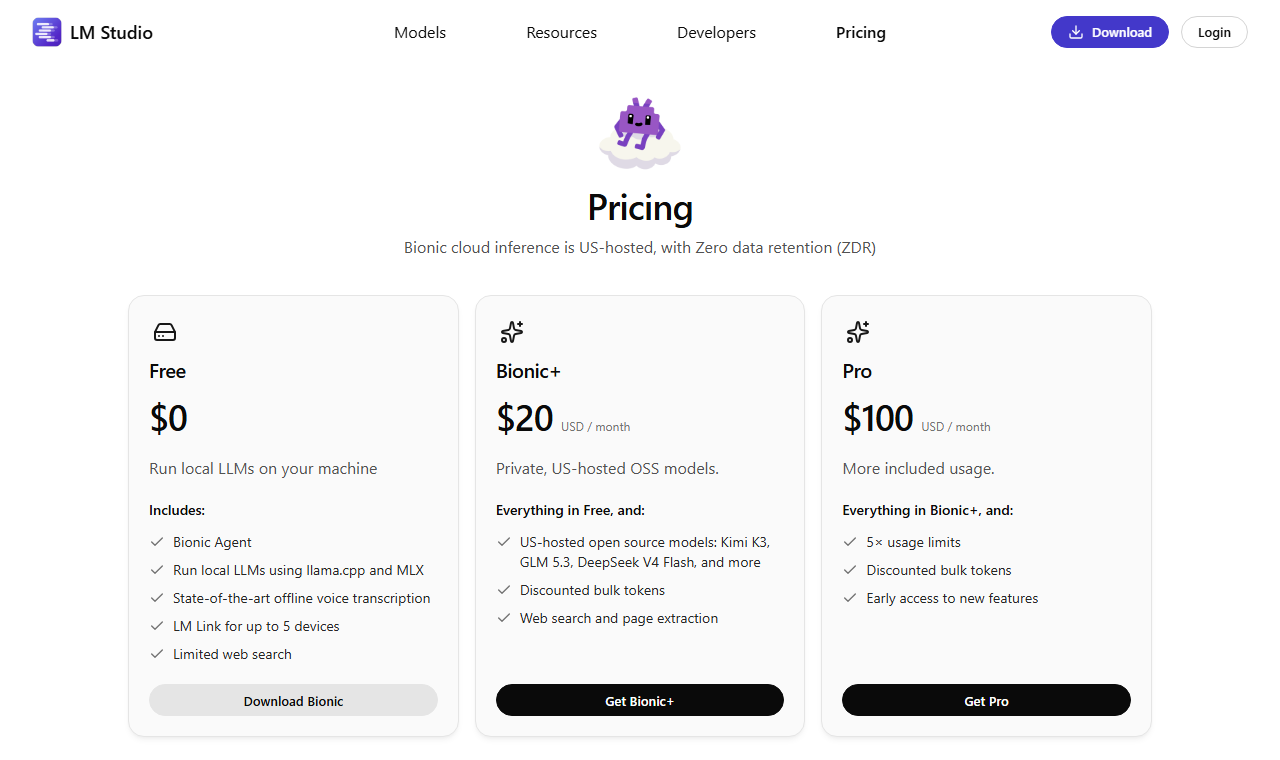 LM Studio's pricing page, captured on 7 October 2026. The Free column is the one that covers local models.
Which is faster?
The honest answer is that the model, the quantization and your hardware decide speed far more than the app does. Both products wrap the same kind of engine, and llama.cpp sits underneath much of this category. Most head-to-head numbers on the web come from one person's machine, with no shared method, so treat them as anecdotes.
There is one dated, named figure from a vendor, and it compares Ollama with itself. On 30 March 2026 Ollama announced a preview of version 0.19 built on MLX. In its own test on 29 March, using Qwen3.5-35B-A3B, decode speed rose from 58 to 112 tokens per second and prefill from 1,154 to 1,810 tokens per second against version 0.18. Ollama says the preview needs a Mac with more than 32 GB of unified memory.
That tells you MLX matters on a Mac, and it says nothing about Ollama against LM Studio. LM Studio has run MLX as an option for longer, so on Apple silicon the two are now closer than older reviews suggest. On a Windows or Linux box with an Nvidia card, both lean on the same CUDA-capable engine work, and you should expect a small gap at most.
If you want a real answer for your own computer, run the same model file in both for ten minutes and compare tokens per second. A model that does not fit in graphics memory will spill into system memory and slow down in either app. No runner fixes that, so check the model size before you blame the software.
Where does Ollama win?
Ollama wins when something else has to call the model. It starts as a background service, listens on one port and stays out of the way. A single command such as ollama run gemma4 downloads a model and opens a chat, and the same service answers HTTP calls from anything on the machine.
That makes it the default plumbing for developer tools. Ollama's own documentation lists coding agents such as Claude Code, OpenClaw, Hermes Agent and Cline, along with editors and the automation tool n8n. Frameworks such as LangChain and LlamaIndex ship connectors for it. If you have ever followed a tutorial that said "point it at localhost:11434", this is why.
Three more things go in Ollama's favour:
- The whole project is MIT licensed, so you can read and audit the code.
- It installs without a graphical session, which matters on a server or a remote box.
- Its cloud plans use the same command line, so moving a big model off your laptop is a flag, not a new tool.
The cost is polish. The desktop window is a chat box, not a workspace, so there is no visual model library, no document chat and no settings panel for tuning. Beginners often pair Ollama with a front end such as Open WebUI to get that.
Where does LM Studio win?
LM Studio wins on the first hour. You open the app, search for a model, see which files fit your memory, download one and start chatting. Nothing asks you to know what a quantization is before you can try it, and the same app starts a local server when you want one.
The vendor's pages describe an app that does more than chat. The Bionic Agent drafts and edits documents and runs scripting jobs, and offline voice transcription runs on the device. LM Link connects up to 5 of your machines on the free plan, so a gaming desktop can serve a thin laptop on the same account.
Its server is OpenAI-compatible on port 1234. LM Studio's documentation also lists a lms command line tool, MIT licensed, with commands to chat, download, load and unload models, and control the server. A separate lms daemon set of commands manages a headless mode. That is a change from the old advice that LM Studio could not run without a window.
Platform support is the catch. The app supports Apple silicon Macs on macOS 14 or newer, so older Intel Macs are out. The vendor recommends at least 16 GB of RAM. The app is proprietary freeware, so the code that handles your prompts is not open to audit, which matters in the privacy section below.
Where do llama.cpp, Jan and vLLM fit?
Two other names come up in every search for this comparison. The first is llama.cpp, the open-source engine underneath many local apps. Its repository holds more than 130,000 stars as of 7 October 2026. You use it directly when you want the newest model support or fine control over memory splits between graphics card and processor, and you accept a command line to get it.
The second is vLLM, which people often confuse with a local runner. It is a different job. Its documentation describes a library for LLM inference and serving that came out of the Sky Computing Lab at UC Berkeley, built around PagedAttention, continuous batching and prefix caching. Those features pay off when many users hit one server, not when one person chats on a laptop. If you are serving a team, look at vLLM. If you are one user, it is more machinery than you need.
| Tool | Best for | Interface | Skip it if |
|---|---|---|---|
| Ollama | Developers wiring agents and scripts | Terminal and API | You want a visual library |
| LM Studio | First-time local users | Desktop app | You run Intel Macs |
| llama.cpp | Control and low memory | Command line | You want a point-and-click app |
| Jan | Open-source chat app fans | Desktop app | You need a server first |
| vLLM | Serving many users on GPUs | Python library | You are a single user |
Other apps in the same category are worth a look if neither of the two fits. GPT4All and AnythingLLM lean toward chatting with your documents, Msty mixes local and hosted models in one window, and the full list sits in our edge AI platforms directory.
Who should pick which?
Pick by what you will do in the first week, not by the feature list.
- You are a developer wiring up an agent, an editor or a script. Choose Ollama. The endpoint is the product, and the tutorials for Aider, Cline and Claude Code assume it.
- You want to try local models and see what runs on your machine. Choose LM Studio. The model browser saves you from reading file names.
- You run a headless Linux box. Choose Ollama first, and consider the LM Studio daemon if you already like its model handling.
- You work in a company with privacy rules. Choose whichever your security team can audit. Ollama is MIT. LM Studio allows work use, which it has since 8 July 2025, but the app itself is closed.
- You mostly need hosted frontier models. Neither is the right tool. Compare OpenRouter or Together AI for hosted routes to the same open models.
If your constraint is hardware, the model matters more than the runner. Which models are worth the memory is covered in our local coding models roundup, and Smart Match can narrow tools and models to your own stack and budget. Open models such as Gemma 4 and Qwen 3.8 27B are the sizes most laptops can actually run.
How do you get started with each?
Both take under ten minutes if your connection is decent. The slow part is the model download, which can run to many gigabytes.
With Ollama, you install the app on macOS or Windows, or run the install script on Linux, then pull and chat in one step:
ollama run gemma4With LM Studio, you install the app, open the model browser, pick a file that fits your memory and press download. Then load it and chat, or start the local server from the app. The lms command line gives you the same steps from a terminal.
Once either server is running, any tool that speaks the OpenAI style of request can call it. The first command below targets Ollama on port 11434. The second targets LM Studio on port 1234, where the model name must match the one shown in the app. The only real difference is the address:
curl http://localhost:11434/v1/chat/completions -H "Content-Type: application/json" -d '{"model":"gemma4","messages":[{"role":"user","content":"Say hello"}]}'

curl http://localhost:1234/v1/chat/completions -H "Content-Type: application/json" -d '{"model":"YOUR-MODEL-NAME","messages":[{"role":"user","content":"Say hello"}]}'
Pick a model your memory can hold with room to spare. A rough rule is that a model should fit in video memory, or in unified memory on a Mac, with a few gigabytes left for the context window. If it spills over, expect a slow, laggy chat.
Do not start with the biggest model on the list.
Pick something small from the Hugging Face catalogue or the in-app browser, such as a 4 to 8 billion parameter model. Start with a small one that answers in a second, confirm the whole chain works, and then move up a size.
Most disappointment with local models comes from trying a model that is too large for the machine, or from judging all local models by one that was quantized too hard. If a reply is slow, check memory before you blame the app. If a reply is poor, try a different model before you try a different runner, because the runner is rarely the cause.
How hard is it to switch later?
Switching is cheap, and that is the best reason not to agonise over this choice. Both apps expose an OpenAI-style endpoint, so a tool that accepts a custom base URL needs one line changed: port 11434 for Ollama, port 1234 for LM Studio.
Three costs remain. First, each app keeps its own model library, so plan to download a model again rather than expect one app to see the other's files. Second, settings do not travel: context length, system prompts and sampling choices live inside each app. Third, a tool that speaks Ollama's native API, not the OpenAI-style one, will not work against LM Studio without changes.
The practical advice is to start with the app that suits your first week and move only when a real constraint bites. Models themselves come from places like Hugging Face, which both apps can search, so your sources do not change.
What happens to your data?
When you run a model locally in either app, your prompts are processed on your own machine. That is the main reason people choose this category. The cloud tiers are the exception, and you should read them as separate products.
Ollama says prompts sent to its cloud models are never stored or trained on. LM Studio's pricing page states that Bionic cloud inference is US-hosted with zero data retention, and that web search also uses zero data retention. The same page warns that querying the web carries its own privacy and security risks, so treat web content as untrusted.
None of this replaces checking for yourself. If the point is that nothing leaves the machine, turn the network off or block the app in your firewall and confirm that the model still answers. A local model that works offline is a local model.
What is the best argument against this verdict?
The strongest objection is that LM Studio being closed source disqualifies it for anyone who cares about privacy. You cannot audit the app, and Ollama's MIT code you can. That is a fair point for a regulated company, and it is why the "who should pick which" list above sends security teams to whichever tool they can review.
For an individual, the objection is weaker than it sounds. The lms tool is open, the engine underneath is llama.cpp, and a firewall rule proves the app is not calling out. A closed app that works offline is not a closed network.
The second objection runs the other way: that LM Studio's new command line and daemon erase the developer split, so you should simply use it for everything. That may become true. For now, Ollama's tutorials, integrations and defaults assume its own port and commands, and that ecosystem is worth more than a prettier model browser if you are building something.
What would change this recommendation?
Four things would move the verdict:
- Ollama ships a full desktop workspace with a visual model library. That would remove LM Studio's biggest advantage.
- LM Studio's daemon matures into a first-class server with the same integrations as Ollama. That would remove Ollama's.
- A neutral benchmark runs both with identical models, quantization and hardware, and finds a consistent gap. None has been published that I could verify.
- Either vendor changes its free local tier. Both say local use is free today, and a paywall on local use would reopen the whole decision.
Check the model leaderboard for what the models themselves cost and score, and revisit this comparison when either app's version number moves. The next thing to watch is whether Ollama's MLX preview becomes the default on Apple silicon, because that is where the speed gap between the two is changing fastest.
Frequently asked questions
Is Ollama or LM Studio better?
Neither wins outright. LM Studio is better for a first try because it has a model browser and chat window. Ollama is better when an agent, editor or script needs a local endpoint. Many people install both, since they run side by side.
Are Ollama and LM Studio free?
Yes for local use. Ollama lists a $0 Free plan and LM Studio lists a $0 Free plan that covers local models, including at work. Both charge only for optional cloud models, starting at $20 a month.
Which is faster, Ollama or LM Studio?
It depends on the model, quantization and hardware more than the app. Ollama published a dated test on 29 March 2026 where its MLX build decoded 112 tokens per second against 58 for the previous version. No verified neutral test compares the two directly.
What is the difference between Ollama and llama.cpp?
llama.cpp is the open-source engine that runs the model. Ollama and LM Studio are products built around inference engines, adding a model downloader, a server and an interface. Use llama.cpp directly only if you want fine control and accept a command line.
Is vLLM an alternative to Ollama?
Only for a different job. vLLM is a serving library built for many simultaneous users, with features such as PagedAttention and continuous batching. For one person running a model on a laptop, Ollama or LM Studio is simpler.
Covered in this guide
- Ollama: MIT-licensed runtime that runs open-weight LLMs on macOS, Windows and Linux with a local API, plus an optional paid cloud for larger models.
- LM Studio: Free desktop app that runs open LLMs locally on llama.cpp and MLX, with an OpenAI-compatible local server and an optional $20 cloud plan.
- Aider: Free, open-source terminal pair programmer that edits your git repo and commits each change; bring your own LLM key. 49,000+ GitHub stars.
- AnythingLLM: Free MIT-licensed desktop app that chats with your documents and runs agents on local models, no account needed. About 66,700 GitHub stars.
- Cline: Free, open source AI coding agent for VS Code, JetBrains, and the terminal with 11M+ installs; bring your own Claude, GPT, or Gemini key.
- DeepSeek V4 Flash: DeepSeek-V4 Flash: 284B-param MoE with 13B active (April 2026), 1M context, 79% SWE-bench, $0.14/M input. Open-source MIT license.
- Gemma 4: Gemma 4 31B, released April 2, 2026 by Google DeepMind, is a 31B open-weight multimodal model with a 262,144-token context window.
- GLM 5.3: GLM-5.3 arrived in August 2026 as Z.ai's coding- and cybersecurity-focused update, post-trained on the same base as its predecessor.
- GPT4All: Free MIT-licensed desktop app that runs open-weight LLMs offline, with LocalDocs chat over your own folders. About 77K GitHub stars.
- Hermes Agent: Hermes Agent is Nous Research's MIT-licensed self-improving AI agent, past 212,000 GitHub stars by July 2026. Self-hosted, model-agnostic, and free to use.
- Hugging Face: The AI community building the future. Platform for discovering, sharing and collaborating on machine learning models, datasets and applications.
- Jan: Open-source desktop app that runs open LLMs offline on Windows, macOS and Linux, with optional cloud models through your own API keys.
- Kimi K3: 2.8T-parameter open-weight MoE model from Moonshot AI (July 2026) with a 1M-token context window and 93.5% GPQA Diamond, the top open score.
- llama.cpp: Free MIT-licensed C/C++ engine that runs LLMs locally. 130,000+ GitHub stars, GGUF models, OpenAI-compatible server. A developer tool.
- LlamaIndex: The world's most accurate agentic OCR and document-specific AI workflows for enterprise automation
- Msty: Desktop AI workspace that runs local and online models side by side. Free Studio plan and paid Aurum tier. For Windows, macOS and Linux.
- Open WebUI: Self-hosted browser chat for Ollama and OpenAI-compatible models, adding retrieval, plugins and user roles. Free software, about 154K GitHub stars.
- OpenClaw: OpenClaw is a free, MIT-licensed agent gateway: one self-hosted process connects your chat apps to the AI model you choose, with the OpenClaw Foundation as steward.
- Qwen 3.8 27B: A dense 27B vision-language model from Alibaba's Qwen team, open-weight since 2026 with native text, image, and video understanding.
Sources
Still deciding?
This guide covers a handful of options. Smart Match checks every listing in the directory against how you actually work and what you can spend, then hands you the shortlist and the reason behind each pick.
Start Smart MatchRelated guides
- What Happened When 7 AI Agents Got Real Bank Accounts and No SupervisionAnalysisWhat changed and who it affects
- Best AI Agents in 2026: Autonomy Level Matters More Than BenchmarksBuyer's guideHow to pick, across a category
- Best AI Coding Assistants in 2026: Pick the Job, Not the BrandBuyer's guideHow to pick, across a category
- Best AI Models You Can Run Locally for Coding in 2026Buyer's guideHow to pick, across a category
- Best AI Orchestration Tools in 2026: How to Actually ChooseBuyer's guideHow to pick, across a category
- Best AI Search & Retrieval Infrastructure Tools in 2026Buyer's guideHow to pick, across a category