Best AI Browsers in 2026: Comet, Chrome, Edge, Dia and Opera Neon Compared
An AI browser is a web browser with a built-in model that reads your open tabs and, on paid tiers, clicks, fills forms and books for you. As of 5 November 2026 the live options are Comet, Chrome with Gemini, Edge with Copilot, Dia and Opera Neon. Prices run from $10 to $19.90 a month.
The short version
Every AI browser is free to download; the agent that acts for you is the paid part. Comet suits researchers, Chrome suits people who will not switch, Dia is the cheapest at $10 a month, and Neon suits people running their own agents. ChatGPT Atlas was retired in August 2026.
Want this decided for your own case? Find your tools with Smart Match, starting from this guide's question.
ChatGPT Atlas, OpenAI's AI browser, was retired in August 2026, and the five that remain all charge for the same thing: the part where the browser acts for you.
The browsers themselves are free. Comet, Dia, Opera Neon, Chrome and Edge cost nothing to download, and each puts an assistant in a side panel that can read your tabs. The money starts when you ask the browser to click, fill, book or buy.
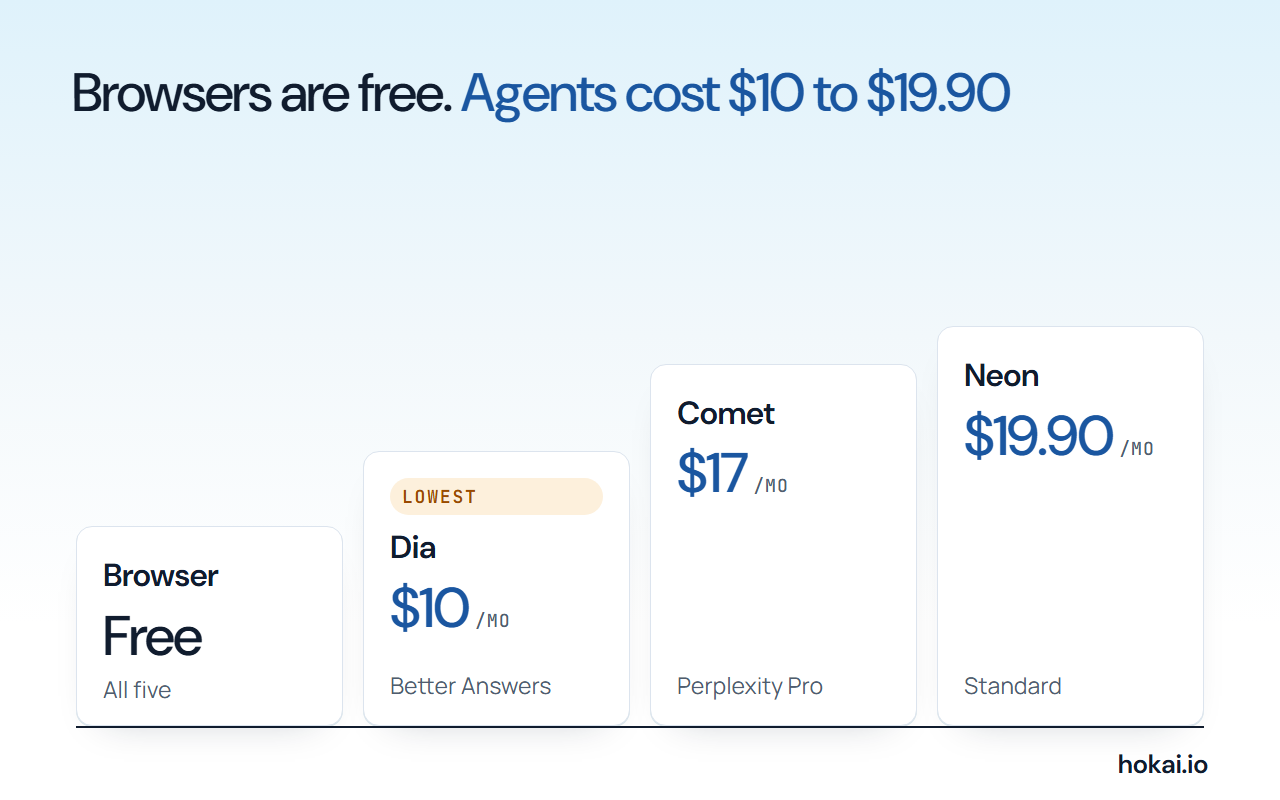 Hokai chart of what the paid agent tier of each AI browser costs a month, from each vendor's pricing page as checked on 5 November 2026.
That changes how you should pick one. The useful questions are which browser you already live in, which subscription you already pay for, and how much of your logged-in life you are willing to hand to a model that reads untrusted pages. This guide ranks six options on those three questions, with every price and platform read from the vendor's own page on 5 November 2026. If you want the shortlist built from your own constraints, Smart Match asks the same questions against the full AI tools directory.
How to choose: four questions before the list
Four questions settle most of this choice. Answer them before you read a single product name. They take two minutes, and they will cut the field to two or three browsers.
- Which browser do you use today? Moving your passwords, profiles and habits is the real cost of switching, not the download.
- Which AI subscription do you already have? Perplexity, Google AI and Microsoft 365 each switch on one browser's agent.
- Do you want answers or actions? Summaries and comparisons are free almost everywhere. Booking, shopping and form filling are where limits and prices appear.
- What are you willing to expose? An agent that works inside your signed-in browser can reach whatever you can reach.
Most people end up with the browser that belongs to a subscription they have. That is a dull answer, and it is usually the right one.
The shortlist at a glance
The table below puts the five live browsers side by side. "Agent tier" means the plan that switches on the version that takes actions for you.
| Browser | Platforms | Agent tier | Pick it if |
|---|---|---|---|
| Comet | Mac, Windows, iOS, Android | Perplexity Pro, $17 a month on annual billing | You research a lot and want tasks done |
| Chrome with Gemini | Desktop and phone | Google AI Pro or Ultra, US and India | You will not leave Chrome |
| Edge with Copilot | Desktop, with a mobile app | Microsoft 365 for higher limits | You live in Windows and Office |
| Dia | macOS and Windows | $10 a month | You work across Slack, Notion and mail |
| Opera Neon | Windows and macOS | $19.90 a month | You want to plug in your own agents |
Our ranking is by fit, not by a single score. We did not run a controlled task test across all five, so nothing here claims one browser completes more bookings than another. What we can stand behind is what each vendor publishes about platforms, price and safety, and where those pages disagree with the press.
The switching cost is worth a minute. Comet, Dia and Neon are separate browsers, so you move bookmarks, saved logins and extensions by hand. Chrome and Edge need no move at all. That is why the two incumbents rank higher for casual readers than their agents alone would justify.
Comet is the best all-round pick if you already like Perplexity
Comet comes from Perplexity, and it is the only browser here with an assistant that started life as a search product. Perplexity's page says it is available for Mac, Windows, iOS and Android, which is the widest platform list in this guide. The download is free.
The assistant is not. Perplexity's plan comparison lists browser agent queries as "No" on the free plan, monthly limits on Pro, and higher limits on Max. Enterprise Pro seats get 80 a month and Enterprise Max seats 800, per the same help page, last modified on 29 October 2026.
Pro is $17 a month on annual billing, according to the Perplexity pricing page. We could not read a month-to-month Pro price on that page, so treat $17 as the annual rate. Our Perplexity versus ChatGPT Search comparison covers what Pro buys in search itself, so we do not repeat it here.
Perplexity's own examples for the assistant are everyday ones: comparing how different outlets cover the same story, drafting a reply that shares your upcoming schedule, building a week-long study plan from a syllabus, and buying a comfortable but cheap office chair. It publishes no task success rate for any of them. None.
Choose Comet if research is most of your day and you would pay for Perplexity anyway. Skip it if you want the agent without a subscription, because there is no such tier.
Chrome with Gemini is the safest bet if you will not switch
Gemini in Chrome adds an assistant to the browser most people already use. Google's page lists summaries, questions about selected content, image editing with Nano Banana and "skills", and all of it works on your open tabs. Google says you can pause the assistant, control what it can access and delete its history. Simple.
The agent part is called auto browse. Google's page says it can fill a shopping cart or book a reservation, and that it is available to Google AI Pro and Ultra subscribers in the US and India. Google's plan page, read on 5 November, repeats that restriction.
We could not quote a US price for the Pro plan. Google served its plan page in Indonesian rupiah to our connection, with Pro at Rp 309 thousand a month there, and showed no dollar figure. Check the price in your own country before you buy.
Chrome wins on friction. Nothing to install, no profile to move, no new password manager. It loses on reach: if you live outside the US and India, auto browse is not offered to you yet.
It also asks the most of your trust, because the assistant sits on top of a browser that already holds your passwords, your history and your signed-in sessions for banks, mail and work, which is why Google's safety design, covered below, matters more here than anywhere else in this guide. Read it before you switch auto browse on.
Edge with Copilot is strong on Windows and thin on agents
Edge puts Microsoft Copilot in a sidepane or on a new tab page. Microsoft's Copilot Mode page lists comparing options across tabs, summarising any page, writing help, image creation and "Journeys", which groups your browsing into related sessions.
On cost, Microsoft says Copilot users in Edge may get a higher free allowance. Its FAQ adds that higher limits to chat and create, to use agents, or to tackle complex multi-step tasks need a Microsoft 365 subscription.
Here is the gap. Microsoft's page does not describe an agent that books or buys, and press from late 2025 described a US-only preview of "Actions" that we could not confirm is still running. We are not ranking Edge as an acting browser until Microsoft says plainly that it is one.
Edge is still a good choice for one reader. Someone on a Windows laptop who already pays for Microsoft 365, wants summaries and tab comparison, and has no wish to learn a new browser, a profile system or a different set of extensions just to get an assistant in a side panel. Our guide to AI assistants for office work covers the Copilot side of that decision.
Dia is the cheapest paid assistant, and it now runs on Windows
Dia is the browser from The Browser Company, the team behind Arc. Its home page says it is available for macOS and Windows, and that you can download it free. Older reviews call it Mac only, so check the date on whatever you read.
Dia has three plans. Free is "a better browser, without the AI", with profiles, split view and an ad blocker. Better Answers is $10 a month and adds a Morning Brief, searching and drafting across connected tools such as Slack, Notion, Gmail and GitHub. Better Days is $100 a month with 20 times more asks.
The pitch is context, not clicking. Dia reads between your tabs and your work apps, and builds a report or a deck from them. It is a research assistant first. An actor second, if at all. Its pricing page does not promise form filling or booking, so we do not list it as an acting browser.
Pick Dia if your day is documents, meetings and messages. If Arc was your browser, read why Arc stopped shipping features before you decide which of the two to keep.
Opera Neon is for people who bring their own agents
Opera Neon is the most agent-first product here. Opera's FAQ says it opens pages, researches, fills in forms and creates, "with you in control at every step". It runs on Windows and macOS.
The browser is free and includes an MCP connector and command line, so outside agents can connect to a live Neon session. Opera names Claude Code as one that works today. It also names Lovable for building apps and n8n for workflows. The Standard plan is $19.90 a month and adds Neon's own agents, deep research, scheduled tasks and a choice of models from OpenAI, Anthropic and Google.
There is one detail to weigh. Opera says Neon uses your real, logged-in browser session, not a sandbox, so an agent that connects works with your actual accounts. By default the connection is read-only, and clicking or filling a form needs your explicit permission.
That design is useful and risky in the same breath. Choose Neon if you already run agents such as Claude and want one that can see your browser. Leave it alone if you want a browser that simply works.
ChatGPT Atlas is gone, and its job moved into ChatGPT
OpenAI's help centre states that ChatGPT Atlas "has been retired and no longer receives updates", and its release notes put the stop date at 9 August 2026. Bookmarks, tabs, history and sessions do not transfer on their own.
The agent did not disappear. Release notes dated 25 August 2026 say ChatGPT Work's browser can finish tasks on some sites that need a sign-in, for Plus and Pro, and that it asks before consequential actions such as a payment. Notes from 31 August say the ChatGPT extension now runs in Edge, Brave, Opera and Vivaldi.
So the honest line is this: OpenAI stopped selling a browser and kept the agent. If you want a ChatGPT-style agent, you now run it inside another browser or its desktop app. Any list that still ranks Atlas is out of date.
Builders get a different answer: Browser Use
Everything above is for people. If you build products, you want an agent library rather than a browser. Browser Use is MIT licensed and had 120,091 stars on GitHub on 5 November 2026.
Its pricing page is pay as you go, with no subscription and credits that never expire. Cloud browsers cost $0.02 an hour plus $5 a gigabyte of residential proxy traffic.
Hosted web agents add 20% to the model price, and new accounts get a free credit. The page also publishes a model comparison on 60 tasks per setting. It warns that recorded costs leave out some items, so read it as a guide to cost, not a quote.
MultiOn is the older name in this corner. Browserbase sells cloud browsers for agents, and Skyvern is an open-source agent that runs browser workflows on any website, according to its Hokai record. Our roundup of autonomous AI agents covers where each sits on the control spectrum.
What each option costs a month
The chart shows the entry price of each paid agent tier. Chrome and Edge are left out because their prices depend on a plan you may already own.
Read from each vendor's pricing page. Comet's $17 is the annual-billing rate.
Dia is cheapest at $10 a month. Neon costs $19.90 on a month-to-month plan. Comet sits between them, but only if you accept annual billing.
Two things sit outside this chart. Dia has a $100 tier for heavy use, and Neon and Comet both have bigger plans above their entry price. The entry tier is what most readers need.
Prompt injection and data security: what each vendor says it does
A browser agent reads pages you did not write. A page can hide text that tells the agent to do something else. That is called indirect prompt injection, and it is the main security question for any browser that acts. Google's own security team calls it "the primary new threat facing all agentic browsers".
Perplexity published the largest dataset on it. Its BrowseSafe++ report, dated 2 November 2026, says Comet's detector flagged 1.15 million injections on pages its agent read between September 2025 and September 2026. More than four in ten of the flagged injections push the agent toward an action the user never asked for.
| Vendor | What it says it does | Source date |
|---|---|---|
| Perplexity | Runs a small detector on every page; open-sources a benchmark | 2 Nov 2026 |
| Second model vetoes actions; agent limited to task sites | 8 Dec 2025 | |
| Opera | Connection read-only by default; actions need your permission | 5 Nov 2026 |
| Dia | Built on Chromium, Google account integration disabled, outside audits | 5 Nov 2026 |
| Microsoft | Features optional, permissions and memory under your control | 5 Nov 2026 |
Where your data sits is a separate question. Dia's security page says conversations, history, bookmarks and files are encrypted and stored locally by default, and that Google account integration is switched off in its Chromium build. Opera's design sends the agent into your live session, so your cookies and logins are in play. Perplexity's help centre says Pro and Max users can opt out of AI training. Read the privacy page of whichever browser you pick before you sign in to anything sensitive.
- Strongest published design
- Chrome, with a separate checking model and site limits
- Largest public dataset
- Comet, with 1.15 million flagged injections
- Weakest disclosure
- Edge, whose page names no injection defence
- Riskiest by design
- Neon, which works in your real session
Google's design is the most specific. Its Chrome security team describes a "User Alignment Critic", a separate model that sees only the proposed action and not the web page, so a page cannot talk to it. It also limits the agent to sites relevant to the task and asks you before sensitive steps.
Microsoft's Copilot Mode page names permissions and optional memory but does not describe an injection defence. We read that as a gap in what Microsoft publishes, not proof that Edge has none.
The strongest case against an AI browser
The strongest objection is that an acting browser is a security risk you do not need, and Perplexity's own data supports it. In its adaptive test, attackers rewrote failed injections up to 64 times. They succeeded on at least 79% of tasks against five of the seven agents tested.
Detection helped but did not close the door. Screening pages with its Guard detector blocked 94.5% of the original injections. With all 64 attempts, the attacker still won on 84.2% of tasks, against 93.6% without Guard. Perplexity concludes that no detector is a silver bullet.
We agree, and it changes the advice rather than ending it. The tests used agents built on language models in a sandbox, not Comet's production system, and the original, unrevised injections worked on at most 4% of tasks. The risk is real but it depends on what the agent can touch.
So split the jobs. Let an AI browser summarise, compare and research on pages you can afford to lose. Keep banking, payroll and anything with a stored card out of the agent's reach, and read what each action asks before you approve it. Our guide to personal AI agent approvals sets out which actions deserve a pause.
Who should skip an AI browser
If you only need a summary of the page you are on, a chatbot extension does the job without moving your profile. If you mostly shop or book, a general agent such as Manus or Genspark may fit better, and our Manus versus ChatGPT agent comparison shows how those differ.
If you manage a team, hold off until your security group has decided what agents may touch. And if you are happy in your current browser, you may need no new browser at all: the Chrome and Edge assistants cost nothing.
For wider context, our best agentic AI roundup and the personal agent buyer's guide cover the agents that work outside a browser, and the personal agent protocol piece covers how those agents will sign in to shops and banks.
What would change this ranking
Four things would reorder the list.
- A Microsoft agent announcement. If Edge ships a documented acting agent with a published safety design, it moves up fast.
- A Chrome rollout beyond the US and India. Chrome's reach is its main limit today.
- A Dia agent tier. Dia's price is the lowest here, and an acting agent would make it a real rival to Comet.
- A real incident. One public case of an agent draining an account would reset the safety conversation for every vendor on the list.
Check the vendor pages again in a quarter. Perplexity shipped its second injection benchmark within a year of the first, and OpenAI retired a whole browser in the same stretch.
Frequently asked questions
What is the best AI browser in 2026?
It depends on the subscription you already pay for. Comet suits heavy researchers, Chrome with Gemini suits people who will not switch browsers, and Dia is the cheapest paid assistant at $10 a month. We did not run a controlled task test, so the ranking is by fit, not by score.
Is ChatGPT Atlas still available?
No. OpenAI's help centre says ChatGPT Atlas has been retired and no longer receives updates, and its release notes give 9 August 2026 as the stop date. The agent features moved into ChatGPT, including a browser extension for Edge, Brave, Opera and Vivaldi.
Are AI browsers free?
The browsers are free to download. The assistant that takes actions is usually paid: Comet needs Perplexity Pro at $17 a month on annual billing, Dia Better Answers costs $10 a month, Opera Neon Standard costs $19.90 a month, and Chrome auto browse needs a Google AI Pro or Ultra plan.
Are AI browsers safe to use for banking or shopping?
Treat them with care. Perplexity's own tests found attackers could still hijack most tested agents after repeated attempts. Use them for research and comparison, keep banking and stored cards out of the agent's reach, and approve each action yourself.
Which AI browser works on Windows?
Comet, Dia, Opera Neon, Chrome and Edge all run on Windows. Comet also runs on Mac, iOS and Android, Dia runs on macOS and Windows, and Opera Neon runs on Windows and macOS, according to each vendor's own page on 5 November 2026.
Covered in this guide
- Comet: Perplexity's Chromium-based AI browser with a built-in assistant, free on Mac, Windows, iOS and Android, with 7 headline features.
- Dia: Dia is a Chromium browser for macOS and Windows with a built-in assistant that answers from your tabs and apps like Gmail, Slack and Notion.
- Gemini in Chrome: Google's multimodal AI assistant and model family, sold as a free app, tiered subscriptions and a pay-per-token API
- Arc: A Chromium browser with a vertical sidebar that organizes tabs, apps, and bookmarks into separate Spaces.
- Browser Use: Open-source browser agent with a hosted cloud: describe a web task in one sentence, get JSON back. The repo has 117,000+ GitHub stars.
- Browserbase: Hosted headless browsers for AI agents, with a free plan of 3 concurrent sessions, session replays and the open source Stagehand SDK.
- ChatGPT: ChatGPT is OpenAI's AI assistant, with 1.2 billion weekly users by OpenAI's count, the GPT-6 model family and plans that run from a free tier to a premium Pro tier.
- Claude: Claude is Anthropic's AI assistant, with a free tier, Pro, Max and Ultra personal plans, and Team and Enterprise seats. Opus access starts at Pro.
- Genspark: Genspark is an AI super agent that runs 8+ LLMs and 80+ tools to build slides, research reports, and apps, with a free daily-credit tier and paid Plus/Pro plans.
- Lovable: Build something lovable. Create apps and websites by chatting with AI.
- Manus: Autonomous AI agent that plans and executes multi-step work from one prompt: research, documents, apps and video. The September 2026 release adds Cascade, Automations and Studio. Free tier available.
- Edge: Microsoft, founded 1975, is a public company (NASDAQ: MSFT) and the Redmond maker of Windows, Azure, GitHub and the Copilot assistants, with $331.8B of fiscal 2026 revenue.
- Microsoft Copilot: Microsoft's AI assistant across Windows, Edge, Word, Excel, Outlook and Teams, from a free tier to per-seat work plans on OpenAI's latest GPT-5 models.
- MultiOn: MultiOn was a browser agent with a Chrome extension and Agent API. The vendor, AGI, Inc., has since moved to AGI-0 for phones, and the V1 Beta docs remain online.
- ChatGPT Atlas: OpenAI builds ChatGPT, the GPT-6 family (Astra, Sol, Luna), Codex and the OpenAI API. It reports 1.2B weekly ChatGPT users and an $852B valuation after its March 2026 round.
- Perplexity: Perplexity AI makes a cited answer engine, the Computer agent and an Agent API, and routes work across models from several vendors.
- Skyvern: Open-source AI browser agent with 23.2k GitHub stars that logs in, fills forms, downloads files and extracts data from sites with no API.
Sources
Still deciding?
This guide covers a handful of options. Smart Match checks every listing in the directory against how you actually work and what you can spend, then hands you the shortlist and the reason behind each pick.
Find your toolsRelated guides
- Abacum Alternatives in 2026: FP&A Tools for Mid-Market Finance TeamsBuyer's guideHow to pick, across a category
- The AI 80s Photo Trend: How to Make Yours (and Turn It Into a Video) in 2026AnalysisWhat changed and who it affects
- The AI Tools That Do One Microsoft Copilot Job, CheaperBuyer's guideHow to pick, across a category
- Arc Browser Hasn't Shipped a Feature in 449 Days. Cloudflare Just Showed Why.AnalysisWhat changed and who it affects
- Attio vs HubSpot in 2026: Which CRM for a Startup?ComparisonHead-to-head, with a verdict
- Best Agentic AI in 2026: Manus, Genspark and the Platforms That Finish Whole TasksBuyer's guideHow to pick, across a category