Best AI Video Editors in 2026: Clipping, Captions and Editing Footage You Already Have
The best AI for video editing depends on whether you have raw footage or a script. For editing existing footage, CapCut (free, ~$19.99/mo Pro) and Descript ($24/mo Hobbyist, transcript-based) lead. For repurposing long recordings into clips, Opus Clip ($15/mo Starter) is purpose-built. For generating video from text, InVideo and Pictory AI are the category leaders.
The short version
AI video tools split into editors (CapCut, Descript, VEED, Opus Clip) that cut footage you already shot, and generators (InVideo, Pictory) that build video from a script. CapCut wins on cost and mobile editing; Descript wins on speed for talking-head content read as a transcript instead of scrubbed as a timeline.
Want this decided for your own case? Find your tools with Smart Match, starting from this guide's question.
Opus Clip's Pro plan costs $29 a month and gives a solo creator unlimited 4K exports, a virality score on every clip, and a social scheduler for five platforms. CapCut's free tier costs nothing and gives the same creator auto-captions, an AI-cut timeline, and a 1080p export limit with no watermark. Neither number tells you which one to buy, because they are not competing for the same job.
That is the split most roundups skip. "AI video editing" now covers two genuinely different workflows. One turns footage you already shot into something shorter. The other builds a video from a script or a blank timeline. A creator who conflates the two ends up paying $29 a month for repurposing tools they never touch, or fighting a transcript editor to do the one thing a timeline app does in two clicks.
For a solo creator or a two-to-three person social team putting out three to five videos a week, that mismatch costs more than the subscription. It means redoing the whole workflow in six weeks once the wrong fit becomes obvious, plus whatever content got published on a tool that was never going to scale with the job.
This guide is about working with footage you already have. To make new clips from a prompt, see the AI video generators guide; to animate a single still, see the best free AI for turning a photo into a video.
Editing tools and creation tools are not the same shopping list
CapCut, Descript and VEED are built to cut down footage you already have: a podcast recording, a Zoom call, a phone-shot product demo. Opus Clip does one specific version of that job. It turns a single long recording into several short ones, each scored for how likely it is to get watched.
InVideo, Pictory AI, Lumen5 and Fliki point the other direction. You give them a script, a blog post or a prompt, and they generate a video that did not exist as footage before. Lumen5 turns a blog post into on-brand video built from licensed stock footage. Fliki does the same starting point but leans on AI voice cloning and narration instead of stock clips.
Every general "best AI video tools" roundup online blends all eight of these into one undifferentiated list. That is fine for browsing and useless for deciding. The two jobs have different failure modes, different pricing shapes and different tools that win them, which is the actual decision this guide answers. A single "best overall" pick is the wrong frame here. The right question is which of the two jobs describes your Tuesday, not which brand has the most name recognition.
Platform reach splits along the same line. CapCut is the only tool here that ships native apps for Windows, Mac, iOS and Android on top of the browser version. Descript and Opus Clip run in a browser only, with no desktop or mobile app at all. VEED ships an iOS app alongside its browser editor but nothing for Android or desktop. A creator who edits primarily on a phone has effectively one real option in this shortlist, and it is not the one most roundups lead with.
How to choose: three questions that matter more than the brand name
Three criteria decide this before any tool name comes up. Each one is testable against footage you already have on your phone right now.
Do you have raw footage, or do you have a script? If you are cutting something you filmed, you want an editor. If you are starting from text, you want a generator. Mixing the two up is the single most common reason people churn out of a subscription within a month. Someone signs up for a generation tool expecting it to clean up a messy podcast recording, discovers it has no real footage-import workflow, and cancels blaming the tool instead of the mismatch.
Is your bottleneck finding the good parts, or building the whole thing? A ninety-minute podcast has maybe six clippable moments buried in it. That is a search problem, which is what Opus Clip's virality scoring exists to solve: it ranks every candidate clip so you are not scrubbing the full recording by hand. A blank timeline with no raw material is a construction problem, which is what InVideo's credit-based generation exists to solve.
Do you edit faster by watching, or by reading? Descript's entire pitch is that cutting a transcript is faster than scrubbing a timeline for talking-head or interview content: delete the sentence, and the corresponding video frames go with it. If you think in frames rather than words, that workflow will fight you the whole way.
A reader who answers these three questions can stop reading here and pick correctly, without a single tool name. Everything below is which specific tool wins each answer, what it costs, and where this guide's eight tools stop being the right answer at all.
Run the test against a real week. A two-person team recording one 40-minute podcast episode and cutting it into five short clips has raw footage and a repurposing bottleneck, which points straight at Opus Clip. The same team building a weekly explainer video from a written script, with no camera involved at all, has neither footage nor a repurposing problem. That is InVideo or Lumen5 territory instead, and reaching for Opus Clip there would mean paying for a virality-scoring feature with nothing to score.
The shortlist: eight tools, sorted by which job each one solves
| Tool | Job | Free tier | Paid entry point |
|---|---|---|---|
| CapCut | Mobile-first timeline editing | 1080p exports, no watermark | ~$19.99/mo, or $179.99/yr |
| Descript | Transcript-based editing | 60 min/mo, 720p, watermark | $24/mo, or $16/mo billed annually |
| VEED | Browser captions and brand kit | 720p, 10-min max, watermark | Lite ~$19/mo, or ~$12/mo annually |
| Opus Clip | Long-form to short-form repurposing | 1080p, exports expire in 3 days | Starter $15/mo |
| InVideo | Prompt and template-driven generation | No free tier on current plans | Basic $9/mo (annual), 190 credits |
| Pictory AI | Text and blog-post to video | None | $29/mo entry tier |
| Lumen5 | Blog-to-video with stock footage | Limited free plan | ~$19/mo billed yearly |
| Fliki | Narrated video with AI voice cloning | 5 min/mo | Basic $28/mo, 180 min |
CapCut, Descript, VEED and Opus Clip cover the editing side of the split. InVideo, Pictory AI, Lumen5 and Fliki cover the creation side. Picked for job coverage, not popularity: each one wins a distinct answer to the three questions above, rather than eight brands competing for the same use case.
Fliki's Standard tier jumps to $66 a month for 600 minutes and premium voices, according to Fliki's own pricing page (accessed 21 September 2026), which is a steep step up from its $28 Basic tier. Lumen5's Basic plan caps AI voiceover at 20 minutes a month; its Pro plan raises that to 180 minutes, per Lumen5's published pricing.
What this actually costs: monthly vs. annual, side by side
Every tool on this list charges less per month if you commit to a year up front, and the gap is bigger than most buyers expect.
| Tool | Billed monthly | Billed annually (per mo) | Gap |
|---|---|---|---|
| Descript Hobbyist | $24 | $16 | 33% |
| Descript Creator | $35 | $24 | 31% |
| VEED Lite | $19 | ~$12 | 37% |
| InVideo Basic | n/a | $9 | annual-only |
| CapCut Pro | ~$19.99 | ~$15 (=$179.99/yr) | 25% |
A creator who defaults to monthly billing and only switches to annual later has usually already paid the difference for two or three months by the time they notice. Descript's Creator plan, the one most solo creators land on once they outgrow Hobbyist, runs $35 a month billed monthly or $24 a month billed annually, with 30 hours of media and full access to its Underlord AI toolset, per Descript's own pricing page.
Two more tools round out the wider list without making the top eight. Filmora sells a genuine perpetual license: a single payment for one version, rather than a subscription. Nobody in the top eight offers that. The tradeoff is that a perpetual license does not include the next major version, so moving from Filmora 15 to 16 later means buying again. Canva has folded basic AI video trimming and captioning into its existing design subscription, which matters mainly if you already pay for Canva for other work.
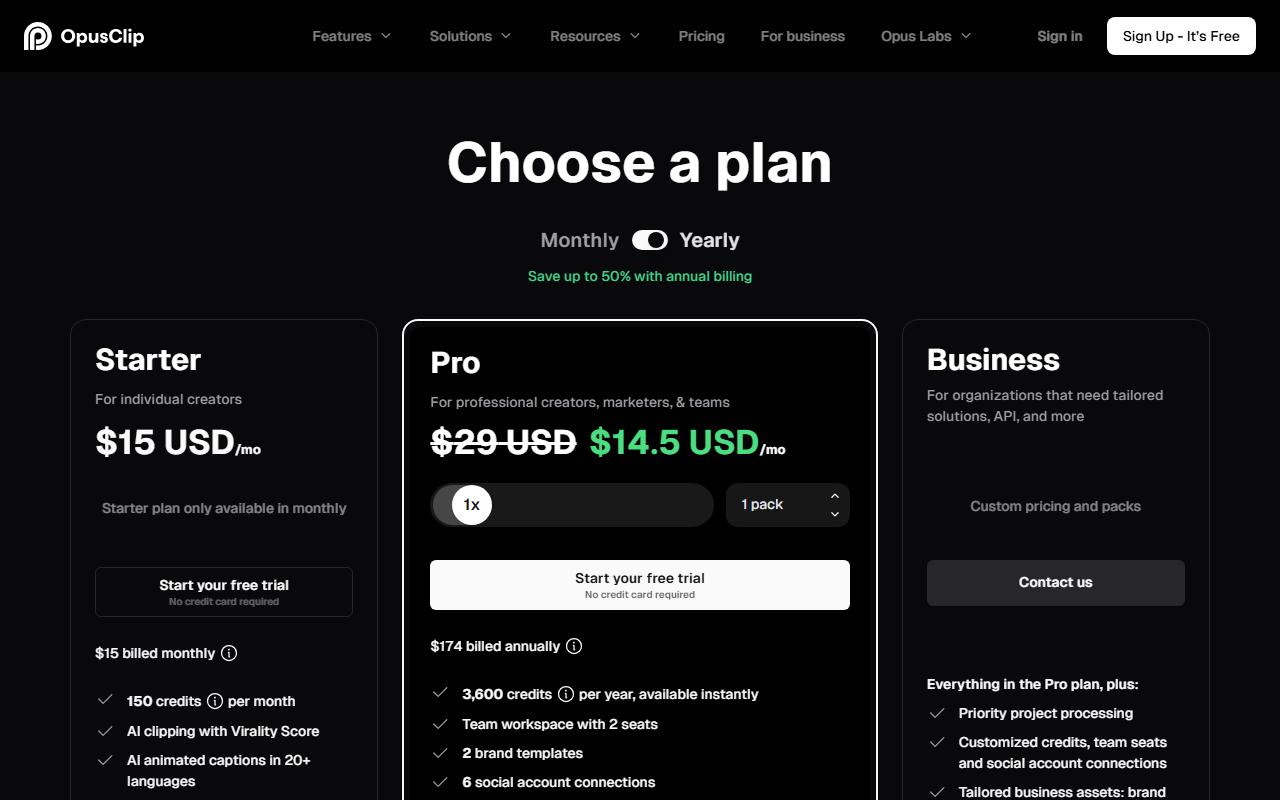 Opus Clip's live pricing page, captured 21 September 2026. The standard Pro rate is $29/mo; the green price reflects a temporary annual-billing promotion.
CapCut versus Descript: the two most people are actually deciding between
Most searches that land on this page are choosing between these two, not the full eight.
CapCut wins on cost and platform reach. It is free to start, edits natively on a phone, and its AI auto-captions and auto-cut cover most of what a short-form creator needs without hitting a paywall. The catch: CapCut, owned by ByteDance, does not publish subscription prices on capcut.com. Third-party trackers put Pro at roughly $19.99 a month or $179.99 a year as of September 2026, and the number a given user sees can vary by region, device and app store.
Descript wins on speed for anything talking-head or interview-based. Deleting a filler word or a bad take means deleting the word in the transcript, not scrubbing a waveform to find the exact frame. Its Creator tier throws in more than 20 AI tools, including Studio Sound cleanup and AI voice cloning, with no direct CapCut equivalent.
That advantage disappears once the footage is mostly b-roll or motion graphics, where there is no dialogue to edit against. Descript's free tier caps out at 720p with a watermark and 60 minutes a month, not enough to run a channel on. A creator recording two 45-minute interviews a week burns through that free allowance inside a single episode.
Pick CapCut for phone-first editing, short-form output, and zero spend to start. Pick Descript when the raw material is mostly spoken word and reading an edit beats watching one. If neither fits cleanly, the real bottleneck is usually repurposing, not editing, which points to Opus Clip instead of either.
Who should skip AI video tools entirely
Not every creator needs this category. The fastest way to waste a subscription is signing up before checking whether any of these three apply.
- You need broadcast-grade color grading or multitrack audio mixing. None of the eight tools above compete with a real non-linear editor like DaVinci Resolve or Premiere Pro on color science or audio sweetening. They are built for speed, not post-production polish.
- You publish fewer than one video a month. The learning curve and subscription cost outpaces what you would save over editing by hand in whatever free tool came with your phone or laptop.
- Your footage has no spoken dialogue at all. Descript's core advantage disappears without a transcript to edit against, and most auto-caption features across this list assume there is speech to caption.
Professional colorists generally use one of these AI tools for the rough cut and finish the grade somewhere else entirely. That split, fast rough cut in an AI tool, final polish in dedicated software, is common enough among working editors that it is worth planning for from the start rather than discovering it after a subscription is already paid for.
Data handling: where your footage actually goes
Every tool on this list processes video in the cloud, not locally, which matters if the footage includes anything under an NDA or another person's face without consent. Opus Clip's free tier stores uploaded media for three days before deletion; its paid Starter tier extends that to 29 days, and even the Pro tier's 100GB storage allowance is fixed rather than unlimited.
Descript does not publish a standard retention window on its public pricing page. Its Business tier specifically calls out SOC 2 Type II compliance as an enterprise feature, which implies the lower tiers are not independently audited to that standard. If footage cannot leave a controlled environment for compliance reasons, none of these eight tools clear that bar. A locally-installed editor is the honest answer instead, the same tradeoff Hokai found when comparing AI coding assistants on data handling: cloud convenience and strict data control rarely come together.
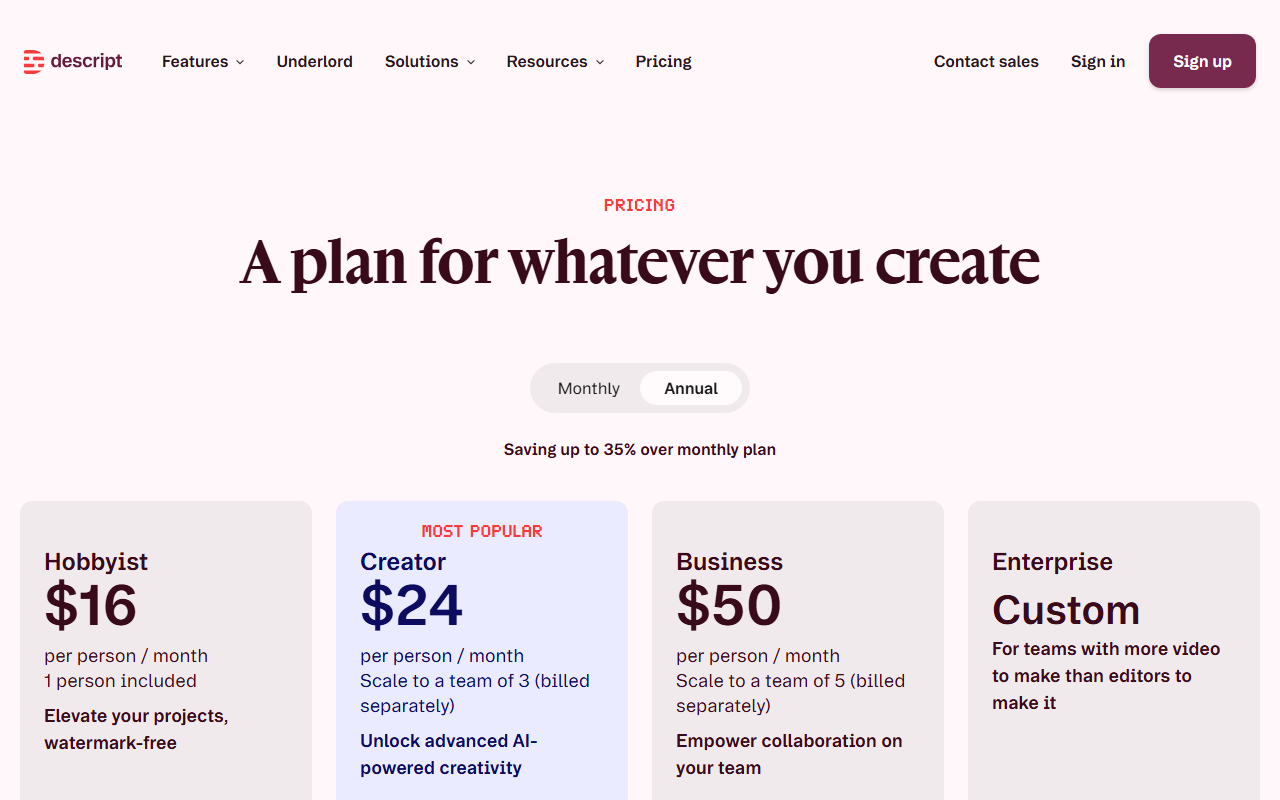 Descript's live pricing page with the annual-billing toggle selected, captured 21 September 2026.
The turn: is text-based editing actually faster, or just different
The strongest case against this guide's own verdict is that "editing by transcript" sounds faster in a demo and is not always faster in practice. Reading and re-reading a script to find the right cut point is its own kind of friction. Creators who think visually, who know a cut is wrong by the way a shot lands rather than by the words spoken over it, report fighting Descript's model as often as they praise it.
The tool that is objectively faster for a workflow you have never tried is simply the one whose friction points you have not learned yet. That is not an argument against Descript specifically. It is an argument for testing before committing. Every tool in this shortlist has a genuinely usable free tier or a sub-$20 entry plan. The actual cost of finding out which model fits how you think is one afternoon, not one subscription cycle.
Where this guide stops: pure generation, YouTube tools and all-in-one suites
This guide covers editing footage and building video from a script or prompt with a defined product in mind. It does not cover pure text-to-video generation with no script at all, a different category with its own leaders, covered in Hokai's best AI video generators guide and, for combining image and video generation in one workflow, best AI tools to create images and videos.
If the job is specifically repackaging existing YouTube content rather than producing new video, two more guides answer that narrower question directly: best AI for creating YouTube videos for production, and best AI tools for summarizing YouTube videos and podcasts for turning long recordings into written or audio digests. The full catalog, including tools that did not clear this guide's job-fit bar, is browsable at Hokai's video generation directory.
None of this means the eight tools in this guide are wrong for those adjacent jobs; several, especially InVideo and Pictory AI, show up again in the pure-generation guide under a different comparison. It means the verdict here is scoped to editing existing footage and building from a script with a known product in mind, not to every possible AI video workflow a creator might run in a given week.
What would change this verdict
Pricing itself is the most likely near-term mover, and it has already moved once. CapCut restructured its paid tiers on 20 February 2026, splitting the old single Pro plan into a cheaper Standard tier and a pricier new Pro tier carrying the full AI toolkit. The annual top-tier price roughly doubled, from about $77 to $179.99, according to reporting on the change.
If mobile-first competitors like VEED respond by cutting their own Lite pricing, or if CapCut restructures its tiers again, the "start free on CapCut" default in this guide's verdict gets weaker rather than the tool itself changing.
A pair of product changes would flip the picks above. If CapCut or VEED shipped a transcript-editing mode as capable as Descript's Underlord, the reason to pay for Descript specifically would mostly disappear. Separately, if Opus Clip's free-tier export window stopped self-deleting after three days, the case for skipping straight to its $15 Starter plan would weaken, since the free tier would become viable for anyone who downloads promptly.
Until either happens, the split holds. Editing tools for footage you have. Generation tools for scripts you don't. CapCut or Descript as the two real contenders, depending on which one you're doing. If you are choosing between AI tools for a broader workflow than just video, comparing options through Smart Match narrows the list to what fits your stack instead of starting a fresh search every time.
The tools worth watching next are the ones already testing the boundary this guide draws. Descript's Business tier already bundles AI-generated custom avatars alongside its transcript editor, and InVideo's credit system now covers both image and video generation in one plan. The line between cutting what you shot and generating what you didn't is the one to watch shrink.
Frequently asked questions
What is the best free AI video editor in 2026?
CapCut's free tier is the strongest no-cost option, giving 1080p exports with no watermark plus AI auto-captions and auto-cut. Descript and VEED also have free tiers, but both cap exports at 720p with a watermark, which makes them trials rather than a usable free workflow.
Is Descript better than CapCut for AI video editing?
It depends on the footage. Descript is faster for talking-head or interview content because you edit by deleting text in a transcript. CapCut is faster and cheaper for short-form, phone-shot content with little dialogue, and its free tier has no watermark, which Descript's does.
What is the difference between AI video editing and AI video generation?
Editing tools like CapCut, Descript and VEED cut down footage you already recorded. Generation tools like InVideo and Pictory AI build a video from a script, blog post or prompt with no original footage. Choosing the wrong category for your workflow is the most common reason creators churn out of a subscription.
How much does Opus Clip cost?
Opus Clip has a free tier with 1080p exports that expire after three days. Its Starter plan is $15 a month with 29-day storage and watermark-free exports, and its Pro plan is $29 a month with unlimited exports, 100GB storage and a built-in social scheduler, according to Opus Clip's own pricing page.
Do AI video editing tools store my footage in the cloud?
Yes, every AI video tool in this guide processes and stores video in the cloud rather than locally, with retention windows that vary by plan. If your footage is under an NDA or cannot leave a controlled environment, a locally-installed editor is the safer choice over any cloud-based AI tool.
Covered in this guide
- CapCut: AI-powered video editor for creating trending content across all platforms
- Descript: AI-powered video & audio editing as easy as editing text
- Fliki: Transform text into professional videos with AI voiceovers in minutes
- InVideo: Create videos without limits. Turn any idea into videos with AI.
- Lumen5: AI video maker that transforms text into engaging videos in minutes
- Opus Clip: AI-powered video editing tool that turns long videos into viral short clips in one click
- Pictory AI: Create professional videos in minutes using AI from text, blogs, scripts, and more
- VEED: Browser-based video editor with AI subtitles, avatars, voice cloning, and text-to-video: no download needed.
- ByteDance: ByteDance is a Beijing-based consumer-internet group whose short-video apps and Seed AI models power the Doubao assistant.
- Canva: Canva is a Sydney-founded design platform with an in-house AI lab, Canva Research, and Free, Pro, Business and Enterprise plans. Private; no IPO filing found as of October 2026.
- Filmora: Professional video editing made accessible to everyone with AI-powered features
Sources
Still deciding?
This guide covers a handful of options. Smart Match checks every listing in the directory against how you actually work and what you can spend, then hands you the shortlist and the reason behind each pick.
Find your toolsRelated guides
- The AI 80s Photo Trend: How to Make Yours (and Turn It Into a Video) in 2026AnalysisWhat changed and who it affects
- Best AI Companies in 2026: Who Is Actually LeadingBuyer's guideHow to pick, across a category
- Best AI Dubbing and Video Translation Tools in 2026Buyer's guideHow to pick, across a category
- Best AI for Creating YouTube Videos in 2026: A Buyer's GuideBuyer's guideHow to pick, across a category
- The Best Free AI for Turning a Photo Into a Video in 2026Buyer's guideHow to pick, across a category
- The Best AI for Qualitative Data Analysis in 2026 Depends on What You Already HaveBuyer's guideHow to pick, across a category