Best AI for Creating YouTube Videos in 2026: A Buyer's Guide
For YouTube creators in 2026, OpusClip and VEED start from footage already filmed, while Pictory and inVideo start from a script or a template. Entry pricing runs roughly $12 to $25 a month, and the ceiling now reaches $900 a month at inVideo's newest, highest tier for high-volume output.
The short version
Match the AI video tool to how the footage starts. OpusClip and VEED work from footage already filmed, the first for fast clipping into shorts and the second for a full timeline edit. Pictory and inVideo generate video from a script or template instead. Two of the four repriced within the last five weeks.
Want this decided for your own case? Find your tools with Smart Match, starting from this guide's question.
inVideo's cheapest paid plan now costs $17 a month, five weeks after HokAI's own reporting put it near $25, and its new top tier prices out at $900 a month.
That kind of drift is why a "best AI video tools" ranking goes stale inside a month. Pictory and inVideo have both touched their pricing since HokAI last checked in early August, and most of the roundups ranking for this query are still quoting the older numbers.
For a channel doing one to three uploads a week, the harder problem isn't which tool has the flashiest avatar generator. It's matching the tool to how the video actually starts: from footage already shot, from a script with no camera involved, or from an hour of long-form that needs cutting into ten short clips. Get that match wrong and the subscription pays for features the workflow never touches, month after month, without anyone noticing until the renewal bill lands.
None of the pricing below comes from a hands-on quality test of the output. It is pulled from each vendor's own pricing page, dated to when HokAI checked it, the same standard this guide holds every other page on the site to.
How to choose: match the tool to where your footage already is
Four questions actually separate these tools, and a reader can apply them without reading the shortlist below. None of them are about which vendor has the flashiest demo reel on its homepage; all four are about the channel's own weekly production, which is the part a homepage demo never shows.
Where does the raw material start? If a camera already rolled and the file exists, the job is editing or clipping. If nothing has been recorded yet and there's only a script or a blog post, the job is generation. Those are different products, not two names for the same one.
How many finished minutes does the channel need per month, and does the tier's cap actually cover that math? Script-to-video tools meter by credits or minutes, not by a flat "unlimited videos" promise, so the entry tier's cap is worth checking against a real upload schedule before paying.
Does the flagship upload still get a human edit pass, or does the tool have to survive unsupervised? A tool that's good enough for a repurposed short is not automatically good enough for the video the channel is built on.
What happens at the free tier's ceiling? Every tool here watermarks, caps resolution, or caps length on its free plan. The gap between "free" and "the plan that actually removes the watermark" is where most of these budgets really start.
| Starting point | Pick | Entry price | The one caveat |
|---|---|---|---|
| Footage exists, need shorts fast | OpusClip | $15/mo | No full timeline; it clips and captions, it doesn't edit the source video |
| Footage exists, needs a real edit | VEED | roughly $12/mo, tier names changed recently | Vendor's own pricing page didn't resolve on automated fetch this run; confirm live |
| Script or blog post, no camera | Pictory | $25/mo annual, $29/mo monthly | Bills by minutes of output, not by video count |
| Branded templates at volume | inVideo | $17/mo, ceiling now $900/mo | Both ends of the ladder moved since HokAI's last check |
OpusClip: long-form into shorts
OpusClip takes an existing recording, an uploaded file, a YouTube link, or a livestream, and finds the sub-clips worth cutting into Shorts, Reels, or TikTok posts on its own. It scores segments for predicted engagement and burns in captions automatically, which is the step that used to take an editor an afternoon per long video.
As of September 3, 2026, OpusClip's Starter plan costs $15 a month, billed monthly only. Pro normally lists at $29 a month but is running at an effective $17.40 a month on annual billing today ($208.80 billed yearly), per OpusClip's own pricing page. Business tier is custom, negotiated directly with OpusClip's sales team, and adds SSO and API access. The free tier exists but caps both length and export count hard enough that a weekly-upload channel outgrows it fast.
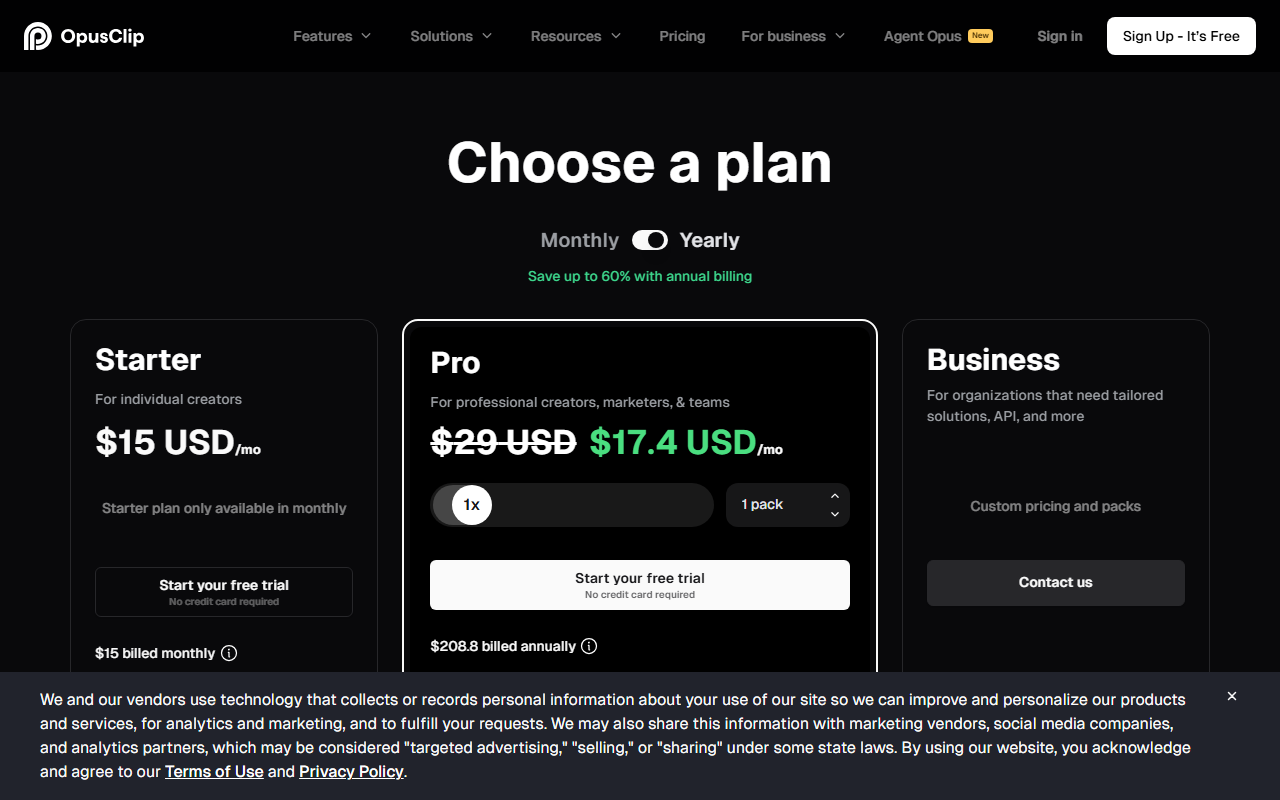 OpusClip's pricing page, captured 3 September 2026. The Pro discount shown is an active annual-billing promotion, not the standard $29 rate.
Pictory: script to video, without a camera
Pictory starts from a script, an article URL, or a blog post and assembles a video from stock and AI-generated footage, without anyone filming anything. It bills by minutes of finished output rather than by a tool count, which is the detail most ranking lists gloss over in favor of a flat "$X a month" line.
Verified against Pictory's own pricing page today: Starter runs $25 a month billed annually (2,400 minutes a year) or $29 a month billed monthly (200 minutes); Professional runs $35 a month annually (7,200 minutes a year) or $59 monthly (600 minutes); Team runs $119 a month annually (21,600 minutes a year) or $199 monthly (1,800 minutes). Enterprise is custom. A 14-day free trial with full feature access is offered before any of those numbers apply.
 Pictory's pricing page, captured 3 September 2026.
inVideo: templates, and a ladder that moved since HokAI last checked
inVideo leans on templates and a bundle of 200-plus AI models for creators who want branded, consistent output fast rather than a from-scratch edit. Individual plans now run in four tiers: Plus at $17 a month (750 credits), Max at $85 a month (3,900 credits, marked "Most Popular"), Generative at $170 a month (8,000 to 16,000 credits, marked "Best Value"), and a new Elite tier at $900 a month (42,500 to 85,000 credits, positioned "for power creators"). Annual billing knocks 15% off the first three tiers and 18% off Elite.
That's a real shift from what HokAI recorded roughly five weeks ago, when Plus started near $25 a month and the top tier, bundling access to models including Sora and Veo, priced around $120 a month. The entry price dropped, and a tier seven and a half times more expensive than the old ceiling appeared above it.
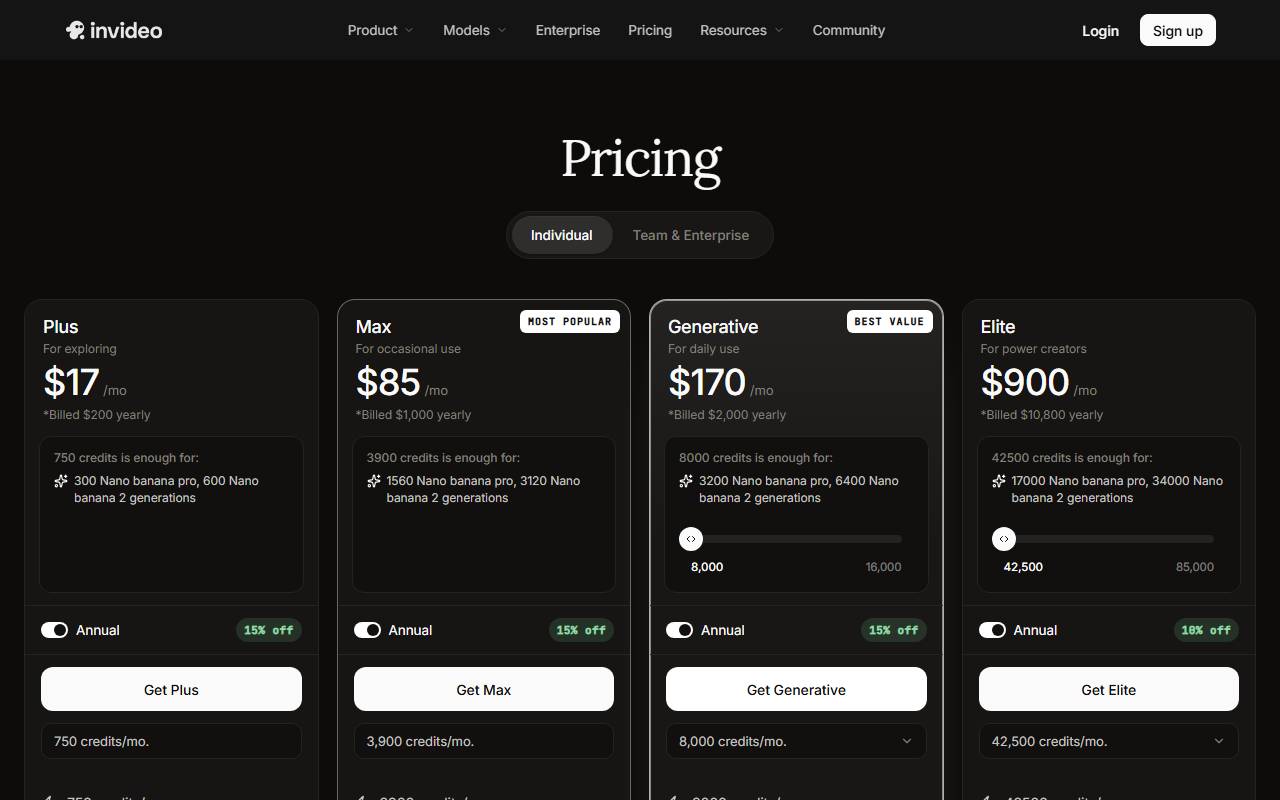 inVideo's pricing page, captured 3 September 2026.
VEED: the full edit, wearing a name you might not recognize
VEED is a browser-based editor built for a real timeline pass: multi-track cuts, a brand kit that locks fonts and colors, subtitle generation, and no local software install. It's the one on this list built to replace an edit, not just accelerate one.
Here's the honest gap: VEED's own pricing page renders client-side and did not return a readable price table on this run, unlike the three vendors above, whose static pricing pages captured cleanly.
Third-party pricing trackers report that VEED has retired its older Free, Lite, Pro, and Business naming in favor of Free, Creator, Pro, Studio, and Enterprise: Creator priced near $12 a month, Pro near $24 a month on annual billing, and a new Studio tier around $39 a month sitting between Pro and Enterprise. Those figures come from trackers, not from veed.io directly, so confirm the current numbers on VEED's own pricing page before subscribing.
What did confirm cleanly, from VEED's own marketing pages, is the product itself: a browser-based multi-track editor with a brand kit, automatic subtitles, and no download required.
OpusClip or VEED: the pair most channels are actually deciding between
Between the two tools built around existing footage, the honest split is what "editing" means to the channel. If the job is finding and cutting shorts out of a video that's already finished, OpusClip's engagement scoring and one-click export to YouTube Shorts, TikTok, and Instagram wins on speed; there's no reason to open a full timeline for that.
If the long-form video itself still needs trimming, color correction, or a second audio track before it's ready to upload, that's VEED's timeline job, not the clipper's; a clipping tool was never built to replace a real edit pass.
Running both isn't unusual for a channel with real volume: VEED for the long-form cut, OpusClip's queue for what gets repurposed out of it afterward.
Beyond the video itself: thumbnails, voice, and scripts
Three jobs sit outside the video file and still gate whether it gets watched. Canva's AI thumbnail and background-removal tools cover the packaging once the video exists, and it's the fastest of the three to get a clickable frame out the door since it's built around a design canvas rather than a timeline.
ElevenLabs covers AI voiceover, useful for faceless channels or for dubbing a video into a second language without re-recording the original audio. Jasper covers drafting a script from an outline before any of the tools above ever touch a frame of footage.
All three already carry deeper coverage elsewhere on HokAI, which is why they get a clause here instead of a full section: the job they do is real, it just isn't the video itself.
One gap worth naming directly: HokAI doesn't currently track a dedicated YouTube SEO or keyword-research tool, the category vidIQ and TubeBuddy occupy. If title and thumbnail testing against search demand is the actual bottleneck, that's a real hole in this shortlist, not an oversight to paper over.
Who should skip this whole category
A channel still filming and editing everything by hand, under maybe 10,000 subscribers, usually isn't ready for a second subscription. None of these tools fix a weak hook or a thumbnail nobody clicks; they only speed up production once the format already works, and a tool that speeds up a broken format just produces the wrong video faster. A channel posting less than twice a month rarely clears the fixed monthly cost of any paid tier here either, no matter how good the annual-billing discount looks on the pricing page.
There's a narrower version of the same problem: a channel that already pays for CapCut or Descript, both of which show up elsewhere on HokAI with three or more guides already covering them, may not need a fifth subscription just because this list names four other tools. The question isn't whether a tool is good. It's whether the workflow it speeds up is one this channel actually runs every week.
If it's still unclear whether the actual bottleneck is production speed or something upstream of it, like format or thumbnails, Smart Match asks a few questions about the real workflow and matches the job to a tool instead of a brand name.
The turn: when the all-in-one pitch is actually right
The obvious objection to stacking four subscriptions is cost and export friction between them: every hop between tools is a file to move and a format to re-check. That's a fair complaint for a channel posting once a week, where any single tool's ceiling already covers the volume. For that channel, the answer is VEED or inVideo alone, not a four-tool stack.
This guide is written for a channel that has already hit a specific ceiling, whether that's clip volume, footage-to-publish speed, or a template limit, and needs the one tool built for that exact bottleneck rather than the one that claims to do everything. A single all-in-one subscription is also the lower-friction choice for anyone managing this alone with no editor on staff, since there's only one bill to track and one interface to relearn after each update.
OpusClip, Pictory, and inVideo have each rewritten their pricing at least once in the last five weeks. A channel that locks into one of these stacks today should plan to re-check the bill before the year is out, not assume today's numbers hold.
Frequently asked questions
What's the best AI tool for turning long YouTube videos into Shorts?
OpusClip is built specifically for that job: it scans an uploaded file, a YouTube link, or a livestream for the segments most likely to perform as Shorts, cuts them, and adds captions automatically. Its Starter plan runs $15 a month and Pro normally lists at $29, though an annual-billing promotion currently brings Pro down to roughly $17.40 a month, per OpusClip's own pricing page. VEED can also output shorts, but its strength is a full edit timeline rather than automated clip-finding.
Can AI generate a full YouTube video from just a script?
Pictory does this: feed it a script, an article, or a blog URL, and it assembles a video from stock and AI footage without any filming. Pricing is metered by minutes rather than by video count, running from $25 a month on the annual Starter tier up to $119 a month for the Team tier, per Pictory's live pricing page. inVideo covers similar ground with a heavier template library, priced from $17 to $900 a month across four tiers.
Is VEED or OpusClip better for editing YouTube videos?
It depends on what editing means for the channel. OpusClip wins for repurposing an already-finished long video into shorts fast, since it isn't built around a manual timeline. VEED wins when the long-form video itself still needs a real pass: multi-track cuts, color correction, or a second audio layer before it's ready to publish.
How much does AI video software cost for a YouTube channel?
Entry pricing across the tools in this guide ranges from about $12 to $25 a month, and the ceiling depends heavily on volume: inVideo alone now stretches from a $17 Plus tier up to a $900 Elite tier for high-volume creators. A channel posting once or twice a month rarely needs to go past the cheapest tier of any single tool here.
Does HokAI test these AI video tools hands-on?
No. The pricing and feature details in this guide come from each vendor's own pricing and product pages, checked on the date noted in the guide, not from hands-on output-quality testing. Where a vendor's page didn't return readable data, as with VEED's client-side-rendered pricing page during this check, the guide says so directly instead of guessing.
Covered in this guide
- OpusClip: AI-powered video editing tool that turns long videos into viral short clips in one click
- Pictory: Create professional videos in minutes using AI from text, blogs, scripts, and more
- VEED: Browser-based video editor with AI subtitles, avatars, voice cloning, and text-to-video: no download needed.
- Canva: Helps everyone design anything and publish it anywhere
- ElevenLabs: The leading AI voice platform for text-to-speech, voice cloning, and conversational AI agents
- inVideo: Create videos without limits. Turn any idea into videos with AI.
- Jasper: Jasper is the agent workspace built for marketing teams, now expanded with a GEO Agent for AI-search visibility, an IQ Agent for automated brand setup, and MCP support for running its agents from other systems.
Sources
Still deciding?
This guide covers a handful of options. Smart Match checks every listing in the directory against how you actually work and what you can spend, then hands you the shortlist and the reason behind each pick.
Find your toolsRelated guides
- Best AI Content Creation Tools in 2026: Pick By the Job, Not the CategoryBuyer's guideHow to pick, across a category
- Best AI Dubbing and Video Translation Tools in 2026Buyer's guideHow to pick, across a category
- Best AI for Writing a Business Plan in 2026: Tested Picks and a VerdictBuyer's guideHow to pick, across a category
- Best AI Tools for Graphic Designers in 2026Buyer's guideHow to pick, across a category
- Best AI for Creating Logos in 2026: Tested Picks & VerdictBuyer's guideHow to pick, across a category
- Best AI Tools for Writing a Recommendation Letter in 2026Buyer's guideHow to pick, across a category