How to Automate Repetitive Work With AI (Without Writing Code)
No-code automation follows one pattern: a trigger starts it, a condition decides whether to act, and an action does the work. Zapier lists 9,000+ apps and bills AI steps at 1, 3 or 5 tasks by model tier. Make bills in credits, from $9 a month at 10,000 credits. Notion agents handle open-ended tickets.
The short version
To automate repetitive work without code, define a trigger, a condition and an action, then build one small flow first. Zapier charges 0 to 5 tasks per step depending on type, Make charges about one credit per action, and Notion agents suit open-ended work. Price a flow before choosing a platform.
Want this decided for your own case? Find your tools with Smart Match, starting from this guide's question.
Zapier now bills AI steps at 1, 3 or 5 tasks depending on the model tier, and most guides to no-code automation still describe a flat price per action.
That gap matters more than it looks. This guide first ran in August 2026, and three things it described have moved since: Zapier folded AI steps, code and its SDK into one task-based pricing model, Make bills everything in credits, and Notion's July release let a team assign tickets to outside agents. The mental model below has not changed. Almost every tool detail underneath it has, and this page was re-checked against the vendors' own pages on 13 October 2026.
Three parts, one pattern: trigger, condition, action
Whether it is a one-line email rule or a five-step operations pipeline, every workflow breaks down into the same three moving parts: a trigger, a condition, and an action.
Something observable has to start the process: a form submission, an inbound email, a calendar event beginning, a clock hitting a scheduled hour. Name it in a single sentence. If you cannot, you have described a category of work, not a workable trigger.
Next comes the condition, the gate that screens each firing for whether it deserves a response at all. Not every submitted form should spawn a deal record, and not every inbound message needs a priority ping. Ask a narrow question of each instance: a budget past a threshold, a sender on a known domain, a keyword sitting in the body text.
Last is the action, whatever fires once an instance clears its gate. A message goes out. A task gets created. A draft gets written. A record gets updated. These are the outputs a person used to produce by hand.
Here is what that looks like end to end. Someone fills out a contact form on your site. The gate checks two things: does the stated budget clear $5,000, and is the buying window inside 90 days. Clear both and three things happen at once: a CRM record gets created with every field mapped, a heads-up lands in the sales channel, and a personalized reply goes out with a booking link attached.
How to choose what is worth automating
Before opening any tool, spend fifteen minutes on one exercise. List every task from the last twenty working hours, including the small administrative steps wedged between the work that actually required thought. Circle whatever showed up three or more times, following an identical pattern each time.
Every circle is a candidate. Three categories show up in almost every audit:
- Inbound processing: leads through forms, requests through email, meetings landing on a calendar. This is usually the highest-volume group and the easiest to structure.
- Data hygiene: moving information between tools and generating reports from data that already exists.
- Content and communication: drafting similar messages and repurposing existing material across channels. The AI content workflow guide covers that lane in depth.
The audit tends to reveal something people do not expect: the tasks that feel like background noise are often the ones eating the most cumulative time. Fifteen four-minute email checks a day add up to a full hour, every working day, and each one follows a pattern consistent enough to hand off.
Use case: lead qualification that runs without you
Unfiltered inbound forces a human decision on every submission, and most of those decisions do not need a person. Filling a pipeline with contacts who were never going to buy costs more downstream, in wasted follow-up and cluttered reporting, than one honest qualifying check upfront.
The structure: a new form submission starts the flow. The gate checks whatever defines fit for your process, such as budget, timeline or company size. Clear it, and a record gets logged in HubSpot with every field carried over, a ping goes to the sales channel, and an email goes out referencing what the lead actually wrote. Fail the gate, and the contact gets a nurture sequence or a tag for batch review instead.
A Zapier build of this flow needs the form, the CRM and the email account connected, and nothing else. The AI step that drafts the outbound email pulls in the form data and writes an opening line grounded in what the lead said, rather than a template with a first name swapped in. If the lead data needs enrichment first, a tool such as Clay can sit between the form and the CRM.
Use case: meeting notes that become action items
A recorded transcript is one of the highest-waste assets in most small companies. The information gets captured accurately, then sits in a folder nobody reopens. Decisions go undocumented until someone asks a week later what was actually agreed.
The structure: a new transcript from a meeting-intelligence tool such as Gong triggers the flow. An AI step reads it and confirms whether it contains decisions or action items, filtering out routine check-ins that do not. If it passes, three things follow:
- A structured summary with decisions, blockers and action items posts to a shared workspace.
- Each assigned person gets an email listing only their own tasks, with deadlines.
- A short version lands in the team chat.
The meeting itself still has to happen. Everything that used to eat the hour afterward, cleanup, task creation, chasing people, is finished before anyone books the next call. The meeting assistants roundup compares the recorders that can feed this flow.
Use case: email triage at scale
Few problems are easier to automate, or more often left alone, than a shared team inbox. Each arriving message is a natural trigger, sorting it by type is the gate, and sending it to the right queue is the output.
An AI step reads each message and sorts it into one of five buckets: support, sales, partnership outreach, invoice, or noise. Support tickets get tagged and acknowledged without a person touching them. Sales messages trigger a lookup against existing records. Partnership pitches get routed to a human with a one-line summary of the ask. Noise gets archived unread.
This is the job a keyword filter cannot do reliably: a message discussing invoicing software, but not an actual invoice, would trip a naive rule every time. For outgoing replies, the same setup produces a first draft for the high-volume categories, and a person reviews before sending. A ChatGPT or Gemini step can write the draft, and the ChatGPT use cases guide shows what each does well.
The shortlist: five platforms, one job each
The trigger-condition-action model is tool-agnostic. The tools are not interchangeable. This table shows what each one is built around, with the Zapier and Make figures read from the vendors' own pricing pages on 13 October 2026.
| Platform | Built around | Free plan | Paid from |
|---|---|---|---|
| Zapier | App library, 9,000+ apps | 100 tasks a month | $19.99 a month |
| Make | Visual branching scenarios | 1,000 credits a month | $9 a month |
| Notion | Agents inside a team workspace | See Notion's pricing page | See Notion's pricing page |
| n8n | Self-hostable workflows | Free tier listed | See the n8n record |
| Lindy | AI assistants as the workflow | No free tier listed | See the Lindy record |
Zapier is the widest. Its pricing page lists 9,000+ app connections and four plans: Free, Professional, Team and Enterprise. Free allows two-step Zaps, so a trigger plus one action; anything with a condition in the middle needs Professional, which also unlocks multi-step Zaps, webhooks and unlimited premium apps. Team adds 25 users, shared Zaps and folders, and SAML single sign-on.
Make rebuilt its pricing around credits, and its pricing FAQ says credits became the billing unit on August 27. Most actions cost one credit each. The router module and error-handler modules cost nothing, which matters for flows with heavy branching.
Notion has changed the most. Its 3.6 release, dated July 1, 2026, added External Agents, with Claude and Cursor as the first two. A team assigns them tasks from a shared board and @-mentions them like teammates. Notion's release page lists a 3.7 update on September 15, 2026, titled "Agent skills for your whole team", so the platform is still moving quickly.
For teams that want to run the engine themselves, n8n is the usual name, and for consumer-grade app glue IFTTT still exists. Lindy and Bardeen are worth a look if you would rather describe the job to an assistant. The full field is in the automation directory and the agentic AI roundup.
What it costs: tasks, credits and the AI step surcharge
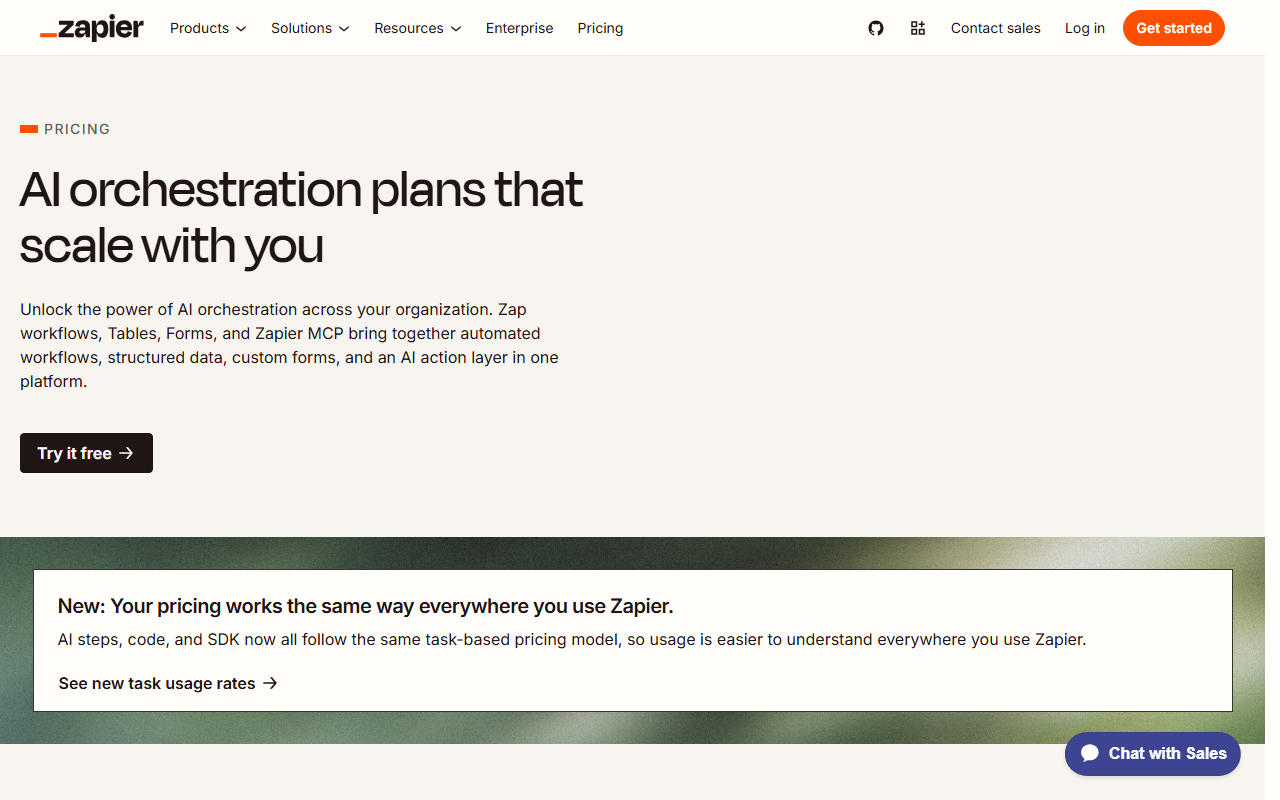
The old rule of thumb, one action equals one unit, no longer holds on Zapier once an AI step is involved. Zapier's task usage rates page sets the schedule.
| Step type | Zapier cost |
|---|---|
| Standard app step | 1 task |
| Filter, Formatter, Path, Delay, Tables, Forms | 0 tasks |
| AI step, standard model | 1 task |
| AI step, advanced model | 3 tasks |
| AI step, premium model | 5 tasks |
| Zapier MCP tool call | 2 tasks |
Make works differently. Its plans are sized in credits per month, and each tier shows a per-1,000-credit rate:
| Make plan | Monthly price | Per 1,000 credits |
|---|---|---|
| Free | $0 | 1,000 credits included |
| Core | $9 | $0.90 |
| Pro | $16 | $1.60 |
| Teams | $29 | $2.90 |
Those figures are the prices Make shows at the 10,000-credit tier, and the page also tags a 15% saving on annual billing. Zapier shows a similar toggle, with its yearly option marked as saving 33%, so check which billing mode is selected before comparing any two numbers.
Here is the arithmetic worth running before you choose, using an assumed four-step lead flow and 500 leads a month. That is 2,000 standard Zapier steps, or about 2,000 tasks, and an AI drafting step on a premium model adds 2,500 more.
On Make the same four modules cost about four credits a run, so 2,000 credits, comfortably inside a 10,000-credit plan. The assumption is the point: the cost gap shows up at the flow-design stage, not on the sales page, and it is worth five minutes of arithmetic before you pick a platform.
Two cheap habits cut the bill on either platform:
- Put the filter first. Zapier's Filter step costs 0 tasks, so rejecting a bad lead before any paid step runs saves every downstream task.
- Use the smallest model that can do the job. Classification and extraction fit the standard tier at 1 task, while a premium model costs five times that for the same sorting job.
Data handling, security and who sees your records
Automation moves customer data between systems, so the platform becomes part of your data path. Zapier lists SAML single sign-on on the Team plan and advanced admin permissions on Enterprise. Notion says its audit log now includes Custom Agent activity, available on Enterprise, so a security team can see when an agent ran and what it changed.
Before connecting a CRM or inbox, ask these questions of any platform:
- Which plan holds the controls you need, such as single sign-on or an audit trail?
- Does an AI step send record contents to a model provider, and can you bring your own model account?
- Who in your team can see a connection's credentials once it is shared?
Zapier's rates page notes you can connect your own model provider account and pay that provider directly, which is the cleaner answer when contracts restrict where data goes. Treat any of this as a prompt to read the vendor's trust page, not a substitute for it.
Build in this order, or redo the work later
Time gets wasted in one specific way: opening the tool before the logic on paper is settled. Skip that step and an hour vanishes into a flow that misfires because a trigger was defined loosely, not because the platform is broken.
- Write the flow on paper: one sentence for the trigger, one for each gate, one for each output.
- Build the smallest version that could work, one instance of each part, and test it on real data.
- Require a human to approve the first ten runs of anything that emails a customer or edits a record.
- Check the results weekly for a month, then let it run unattended.
Most flows need one or two small corrections early on. Three mistakes account for most of the rework:
- Automating a broken process. A flow repeats whatever the manual process does, including its errors, so fix the process on paper first.
- No owner. Every flow needs one named person who reads its error emails, or a silent failure runs for weeks before anyone sees it.
- No off switch. Keep a single place where you can pause everything that emails a customer, and test that it works before you need it.
That discipline is dull, and it is what separates a flow that quietly saves an hour a day from one that quietly embarrasses you in front of a client. If you would rather get a shortlist matched to your own task than read five vendor pages, Smart Match asks a few questions and narrows the directory for you.
Who should skip rigid automation and stay with an agent
The obvious objection to all of this is that agentic tools like Notion's External Agents make the trigger-condition-action model obsolete. Why write conditions by hand when you can hand a ticket to an agent and let it figure out the steps?
That argument holds for genuinely open-ended work: research, a messy migration, a task whose steps you cannot list in advance. If you cannot write the flow on paper, an agent is the better fit, and the agentic AI roundup covers the options.
It does not hold for repeatable work. The value of the five use cases above comes from the same input producing the same output every time, with no variance a client or a finance team would want to see.
An agent that reasons freshly about lead qualification on every run is slower and costs more than a condition that checks three fields, and under Zapier's schedule a premium-model step costs 5 tasks where a filter costs none. Structure decides what should happen automatically, and an AI step handles the one piece inside it that needs judgment. Picking the model for that step is its own question, covered in the guide to choosing the right LLM and the chatbot roundup.
What would change the verdict
Three things would change the advice on this page:
- Zapier changes its AI task rates. Its page says rates may change and that changes will be announced first. A cut to the premium-model rate would narrow the cost gap with Make.
- Notion's agents prove reliable on repeatable work. Today they are new. If a team can show an External Agent running a lead flow for a quarter without supervision, the case for a rigid flow weakens.
- Your volume crosses a tier. A flow that is cheap at 500 runs a month can be the largest line in the automation bill at 50,000, and at that point self-hosting an engine such as n8n deserves a real comparison.
Where to start
Pick the single task from your audit with the clearest shape and the highest frequency, and build only that one. Let it run two full weeks before touching anything else, and track the hours it actually gives back against the hours it cost you to build and fix. Only then move to the second flow.
Teams that stick to that order tend to have several flows live inside a month, each later one quicker to build than the last. The real constraint in most small operations was never the core work. It was the accumulated weight of repetitive tasks sitting around it. Browse the full guides library for the next step, or start from the tools directory.
Frequently asked questions
What is the easiest way to automate repetitive tasks without coding?
Use a no-code platform such as Zapier or Make, both of which connect apps through a visual builder. Before opening either tool, map the automation as a trigger, a condition and an action. Then build the smallest version that works and test it on real data before adding steps.
What is the trigger-condition-action automation model?
It is the structure behind every automation. The trigger is the event that starts the process, such as a form submission. The condition is the filter that decides whether that instance deserves a response. The action is what happens once the condition passes, such as creating a record or sending a message.
How does Zapier charge for tasks in 2026?
According to Zapier's task usage rates page, a standard app step uses 1 task and built-in tools such as Filter, Formatter, Paths and Delay use none. AI steps use 1, 3 or 5 tasks depending on whether the model tier is standard, advanced or premium. The Free plan includes 100 tasks a month, and Professional is listed from $19.99 a month.
How does Make charge for automation?
Make bills in credits, and its pricing FAQ says most actions consume one credit each. The router and error-handler modules cost nothing. At the 10,000-credit tier Make lists Core at $9, Pro at $16 and Teams at $29 a month, with a free plan of 1,000 credits.
Can Notion run automations the way Zapier or Make can?
Partly. Notion's July 1, 2026 release added External Agents, with Claude and Cursor as the first two, which a team can assign tasks from a shared board. That suits open-ended tickets, while repeatable flows with fixed rules are still cheaper and more predictable on a rule-based platform.
Covered in this guide
- Make: No-code visual automation platform to connect apps and build AI workflows at scale
- Zapier: The automation layer for agentic AI connecting 8,000+ apps
- Notion: Your AI everything app: All your tools and work in one unified workspace.
- Bardeen: Find and reach leads no one else can with agentic web scraping, AI qualification, and contact enrichment.
- ChatGPT: ChatGPT is OpenAI's AI assistant, with 1.2 billion weekly users by OpenAI's count, the GPT-6 model family and plans that run from a free tier to a premium Pro tier.
- Claude: Claude is Anthropic's AI assistant, with a free tier, paid personal plans, and Team and Enterprise seats. Opus access starts at the first paid plan.
- Clay: AI go-to-market platform with waterfall data enrichment and Claygent AI research agents, with plans from free to enterprise.
- Cursor: Cursor is an AI code editor built on VS Code, widely adopted across large enterprise engineering teams, with Agent Mode, Tab completion, and Cloud Agents.
- Gemini: Google's multimodal AI assistant and model family, sold as a free app, tiered subscriptions and a pay-per-token API
- Gong: Revenue intelligence platform with conversation AI, call analysis, and AI agents for sales coaching and forecasting for 4,500+ companies.
- HubSpot: HubSpot is an all-in-one CRM and marketing platform used by 288,706 customers, now with Breeze AI agents for prospecting, content, and customer support.
- IFTTT: Automate anything by connecting your favorite apps and devices
- Lindy: AI teammate that handles email, meetings and workflows across 1,000+ apps; no free plan, just a 7-day trial then per-seat billing.
Sources
Still deciding?
This guide covers a handful of options. Smart Match checks every listing in the directory against how you actually work and what you can spend, then hands you the shortlist and the reason behind each pick.
Find your toolsRelated guides
- Two Kinds of Picture: How HokAI Illustrates Its GuidesInside HokAIHow the directory works, verified in the open
- The AI 80s Photo Trend: How to Make Yours (and Turn It Into a Video) in 2026AnalysisWhat changed and who it affects
- AI Development Services in 2026: Which Layer You Actually NeedBuyer's guideHow to pick, across a category
- The AI Tool Ecosystem in 2026: Buy the Meter, Not the CategoryBuyer's guideHow to pick, across a category
- Apollo.io Alternatives in 2026: Pick by the Job You Hired Apollo ForBuyer's guideHow to pick, across a category
- Apollo vs Clay: Which One Should You Buy First?ComparisonHead-to-head, with a verdict