Best AI for Translation in 2026: Four Jobs, Not One Tool
The best AI for translation depends on the job: DeepL for text and documents (from €7.49/month, free tier available), Google Lens for free live camera and visual translation, Crowdin for continuous software/app localization workflows built on top of engines like DeepL, and Translate.video or UnmarkAI for dubbing spoken video into other languages.
The short version
AI translation isn't one product category. DeepL leads on text and documents, Google Lens is the free default for live/visual translation, Crowdin orchestrates software localization workflows (it doesn't translate itself), and Translate.video or UnmarkAI handle dubbing spoken video, each gating their free tier differently.
In September 2026, DeepL, Google Lens, Crowdin, Translate.video and UnmarkAI all rank under a "best AI for translation" search. Only one of them, DeepL, is actually a translation engine you'd compare head to head with another translation engine.
The other four solve four different problems that happen to involve moving words between languages. A support lead translating a help-center article, a product manager localizing app buttons, a founder dubbing a demo video into Spanish, and a traveler pointing a phone camera at a menu are not shopping for the same tool, even though they typed a nearly identical query.
Here is the short version. Static text and documents go to DeepL. Live and visual translation, the kind you'd use once and never pay for, goes to Google Lens. A software product that ships new strings every sprint needs Crowdin's workflow, not a one-off translation. Spoken video needs a dubbing tool, and the two catalogued here price and gate their free tiers very differently. Get the job right first, and the vendor choice mostly picks itself.
How to choose the right AI translation tool for your job
Ask what you're actually translating before you ask which vendor is "best." Four questions do most of the sorting:
- Is the source text static, or does it change every week?
- Is the content written or spoken?
- Do you need this once, or continuously?
- Is this a support or documentation workload specifically?
A one-time document (a contract, a whitepaper, a support ticket) is a single translation job. A product's UI strings, changing with every release, is a translation workflow problem, and a plain translation engine will not manage that for you on its own; that is what software localization tools exist for.
Text and documents are DeepL's and Google Lens's territory. Spoken video needs a dubbing pipeline that separates voice from background audio, times the new voice track, and optionally clones the original speaker's voice, closer to what our AI video editing guide covers than to a text translator.
A traveler or a one-off document doesn't need a subscription. A company shipping a product into new markets every quarter does, and the cheapest per-task tool is usually the most expensive choice once you count the time spent re-doing the same integration by hand, the same lesson our guide to automating repetitive work with AI makes about workflow tools generally.
Multilingual customer support has its own tooling question, separate from translating a one-off document; our AI customer support guide covers the platforms built around that job.
If your team is comparing AI vendors more broadly, not just for translation, Smart Match matches the requirement to the catalog instead of asking you to read five more listicles like this one.
The shortlist, by job
| Job | Tool | Starting price | Free tier that's actually usable |
|---|---|---|---|
| Text and documents | DeepL | €7.49/mo (Individual, billed annually) | Yes, 50,000 characters/month |
| Live and visual translation | Google Lens | Free | Yes, no paid tier exists |
| Software and app localization | Crowdin | Usage-based, quote required | 14-day trial only, no permanent free tier |
| Dubbing spoken video, budget | Translate.video | $9/mo (Basic) | No, 0 minutes allocated |
| Dubbing spoken video, cleanup + dub | UnmarkAI | $9.90/mo (Starter, 300 points) | No, 10 points covers the first 30 seconds only |
Text and documents: DeepL sets the bar
DeepL is the one tool on this list built purely as a translation engine, verified on DeepL's own pricing page in September 2026.
Four tiers run billed annually: Individual at €7.49/month with 300,000 characters and 3 file translations a month, Team at €24.99 per user with 1,000,000 characters and team administration, Business at €49.99 per user with unlimited characters and translation memory included, and a custom Enterprise tier with a 99.9% availability commitment.
The free plan, separate from all four, allows 50,000 characters a month, one file translation, and a five-term glossary per language pair. That's genuinely enough to translate a handful of real documents before you'd need to pay, unlike most of the other tools in this piece.
DeepL covers document formats directly (PDF, Word, PowerPoint, Excel), offers an API for developers, and supports glossaries and translation memory so repeated terms stay consistent across a project. What its own pricing page does not offer is a quantified accuracy claim. DeepL markets itself as "market-leading quality" without publishing a benchmark score, so treat any specific percentage you see elsewhere as third-party, not vendor-confirmed.
If your work is mostly writing rather than translating, and you're deciding between an AI writing assistant and a pure translator, our AI writing assistant guide covers that adjacent decision. DeepL is not trying to draft your copy, only carry it between languages.
Live and visual translation: why Google Lens is the free default
Google Lens translates text in real time from over 100 languages, verified directly on Google's own product page in September 2026.
Point a phone camera at a menu, a sign, or a document, and the translated text overlays the original. It works inside the Google app on Android and iOS, inside Google Camera and Google Photos, and inside Chrome for text on a webpage. There is no paid tier, no subscription, and no character limit published anywhere.
This is the job most "best AI translation" articles bury under general-purpose tools, but it's arguably the most common one: a person who needs to read something in another language once, right now, and never again. Paying a subscription for this job, when DeepL or any other paid translation tool could handle it, is money most people don't need to spend.
Our AI search engines guide covers Google Lens as part of a wider look at free Google AI tools, if that's the comparison you're actually making.
Software and app localization: Crowdin orchestrates, it doesn't translate
This is the distinction most buyers miss, and it's the one this article exists to make clear.
Crowdin is not a competing translation engine. Its own pricing page, read directly in September 2026, describes its AI translation feature as running through "AI Translation (e.g., DeepL, Google Translate)." Crowdin plugs an external engine into a workflow; it doesn't ship its own.
What Crowdin actually sells is the workflow around that translation. That includes a project structure for source strings, translation memory and glossary tools, an online editor for human review, quality-assurance checks, and over-the-air content delivery for mobile apps. More than 700 integrations let a new UI string flow from your codebase to a translator and back, without anyone manually exporting a spreadsheet.
That makes Crowdin the right buy only if you're shipping software with strings that change on every release.
A one-time document translation does not need a workflow tool at all. It needs a translation, which is DeepL's job, not Crowdin's.
Crowdin does not publish flat per-tier prices on its pricing page. The page instead defines cost by "hosted words" (words to be translated multiplied by target languages), and the exact figures live behind a calculator rather than a static table. A 14-day free trial covers the Team plan; Enterprise gets a 30-day trial of Business-plan features. Neither is a permanent free tier, the same pattern our checklist for verifying any AI vendor's pricing flags across categories that hide numbers behind a sales call.
Dubbing spoken video: Translate.video and UnmarkAI
Spoken video is its own job. It needs tools that separate voice from background audio, retime the new language track to match mouth movement, and optionally clone the original speaker's voice rather than replacing it with a generic narrator, the same production concerns covered in our guide to AI video generators.
**Translate.video**, verified on its own pricing page in September 2026, splits into four tiers:
| Plan | Price | Languages | Lip sync included |
|---|---|---|---|
| Free | $0/mo | 2 | 0 minutes |
| Basic | $9/mo (down from $29) | 2 | 0 minutes |
| Pro | $99/mo | 81 | 10 minutes |
| Premium | $299/mo | 81 | 30 minutes |
Voice cloning is included on every tier. Language coverage is the real gate: Free and Basic are capped at 2 languages, while only Pro and Premium include the full 81-language library. Extra lip-sync minutes beyond the plan allowance cost $3 to $5 each. The Free plan carries zero minutes of dubbing, captioning, or export allowance, which makes it a demo rather than a usable free tier.
**UnmarkAI** does a related but different job. It cleans a video first, removing burned-in captions, timestamps, and on-screen text, then reconstructing the frame behind them, before translating subtitles and dubbing the result.
Its pricing, read live from its own pricing page in September 2026, runs on a points system rather than flat monthly minutes:
| Plan | Price | Points |
|---|---|---|
| Starter | $9.90/mo | 300 |
| Creator | $19.90/mo | 1,000 |
| Pro 10,000 | $159/mo | 10,000 |
| Pro 50,000 | $759/mo | 50,000 |
| Team Starter | $69/mo | 3,000 (shared) |
A free tier exists on paper: ten points covering the first 30 seconds of a clip. Text cleanup alone costs 5 to 10 points per 30 seconds, so the free allocation does not survive a single real edit.
If video is your main content format rather than a one-off dubbing job, our AI video editing guide and our guide to creating images and video with AI cover the wider category these two tools sit inside. And if the video you're localizing is long-form, a podcast or a YouTube upload rather than a short clip, our guide to summarizing YouTube videos and podcasts with AI covers the adjacent job of getting the source content down to something worth dubbing in the first place.
What it actually costs across all four jobs
The headline price on a pricing page is rarely the number you'll actually pay. That's the same problem our pricing-verification checklist exists to catch across every AI category, not just translation.
Three costs are easy to miss here specifically.
DeepL's advertised rate is the annual price. Monthly billing costs more per month, the same pattern AI app builders with published pricing has to account for in a completely different category.
Crowdin's cost scales with hosted words times target languages, so adding a fifth market can cost more than doubling your source content in one language.
Both dubbing tools charge extra for the specific feature that makes dubbing convincing: lip sync. Budget for the add-on minutes, not just the base plan, before you commit to either.
A "free tier" can also change under you after you've already built a workflow around it. Qodo's decision to drop its permanent free tier the same month it open-sourced a different product is a reminder that a free plan is a business decision a vendor can reverse, not a fixed feature of the product.
Who should skip AI translation tools entirely
If you need legally binding, certified, or diplomatic-grade translation, none of the five tools here are built for that. You need a human certified translator, full stop, and every vendor in this piece would tell you the same thing if you asked their support team directly.
If your translation volume is a handful of sentences a month, Google Lens or a general chatbot covers it for free, and a paid subscription to anything else is money you don't need to spend.
And if you're translating between two languages that DeepL, Google Translate, and Google Lens all cover thinly (some lower-resource languages still have weak coverage across every mainstream engine), a specialist agency or a language-specific model will outperform any of the generalist tools named here.
The same logic applies one level up the stack: don't buy a dedicated tool for a job a platform you already pay for does adequately. A team already running an AI customer support platform or an AI chatbot may find multilingual replies are already included, which makes a separate translation subscription redundant for that specific workload even though it's still worth paying for elsewhere in the business.
What happens to your data
Pasting a client contract or unreleased product copy into a translation tool is still sending that text to a third party, and the terms differ by vendor.
DeepL's paid Business and Enterprise tiers are built around not using customer text to train models, the standard enterprise ask. Verify the exact retention terms for your tier before sending anything under an NDA, since free and lower tiers can carry different terms than the enterprise plans do.
Crowdin's workflow tools mean your source strings live inside its platform continuously, not as a one-off upload, so its access and retention policies matter more than a single-use tool's would.
For a one-off document you can't risk exposing, translating a redacted version, or using a tool with a written zero-retention guarantee for your specific plan, costs less than a breach does. The same caution applies to any AI content workflow that touches unreleased material, not just translation specifically.
The case against this four-way split
The strongest objection to organizing translation by job is that general-purpose AI chatbots increasingly do a competent job of translation without needing any dedicated category at all. You can paste a paragraph into a chatbot like the ones covered in our AI chatbots guide and get a reasonable translation for free, no dedicated tool required.
That's a fair point for casual, low-volume text, and it's part of why Google Lens's live-camera use case has largely taken over the market for one-off phrase lookups that used to go to a dedicated app.
But the chatbot answer breaks down exactly where the job-based split matters. A general chatbot doesn't manage glossaries across a thousand-document project the way DeepL's translation memory does. It doesn't wire a translation into a release pipeline the way Crowdin's 700-plus integrations do. And it doesn't separate a speaker's voice from background music or time a dub to lip movement the way a dedicated video tool does.
"Good enough for one paragraph" and "good enough for a product localization workflow shipping every two weeks" are different bars. The tools that clear the second one are the ones worth paying for, the same distinction our guide to AI content creation tools draws between a quick draft and a repeatable production line.
What would change this
This breakdown holds only as long as no single vendor credibly does all four jobs at once.
Crowdin already hints at where that could go. If DeepL or Google shipped a first-party localization workflow layer, with the glossary and release-pipeline integrations Crowdin currently owns, the reason to run two separate subscriptions would disappear.
On the video side, if a dubbing tool matched DeepL's text accuracy while keeping a genuinely usable free tier, that would collapse the current split between translating the words and translating the speech.
Neither has happened as of September 2026. Until it does, matching the tool to the job beats picking one brand and hoping it covers everything.
The fastest way to waste money in this category isn't picking the wrong vendor. It's paying for a translation workflow tool to do a one-off job, or a one-off tool to do a job that repeats every sprint.
Translation, localization, and dubbing aren't the same purchase
It's worth saying plainly, since vendors rarely do: "AI translation," "AI localization," and "AI dubbing" are three different purchases wearing one marketing label, and this guide has covered all three under a single search query because that's how people actually search.
DeepL is translation: words in, words out, in a different language. Crowdin is localization: the ongoing pipeline that keeps a shipping product's strings translated as they change, built on top of a translation engine rather than replacing one. Translate.video and UnmarkAI are dubbing: replacing spoken audio, not just subtitling it, which is a harder and more expensive problem than either translation or localization alone.
If you only remember one thing from this piece, remember which of those three purchases you're actually making before you compare a single price across all five tools. A $9-a-month dubbing plan and a $7.49-a-month translation plan are not competing for the same budget line, no matter how similar they look on a comparison table.
Further reading on the adjacent decisions
A few of the adjacent decisions above are worth their own read if they're also open questions for your team. Our AI writing assistant guide covers general-purpose writing tools, separate from translating existing text. Our AI search engines guide covers free alternatives to a plain Google search, the same free-by-default territory Google Lens occupies here. Our AI video generators guide covers video creation beyond dubbing an existing clip, and our AI chatbots guide covers the general-purpose assistants this piece's turn section already leaned on.
For pricing transparency specifically, our AI app builder pricing guide covers the same free-tier-that-isn't pattern in a different category entirely. Our pricing-verification checklist is the general-purpose version of the same four-minute audit this piece just ran on five translation vendors. And if translation is just one line item inside a larger AI buying decision, Smart Match handles the rest of that comparison.
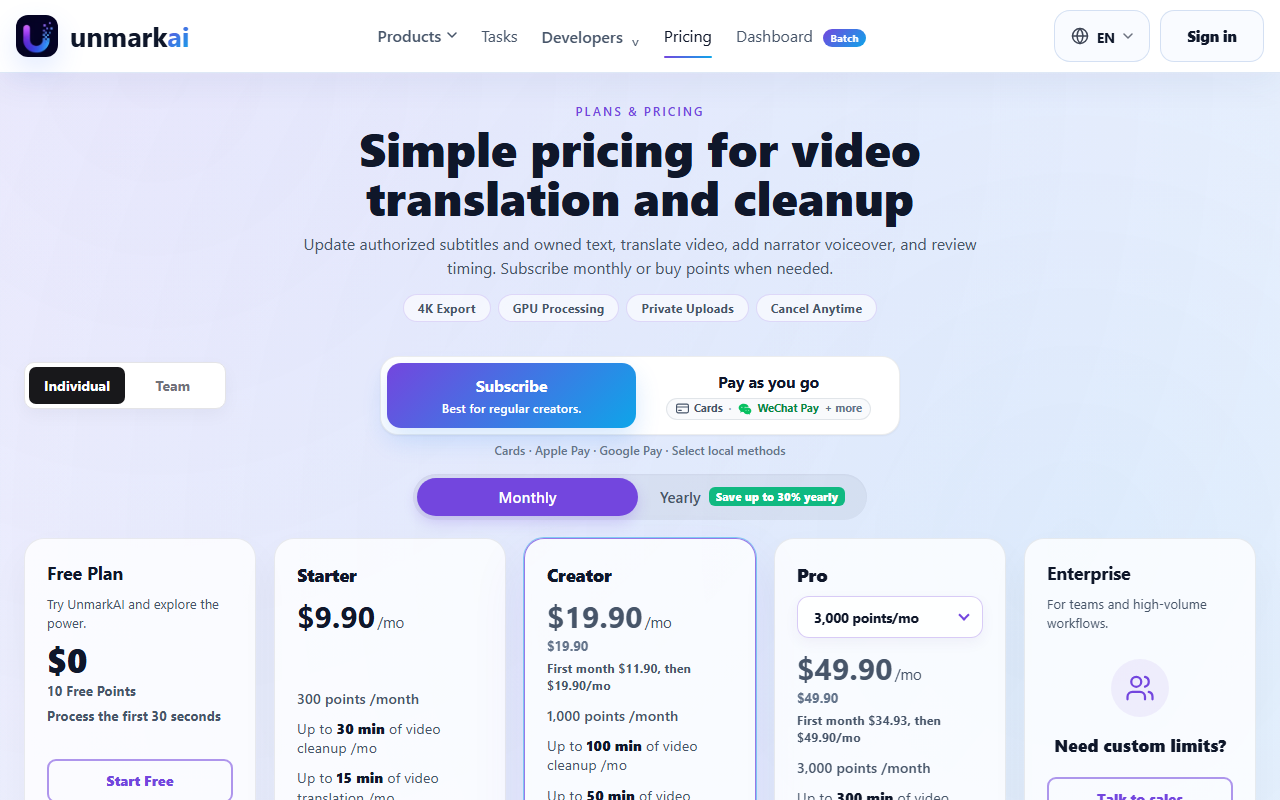 UnmarkAI prices by points rather than flat minutes, captured 22 Sep 2026. The Free plan's 10 points cover roughly 30 seconds of a real edit, and Starter starts at $9.90/month for 300 points.
Frequently asked questions
What is the best AI for translating documents?
DeepL is the best AI tool specifically for translating documents in 2026. It handles PDF, Word, PowerPoint, and Excel files directly, supports glossaries and translation memory for consistency across a project, and its free tier (50,000 characters, one file translation, one glossary per month) is enough to test real documents before paying.
Is Google Translate or Google Lens better for quick translation?
Google Lens is built for live, visual translation: point a camera at a sign, menu, or document and see the translation overlaid in real time, across more than 100 languages, for free on Android, iOS, and Chrome. It's the better fit for one-off, in-the-moment translation rather than translating written documents at your desk.
Does Crowdin have its own AI translation engine?
No. Crowdin's own pricing page describes its AI translation as running through external engines like DeepL and Google Translate. Crowdin's actual product is the localization workflow around that translation: project structure, glossaries, an online review editor, and over 700 integrations that route new software strings from your codebase to translation and back.
What's the best AI for translating and dubbing a video?
Translate.video and UnmarkAI both dub spoken video into other languages with voice cloning. Translate.video starts at $9/month but caps free and Basic plans at 2 languages, with the full 81-language library included only from the $99/month Pro plan up. UnmarkAI additionally cleans burned-in captions and on-screen text before dubbing, priced on a points system starting at $9.90/month for 300 points.
Are any of these AI translation tools actually free to use?
Google Lens is fully free with no paid tier. DeepL's free tier (50,000 characters/month) is genuinely usable for casual document translation. Crowdin, Translate.video, and UnmarkAI all advertise a free tier or trial, but each is capped tightly enough (a 14-day trial, 0 usable dubbing minutes, or 10 points covering 30 seconds of video) that it functions as a demo rather than a working free plan.
Covered in this guide
- Crowdin: Crowdin localizes apps via 700+ integrations with AI translation. Free for open-source; plans from $50/month.
- DeepL: AI translation platform for text, documents and voice, with 134 languages listed in its API docs. Trusted by 200,000+ businesses. Free tier available; paid plans from $8.74/month billed annually.
- Google Lens: Google's AI-powered visual search tool that identifies objects, translates text in 100+ languages, matches products against the Shopping Graph, and provides homework help. Free on Android, iOS, and Chrome, with a Windows desktop app that launched in 2026.
- Translate.video: AI video dubbing and translation tool with voice cloning and lip sync in 81 languages, from $9/mo, used by 250,000+ creators.
- UnmarkAI: AI video cleanup and localization platform: erases hardcoded captions, watermarks and objects, then dubs footage into 20+ languages via web app or API.
Sources
Still deciding?
This guide covers a handful of options. Smart Match checks every listing in the directory against how you actually work and what you can spend, then hands you the shortlist and the reason behind each pick.
Start Smart MatchRelated guides
- Best AI Search Engines in 2026: 6 Free Alternatives to GoogleBuyer's guideHow to pick, across a category
- Best AI Search Tools in 2026: Match the Tool to the JobBuyer's guideHow to pick, across a category
- Best AI Writing Assistant in 2026: How to Actually ChooseBuyer's guideHow to pick, across a category
- Copy.ai vs JetWriter AI in 2026: They're Not Actually CompetingComparisonHead-to-head, with a verdict
- The Top AI Tools in 2026: How to Actually Choose OneBuyer's guideHow to pick, across a category
- Gemini Hit a Billion Users. Then Google Shipped a Different One.AnalysisWhat changed and who it affects