Best AI Email Assistants in 2026: Inbox Zero Without Giving Up Control
An AI email assistant is software that sorts, summarizes or drafts mail in Gmail or Outlook. In November 2026 prices run from $3.49 a month for SaneBox to $37 for Fyxer Pro. Most tools draft and leave sending to you; only a few offer to send unasked.
The short version
Pick an AI email assistant by what it may do alone, then by price. Fyxer drafts in Gmail and Outlook but cannot send. Gemini in Gmail costs $7 on Workspace. SaneBox sorts for $3.49 without reading bodies. Agents like Town and Lindy act, so set approvals.
Want this decided for your own case? Find your tools with Smart Match, starting from this guide's question.
Fyxer will draft your replies but cannot send one, while Superhuman's own product page says its AI can send fully written emails for you if you let it.
That single difference decides more than any feature list. Control is the product. Nine products now sell themselves as an AI email assistant, from a $3.49 monthly sorter to a $199 text-message agent.
They separate on three questions: what the tool reads, what it may send without asking, and which inbox it lives in. This guide ranks them for someone who keeps Gmail or Outlook, has no wish to move to a new mail client, and wants fewer hours inside the inbox without handing software the power to send something embarrassing in their name.
Prices here come straight from vendors' pricing pages, opened on 5 November 2026. Hokai ran no product against a test inbox, so the ranking rests on what the vendors document, what they charge and what they say they read. Where a page is silent, the guide says so.
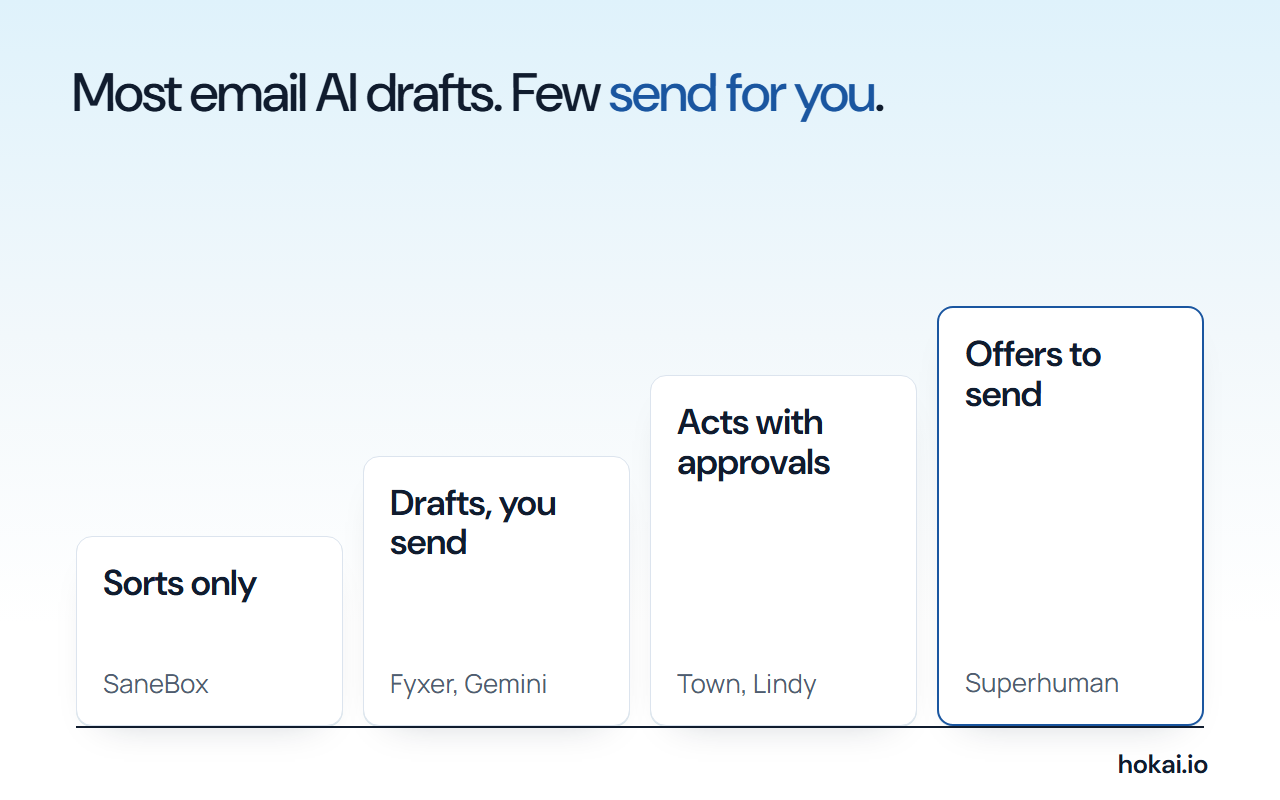 Hokai's ladder of email authority, built from each vendor's pricing and help pages as read on 5 Nov 2026.
- AI email assistants compared
- 9
- Gmail, Outlook or both
- Cheapest paid plan
- $3.49
- SaneBox Snack, billed monthly
- Highest entry plan
- $37
- Fyxer Pro, billed annually
How to choose an AI email assistant: four tests
Run these in order. The first two remove most of the field in a minute. The last two decide between whatever is left, and they are where the money goes.
- Reach. Which inbox do you live in? Gemini in Gmail works only in Gmail, and Copilot in Outlook works only in Outlook.
- Authority. What may the tool do alone: sort mail, draft replies, send them, or act across other apps? Most of this list drafts and stops there.
- Reading. Does it see headers, whole messages or attachments, and does the vendor say it never trains on your mail?
- Meter. Is the price a flat seat, or credits that run out? Lindy's monthly credits do not roll over, and Fyxer's Free plan gives no drafts at all.
Reach comes first because it is the cheapest test. The table below shows what each vendor's pages say about the two big inboxes.
| Tool | Gmail | Outlook |
|---|---|---|
| Fyxer | Yes | Yes |
| Gemini in Gmail | Yes | No, Gmail only |
| Superhuman | Yes | Yes |
| Shortwave | Native | Only via a linked Gmail account |
| Copilot in Outlook | Not documented | Yes |
| SaneBox | Not checked | Not checked |
| Town | Yes | Listed as an integration |
| Lindy | Chrome extension in Gmail | Not checked |
| Poke | Yes | Yes |
If you would rather not read nine pricing pages, Smart Match asks about your inbox and budget and narrows the field. The sections below give the evidence behind each pick.
The shortlist: nine tools ranked by who they fit
The order reflects how many readers each tool fits without a catch, not how many features it lists. The table gives each tool's cheapest paid plan, and a later section explains the billing basis.
| Rank | Tool | Best for | Cheapest paid plan |
|---|---|---|---|
| 1 | Fyxer | Replies in your voice, Gmail or Outlook | $37 a month, annual |
| 2 | Gemini in Gmail | Gmail users who already pay Google | $7 a month, Workspace Starter |
| 3 | Superhuman | A fast client for teams | $25 a month, annual |
| 4 | Shortwave | Gmail power users who want AI search | $30 a month |
| 5 | Copilot in Outlook | Microsoft 365 companies | $18 a month, add-on |
| 6 | SaneBox | Cleanup without AI reading bodies | $3.49 a month |
| 7 | Town | An assistant that triages and schedules | $15 a month |
| 8 | Lindy | Building your own inbox workflows | $29.99 a month |
| 9 | Poke | Email through text messages | $19 a month |
Fyxer ranks first because it covers both inboxes, drafts in your voice, and says plainly that it cannot send. Poke ranks last for a simple reason. The pages read for this guide do not say whether it sends anything unasked.
Fyxer drafts in your voice and cannot send, which is the point
Fyxer's pricing page lists a Free plan, a Pro plan and a Team plan. Pro is $37 a person a month billed annually, or $49 month to month.
Team is $64 annually and $99 monthly. Enterprise is quoted by sales.
The Free plan matters less than it looks. Check the fine print. It gives 400 credits a month and audio meeting notes, but no automatic reply drafts and no inbox sorting. Drafting starts at Pro. A 14-day trial of the Team plan comes with signup.
Pro includes unlimited credits for the first three months as a launch offer, then 3,000 credits a month. Sorting costs one credit per five emails. A person who gets 100 emails a day receives about 3,000 a month, which uses 600 credits on sorting alone, a fifth of the Pro allowance. Chat messages draw on the same pool.
The control question has a flat answer. Fyxer's FAQ says it does not send on your behalf. It drafts replies in your inbox and you press send. For anyone who has been burned by an auto-reply that went to the wrong thread, the wrong client or the wrong tone at the wrong hour, that design makes it the safest draft-first option on this list.
One seat covers both providers, since Fyxer counts a person who links Gmail and Outlook as a single paid member, which matters for consultants who keep a client's Outlook account beside their own Gmail. The caveat is the meter. When credits run out, Fyxer says sorting pauses first.
Gemini in Gmail is the cheapest route if you already live in Google
Gmail's AI features sit inside the mail you already use. Google's Gmail help page lists thread summaries, Help me write, Suggested Replies, an AI Inbox briefing and a Gemini side panel that summarizes and drafts, and it splits availability by plan, language and country in a table that most buyers will never open before they pay. Read it first.
For paying customers, Google's Workspace pricing page puts the Gemini assistant in Gmail on the Business Starter plan. That costs $7 per user a month on a one-year commitment.
Standard is $14 and Plus is $22.
New customers can get 40% off for the first 12 months, which brings Starter to $4.20. The offer covers only the first 20 users. A 14-day trial is free.
Availability is the catch. Google's own help page says some features are limited to the US for personal Gmail accounts without a paid plan, and AI Inbox is listed as English and US only. AI Overview in Gmail search is not offered to personal accounts in the European Economic Area, the UK, Switzerland or Japan.
No feature on that page sends mail on its own. Good. Reach is also narrow, because this is a Gmail tool and nothing else. For how the model underneath compares with rivals, see our ChatGPT vs Gemini comparison.
Superhuman and Shortwave are fast inboxes with AI built in
Superhuman sells Starter at $25 per member a month billed annually. Business is $33, with 15% off for teams of five or more. Auto drafts, Ask AI, custom auto labels, CRM integrations and an MCP server are Business-only.
Its product page says the Email Assistant works inside Gmail or Outlook. It also says the AI drafts, and "if you want" sends, fully written emails for you.
Investors noticed. In a report dated 5 October 2026, a16z said Superhuman, formerly Grammarly, debuted at number four in its first ranking by consumer card spending, using YipitData's US panel of card transactions, which a16z itself warns should not be read as total company revenue.
Shortwave takes a different route. Its pricing page lists Business at $30 and Premier at $45 per seat.
Max is $120. Business includes five years of AI search history and 50 threads per AI search, while Max raises that to 150 threads. A 14-day trial is free.
Shortwave says it is CASA Tier 2 compliant and that no third-party language model is trained on your data. Both products show you when a recipient opens your mail. Shortwave also lists a setting that stops senders tracking you. Its automatic drafting comes through a sister product, Tasklet.
Copilot in Outlook only makes sense inside Microsoft 365
On its consumer Outlook page, Microsoft says Copilot summarizes long threads, drafts replies and marks high and low priority mail based on your role and preferences. It runs in Outlook.com, Outlook for Windows and Mac, and the iOS and Android apps.
For companies the price is a stack, and you should add the layers before you compare it with anything else here. Microsoft's business page lists the Copilot Business add-on at $18 per user a month paid yearly, down from $21 under an offer that runs from 1 July to 31 December 2026. It applies to the first year only, needs an eligible Business plan underneath, and requires an annual commitment.
Bundles cost more. Business Standard with Copilot is $23.50 and Business Premium with Copilot is $32. Some advanced AI features are billed by usage on top.
The page names Enterprise Data Protection as part of the add-on. It does not say whether Copilot sends mail unasked, and this guide found no statement either way. The Microsoft company page lists the rest of the product family.
For anyone on Gmail the answer is simple. Skip it. Not one Microsoft page read for this guide suggests it works there.
SaneBox sorts mail without reading it
SaneBox is the odd one out because it writes nothing. It moves mail into folders such as SaneLater, SaneNews and SaneBlackHole, sends a daily digest, and leaves the replying, the tone and the decision to send entirely to you. Its help center says it does not access the body or attachments of your mail by default, and that its terms prohibit human access to message content.
Most features need only headers. The exception is SaneAttachments with cloud storage, which needs temporary access to attachment data.
Pricing is the lowest on this list, by a distance. Billed monthly, Snack is $3.49 for one account and two features. Lunch is $5.99 for two accounts and six features per account.
Dinner is $16.99 for four accounts with every feature.
Billed every two years, Snack falls to $2.04 and Lunch to $3.50.
Dinner falls to $9.96. A 7-day trial includes all features. Treat these as dated readings, since the rate moves with the billing term you pick. The wider business agents category shows which neighbouring tools Hokai tracks.
Town, Lindy and Poke act for you, so approvals matter
These three are assistants rather than inbox tools. a16z lists Poke, Lindy and Town among agents that report hundreds of thousands of users. Our guide to what personal agents can do without asking covers the permission model in depth. The best personal AI agents guide ranks the wider field.
Town has a Free plan with 30 chat messages a month and a 7-day Pro trial. Starter is $15 a month billed monthly and adds inbox triage, drafts and scheduling.
Pro is $49 a month per user billed annually. Power is $99.
Its homepage says nothing you connect trains a model by default and that it holds SOC 2 Type 2, and its own examples show it drafting a reply that offers two open times from your calendar, and, in a separate example, waiting for approval before it moves a meeting.
Lindy gives new accounts $50 in free credits that last 7 days. Paid credit plans start at $29.99 a month for 3,000 credits, billed per active user, and unused credits expire. A simple ask such as drafting a reply costs between 2 and 250 credits, so 3,000 credits buys 12 asks at the top of that range and 1,500 at the bottom.
The page lists drafting in your voice, two to five connected inboxes depending on plan, and approvals built in.
Poke is free to start, then $19 a month for Pro or $199 for Ultra. Its FAQ says it supports Gmail and Outlook inboxes in full, and it lives in your text messages. Cognition, the company behind Devin, announced that Poke's maker is joining it and said users can keep using Poke as before. Whether Poke sends mail without asking is not stated on the pages read.
Instinct also appears in a16z's agent list. So do Tomo and Muse. This guide kept to products whose pricing and email support could be read on the vendor's page today.
Data: what each tool reads, and what it says about training on your mail
This is the data question. The vendors answer it unevenly, and some barely answer it on the pages a buyer sees before paying. The table records only what each vendor's page says. A cell reading "Not checked" means we found no statement.
| Tool | Drafts replies | Sends alone | Data statement |
|---|---|---|---|
| Fyxer | Pro plan and up | No, per its FAQ | SOC 2 Type II; providers cannot train on data |
| Gemini in Gmail | Yes | None listed | Workspace data not used to train models |
| Superhuman | Business plan | Optional, per its page | Not checked |
| Shortwave | Yes | Not stated | No third-party model trained on your data |
| Copilot in Outlook | Yes | Not stated | Enterprise Data Protection on the add-on |
| SaneBox | No such feature listed | No | Headers only by default |
| Town | Starter plan and up | Asks before moving meetings | Nothing trains a model by default |
| Lindy | Yes | Approvals built in | Not checked |
| Poke | Not stated | Not stated | Not checked |
Fyxer adds ISO/IEC 27001 and GDPR compliance, and says HIPAA support is available only to Enterprise customers. Google's training statement on its pricing page is worded for company data in Gemini chat. Read it with that scope in mind.
The ladder at the top of this guide follows from the same table. SaneBox sits at the bottom because it only moves mail. Fyxer and Gemini draft and leave sending to you, while Copilot drafts and its pages do not say who sends. Town and Lindy act, with approvals. Superhuman is the one product here whose own page offers to send for you.
What an AI email assistant costs per month, and the catch on each price
The bars show each tool's lowest paid plan. They are not like for like, so read the catch for each one.
Read from each vendor's pricing page. Billing terms differ.
SaneBox is lowest at $3.49 but writes nothing. Gemini at $7 buys the whole Workspace suite.
Copilot at $18 needs an eligible Microsoft plan beneath it.
Fyxer's $37 is the annual rate, and it rises to $49 month to month.
Superhuman's Starter at $25 lacks auto drafts, which start at $33.
Poke Pro at $19 is the one price left off the bars. Its pages do not say what mail features the paid tier changes.
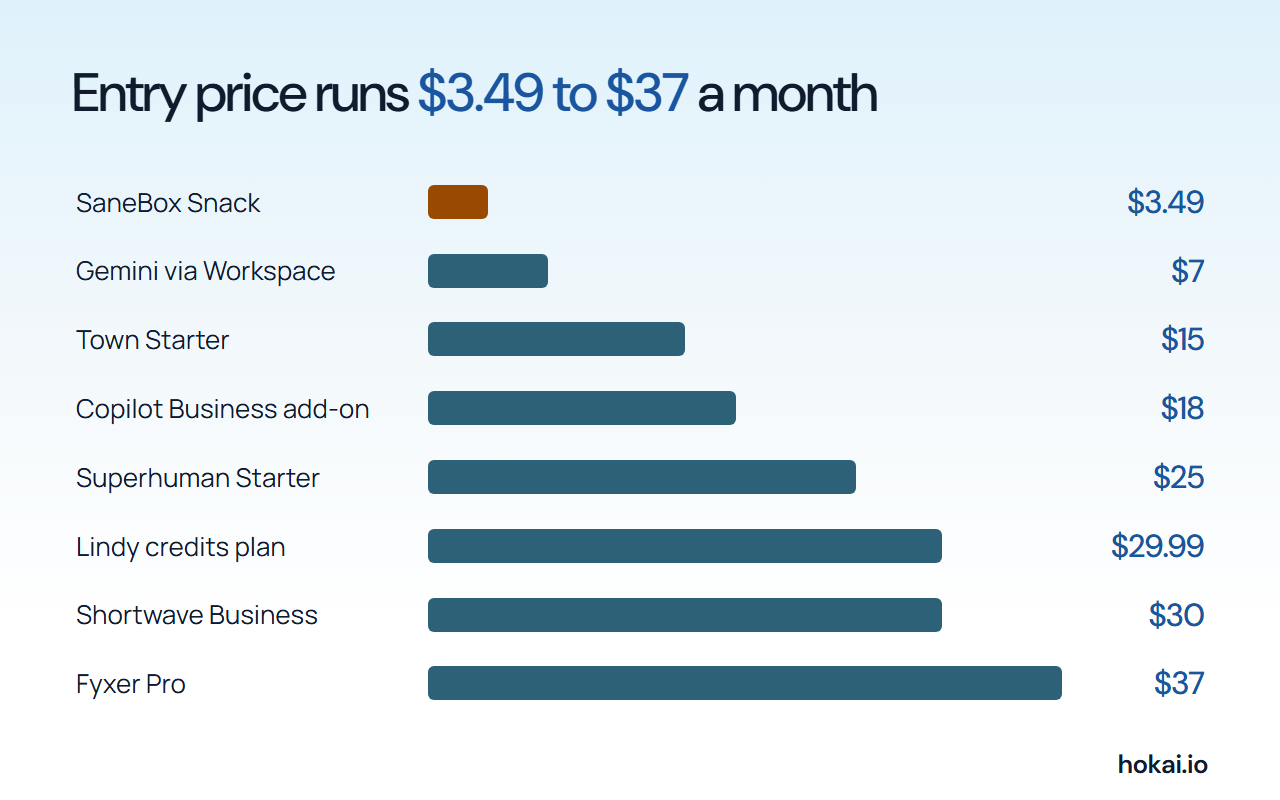 Hokai chart of each tool's lowest paid plan, with each figure taken from a vendor pricing page on 5 Nov 2026. Billing terms differ.
Team math shifts the order. Five seats on each tool's drafting tier, priced from the vendors' pages with any published team discount applied, come to the following per month.
| Tool | Plan used | Billing | Five seats a month |
|---|---|---|---|
| Gemini in Gmail | Workspace Starter | Annual commitment | $35 |
| Copilot in Outlook | Business add-on | Yearly | $90, plus a base plan |
| Superhuman | Business | Annual, 15% team discount | $140.25 |
| Lindy | Credits plan | Per active user | $149.95 |
| Shortwave | Business | Listed per seat | $150 |
| Fyxer | Pro | Annual | $185 |
Trial clocks run from a week to a month. Test two tools at once rather than in sequence.
- SaneBox 7 daysA free trial with every feature unlocked
- Lindy 7 days$50 in free credits, no card needed
- Fyxer 14 daysTeam plan free on signup
- Shortwave 14 daysA free trial of the paid plans
- Google Workspace 14 daysStarter at no cost
- Microsoft Copilot 1 monthA one-month trial before billing starts
For a wider view of agent running costs, our personal AI agent cost breakdown shows what credits tend to cost in practice.
Which AI email assistant to pick for your inbox
Match your situation to a row, then check the catch before you pay.
| Your situation | Pick | Price | Catch |
|---|---|---|---|
| Gmail on Workspace, small budget | Gemini in Gmail | $7 a month | Gmail only; some features US English |
| Gmail or Outlook, replies in your voice | Fyxer | $37 a month, annual | No drafts on the Free plan |
| Team that lives in email all day | Superhuman Business | $33 a month, annual | Auto drafts need Business |
| Gmail power user who searches a lot | Shortwave | $30 a month | Outlook only through Gmail |
| Microsoft 365 company | Copilot add-on | $18 a month | Needs an eligible plan |
| Overloaded, wary of AI reading bodies | SaneBox | $3.49 a month | Sorts only |
| Want an assistant that acts | Town or Lindy | $15 or $29.99 | Credits meter; set approvals |
Pairs matter too. Two tools can beat one. SaneBox Snack plus Workspace Starter covers cleanup and drafting for $10.49 a month. Fyxer on its own covers both inboxes.
If your bottleneck is meetings rather than mail, a scheduling tool such as Reclaim.ai or Motion may serve you better. Our office work assistant guide compares the wider suites.
The case for staying with Gmail's and Outlook's built-in AI
The strongest objection to this ranking is simple: a third-party assistant means handing your whole mailbox, years of client threads and password resets included, to another company that you have to trust. Google and Microsoft already ship summaries and drafting inside the client. If you pay for Workspace Starter at $7 a month or hold a Copilot seat, the extra cost of the built-in features is close to nothing, and no new vendor sees your mail.
That is a fair argument. For many people it wins. Someone who wants summaries and a quicker first draft should start with the built-in tool and add nothing.
Built-ins lose in three places, and they are specific. Regional limits leave many personal Gmail accounts without the best features. Neither Gmail nor Outlook gives you one assistant across both inboxes. And the tools above that sort mail, track follow-ups or draft in a learned voice do work the built-ins do not list. If none of those matter to you, stay put.
Who should skip AI email assistants entirely
Some inboxes are better left alone. Which ones?
- Regulated mail. Fyxer offers HIPAA compliance on Enterprise only. If your mail carries patient or client confidences and your employer has not approved a vendor, do not connect one.
- Low volume. If you answer a few dozen messages a day, the sorting and drafting save little. That threshold is our judgement, not a vendor figure.
- Mailboxes that are mostly newsletters. Gmail's own filters or a sorter such as SaneBox solve that cheaply, with no AI near message bodies.
- Teams without a policy. Agree who may connect a mailbox before anyone does.
Even for everyone else, start read-only. Be strict about it. Let a tool sort and draft for two weeks before you let it send anything.
What would change these picks
Four developments would reorder the list. None is exotic. If Poke or Town publish clear rules on sending mail unasked, both climb. If Superhuman states whether its AI trains on your mail, it gains or loses ground on that answer.
If Google lifts the US limit on AI Inbox and Suggested Replies, Gemini in Gmail rises for personal accounts. And if Fyxer ends its launch offer of unlimited credits for new signups, its real cost becomes the 3,000-credit ceiling.
The first date to watch is 31 December 2026. Microsoft's footnote says the Copilot Business offer ends then, which makes the $18 price the first number in this guide due a re-read, before any vendor here has had the chance to publish the sending rules this ranking is still waiting on.
Frequently asked questions
What is the best AI email assistant for Gmail and Outlook?
Fyxer is this guide's first pick because it works in both inboxes, drafts replies in your voice and says it cannot send mail itself. Pro costs $37 a person a month billed annually, or $49 monthly. Superhuman also lists both inboxes, at $25 or $33 a month.
Is there a free AI email assistant?
Gemini in Gmail has some free features for personal accounts, but the help page limits several to the US. Fyxer, Town and Poke have free plans. Fyxer's Free plan gives no reply drafts or sorting, so the useful part starts at its paid tier.
Can an AI email assistant send emails without asking me?
Some can. Superhuman's product page says its AI can send fully written emails on your behalf if you choose. Fyxer says it never sends, and Lindy lists approvals as built in. For Poke and Copilot in Outlook the pages read do not say.
Does an AI email assistant read my whole inbox?
It depends on the tool. SaneBox says it does not access message bodies or attachments by default and works from headers. Drafting tools such as Fyxer and Shortwave must read message content, and both say their AI providers cannot train on it.
Is Gemini in Gmail or Copilot in Outlook enough on its own?
For summaries and faster first drafts, often yes. Workspace Starter at $7 a month includes Gemini in Gmail, and Copilot in Outlook is available through a $18 business add-on or a consumer plan. They cover one inbox each and lack cross-provider sorting.
Covered in this guide
- Fyxer: Sorts Gmail and Outlook inboxes, drafts replies in your voice and writes meeting notes, but never sends anything itself. Four plans, one free.
- Gemini in Gmail: Google's multimodal AI assistant and model family, sold as a free app, tiered subscriptions and a pay-per-token API
- Instinct: Invite-only AI agent from Instinct that books travel, orders groceries and makes calls by text or phone; it publishes no prices yet.
- Lindy: AI teammate that handles email, meetings and workflows across 1,000+ apps; no free plan, just a 7-day trial then per-seat billing.
- Microsoft company page: Microsoft, founded 1975, is a public company (NASDAQ: MSFT) and the Redmond maker of Windows, Azure, GitHub and the Copilot assistants, with $331.8B of fiscal 2026 revenue.
- Copilot in Outlook: Microsoft's AI assistant across Windows, Edge, Word, Excel, Outlook and Teams, from a free tier to per-seat work plans on OpenAI's latest GPT-5 models.
- Motion: Motion is an AI-powered scheduling and productivity platform used by 1M+ professionals that automates calendar management, task prioritization, and project planning with AI Employees.
- Muse: Meta's AI agent runs tasks in its own cloud computer; open in the US, Canada, Japan and Singapore, with small-business skills for Shopify, QuickBooks and Meta ads in the US and Canada.
- Poke: Text-first personal agent in Apple Messages, WhatsApp and Telegram that handles email and reminders, now part of Cognition (since 23 July 2026).
- Reclaim.ai: AI calendar app that automatically schedules tasks, meetings, and focus time to reclaim your workweek.
- SaneBox: AI-powered email management to eliminate inbox clutter and save 3-4 hours per week
- Shortwave: The world's smartest AI email assistant: organize, write, and automate your inbox with natural language prompts
- Superhuman: AI that works everywhere you work: mail, docs, writing, and agents.
- Tomo: Text-based personal AI from Mapo Labs that tracks goals, sends check-ins and joins group chats. Made for ages 13 and up, with parental consent under 18.
- Town: Town gives each user a Townie with its own email and phone number; Free plan, 5 paid tiers, approval before sending by default.
Sources
Still deciding?
This guide covers a handful of options. Smart Match checks every listing in the directory against how you actually work and what you can spend, then hands you the shortlist and the reason behind each pick.
Find your toolsRelated guides
- Abacum Alternatives in 2026: FP&A Tools for Mid-Market Finance TeamsBuyer's guideHow to pick, across a category
- The AI 80s Photo Trend: How to Make Yours (and Turn It Into a Video) in 2026AnalysisWhat changed and who it affects
- The AI Tools That Do One Microsoft Copilot Job, CheaperBuyer's guideHow to pick, across a category
- Best Agentic AI in 2026: Manus, Genspark and the Platforms That Finish Whole TasksBuyer's guideHow to pick, across a category
- Best AI Agent Builders in 2026: Automate, Build or Self-HostBuyer's guideHow to pick, across a category
- Best Autonomous AI Agents in 2026: How Much Control to Hand OverBuyer's guideHow to pick, across a category