What Gemini Omni Flash Is For: Google's Default Video Model, What It Costs, and Where Veo 3.1 Still Wins
Gemini Omni Flash is Google's multimodal video model. It accepts text, images, audio and video, returns video with synchronized audio, and edits existing clips through chat. The Gemini API bills video output at 5,792 tokens per 720p second, about $0.10 per second, and it has no free API tier.
The short version
Google's Gemini API docs now recommend Gemini Omni Flash as the default video model, and the Gemini app replaces Veo 3.1 with it. It costs about $0.10 per second, level with Veo 3.1 Fast, and edits clips by conversation. It trails Wan 3.0 on blind human votes.
Google's Gemini API documentation now tells developers to use Gemini Omni Flash as their default video model, and the Gemini app page says Omni will replace Veo there.
That is a bigger shift than a version bump. Veo 3.1 was the model Google's own tools pointed at for a year. As of 7 October 2026, the company's docs list it second, for specific jobs. If you build with video, pay for a Google plan, or compare video generators for a living, the question is practical: what does the new default do better, what does it cost, and when is the old one still the right call?
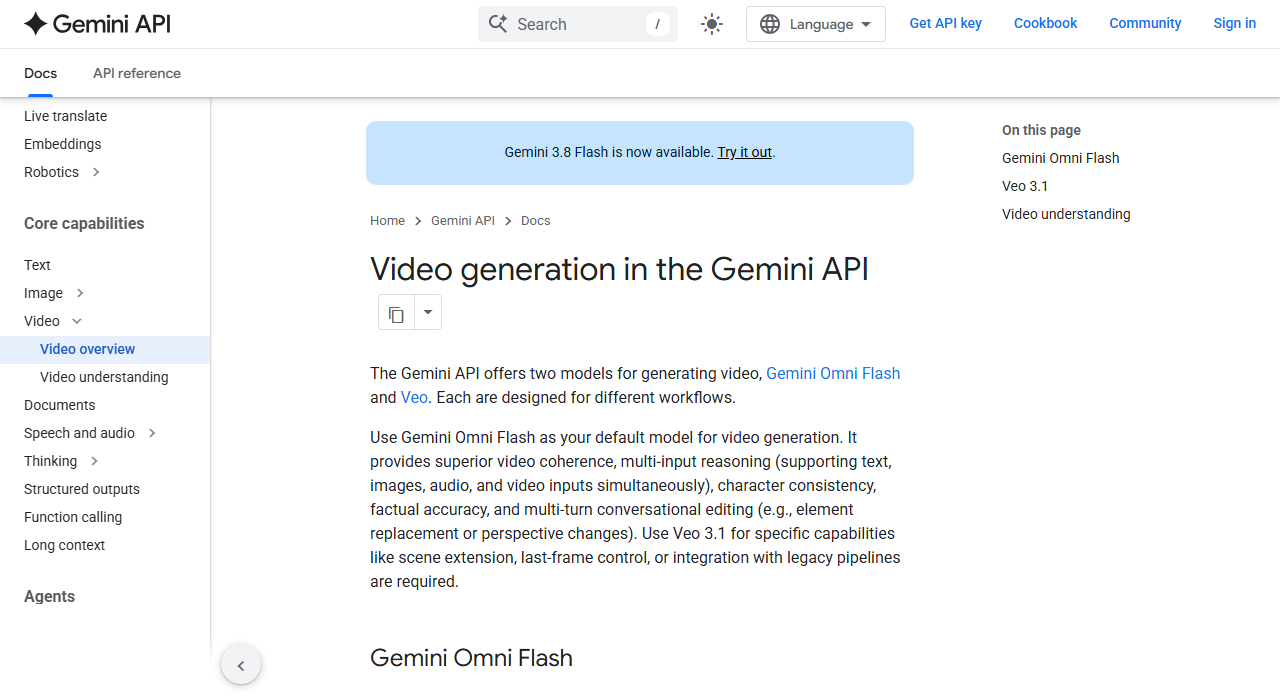 The docs paragraph that made Omni the default, captured 7 Oct 2026.
What changed when Google made Omni the default
Three separate Google pages now say the same thing in different words.
The Gemini API's video docs say to use Omni Flash "as your default model for video generation" and to reach for Veo 3.1 when you need scene extension, last-frame control, or a legacy pipeline. The consumer page at gemini.google says Gemini Omni 1.1 Flash replaces Veo 3.1 in the Gemini app. And the Google DeepMind model card, published 27 August 2026, lists four places the model ships: the Gemini app, YouTube, Google Flow and Google Flow Music.
The date matters. Our record of the Gemini Omni 1.1 Flash model puts general availability on 27 August, replacing the preview endpoint that Google scheduled to retire on 30 September. The pricing page still listed the preview model on 7 October. Check which model ID your code calls before you assume you are on the new one.
Veo is not gone. It stays in the API at three speed tiers, and the older Gemini Omni preview family sits beside it. What changed is the order of recommendation, and Google rarely reorders its own docs by accident.
What Gemini Omni Flash does that Veo 3.1 does not
The model takes text, images, audio and video in a single request and returns video with synchronized audio. Veo takes text and images. That one difference decides most of the use cases.
the consumer page lists what the app version offers:
- 10-second videos with native audio.
- Up to 5 reference photos per video.
- Scene extensions, so a clip can keep going after the first pass.
- Video-to-video editing, where you hand it a clip and describe the change.
- Turn-by-turn editing, so you can fix one thing without regenerating the rest.
- AI avatars, an opt-in digital version of yourself for video.
The editing loop is the real product. With Veo, a result you almost like means a new generation and a new bill. With Omni, the follow-up message ("swap the background", "steady the shot") edits what exists. the docs describe this as element replacement and perspective changes across multiple turns.
The model card is blunt about the limits. It says keeping complete consistency through edits, generating scenes with complex motion, and rendering accurate text all remain challenges. Believe it. A conversational editor that drifts by the fourth turn is a demo, not a pipeline.
Our model record adds details the docs do not repeat in one place: a single pass runs 3 to 10 seconds, 1080p and 4K outputs are upscales of a 720p native render, and speech editing on uploaded video is disabled pending safety review. Treat those as our reading of its launch material, not a quote from a spec sheet.
What a clip costs: Omni against the three Veo tiers
Google bills Omni Flash by token and Veo by the second. The pricing page converts one into the other for you: video output is billed at 5,792 tokens per 720p second, which Google says works out to about $0.10 per second.
The table below puts Google's published rates side by side for an 8-second clip, the longest single Veo generation.
| Model and resolution | Rate per second | An 8-second clip |
|---|---|---|
| Omni Flash 1.1, 720p basis | about $0.10 | about $0.81 |
| Veo 3.1 Standard, 720p or 1080p | $0.40 | $3.20 |
| Veo 3.1 Fast, 720p | $0.10 | $0.80 |
| Veo 3.1 Fast, 1080p | $0.12 | $0.96 |
| Veo 3.1 Lite, 720p | $0.05 | $0.40 |
| Veo 3.1 Lite, 1080p | $0.08 | $0.64 |
Two things stand out. Omni lands on the same price as the Fast tier at 720p, so the choice between those two is about capability, not money. And The Standard tier costs four times as much per second for the same resolution.
The Omni figure is a floor. Input is billed separately at $1.50 per million tokens across text, image, video and audio, and any text the model writes back while you edit costs $9.00 per million. A multi-turn editing session on long source footage will cost more than the headline rate suggests.
Scale the table to a month of work and the gap gets concrete. A team that renders 100 eight-second clips at 720p pays roughly:
- $81 on the Omni video rate.
- $80 on the Fast tier.
- $320 on the Standard tier.
- $40 on the Lite tier.
That math ignores retries. If one clip in three gets thrown away and re-run, multiply each figure by 1.5. It also ignores the edit loop. An Omni edit turn returns new video, and its pages do not say whether that output is billed like a fresh clip. Until they do, assume it is, and do not count the editing workflow as a saving.
There is no free tier on the API for either family. Google's pricing page marks free-tier access as not available for Omni and for all three Veo models, and says paid-tier data is not used to improve its products. If you want to try Omni without an API bill, you need an app plan, covered next.
What the Gemini app plans buy
For most people the app is the entry point, and Google meters it in credits rather than clips. The subscriptions page, read on 7 October, lists these US plans.
| Plan | Monthly price | Flow credits |
|---|---|---|
| Google AI Plus | $4.99 | 200 |
| Google AI Pro | $19.99 | 1,000 |
| Google AI Ultra | $99.99 or $199.99 | 10,000 or 25,000 |
Each paid row says the credits give access to Gemini Omni Flash inside Google's Flow creative studio. The free plan lists limited Flow access with Nano Banana Pro and does not mention Omni. A banner on the page also offers college students a free Pro plan for one year.
Google does not say how many credits one clip costs, and we did not find a published credit-per-clip rate this run. So the tiers cannot be converted into a clip count. If you plan to produce video weekly, test on the Plus plan for a month and read your own usage before moving up.
For API builders, the app plans are a poor proxy. Flow credits and API tokens are separate meters, and nothing on either page links them.
How it scores against the field
Pricing and docs are Google's claims. The Artificial Analysis Video Arena is the closest thing to an outside check, because humans compare pairs of clips without knowing which model made which.
On the text-to-video board with audio, read on 7 October 2026, it scored 1113 Elo from 8,696 votes, with a 95 percent interval of plus or minus 9. Veo 3.1 scored 962. That gap of about 150 points is the clearest evidence for Google's decision to swap the default.
| Model | Elo | Votes | Listed price per minute |
|---|---|---|---|
| Wan 3.0 | 1156 | 8,300 | $12.00 |
| Seedance 2.5 | 1143 | 8,264 | $34.12 |
| MiniMax H3 (768p) | 1137 | 8,315 | $4.80 |
| Omni Flash 1.1 | 1113 | 8,696 | $9.12 |
| Veo 3.1 | 962 | 2,998 | $24.00 |
| Veo 3.1 Fast | 961 | 4,325 | $7.20 |
Read the top of that table before you celebrate. Omni is not the leader. Wan 3.0 sits 43 points above it, and on the silent board the same site shows Wan 3.0 first with Omni outside the top five. Our own stored record described Omni as leading the no-audio categories; the live board does not support that today, and we flag it for correction on the model page.
The last column also disagrees with Google. Artificial Analysis lists $9.12 per minute for Omni, while Google's rate works out to about $6.00. We could not reconcile the two from public pages, so budget from Google's number and treat the board's as a cross-check, not a quote.
A gap smaller than about 20 points sits inside the intervals the board prints, so treat neighbouring rows as ties and only the larger gaps as real. By that rule the top three are close, and the 150-point drop to the older Veo tiers is not.
Arena Elo measures preference on short clips, not whether a model survives your edit chain. For a wider view across all of them, the video generator directory and the model leaderboard show how the field is moving week to week.
Who it affects: who should switch, and who should wait
The change lands differently on three kinds of reader: developers on the Gemini API, people who pay for a Google AI plan, and teams that compare video generators before they commit. Each should read the decision rules below against their own constraints rather than against the launch headlines.
Switch if you are in one of these groups:
- You build on the Gemini API and start new work: the docs now point you to Omni, and the price matches Veo Fast.
- You edit existing footage: only Omni takes a video as input and rewrites it from an instruction.
- You work from reference photos or want a recurring character across shots.
Wait, or stay on Veo, if your pipeline depends on exact control. its own docs keep Veo 3.1 as the answer for last-frame control and legacy integrations, and those docs were last updated before Omni 1.1 added extension and first-and-last-frame interpolation, so they may lag the model. Test both before you rewrite anything.
Pick a different vendor if sound and sheer preference score matter most. Wan 3.0 and Seedance 2.5 beat Omni on the audio board, and our Wan 3.0 against Seedance 2.5 comparison covers what separates those two. Budget buyers should read what happened to Sora's users after OpenAI stopped supporting it, and why Kling absorbed many of them.
If the right answer depends on your budget, clip length and whether you need audio, Smart Match can narrow the field from your constraints in a couple of minutes.
Not everyone is a developer. If you only want to animate a photo, the model name matters less than the free allowance, and our guide to the best free ways to turn a photo into a video lists what each service gives away. If your work is cutting and captioning rather than generating, CapCut and VEED solve a different problem than either Google model does.
The strongest case against switching
The best argument against moving is lock-in to a model Google can retire. The preview endpoint's scheduled retirement happened within five weeks of general availability, and Veo 3.1 itself still carries a preview label on its API model IDs. A default you are told to adopt can become a deprecated default quickly.
There is a second worry. Omni is a conversational model, and conversation hides cost. Every extra turn adds token spend, and no public page tells you how many turns a typical edit needs.
Both points are fair. They argue for caution, not for staying put. Pin the model ID, keep the prompts and reference images in version control, and cap the number of edit turns per job. A pipeline built that way costs little to re-point when Google moves again, and it makes the Elo gap, the extra input types and the price parity worth acting on now.
For a team already mid-project on Veo, the honest answer is narrower: finish the project, then run a side-by-side on the next one. Runway, Luma Dream Machine, Pika and PixVerse remain real alternatives if you want a workflow outside Google, and the broader best AI video generators roundup shows how they differ.
What we could not verify
Three claims came to us secondhand, and we say so plainly.
First, press coverage at launch reported that scene extension can chain to 40 seconds in total, in 10-second steps. the consumer page confirms scene extensions exist but we did not find the 40-second figure on a Google page, so treat it as reported, not confirmed.
Second, we did not find Google's per-clip credit cost for the app plans. Third, the 30 September retirement date for the preview model comes from launch material in our records, not from a page we could re-read today.
Everything else here, the prices, the plan tiers, the docs wording and the Elo scores, was read on Google's and Artificial Analysis's own pages on 7 October 2026.
Where this goes next
The next number to watch is not a price. It is whether Google rewrites its Veo guidance to say extension and last-frame control are things Omni now does.
When that page changes, Veo 3.1 stops being the exception list and becomes the legacy option. Rivals sell the same promise, an edit loop instead of a re-roll: Kling 3.0, HappyHorse and LTX-2.5 are the ones to test against it.
Note too where Omni sits in Google's own range. The free Gemini plan includes access to Gemini 3.6 Flash, a text model, while video needs a paid plan. For the wider picture of how that range fits together, see what Gemini is for.
Frequently asked questions
Is Gemini Omni Flash replacing Veo 3.1?
In the Gemini app, yes: Google's product page says Omni 1.1 Flash replaces Veo 3.1. In the API, Veo 3.1 stays available at three speed tiers, and Google's docs point to it for scene extension, last-frame control and legacy pipelines.
How much does Gemini Omni Flash cost per video?
Google bills video output at about $0.10 per second of 720p, so an 8-second clip is roughly $0.81 before input costs. Input is $1.50 per million tokens and text replies are $9.00 per million. Veo 3.1 Fast costs the same $0.10 per second at 720p.
Is there a free tier for Gemini Omni Flash?
Not in the API. Google's pricing page marks free-tier access as not available. In the Gemini app, paid Google AI plans from $4.99 a month include Flow credits with access to the model, and the free plan does not list it.
Does Gemini Omni Flash beat Veo 3.1?
On Artificial Analysis blind votes with audio, Omni Flash 1.1 scored 1113 Elo against 962 for Veo 3.1 on 7 October 2026. It does not lead the board: Wan 3.0 scored 1156. Arena votes measure preference on short clips, not editing reliability.
What are the limits of Gemini Omni Flash?
Google's model card says consistency through edits, complex motion and accurate text remain challenges. Our model record also notes that 1080p and 4K outputs are upscales of a 720p render and that speech editing on uploaded video is disabled.
Covered in this guide
- Gemini Omni 1.1 Flash: Gemini Omni 1.1 Flash (Google, GA 2026) generates and edits AI video through chat, adding native synchronized audio and multi-pass scene extension.
- Veo 3.1: Google DeepMind's Veo 3.1 generates 4, 6 or 8-second video clips with native synchronized dialogue and audio, rendering up to 4K.
- CapCut: AI-powered video editor for creating trending content across all platforms
- Gemini 3.6 Flash: Released July 21, 2026, Gemini 3.6 Flash is Google DeepMind's Flash-tier model built for agentic coding, computer use and long-context work.
- Gemini Omni: Gemini Omni is Google DeepMind's multimodal world model (May 2026) that generates and conversationally edits 10-second 1080p video from text, image, audio and video.
- Google DeepMind: Alphabet's AI research lab, created from DeepMind and Google Brain. It makes the Gemini, Gemma and AlphaFold models, and its newest frontier model is still limited to partners.
- HappyHorse: Built by Alibaba's ATH Business Unit, HappyHorse 1.0 generates synchronized video and audio together from a text, image or reference-image prompt.
- Higgsfield: AI video and image studio, used in 238 countries, that runs Kling, Veo, Seedance and Sora plus its own camera and character tools on one credit plan.
- Kling 3.0: Kling 3.0 is Kuaishou Technology's proprietary AI video model, built for native 4K output with synchronized multilingual audio in one generation pass.
- Kling: Kuaishou's text-to-video platform with native 4K, lip-synced audio in 5 languages, and free daily credits. Used by 60M+ creators; plans from $6.99/month.
- LTX-2.5: Lightricks' open-weights video and audio model that renders synchronized 4K HDR clips from text, image or video input, self-hostable and fine-tunable.
- Luma Dream Machine: Creative agents that make you prolific: AI video and image generation for creators
- MiniMax H3: MiniMax H3 (Hailuo 3.0) is a 33B open-weight omni-modal model, released July 31 2026, generating 2K/24fps video with native stereo audio in one forward pass.
- Pika: AI creative platform by Pika Labs. Generates video, image and audio from prompts or photos using its own model plus outside AI engines. Free to start; paid plans scale up from there.
- PixVerse: AI video generator valued at over $2 billion, with native audio, camera controls and a free plan; paid tiers available.
- Seedance 2.5: Seedance 2.5 is ByteDance's 2026 video generation model, producing one continuous multi-reference clip per pass with synchronized audio, launched inside Jimeng AI and Doubao Pro.
- VEED: Browser-based video editor with AI subtitles, avatars, voice cloning, and text-to-video: no download needed.
- Wan 3.0: Wan 3.0 is Alibaba Tongyi Lab's video model, in public beta since August 6, 2026, generating up to 30 seconds of native 1080p video from text, image, audio, video, or documents.
Sources
Still deciding?
This guide covers a handful of options. Smart Match checks every listing in the directory against how you actually work and what you can spend, then hands you the shortlist and the reason behind each pick.
Start Smart MatchRelated guides
- The AI 80s Photo Trend: How to Make Yours (and Turn It Into a Video) in 2026AnalysisWhat changed and who it affects
- AMD Buys World Labs for $8.2B: What It Means for Marble UsersAnalysisWhat changed and who it affects
- Best AI Chatbots in 2026: Pick by the Job, Not the LeaderboardUpdatedRechecked against current sources
- Best AI Companies in 2026: Who Is Actually LeadingBuyer's guideHow to pick, across a category
- Best AI Content Creation Tools in 2026: Pick By the Job, Not the CategoryBuyer's guideHow to pick, across a category
- Best AI for Creating YouTube Videos in 2026: A Buyer's GuideBuyer's guideHow to pick, across a category