Is Viggle AI Free? What the Free Plan Gives You in 2026
Viggle AI has a free plan at $0 a month. It gives credits that refresh daily rather than a monthly allowance, watermarks every video, renders one job at a time, keeps files for seven days and caps motion uploads at one minute. Paid plans start at $7.99 a month billed yearly and remove the watermark.
The short version
Viggle is free to start and always watermarked, one render at a time, with files deleted after seven days. Post memes on free. For anything under your own name, Pro costs $7.99 a month billed yearly, and you should buy it on viggle.ai: the iPhone app charges $239.99 a year for Live against $191.88 on the web.
Not sure which one fits you? Describe your situation and Smart Match names three tools.Find my AI tools
In this guide10 sections
Viggle costs nothing to start, and on 13 November 2026 its pricing page still listed a $0 plan next to three paid ones. Free is real. It is also built to be outgrown.
Every free video carries a watermark, renders one at a time and is deleted after seven days. The free plan also runs one video model instead of the full menu, and caps the motion clip you upload at one minute. Whether that is enough depends on two things: where the video ends up, and whether the watermark matters there.
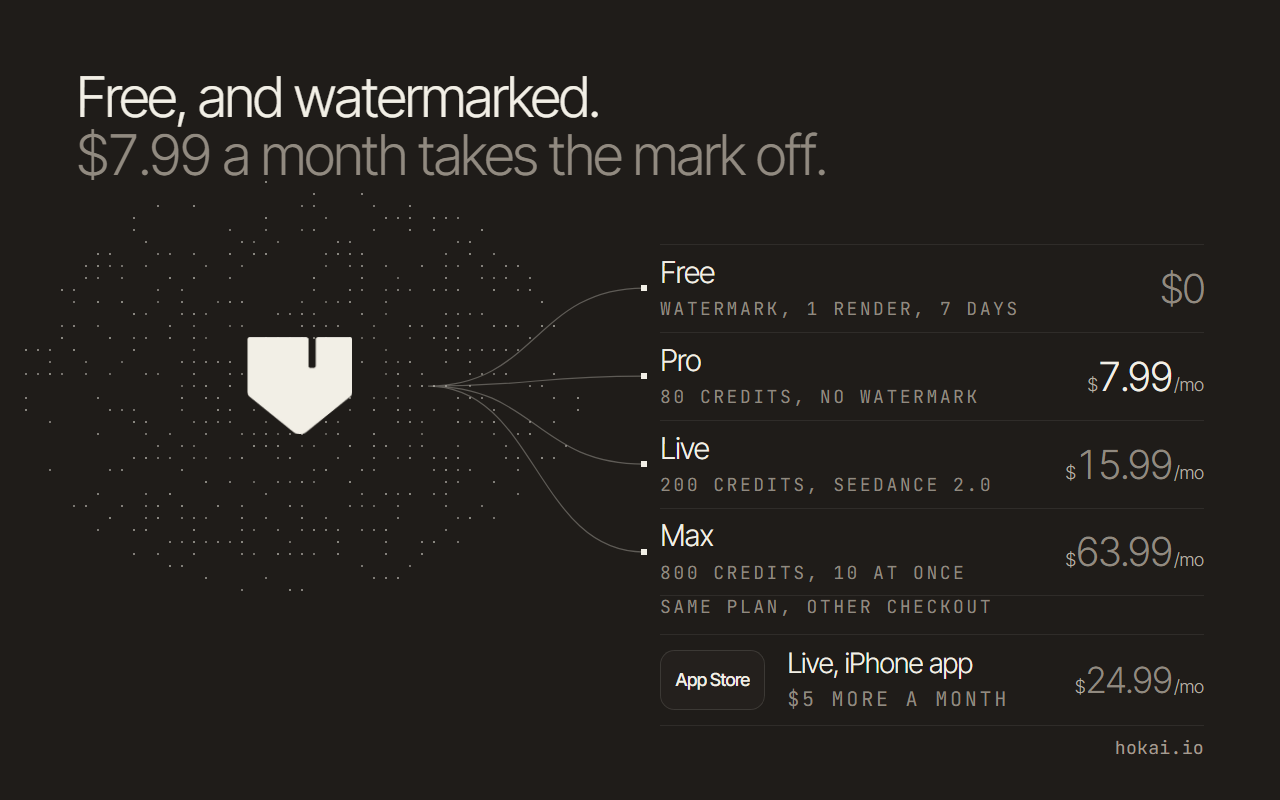 Hokai chart of what each Viggle plan costs and what free gives up, from viggle.ai/pricing and the app's App Store listing as read on 13 November 2026.
- Free plan
- $0
- Credits refresh daily, watermark on
- Render at a time on free
- 1
- Pro runs 4
- Free storage
- 7 days
- Paid plans keep files
- Pro a month, billed yearly
- $7.99
- Cheapest way off the watermark
What is in Viggle's free plan
Viggle is a character animation app. Feed it a still character and a clip of someone moving, and the character copies that motion or takes the mover's place in the original video. Its free plan has no monthly credit allowance at all. The comparison table on Viggle's pricing page shows 0 monthly credits for free accounts and a pool of free credits that "refreshes daily" instead.
How many daily credits is that? Viggle does not print the number, on the pricing page or in the product notes it publishes for assistants, which means the one figure that decides whether free is practical for a given week is the one figure nobody outside the company can quote. The plan page lists the limits instead:
- Watermark: on every free video. Removing it is a paid feature on all three paid plans.
- Queue: 1 video generation at a time. Pro runs 4, Live 6 and Max 10.
- Storage: 7 days for your assets and finished videos.
- Uploads: a motion video of up to 1 minute. Paid plans take 10 minutes.
- Real-Time Swap: 5-minute sessions on free, 30 minutes on Pro.
- Multi-Track editing: limited sessions on free, unlimited on every paid plan.
Viggle's own product notes add the model limit. In its video generator a free account can only run Viggle-Optimized MiniMax H3, built on MiniMax H3, with 5-second clips at 480p, 768p or 1080p. Subscribers can make 5 to 15 second clips and reach 2K. Veo 3.1, Wan 2.7 and Kling 3.0 need any paid plan, and Seedance 2.0 needs Live or Max. The video model leaderboard shows what else that menu is competing with.
One more thing is missing from free. Viggle Remake, the video-to-video editing agent launched on 2 November 2026, is "included in every paid Viggle plan", according to the same notes. Free accounts do not get it.
How long free renders take, and why that matters
Speed is the limit Viggle describes least. Its pricing page promises "faster video generation" on Pro, Live and Max, and names no figure anywhere for free accounts, so the only honest answer about a free render's wait is that Viggle does not publish one and it moves with how busy the service is that hour. No number, then.
The App Store reviews fill some of that gap, with the usual caution that one review is one person's experience. A free user who posted on the iPhone app's listing said template renders that used to take 1 to 2 minutes started taking 15 to 18 minutes, and some never finished. Another reviewer's complaint was the 7-day deletion.
Concurrency is the part you can plan around. Free accounts queue one job at a time, so a batch of ten meme variations runs ten times in a row. On Pro the same batch runs four at once. If you make one clip a day for fun, the free queue hardly matters. Ten a day for a page you are growing is a different job.
What each paid plan costs on viggle.ai
Viggle sells four plans for its main app, billed separately from PINOC, its 3D tool. All fees are in US dollars and non-refundable, according to its terms of use. The yearly discount is 20%.
| Plan | Monthly billing | Yearly, per month | Credits a month |
|---|---|---|---|
| Free | $0 | $0 | Daily free credits only |
| Pro | $9.99 | $7.99 | 80 |
| Live | $19.99 | $15.99 | 200 |
| Max | $79.99 | $63.99 | 800 |
Paying gets you more than credits. All three paid plans drop the watermark, keep your files permanently, take 10-minute motion uploads and run more jobs at once. They also still get 5 daily free credits on top of the monthly pool, and unlimited watermarked Mix videos, per the pricing page's comparison table.
Read the credit rules before you pick yearly billing. A plan's monthly credits expire on the billing date. Credits you buy separately do not expire, but they only work while you hold a subscription. Cancelling takes effect at the end of the billing cycle, so you keep access until then.
Credits are not a flat rate. Viggle's FAQ says each feature and model uses a different number, so 80 Pro credits does not translate into a fixed number of videos.
Why the iPhone app charges more for the same plans
Buy through the App Store and some plans cost more. The iPhone app's listing, read on 13 November 2026, shows these in-app prices next to the web ones:
| Plan | On viggle.ai | In the iPhone app |
|---|---|---|
| Pro, monthly | $9.99 | $9.99 |
| Pro, yearly | $95.88 ($7.99 x 12) | $95.90 |
| Pro, weekly | Not offered | $4.99 |
| Live, monthly | $19.99 | $24.99 |
| Live, yearly | $191.88 ($15.99 x 12) | $239.99 |
| Max, yearly | $767.88 ($63.99 x 12) | $769.00 |
Live is $15.99 a month billed yearly on viggle.ai and $239.99 a year in the iPhone app's in-app purchases.
Pro costs the same either way. Live does not.
The app charges $5 more a month for Live than the web checkout does, which comes to $48.11 over a year.
The weekly Pro plan exists only in the app. Kept for a full month it works out at about $21.62, more than double what a month of Pro costs on the web.
The app's listing names the top plan "Live Max" where the web says Max. Same 800 credits? The listing does not say, so compare the plan screen in the app before paying there.
Discord, web or app: where the free plan lives
Viggle started on Discord, and the server is still huge. Discord's public invite data showed 4,112,294 members and 59,781 online on 13 November 2026. A Viggle blog post about the server lists the bot's commands:
/mixputs your character image into a video./animateplaces a character into one of 1,000+ templates./multiswaps several characters in one clip./movemakes a still picture move.
The same post says the bot had been added to over 51,000 other Discord servers. What none of Viggle's pages publish is a separate free allowance for Discord. The pricing page and the plan notes describe one account with one set of limits, sold for the web and the iOS and Android apps.
The newer tools also live outside Discord. Viggle's product notes put Mix, Multi-Track, Remake and the video generator in the app, which "is free to start, in a browser or the iOS/Android app". On mobile web, the video generator only offers MiniMax H3. Viggle Live, the webcam character swap, treats Discord as an output: it streams to OBS, Twitch, Kick, Zoom and Discord.
So Discord is the community and the quick template route. The web app is where the full free plan, and every paid feature, actually is.
Can you use free Viggle videos commercially?
Viggle's terms of use do not ban commercial use of free app videos, and they do not grant it in so many words either. Three clauses matter more than the plan name.
First, the watermark. Section 9 says you agree not to remove "any watermarks, labels or other legal or proprietary notices" from Viggle animations. Cropping or blurring the free plan's mark breaks the terms, so a clean video means a paid plan.
Second, the licence you grant. Under section 5, Viggle does not take ownership of your uploads or the animations made from them. You do give it a perpetual, worldwide licence to use that content, including to train the AI in its animation tools and to show it to other users.
Third, the products with clearer rules. Free PINOC accounts may only use PINOC for non-commercial purposes; paying lifts that. The Viggle API is the one product where the terms say you own the outputs, may use them for lawful commercial purposes, and that Viggle will not train on them. New API accounts get 100 free credits at $0.01 each, worth $1.
Rights in the source material are your problem either way. The terms make you responsible for permission to use faces, characters and music you upload, and Viggle's community rules ban deceptive impersonation.
Free ways to animate a character without Viggle
The genuinely free alternatives split in two: hosted tools that hand out starter credits, and open-weight models that cost no money and a lot of hardware.
| Option | What it costs | What it needs | Licence |
|---|---|---|---|
| Viggle meme maker | Free, no sign-up | A browser | Viggle terms |
| Wan2.2-Animate-14B | Free weights | One GPU with offload | Apache 2.0 |
| Wan-Animate-2 | Free weights, free demo | 8 A800s for 720p | Apache 2.0 |
| Viggle-Animate | Free weights | 96 GB card, or 32 GB quantized | MiniMax H3 licence |
Start with the route that needs no account at all. We opened viggle.ai/meme on 13 November 2026 without signing in, and the meme editor loaded straight away: top and bottom text fields, an upload button and a download button, under the line "Free, no sign-up" and a note that nothing is uploaded. The page puts its library at 10,000+ meme templates.
It captions and exports images, GIFs and videos. It does not transfer motion, and the "Make it a video" button hands you to the main app, where the daily free credits and the watermark apply again.
For animating a single photo instead, Photo to Video is a browser generator that does that one job on starter credits.
The open models that do Viggle's job for nothing
Wan-Animate-2 is the open model closest to Viggle's job. Alibaba's Wan team released its weights on 7 August 2026 under Apache 2.0, with a free online demo on ModelScope Studio. Its repository says the default settings are tuned for 8 A800 GPUs at 720p, and 480p was tested on 2. That is datacentre hardware, so most people will use the demo.
The older Wan2.2-Animate-14B, released on 19 September 2025, does both character animation and replacement. Its model card says the Wan team claims "no rights" over what you generate, and its single-GPU mode works by offloading the model, with community ComfyUI wrappers adding more memory savers.
Viggle-Animate is Viggle's own character-replacement model, published on Hugging Face. Its card asks for a card with 96 GB or more at full precision, or an RTX 5090 with 32 GB running a quantized build. Its weights fall under the MiniMax H3 Community License, so read that before using clips commercially. Ten community Spaces run it in a browser.
No such hardware? Hosted studios rent it by the clip. LightX2V Studio runs open and commercial video models for avatar and image-to-video work, and Civitai pairs a model-sharing community with an on-site generator, so a character LoRA and the hardware to run it come from the same place.
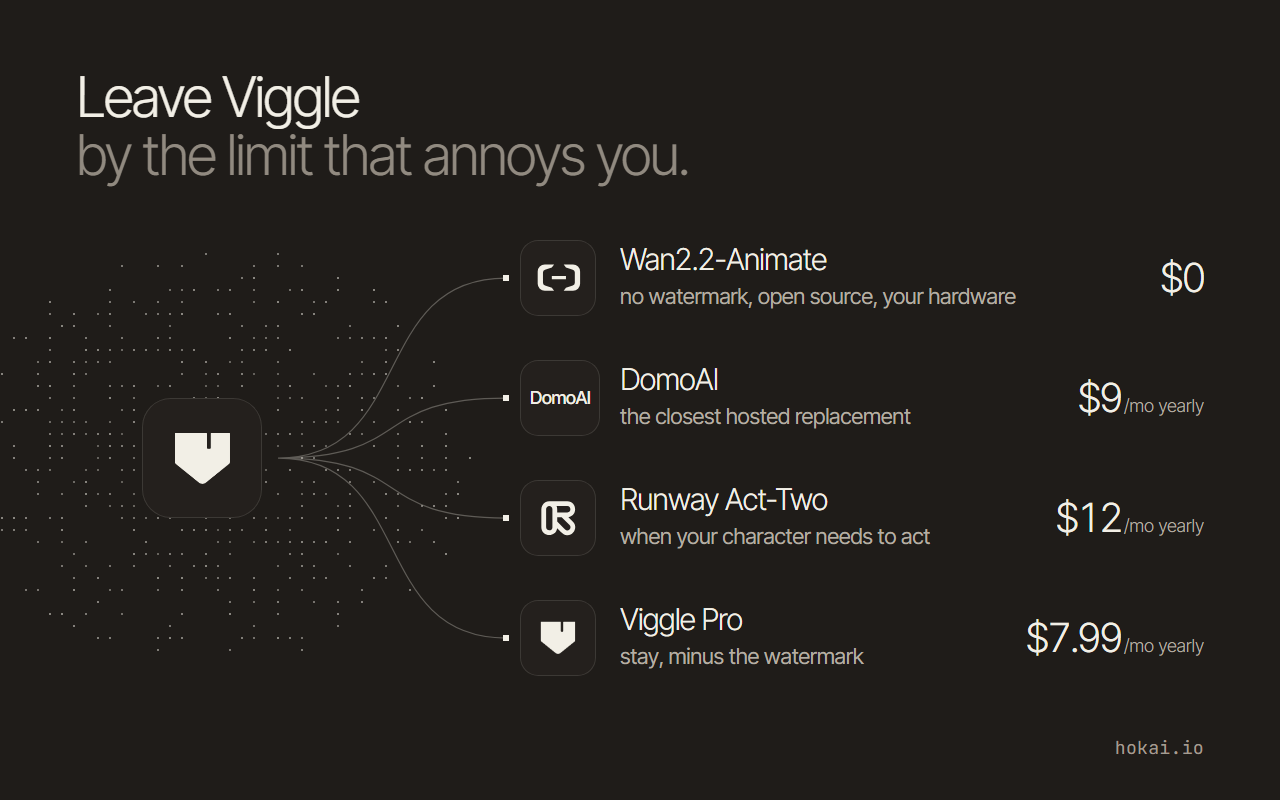
Hosted rivals with their own free credits are a different comparison, covered in our Viggle alternatives guide and the roundup of free tools that turn photos into video.
Who should skip the free plan
The free plan is wrong for anyone whose video has to look like their own. The watermark is on every free render, and the terms forbid removing it, so brand accounts, client work and ads start at Pro's $7.99 a month.
It also fails people who work in volume. One render at a time and a daily credit pool with no published size make a posting schedule hard to plan, and the 7-day storage limit means a free account is not an archive. Download everything you want to keep.
Long source clips are the third case. The 1-minute upload cap on free cuts off most full dance trends, while every paid plan takes 10 minutes. And if you want Kling or Seedance inside Viggle, free cannot run them at all. Our best AI video generators roundup covers the tools that do give free accounts their better models.
What to do: stay free, pay for Pro, or switch
Match the plan to where the video goes:
- Memes for friends or a fan account: stay free. Accept the watermark, download within 7 days, keep motion clips under a minute.
- Anything under your name or a brand: Pro at $7.99 a month billed yearly, bought on viggle.ai. It removes the watermark and keeps your files.
- Seedance, or a streamer using Real-Time Swap: Live, which runs Seedance 2.0 and 6-hour swap sessions. Buy it on the web.
- Commercial rights in writing, or no training on your clips: the API, starting with the 100 free credits.
- No budget but a strong PC, or patience for a demo: an open model such as Wan-Animate-2.
Not sure Viggle is even the right kind of tool? Describe the clip in Smart Match, which ranks the AI video generators in the directory against what you need. The full plan details, models and checked prices sit on the Viggle record.
The number to watch is the one Viggle does not print: the size of the daily free credit pool. It decides whether free is a week's work or an afternoon's, and the plan table that once carried a daily video count now says only that credits refresh, so Viggle can change the figure without changing a published price.
Frequently asked questions
Is Viggle AI really free?
Yes. Viggle's pricing page lists a $0 Free plan alongside Pro, Live and Max. The free plan has no monthly credit allowance; it gives free credits that refresh daily. Every free video carries a watermark and is deleted after seven days.
How many free videos does Viggle give you a day?
Viggle no longer publishes a number. Its comparison table shows 0 monthly credits for free accounts and a daily-refreshing credit pool instead, without saying how large that pool is. Credit costs also vary by model and feature, so the same pool buys different amounts of video.
Does Viggle's free plan put a watermark on videos?
Yes, on every free render. Removing the watermark is a paid feature on Pro, Live and Max. Viggle's terms of use also say you agree not to remove watermarks or proprietary notices yourself, so cropping it out breaks the agreement.
What does Viggle cost if you pay?
On viggle.ai, Pro is $9.99 a month or $7.99 a month billed yearly for 80 credits, Live is $19.99 or $15.99 yearly for 200 credits, and Max is $79.99 or $63.99 yearly for 800 credits. PINOC, the 3D tool, is billed separately.
Can you use free Viggle videos commercially?
The terms neither ban nor explicitly grant it for the main app, but the watermark clause means a free video cannot be cleaned up legally. You also grant Viggle a licence to use your content, including to train its animation models. Free PINOC is non-commercial only, while the API's terms do grant commercial use of outputs.
Covered in this guide
- Viggle: Viggle animates still characters into video by swapping them into clips or applying a motion reference. Free plan: 5 watermarked videos a day. Paid plans add credits and remove the watermark.
- Civitai: Community site for sharing AI image and video models, with an on-site generator, LoRA trainer and three paid membership tiers.
- Kling 3.0: Kling 3.0 is Kuaishou Technology's proprietary AI video model, built for native 4K output with synchronized multilingual audio in one generation pass.
- Kling: Kuaishou's text-to-video platform with native 4K, lip-synced audio in 5 languages, and free daily credits. Used by 60M+ creators; plans from $6.99/month.
- LightX2V Studio: Hosted studio for avatar video, image-to-video and image generation that runs 19 open and commercial models from one credit balance.
- MiniMax H3: MiniMax H3 (Hailuo 3.0) is a 33B open-weight omni-modal model, released July 31 2026, generating 2K/24fps video with native stereo audio in one forward pass.
- Photo to Video: Browser image-to-video generator that animates one photo into a clip of up to 4K, with Kling, Seedance, Veo, Sora 2 and other models on one credit balance.
- Wan-Animate-2: Wan-Animate-2 is Alibaba's open-weight 14B model for character animation, released in 2026, feeding driving video straight into a diffusion transformer.
Sources
Still deciding?
This guide covers a handful of options. Smart Match checks every listing in the directory against how you actually work and what you can spend, then hands you the shortlist and the reason behind each pick.
Find your tools