PixVerse Pricing in 2026: Free Plan, Credits and Which Plan to Pick
PixVerse pricing in October 2026 runs from a free Basic plan with 30 daily credits to Ultra at $149 a month on yearly billing for 25,000 credits. Standard is $8 for 1,200 credits and capped at 720P, Pro is $24 for 6,000 credits, and Premium is $48 for 15,000.
The short version
PixVerse has a free tier and four paid plans from $8 to $149 a month on yearly billing. Premium gives the cheapest credit at $3.20 per 1,000, Pro is the smallest plan with 4K, and Ultra only pays back if unlimited off-peak generation fits your workflow.
Want this decided for your own case? Find your tools with Smart Match, starting from this guide's question.
PixVerse sells a free tier, four paid plans, a team plan and a separate API, and the price on each plan card is the least useful number on the page. The credits are what you actually spend. On 13 Oct 2026 the PixVerse subscribe page listed Standard at $8 a month on yearly billing for 1,200 credits, and Ultra at $149 for 25,000. The cheapest credit in that range was not on the most expensive plan.
The page matters now because PixVerse no longer sells only its own models. It lists access to Seedance 2.5, MiniMax H3, FLUX 3, Wan 3.0, Kling O3 and Sora 2. A plan is a credit balance you can spend across a dozen engines, so picking on the headline price can mean paying twice as much per credit, or finding that the 4K access you assumed is not there.
This guide reads the vendor's own pages, does the credit arithmetic the pricing page leaves out, and says which plan fits which user. It also says plainly what could not be checked. If you would rather describe your use case and get a shortlist, Smart Match does that across the whole video category.
What changed: PixVerse became a multi-model credit store
A year ago a video generator meant one model and one plan ladder. The PixVerse navigation now lists its own V6 and R2 models next to Seedance 2.5, Seedance 2, MiniMax H3, FLUX 3 and GPT Image 2.5. The subscribe page adds Wan 3.0, Gemini Omni Flash, Happy Horse 1.0, Kling O3, Grok Imagine 1.5 and Sora 2.
Access to those outside engines is tiered. The detail table on the subscribe page gives Basic and Standard PixVerse's own models only. Pro and Premium add the third-party list. Ultra and Team Ultra add the list with discounts, which the page marks at 20% off for Seedance 2.5, MiniMax H3, FLUX 3 and Wan 3.0, and 40% off for Seedance 2, Gemini Omni Flash, Happy Horse, Kling O3, Grok Imagine and Sora 2.
Two people on the same plan can burn credits at very different speeds, because the plan sets the size of your balance while the model you pick sets how quickly each generation drains it, which makes the engine you plan to use part of the pricing question before you ever reach checkout. Plan for that.
Who this affects
Four groups feel the change, and they should read the rest of this guide differently.
- Casual and hobby users. The free plan and Standard cover you. The model list matters less because Standard is limited to PixVerse's own engines.
- Freelancers and social creators. You need 1080P or better, a steady monthly clip count and a predictable bill. The Pro and Premium comparison below is yours.
- Agencies and teams. You care about concurrency, shared credits and roles. Team Ultra is the only card built for that.
- Developers. The API is billed on a separate page with its own rate card. Do not size an API budget from a web plan.
PixVerse pricing at a glance
The table below uses the figures on the subscribe page in its yearly view, captured 13 Oct 2026. The first price column is per month when you pay for the year up front. The second is the higher struck-through figure shown beside it on each card.
| Plan | Billed yearly | Struck-through rate | Monthly credits |
|---|---|---|---|
| Basic (free) | $0 | none | 30 daily only |
| Standard | $8 | $10 | 1,200 |
| Pro | $24 | $30 | 6,000 |
| Premium | $48 | $60 | 15,000 |
| Ultra | $149 | $249 | 25,000 |
Team Ultra is a separate card at $149 per seat on yearly billing. It adds a shared credit pool, role-based member management, usage analytics and 12 concurrent generations, against 8 on Ultra. It carries the same 25,000 credits, so it is a workflow product, not a bigger allowance. Enterprise starts at $100 and is the route to API access.
I read the page in its yearly view and did not open the monthly toggle, so I treat the struck-through figures as the list rate and not as a confirmed month-to-month price. Check the toggle before you pay if you want monthly billing.
Top resolution also steps up by plan. Basic is capped at 540P and Standard at 720P. Pro, Premium, Ultra and Team Ultra go to 4K.
What the free plan actually gives you
The Basic card lists 60 initial credits and 30 daily credits. Daily credits renew at 0:00 UTC and lapse when that day ends, so they cannot be banked. The initial 60 are a one-off. Video resolution is capped at 540P, and the plan allows 2 concurrent generations and up to 30 asset folders.
The card does not list watermark-free output, while every paid card does. That is the practical difference between a test and a deliverable. Treat the free plan as a trial of the interface, not a production tool. Nothing more.
Thirty daily credits sounds small, and it is. If the web app charged the API rate card shown further down, a 5-second V6 clip at 360P without audio would cost 25 credits. One such clip a day would fit, and a 540P clip at 35 credits would not. That is a hypothetical, because I could not read a web-app credit schedule. It does show the scale: the free plan is for looking, not producing.
Paid plans keep a daily allowance too. Standard, Pro, Premium and Ultra each list 60 daily credits on top of the monthly pool, and those also lapse at day's end.
What the paid plans add beyond credits
Credits are only half of each card, and the other half is capability, which is where the plans differ most once you move past the headline allowance and start comparing resolution, concurrency and discounts line by line.
- Standard: 720P cap, 3 concurrent generations, watermark-free, a 10% bonus on credit packs, and 20% off in Preview Mode.
- Pro: up to 4K, 5 concurrent generations, a 30% pack bonus, batch creation of up to 4 at a time, a 30% Off-Peak discount, and access to the third-party video models.
- Premium: the same 4K ceiling, 8 concurrent generations, a 50% pack bonus and a 50% Off-Peak discount.
- Ultra: unlimited free generations in Off-Peak Mode on PixVerse's own models, a 50% pack bonus, 8 concurrent generations, and the 20% to 40% discounts on third-party models.
Two limits are easy to miss. Standard stops at 720P, so anyone delivering 1080P or 4K cannot use it for final renders. And the Off-Peak and Preview discounts apply to PixVerse models only, not to the third-party engines.
The page also lists image models with unlimited relaxed-mode generation on paid plans, including GPT Image 2.5, Nano Banana and Seedream. Those matter if you build storyboards or product images first and animate them second. For that workflow, compare against the best AI image generators before committing to a video plan.
Credit economics: what a thousand credits costs
Dividing price by credits is the only fair way to compare these cards. The table puts the yearly-billed subscription rate beside the cost of buying credits in packs, after the plan's pack bonus.
| Plan | Credits per month | Subscription, per 1,000 | Packs after bonus, per 1,000 |
|---|---|---|---|
| Standard | 1,200 | $6.67 | $9.09 |
| Pro | 6,000 | $4.00 | $7.69 |
| Premium | 15,000 | $3.20 | $6.67 |
| Ultra | 25,000 | $5.96 | $6.67 |
The packs themselves are listed in the next table. Bonus credits from packs never expire, according to the page's FAQ, which makes packs the right tool for a one-off crunch and the wrong one for steady use.
| Pack | Credits | Price | Per 1,000, before bonus |
|---|---|---|---|
| Small | 500 | $5 | $10 |
| Medium | 2,000 | $20 | $10 |
| Large | 5,000 | $50 | $10 |
| Largest | 10,000 | $100 | $10 |
Premium is the cheapest credit on the page, at $3.20 per 1,000 on yearly billing.
Ultra costs almost twice as much per credit, at $5.96.
Going from Premium to Ultra adds $101 a month for 10,000 extra credits. That is $10.10 per 1,000, more than buying packs on Premium.
The Ultra discounts change this picture, but not enough. A 40% discount on a model like Kling O3 means each clip uses 60% of the credits, so Ultra's effective rate on that model falls to about $3.58 per 1,000. That is still above Premium's undiscounted $3.20.
At 20% off the effective rate is about $4.77. This assumes the "% OFF" label cuts the credits a generation uses, which the page implies but does not spell out.
So Ultra pays back only through unlimited Off-Peak generation on PixVerse's own models. The page does not say which hours count as off-peak, and that is the first thing to find out before buying it.
Standard has the opposite problem. At $6.67 per 1,000 it is the dearest subscription credit, and packs on top of it cost $9.09. Its value is the low entry price, not efficiency.
What a credit buys: the API rate card
PixVerse publishes one per-second credit schedule that I could read in full, and it belongs to the API platform. The docs page states a unit price directly: $1 buys 5 videos of V6 at 720P, 5 seconds, no audio. That is 45 credits per clip, or $0.20.
| Model and mode | 720P per second | 1080P per second | 1080P with audio |
|---|---|---|---|
| V6 | 9 credits | 18 credits | 23 credits |
| C1 | 10 credits | 19 credits | 24 credits |
| V6, with video references | 18 credits | 36 credits | 46 credits |
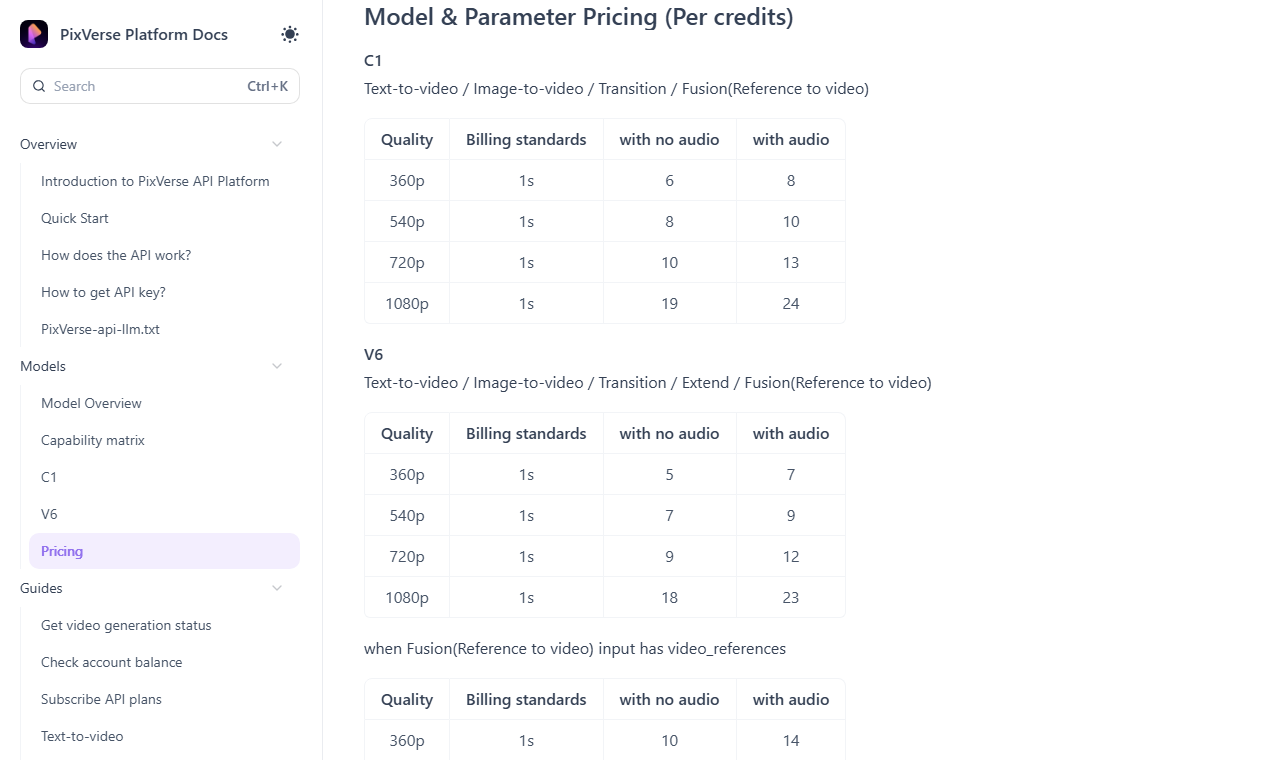 The API rate card as published in the PixVerse Platform Docs, captured 13 Oct 2026.
Turned into 5-second clips at that API rate, V6 costs 45 credits at 720P, 90 at 1080P and 115 at 1080P with audio. At API pricing that is about $0.20 for the first and $0.51 for the last. Using a video reference, which feeds an existing clip into the generation, doubles the rate.
Older models are priced per clip on the same page. V5 at 720P for 5 seconds is 60 credits, and V5.5 is 60 without audio or 70 with it.
The docs point to a separate billing page for API credits. I would not assume that a web-plan credit and an API credit are the same unit, or that a web generation costs what the API table says. The numbers show how steeply cost climbs with resolution and audio. They are not a quote for your subscription.
If the web app did charge the API rate, a 5-second V6 clip at 720P with no audio would cost 45 credits. Standard's 1,200 credits would then make 26 such clips. Pro's 6,000 would make 133, Premium's 15,000 would make 333 and Ultra's 25,000 would make 555. That is an illustration for scale, not a promise.
Which plan fits which user
The best plan depends on how many finished clips you need, at what resolution, and whether you work in bursts.
- You are testing the tool. Stay on Basic. Use the daily credits for a week and check whether the output suits your subject matter before paying.
- You post short clips for social and 720P is enough. Standard is the entry point. Accept that the monthly pool is small and that 720P is a hard ceiling.
- You deliver 1080P or 4K, or need batches. Pro is the smallest plan with the 4K ceiling, 5 concurrent generations, batch creation and the third-party model list.
- You generate daily and fill a queue. Premium has the lowest credit cost on the page and 8 concurrent generations. This is the plan where the arithmetic works in your favour.
- You can run jobs overnight. Ultra is the only plan with unlimited free Off-Peak generation. Confirm the hours first.
- You work in a team. Team Ultra is the only plan with a shared pool and member roles.
Unused membership credits expire when the new 30-day cycle starts, counted from your subscription time and not from midnight UTC. A plan you under-use is the most expensive plan you can buy, whatever its per-credit rate, because the credits you never spend still count toward what you paid for the month.
When a specialist beats the credit store
PixVerse also ships small apps on top of the credit pool, including Ad Master, Product Video Remix, Vibe MV, Magic Extend and a Sound Effect Generator. If you came for one of those jobs, a single-purpose tool may fit better than a general plan.
For music-led visuals, HokAI's directory entries describe Kaiber, which wraps Veo, Kling and Seedance with a beat-sync batch tool, and Neural Frames, an audio-reactive maker built for musicians. Both overlap PixVerse's Vibe MV. For product and ad clips, ByteDance's Pippit turns a product link into a post-ready video, which overlaps Ad Master. For the editing step after generation, CapCut and VEED are the usual pairings.
The point is not that these beat PixVerse. It is that a credit plan prices every job the same way, while a specialist may price your one job better. Test the free tier of each before you commit a year.
How PixVerse compares with Runway and Luma
PixVerse is not alone in selling credits across third-party models. Runway's pricing page, read the same day, lists three individual plans, all with annual discounts.
| Runway plan | Per month, annual | Per month, monthly | Credits per month |
|---|---|---|---|
| Standard | $12 | $15 | 625 |
| Pro | $28 | $35 | 2,250 |
| Max | $76 | $95 | 9,500 |
Runway's own Gen-4.5 costs 60 credits per 5 seconds, and its plans include Kling 3.0 and Seedance 2.5 alongside its own models. Luma's page lists three individual plans too, and its rate card carries Seedance, MiniMax H3, FLUX 3 and Veo 3.1.
| Luma plan | Per month | Billed yearly | Credits |
|---|---|---|---|
| Plus | $30 | $300 | 10,000 |
| Pro | $90 | $900 | 40,000 |
| Ultra | $300 | $3,000 | 150,000 |
Luma's rate card prices Kling 3.0 at 30 credits per second at 720P without audio, so a 5-second clip is 150 credits. Dividing the plan price by credits gives a rough cost per 5-second clip on each service. These are different engines, so the table shows the spread and not a winner.
| Service and engine | Credits for 5 seconds | Approx. cost |
|---|---|---|
| Runway Standard, Gen-4.5 | 60 | $1.15 |
| Runway Pro, Gen-4.5 | 60 | $0.75 |
| Runway Max, Gen-4.5 | 60 | $0.48 |
| Luma Plus, Kling 3.0 at 720P | 150 | $0.38 |
| PixVerse API, V6 at 720P | 45 | $0.20 |
The Runway rows use the annual rate, and Luma uses its $300 yearly price. PixVerse's web plans are missing because I could not read their per-clip rate.
The pattern is the point. All three have become credit wrappers around many models. The engine you want, such as Seedance or Kling, may be available from more than one of them at different credit rates. Compare the rate for the model you will use, not the plan name. Our best AI video generators list covers the engines, and the video generator directory shows the rest, including Vidu, Pika and Higgsfield.
The other side: does credit math even decide this?
The best argument against everything above is that per-credit cost is the wrong metric. What you care about is cost per usable clip. Generative video is hit-and-miss, so a cheap credit that yields one keeper in five costs more than a dear credit that yields one in two. On that view the right plan is the one with the best model for your footage, and the arithmetic is a distraction.
That objection is fair, and it is why the model list matters more than the plan name. It does not rescue the expensive plans, though. A low keeper rate raises your credit burn, which makes cheap credits more valuable, not less. It is also an argument for the free daily credits: run your own prompts through the interface before you decide.
The unknown that could change the verdict is the web-app rate. If PixVerse charges far more per second on the web than the API table implies, every clip count in this guide shrinks. The ranking of plans by cost per credit would still hold, because it depends only on the published price and allowance.
Refunds, cancellation and the fine print
The FAQ on the subscribe page is specific. Partial refunds are not supported. A subscription that is still within its validity period and has not been used is eligible for a full refund, monthly or annual. Expired subscriptions are not refundable even if unused, and credit pack purchases are non-refundable whether or not the credits were spent. Refunds go through support@pixverse.ai with your account ID and receipt.
Deleting your account does not cancel an active subscription, so the page tells you to cancel on the subscribe page first and to back up your data before you start, because the account itself is permanently deleted after a 5-day window. Cancel first.
For freebies, the page describes bonus credits as coming from purchases, rewards and promotional events. It does not publish a redeem-a-code mechanism, so treat third-party sites advertising free credits with caution and keep your login to PixVerse's own pages.
What I could not verify
- Web-app credit costs per generation. Only the API schedule was readable, so the clip counts here are labelled illustrations.
- Monthly-billing prices. I read the yearly view. The struck-through figures are shown on the page, but I did not confirm them under the monthly toggle.
- Off-Peak hours. The page names the benefit and the discount tiers but not when off-peak applies.
- Third-party model credit rates inside PixVerse. The page gives discount percentages, not base rates, so I did not price Seedance or Kling there.
- Kling's own pricing page. It did not load in either reader this run, so Kling is not priced directly. Context is in our Kling shutdown-refugee guide, and what happened to Sora on OpenAI's side is in our report on the shutdown. The PixVerse page only shows that Sora 2 was listed on 13 Oct 2026.
- The subscribe page link. It sits behind a bot check at app.pixverse.ai/subscribe, so it is named here but not listed in the source trail, which only carries pages that load without a browser.
Prices on credit-based tools move often. Our pricing verification checklist shows how to re-check any figure here against the vendor page before you pay.
What to do next
Open PixVerse, spend a week of daily credits on your actual prompts, and note how many generations it takes to get a clip you would publish. Multiply that by your monthly clip count, convert it to credits at the rate PixVerse charges for your chosen model, and only then pick between Pro and Premium. To see how the field compares first, Smart Match takes your use case and returns a ranked shortlist.
The number to watch is the web-app per-second rate. If PixVerse publishes it, the clip counts above can be replaced with real ones.
Frequently asked questions
Is PixVerse free to use?
Yes, the Basic plan costs $0. It lists 60 initial credits and 30 daily credits that expire at the end of each day, with video capped at 540P. The free card does not list watermark-free output, which every paid plan does.
How much does PixVerse cost per month?
On yearly billing the page shows Standard at $8, Pro at $24, Premium at $48 and Ultra at $149 a month. Each card also shows a higher struck-through figure of $10, $30, $60 and $249. Team Ultra is $149 per seat on yearly billing.
Which PixVerse plan has the cheapest credits?
Premium. At $48 a month for 15,000 credits it works out to $3.20 per 1,000 credits on yearly billing, against $4.00 on Pro, $5.96 on Ultra and $6.67 on Standard. Credit packs cost $10 per 1,000 before the plan bonus.
Do PixVerse credits expire?
Daily credits expire at the end of each day, and membership credits expire when the next 30-day cycle starts. Bonus credits from packs, rewards and promotions never expire, according to the FAQ on the subscribe page.
Can I get a refund on a PixVerse plan?
Only for a subscription that is still within its validity period and unused. Partial refunds are not supported, expired plans are not refundable, and credit packs are non-refundable. Requests go to support@pixverse.ai with your account ID and receipt.
Covered in this guide
- PixVerse: AI video generator valued at over $2 billion, with native audio, camera controls and a free plan; paid tiers available.
- CapCut: AI-powered video editor for creating trending content across all platforms
- FLUX 3: FLUX 3 is a video, image, and audio model from Black Forest Labs, launched July 2026, built on a shared Self-Flow architecture.
- Higgsfield: AI video and image studio, used in 238 countries, that runs Kling, Veo, Seedance and Sora plus its own camera and character tools on one credit plan.
- Kaiber: AI video studio built from 3 connected tools: Canvas for Veo, Kling and Seedance, Beat Sync for music-timed batches, and an Editor to finish clips.
- Kling 3.0: Kling 3.0 is Kuaishou Technology's proprietary AI video model, built for native 4K output with synchronized multilingual audio in one generation pass.
- Kling: Kuaishou's text-to-video platform with native 4K, lip-synced audio in 5 languages, and free daily credits. Used by 60M+ creators; plans from $6.99/month.
- Luma: Creative agents that make you prolific: AI video and image generation for creators
- MiniMax H3: MiniMax H3 (Hailuo 3.0) is a 33B open-weight omni-modal model, released July 31 2026, generating 2K/24fps video with native stereo audio in one forward pass.
- Neural Frames: Audio-reactive AI music video maker for musicians, with three creation modes, eight-stem song analysis and a 4K upscale option on higher plans.
- Pika: AI creative platform by Pika Labs. Generates video, image and audio from prompts or photos using its own model plus outside AI engines. Free to start; paid plans scale up from there.
- Pippit: ByteDance's AI creative agent turns a product link, prompt or file into a post-ready video, with avatars, image tools and scheduled posting.
- Runway: AI to simulate the world through generative video and world models
- Seedance 2.5: Seedance 2.5 is ByteDance's 2026 video generation model, producing one continuous multi-reference clip per pass with synchronized audio, launched inside Jimeng AI and Doubao Pro.
- VEED: Browser-based video editor with AI subtitles, avatars, voice cloning, and text-to-video: no download needed.
- Vidu: AI video generator with text-to-video, image-to-video, and reference-to-video modes, native audio-video co-generation up to 16 seconds, and multi-subject consistency: starting free with paid plans.
- Wan 3.0: Wan 3.0 is Alibaba Tongyi Lab's video model, in public beta since August 6, 2026, generating up to 30 seconds of native 1080p video from text, image, audio, video, or documents.
Sources
Still deciding?
This guide covers a handful of options. Smart Match checks every listing in the directory against how you actually work and what you can spend, then hands you the shortlist and the reason behind each pick.
Find your toolsRelated guides
- The AI 80s Photo Trend: How to Make Yours (and Turn It Into a Video) in 2026AnalysisWhat changed and who it affects
- AMD Buys World Labs for $8.2B: What It Means for Marble UsersAnalysisWhat changed and who it affects
- Best AI Content Creation Tools in 2026: Pick By the Job, Not the CategoryBuyer's guideHow to pick, across a category
- Best AI Dubbing and Video Translation Tools in 2026Buyer's guideHow to pick, across a category
- Best AI for Creating YouTube Videos in 2026: A Buyer's GuideBuyer's guideHow to pick, across a category
- The Best Free AI for Turning a Photo Into a Video in 2026Buyer's guideHow to pick, across a category