
Last updated: 2026-10-07
Kaiber, in operation since 2022, is a browser-based AI video and image studio that runs models such as Veo, Kling and Seedance from one credit balance. Its Beat Sync tool turns images, clips and a music track into batches of beat-timed videos, and a built-in timeline editor finishes them for vertical and widescreen export.
About Kaiber
Kaiber is a browser-based creative studio for AI video and images. It was founded in 2022 and became known for music videos made for Kid Cudi and Linkin Park, work TechCrunch used to introduce the company when it launched a mobile app in November 2023. In October 2024, with Victor Wang quoted as CEO, Kaiber announced a funding round from EQT Ventures and Crush Ventures, amount undisclosed, alongside a relaunch around a canvas workspace then called Superstudio.
The product has changed shape more than once. The 2023 tools ran on open-source image projects plus a proprietary layer, the 2024 relaunch turned Kaiber into a front end for third-party models alongside its own, and by 2026 the Superstudio name is gone, replaced by Canvas, Beat Sync and Editor, which the help center describes as one pipeline from generation to finished cut. Read older reviews that mention Flipbook, Motion or Transform modes, or a phone app, as describing a different product: Kaiber now says there is no app to download and serves phones through the browser.
Within AI video generators Kaiber sits with the aggregators. It hosts models from other labs, including Kling 3.0 from Kuaishou Technology, MiniMax video models and the FLUX family from Black Forest Labs, so the look of a given shot is the underlying model's, not Kaiber's. HokAI has records for other families Kaiber names, including Veo 3.1, Seedance 2.5 and Wan 3.0, though Kaiber's pages do not say which versions each plan can run. What Kaiber adds is the workflow around those models. The closest alternatives are Higgsfield for multi-model generation, Neural Frames and Freebeat for music-led video, Runway for filmmaking, and Pika for quick stylised clips. HokAI's guide to all-in-one tools versus specialists, its AI video generator roundup and its video editing and creation guide cover when a bundle beats single tools.
On rights, Kaiber's terms say users keep ownership of what they upload and generate, excluding third-party content, and that Kaiber will not train generative AI models on that content without permission. The same terms warn that output may not be unique across users. HokAI found no published SOC 2 or ISO 27001 report for Kaiber, and the privacy policy names no security certification, so a regulated buyer should ask the company directly.
Public ratings are split. G2 shows 4.6 from 9 reviews, while Trustpilot shows 2.7 from 167, with about half of those reviews at five stars and about 40% at one star. The G2 sample is small and the Trustpilot spread is polarised, so the average says less than the individual reviews do: the one-star reviews HokAI read concern billing and cancellation rather than output quality.
Screenshots
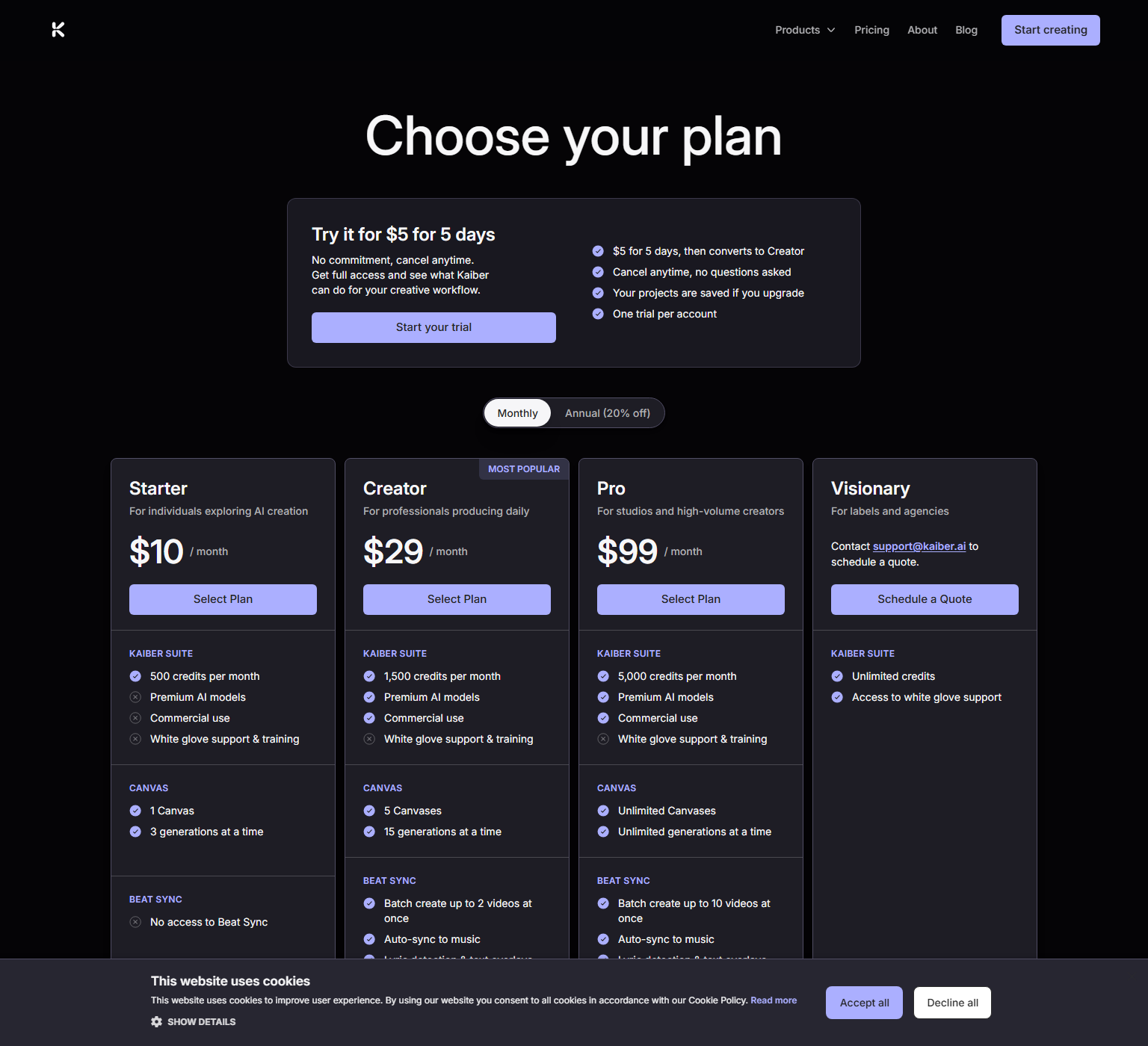
Pricing
Monthly billing: Starter $10 for 500 credits, Creator $29 for 1,500, Pro $99 for 5,000, and Visionary by quote with unlimited credits. Annual billing is 20% off. 25 cents (the $250 pack of 20,000), so the largest pack is the cheapest credit Kaiber sells.
The pricing page does not publish credits per clip, because the cost shows beside the Generate button. Against Higgsfield, price one finished clip on each platform and do the same for Runway, since a credit is not the same unit across platforms.
| Tier | Monthly price | What it includes |
|---|---|---|
| Starter | $10/mo | 500 credits a month, Standard models, premium models not included, Commercial use not included on the pricing page, 1 Canvas, 3 generations at a time, No Beat Sync access, 1 timeline in Editor |
| Creator | $29/mo | 1,500 credits a month, Premium models and commercial use, 5 Canvases, 15 generations at a time, Beat Sync batches of up to 2 videos, Auto-sync to music, lyric detection and text overlays, Auto-Clip Video and no-prompt image to video |
| Pro | $99/mo | 5,000 credits a month, Commercial use and premium models, Unlimited Canvases and simultaneous generations, Beat Sync batches of up to 10 videos, Auto-Clip Video and no-prompt image to video, Unlimited timelines in Editor |
| Visionary | Custom | Unlimited credits, Access to white glove support, Priced by quote through support@kaiber.ai, Built for labels and agencies |
Feature Comparison by Tier
| Feature | Starter | Creator | Pro | Visionary |
|---|---|---|---|---|
| Monthly price (billed monthly) | $10 | $29 | $99 | Quote |
| Monthly price (billed annually) | $8 | $23 | $79 | Quote |
| Credits a month | 500 | 1,500 | 5,000 | Unlimited |
| Premium AI models | No | Yes | Yes | Not listed |
| Commercial use | No | Yes | Yes | Not listed |
| Canvases | 1 | 5 | Unlimited | Unlimited |
| Generations at a time | 3 | 15 | Unlimited | Unlimited |
| Beat Sync batch size | None | Up to 2 | Up to 10 | Up to 10 |
| Auto-Clip Video | No | Yes | Yes | Yes |
| Editor timelines | 1 | Unlimited | Unlimited | Unlimited |
| White glove support and training | No | No | No | Yes |
Key Features
- Multi-model Canvas: Generates video and images from a prompt, photo or clip with models the product page names as Veo, Kling, Seedance, Minimax, Nano Banana and Wan, and compares outputs side by side.
- Beat Sync batches: Builds several videos at once from images, clips or a song with no prompting, cutting to the beat in four styles (Instant, Shuffle, Motion and Scene Cut), with the batch ceiling set by plan.
- Auto-Clip and lyrics: Splits a long video into individual shots and adds timed lyrics or captions that you can restyle over the cut.
- Editor timeline: Trims, splits and layers clips, text and audio with transitions, exports in several aspect ratios, and receives Canvas and Beat Sync output directly.
- Talking characters: Make Them Talk and Character Lip Sync animate a character to speech or singing, and Frame-to-Frame animates between two images or two clip frames.
- Image edit and restyle: Edits, restyles and combines images, swaps backgrounds or outfits, and makes logos and album covers from a prompt.
- Audio for video: Add Audio to Video and Auto-Score Video generate a synced soundscape or a soundtrack for an existing clip.
- Pinterest import: Beat Sync links to a Pinterest account and imports pins as source images, so a mood board becomes a batch of clips.
Pros
- Several video models sit in one account, so the same idea can be tried on each and the results compared before you settle on one, which a single-model tool cannot offer.
- Unused credits carry forward month to month according to the help center, a rarer promise in this category than it sounds: HokAI's Runway and Higgsfield records both say credits expire when the billing cycle ends.
- The terms commit Kaiber not to train generative AI models on user content without permission, while HokAI's Higgsfield record notes a policy that lets standard accounts' prompts and outputs train its models.
- Generation, beat-synced batching and finishing share one Media Library, which saves downloading clips between separate tools.
Cons
- The pricing page excludes premium models and commercial use from Starter, yet the terms let users use output for any purpose, so confirm with support before selling Starter-plan work.
- Credits per generation are not on the pricing page; the cost appears beside the Generate button, so a monthly budget cannot be planned from published prices alone.
- The terms say credits expire one year after purchase or issuance and are non-refundable, which sits awkwardly with the help center's month-to-month rollover wording.
- Trustpilot's lowest ratings centre on billing, including a complaint of unexpected charges after an automatic upgrade and another about cancelling during the trial, and the company replied to 73% of negative reviews.
- No public API or developer documentation is linked from kaiber.ai, and there is no iOS or Android app, only a mobile browser site.
Product Information
- Cloud
- Yes
- Self-Hosted
- No
- On-Premise
- No
- Training
- Help Center, Blog
Data Handling
- Training-data policy
- Terms of service state Kaiber will not use user content to train generative AI models without permission; Kaiber keeps the right to collect and analyze usage data about access, use and performance.
Frequently Asked Questions
What are Kaiber's pricing plans in 2026?
Monthly billing is $10 for Starter, $29 for Creator and $99 for Pro, and Visionary is quoted case by case. Paying annually takes 20% off, which the help center prices at $8, $23 and $79 a month. The $5 trial lasts five days and then converts to a monthly Creator plan, so cancel inside the window if you only wanted to test it. Extra credits come as one-off packs from $5 to $250.
Does Kaiber have a free plan?
No. Kaiber sells a five-day trial rather than a free tier, and the trial rolls into a paid Creator plan unless you cancel it. The help center says the trial includes all three tools and Beat Sync batches of two videos, and each account gets one trial. A free plan quoted elsewhere may come from the October 2024 launch release, which offered new users a free trial with 100 credits.
What are Kaiber's closest competitors?
Neural Frames suits a musician who wants visuals that follow the drums, bass and vocals as separate stems. Freebeat is the cheaper pick when one uploaded song should come back as a finished music video. Higgsfield fits teams that want API or MCP access to Kling, Seedance and Veo, and Runway fits filmmakers who want its own Gen-4.5 models and agentic tools.
Is Kaiber better than Higgsfield?
It depends on the job. Both run third-party video models behind one credit balance, but only Higgsfield's HokAI record lists API and MCP access, while Kaiber adds Beat Sync batches and a timeline editor and, per its help center, carries unused credits over. Credit counts are not comparable, since Kaiber's entry plan gives 500 credits and Higgsfield's gives 120 while each platform charges a different number per clip, so price one finished clip on each before choosing.
How long does it take to get going with Kaiber?
There is nothing to install: sign up at kaiber.ai in a desktop or mobile browser and start from the trial. Canvas, Beat Sync and Editor share one Media Library, so a clip made in Canvas can go straight onto the Editor timeline. HokAI has not timed a first generation, since the wait depends on the model and length you pick, and phones cover more than 20 workflows but limit Beat Sync to its Instant Cut style. To see what the talking-character and animate-image workflows produce across tools, HokAI's guides to [free AI lip sync apps](/guides/best-free-ai-lip-sync-app-2026) and [turning a photo into a video](/guides/best-ai-for-making-videos-from-photos-free-2026) compare them.
Top Alternatives
- Higgsfield: Pick Higgsfield if you need an API, MCP access or ad templates around Kling, Seedance and Veo; pick Kaiber when beat-synced batches, a timeline editor and carry-over credits matter more.
- Neural Frames: Pick Neural Frames if the video should react to a song split into eight stems; pick Kaiber if you start from existing images and clips and want batches cut to the beat.
- Freebeat: Pick Freebeat if one uploaded song should become a finished music video on a lower-priced plan; pick Kaiber when you want model choice and an editor on top.
- Runway: Pick Runway if you want in-house Gen-4.5 models and agentic production tools for filmmaking; pick Kaiber for music-led short-form work across several third-party models.