Best AI Music Video Generators in 2026: Turn a Song into a Video
An AI music video generator turns a song into video. Song-first tools analyse your audio and build the whole video, while clip-first tools generate short shots from prompts that you assemble. Cost depends on seconds of footage per credit, output resolution and whether the plan includes a commercial licence.
The short version
Song-first tools like Neural Frames and Freebeat turn a finished track into a video automatically. Clip-first tools like Runway, Pika and LTX Studio make shots you cut to the beat yourself. Check credits, resolution and licence tier before you pay.
A three-minute song needs about 36 clips of five seconds each. On Runway, 36 clips of Gen-4.5 cost 2,160 credits, which is nearly the whole 2,250-credit month on the Pro plan. On Neural Frames, the same song is one upload and one button called Autopilot. Both turn a track into a video. They do it in opposite ways. The difference decides your bill, your timeline and your control.
The split that matters in 2026 is song-first against clip-first, a distinction most roundups blur because the same vendors sell both kinds of product under one banner and the marketing copy for each sounds identical. Song-first tools read your audio and build the whole video around it. Clip-first tools generate short shots from prompts, and you cut them to the beat yourself.
If you are an independent artist choosing a tool a week before a release, picking the wrong side costs you either money or evenings. This guide sorts seven tools by that split, with prices read from each vendor's own page on 10 October 2026.
One honest limit up front. Kaiber and PixVerse are on the list, but Kaiber's pricing page would not render in our readers and PixVerse's subscription page sat behind a bot check. We quote no price for either and say where that leaves you.
What is an AI music video generator?
It is software that turns a song into moving pictures. That definition hides two very different products.
A song-first generator takes your audio file, analyses its rhythm, energy and structure and returns a finished video that follows the arrangement. No prompts. Neural Frames describes its flow as three steps: upload music, customise style and beat-sync intensity, download. It lists stem extraction, audio-reactive effects and lyric and lip-sync tools alongside Autopilot, which it describes as full music videos from your song. Freebeat sits in the same camp and also generates the music itself.
A clip-first generator makes shots. Runway, Pika, LTX Studio and Kling answer prompts with a few seconds of video. They are general video models, covered in our best AI video generators roundup. They become music video tools only when you do the assembly work.
The shortlist at a glance
Prices below are the cheapest paid tier, as read on 10 October 2026. Yearly billing is noted where the page leads with it.
| Tool | Approach | Cheapest paid tier | Watch-out |
|---|---|---|---|
| Neural Frames | Song-first | $26/mo billed yearly | Entry plan not advised for Autopilot |
| Freebeat | Song-first | $6.99/week list | Pricing text lists 720p |
| Runway | Clip-first | $12/mo billed yearly | 52s of Gen-4.5 per month |
| LTX Studio | Clip-first | $12/mo billed yearly | Free tier is personal use only |
| Pika | Clip-first | $10/mo | Commercial license starts higher |
| Kaiber | Style-first | Not verified | Pricing page unreadable |
| PixVerse | Clip-first | Not verified | Bot check on pricing page |
The table is a starting point, not a ranking. A cheap entry price means little. Seconds of footage per credit is the number that matters, and only one of these vendors prints it.
How to choose
Answer four questions in order.
- Do you already have a finished song? If not, Freebeat pairs music models with a song-first workflow.
- Do you want one automatic pass or shot-by-shot control? Automatic points to the song-first pair. Control points to Runway or LTX Studio.
- Will the video earn money or run as an ad? Then the licence column below matters more than the price.
- How long is the song? Seconds of footage, not plan names, set the cost.
If your answers split across those lines, Smart Match will ask the same questions and narrow the field against the full AI music video directory. The directory is the evidence. The matching step saves you reading nine pricing pages.
What each tool costs
Credits are the real currency, and each vendor defines them differently. The figures below are copied from the pricing pages, not converted.
| Tool | Plan and price | Included allowance |
|---|---|---|
| Neural Frames | Knight $26/mo yearly, $39 monthly | 2,400 credits a month |
| Neural Frames | Ninja $66/mo yearly, $99 monthly | 7,200 credits, 4K upscaling |
| Freebeat | Basic $6.99/week list | 1,990 credits a week |
| Freebeat | Pro $34.99/month list | 10,000 credits a month |
| Runway | Standard $12/mo yearly, $15 monthly | 625 credits, 52s of Gen-4.5 |
| Runway | Pro $28/mo yearly, $35 monthly | 2,250 credits, 187s of Gen-4.5 |
| LTX Studio | Lite $12/mo yearly | 8,000 credits a month |
| Pika | Starter $10/mo | 900 credits a month |
Freebeat's page ran a 30 percent promotion on 10 October, with Basic at $4.99 for the first week and Pro at $26.99. Promotions change. Plan around the list price.
Runway is the one vendor that converts credits to seconds on the page, which makes the arithmetic easy. Gen-4.5 costs 60 credits per five seconds, or 12 credits a second. A three-minute song therefore needs 2,160 credits for a single clean pass with zero retakes. Standard's 625 credits cover 52 seconds, under a third of that. Pro covers the song once with 90 credits to spare, and nobody gets a shot right on the first attempt.
Worked budgets for a release video
Take one three-minute single and price it three ways. All three assume the cheapest plan that fits, billed monthly, because a one-off release does not justify a yearly commitment.
| Route | One-month cost | Catch |
|---|---|---|
| Neural Frames Ninja | $99 | Yearly price is $66/mo |
| Runway Pro, Gen-4.5 | $35 | One pass uses 2,160 of 2,250 credits |
| Freebeat Pro | $34.99 | Pricing text lists 720p |
Look twice at the Runway line, because the cheapest-looking row in that table stops being the cheapest the moment you ask for a single reshoot of a shot that came back wrong, which for generated video is the normal case rather than the exception.
One clean pass leaves 90 credits. Allow a 50 percent retake rate and you need 3,240 credits. That is more than Pro grants. Max grants 9,500 credits for $95 a month, so the real Runway price of a retake-friendly release is closer to Neural Frames than the headline suggests.
Freebeat's four-week arithmetic is simpler. Four weeks of Basic at the $6.99 list price is $27.96, a little under one month of Pro. We did not confirm whether weekly credits roll over, so do not assume they pool.
Neural Frames hides its answer. Its estimator was still loading when we read the page, so we cannot give a per-song figure. The song-cost estimator on its pricing page is the number to get before you pay.
Resolution and delivery
Where the video will play sets the resolution you need. A vertical clip for a phone feed is forgiving. A premiere on a large screen is not.
Neural Frames contradicts itself slightly. Its home page says the download is 4K. Its pricing page marks 4K upscaling as unavailable on Neural Knight and included from Ninja. Read the plan table. Skip the headline.
Freebeat's pricing text lists video resolution up to 720p on Basic and Pro. Runway lists 4K upscaling from Standard and unlimited 4K video upscaling on Pro and Max. LTX Studio lists SDR to HDR enhancement among its features.
A hybrid workflow, step by step
The tools combine better than any single pick. This sequence uses two subscriptions for one month.
- Upload the song to a song-first tool and generate a full pass.
- Watch it once with the sound off and mark every shot you would keep.
- List the sections that fail: lip-sync drift, wrong mood, repeated imagery.
- Rebuild those sections as clips in Runway, LTX Studio or Pika.
- Cut everything to the beat in your editor and export once.
- Cancel the second subscription before the renewal date.
The sound-off pass is the useful trick. It shows whether the pictures carry the song. If they do not, no edit will save them.
Reading the vendor roundups
Search the topic and the first page is full of ranked lists. Many are written by the vendors they rank. Freebeat's own blog publishes a best AI music video generator for artists post, and Neural Frames hosts a creative control roundup. Atlabs runs a head-to-head comparison that includes itself.
Ignore them? No. Take prices, which they quote at different dates, from the vendor's page and treat the rankings as marketing. Their price figures for the same plan disagree with each other, and with the pages we read.
Neural Frames: the specialist for audio-reactive work
Neural Frames is the most music-specific tool here. Its home page promises audio-reactive AI music videos for musicians who want creative control, and its pricing page lists stem extraction, audio-reactive effects, lyric and lip-sync, a 25 fps export and an AI assistant for prompts.
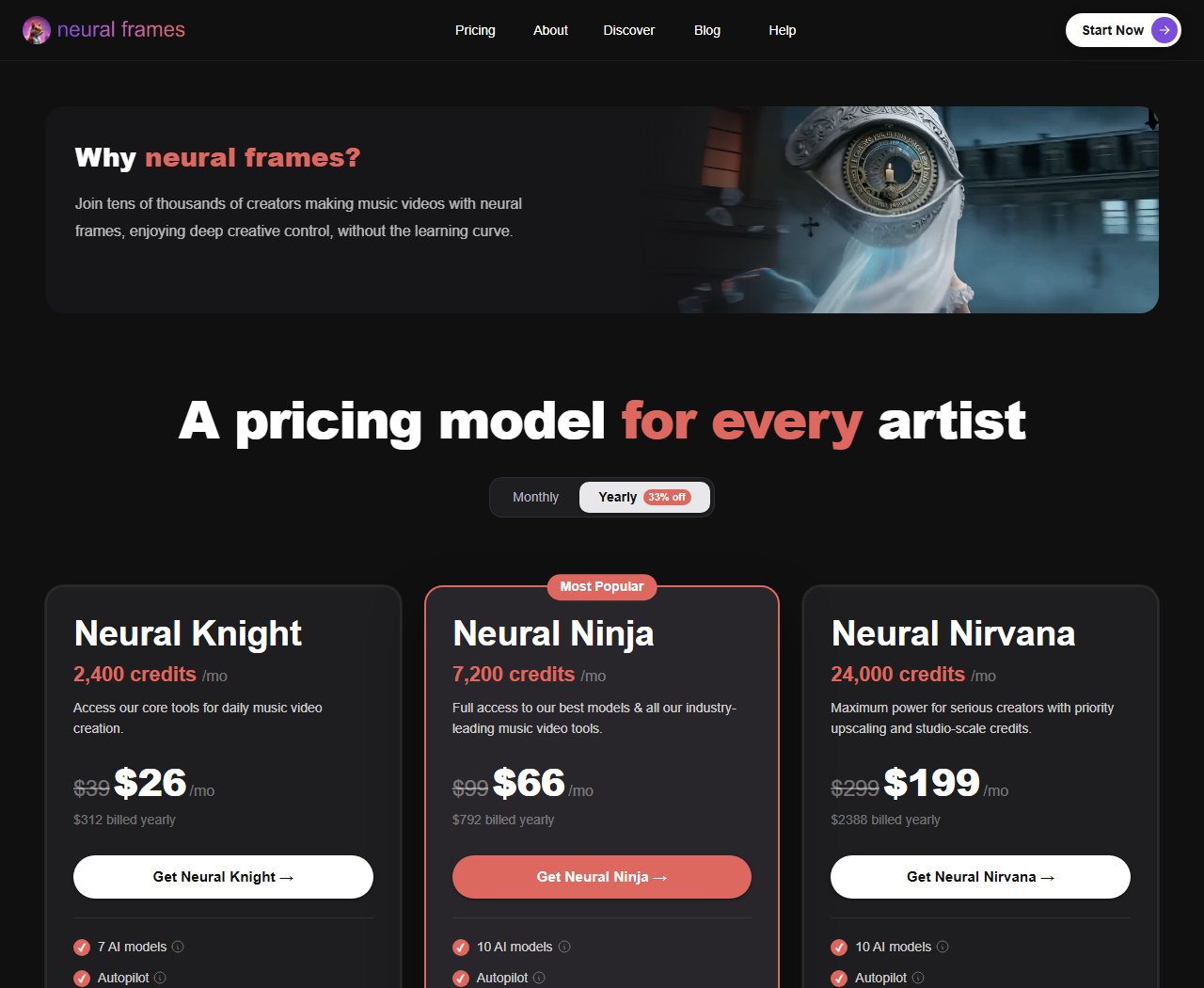 The three Neural Frames plans with yearly billing selected, captured 10 Oct 2026.
The entry plan carries a note. Neural Knight is marked "Not recommended for Autopilot", while Ninja is marked "Good for Autopilot" and Nirvana "Best for Autopilot". Read that plainly: the vendor's cheapest tier is for hands-on work, and its automatic mode wants the middle tier at $66 a month billed yearly. Ninja also unlocks 4K upscaling; Knight tops out at 1080p.
The page also carries a song-cost estimator, which loads dynamically and showed no figures when we read it. Use it before you subscribe. The company claims over two million videos made on the platform and a 25 fps export that is "40% more fluid than competitors". Vendor claims. Untested here.
Short version: pick it if you make electronic, experimental or stem-heavy music and want visuals that respond to individual parts of the mix, because that is the job its tooling was built around. Skip it if you want a quick clip for a social post this afternoon.
Freebeat: music and video under one login
Freebeat takes the broadest swing. Its pricing page lists Seedance 2.5 and MiniMax H3 for video next to Suno V5.5, MiniMax Music 3.0 and Mureka V9 for music. A creator without a finished track can generate the song and the video in one place.
Freebeat's pricing page sits behind a bot challenge, so we read it in a headless browser on 10 October and our automated link checks cannot fetch it.
The entry plan is weekly, not monthly: 1,990 credits a week for $6.99 at list price, which the page translates to roughly 12 Veo 3.1 videos. Pro gives 10,000 credits a month, or about 125 Veo 3.1 videos. The text on both plans lists video resolution up to 720p. That is fine for a vertical social clip and thin for a YouTube premiere on a big screen.
Subscribers on the Creator and Ultimate tiers get PixVerse C1, V6 and V5.5 generations at no credit cost, for manual use in the Freebeat web app only. API, automated and batch use is prohibited. If PixVerse is your preferred look, this is the only route we found that makes it cheap, and the restriction is worth reading twice.
A weekly bill is easy to forget. Set a reminder.
Runway: the clip-first benchmark
Runway is not a music tool. It is the clip generator the others get measured against. Its pricing page shows Gen-4.5, Kling 3.0 and Seedance 2.5 inside one subscription, plus music, voice and sound-effects generation on every paid plan. It also lists a Runway MCP on Pro and Max, which matters if you wire tools together with agents.
You pay in time too. Every shot is a separate prompt, and syncing cuts to a beat is your job in an editor. CapCut handles that adequately, and our video editing guide covers the stronger options. The upside? Control. Each of those 36 clips can be re-rolled on its own.
Standard removes watermarks. It also gives 4K upscaling. Pro adds unlimited 4K video upscaling plus 15 parallel generations, and on a project made of 36 separate shots that parallelism is what stops an evening of waiting for renders from stretching into a weekend.
LTX Studio and Pika: cheaper, with licence strings
LTX Studio lists an Audio-to-Video generation feature, and a banner on its pricing page says audio-to-video is live. It also lists storyboards, camera controls and Kling 3.0 Pro on the Standard tier. The Free plan gives 800 one-time credits and a personal-use licence: it "cannot be used for business, marketing, or paid work". For a musician, a promo video for a streaming release is arguably marketing. Treat Free as a test bench only.
Pika is the cheapest clip-first entry. Starter is $10 a month for 900 credits. Its tiers also separate licensing cleanly. Free and Starter list no commercial license. Creator adds one. If the video will run as a paid ad, the real entry price is the Creator tier, not the headline.
On the day we read it, the Creator card showed $30 beside a $35 figure. We could not tell from the page which was the promotion.
Other clip generators sit in the same bracket. Vidu, Luma Dream Machine and Higgsfield are in the directory, and our photo-to-video guide compares them for single-image jobs.
Kaiber and PixVerse: what we could not verify
Kaiber is described in several vendor-written roundups as the choice for stylised, beat-synced art. We could not confirm that from its own site, because the pricing page rendered blank in both of our page readers on 10 October. Third-party guides quote $5 to $29 a month. Too wide to use. Check the live page.
PixVerse sits behind a Cloudflare check on its subscription page, and we do not attempt to bypass bot checks. Its Freebeat bundling above is the one pricing fact we can source.
Data handling, rights and your master file
Three checks before you upload. The first is about licences.
- Pika puts commercial use at Creator and above.
- LTX Studio's Free tier is personal-use only.
- Runway lists no watermarks from Standard, and Freebeat lists watermark removal on paid plans.
The second is about ownership of a generated song. If Freebeat's Suno or Mureka models make your track, each model provider's terms decide who owns it. We did not read those terms, so treat ownership as unverified.
The third is data handling. An unreleased master is a file you cannot take back once it leaves your machine. We did not verify any of these vendors' training, retention or deletion policies. Upload a rough mix first if that worries you, and read the privacy page before the real master goes up.
None of this is legal advice. The pricing pages simply leave these questions open.
Who should skip all of this
Skip AI generation if the video is the artwork itself, whether that is a live-action concept, a performance clip, or a hand-animated piece you have already spent weeks on. Anything shot or drawn by hand will look worse once a generator flattens it. Skip it too if your release depends on lip-sync accuracy for a lead vocal and you cannot afford retakes. Neural Frames lists lyric and lip-sync tools, but we have not tested their accuracy.
If you only need visual loops behind a streamed set, a plain editor and a stock library cost less than any plan above.
The other side of the argument
The strongest objection is that song-first tools produce generic output. A system that reads your song and picks the pictures has made the creative decisions for you, and everyone feeding in similar tracks gets similar results. Fair. Clip-first tools give you the decisions back, at the price of hours.
There is an answer, and it is a hybrid.
Generate a rough pass with a song-first tool, find the shots that work, then rebuild the weak ones in Runway or LTX Studio and cut everything in an editor.
The Neural Frames timeline editor and Runway's per-shot control both support that. It costs two subscriptions for one month, and for a single release video that arithmetic usually lands well below what a freelance editor would charge for a day of work, though we have not priced editors and your local rates may differ. For more on assembling clips into finished videos, see our guide to making YouTube videos with AI.
What would change this guide
Three things would change the ranking, and we will revisit the guide when any of them lands. First, a readable Kaiber pricing page, which would let us place it properly. Second, Freebeat moving above 720p on its entry tiers. Third, Runway or LTX Studio adding true beat-aware assembly, which would collapse the song-first gap.
Model churn matters too. Vendors add and drop models every few weeks, which means a tool that is the obvious default in October can look stale by Christmas, and the Sora shutdown fallout showed how fast a "default" tool can disappear. If you add dubbed or translated versions of the finished video later, dubbing tools are a separate step, and ElevenLabs is the one most people reach for.
The short answer
For a finished song and a hands-off first pass, start with Neural Frames on the Ninja tier or Freebeat on its weekly plan. For control over every shot, use Runway Pro. For a tight budget with a commercial video, price Pika's Creator tier against LTX Studio's paid tiers. Check Kaiber and PixVerse yourself.
Watch credit pricing. It moves. Freebeat was already running a promotion on the day we read its page. Confirm every figure on the day you pay.
Frequently asked questions
What is the cheapest way to make an AI music video?
Pika starts at $10 a month and Freebeat at $6.99 a week at list price, with a promotional $4.99 on the day we checked. Cheap entry plans often lack a commercial licence or high resolution, so the cheapest tier is not always usable for a release.
Do I need a commercial licence for a music video?
If the video promotes a release or runs as an ad, assume yes. Pika lists a commercial licence from its Creator tier, and LTX Studio limits its Free plan to personal projects. Check each vendor before publishing.
How many credits does a three-minute song need?
On Runway, Gen-4.5 costs 60 credits per five seconds, so 180 seconds of footage is 2,160 credits for one pass with no retakes. Other vendors define credits differently, so use their own estimators.
Which tool is best for audio-reactive visuals?
Neural Frames is the most music-specific option we found, with stem extraction and audio-reactive effects listed on its pricing page. We have not tested output quality.
Can AI make both the song and the video?
Freebeat lists music models such as Suno V5.5 and Mureka V9 next to video models, so one login covers both. Ownership of generated songs depends on each model provider terms, which we did not review.
Covered in this guide
- capcut: AI-powered video editor for creating trending content across all platforms
- Freebeat: AI music video generator that converts songs into rhythm-synced visuals, dance videos, and lyric videos. Free plan, Pro at $24.99/month. Built by Random Motion Technology.
- higgsfield: AI video and image studio, used in 238 countries, that runs Kling, Veo, Seedance and Sora plus its own camera and character tools on one credit plan.
- kaiber: AI video studio built from 3 connected tools: Canvas for Veo, Kling and Seedance, Beat Sync for music-timed batches, and an Editor to finish clips.
- kling: Kuaishou's text-to-video platform with native 4K, lip-synced audio in 5 languages, and free daily credits. Used by 60M+ creators; plans from $6.99/month.
- ltx-studio: Browser-based AI video studio from Lightricks that turns scripts into storyboards, consistent shots and timeline edits, with partner models like Veo and Kling.
- luma-labs-dream-machine: Creative agents that make you prolific: AI video and image generation for creators
- Neural Frames: Audio-reactive AI music video maker for musicians, with three creation modes, eight-stem song analysis and a 4K upscale option on higher plans.
- pika: AI creative platform by Pika Labs. Generates video, image and audio from prompts or photos using its own model plus outside AI engines. Free to start; paid plans scale up from there.
- pixverse: AI video generator valued at over $2 billion, with native audio, camera controls and a free plan; paid tiers available.
- Runway: AI to simulate the world through generative video and world models
- suno: AI music generator with 100M+ users that creates complete songs with vocals from text prompts. Includes a limited free tier; paid plans add commercial rights and voice cloning.
- vidu: AI video generator with text-to-video, image-to-video, and reference-to-video modes, native audio-video co-generation up to 16 seconds, and multi-subject consistency: starting free with paid plans.
Sources
Still deciding?
This guide covers a handful of options. Smart Match checks every listing in the directory against how you actually work and what you can spend, then hands you the shortlist and the reason behind each pick.
Start Smart MatchRelated guides
- The AI 80s Photo Trend: How to Make Yours (and Turn It Into a Video) in 2026AnalysisWhat changed and who it affects
- AMD Buys World Labs for $8.2B: What It Means for Marble UsersAnalysisWhat changed and who it affects
- Best AI Content Creation Tools in 2026: Pick By the Job, Not the CategoryBuyer's guideHow to pick, across a category
- Best AI Dubbing and Video Translation Tools in 2026Buyer's guideHow to pick, across a category
- The Best Free AI for Turning a Photo Into a Video in 2026Buyer's guideHow to pick, across a category
- Best AI for Video Editing and Content Creation in 2026: Pick the Job, Not the CategoryBuyer's guideHow to pick, across a category