The Best Free AI Lip Sync Apps in 2026
Among free AI lip sync apps in 2026, Sync Labs is the only one offering a genuine free lip sync generation: three clips a month, up to 20 seconds each, without a credit card. VEED, Vmaker, and Translate.video restrict lip sync to paid plans; D-ID's free option is a watermarked trial.
The short version
Sync Labs is the only major AI lip sync tool with a real free generation: three clips a month, 20 seconds each, no credit card. VEED, Vmaker, and Translate.video advertise free plans but gate lip sync behind a $9 to $99 paid tier, and D-ID's free trial stamps a full-screen watermark on every clip.
Sync Labs' own documentation says a new account gets exactly three free lip sync generations a month, capped at 20 seconds each, no credit card required. That is the most generous free lip sync allowance among the ten apps checked for this guide.
Most of the others do not offer one at all. Search "ai lip sync app free" and you will land on a dozen roundups that list the same six or seven names without checking what "free" actually unlocks.
This guide checked each vendor's own pricing page on 26 September 2026. The pattern that emerged is not subtle: most apps that market themselves as having a free plan quietly exclude lip sync from that plan, reserving it for a paid tier instead. If you want to know which app will actually let you sync a mouth to audio without paying, read the fine print below before you upload anything.
The shortlist
Three apps are worth your time, and for different reasons.
- Sync Labs if you want to test lip sync quality for free before deciding whether to build on it. It is the only app here with a working, no-card free generation.
- Vmaker if you already need a broader video editor with subtitles and doc-to-video conversion, and lip sync is one feature among several.
- Translate.video only if the job is specifically multilingual dubbing, since its lip sync minutes are metered separately from its dubbing minutes even on paid plans.
Everything else in this guide either has no meaningful free tier for lip sync, or bundles the feature into a broader product where lip sync itself is hard to isolate and price.
How to choose in under five minutes
Skip the marketing copy and answer these four questions in order.
Do you need one test clip, or a recurring workflow? A single test favors Sync Labs' free tier. A recurring need makes every free tier here irrelevant within a week.
Do you already pay for a broader editor? Vmaker and VEED bundle lip sync into a full editing suite, so if you already use one for captions or cutting, adding lip sync there avoids a second subscription.
Do you need multilingual dubbing, or lip sync on original audio? Translate.video is built for the former. The rest assume you already have a final audio track.
Do you need real-time interaction, or a pre-rendered clip? Only D-ID's Agents product handles live conversation. Everything else in this guide renders a finished file.
If the answer to the first question is "recurring workflow," skip the free-tier comparisons below and jump straight to the pricing section.
Most of these free plans don't actually include lip sync
A free plan and a free lip sync generation are two different promises, and vendors rarely distinguish between them on the marketing page. VEED has a genuinely usable free tier for captions and basic editing. Its AI Lip Sync avatar tool is a different story: it sits behind the $24-a-month Pro plan, unavailable on both the free tier and the $12-a-month Lite tier below it.
Vmaker runs the same pattern. The free Lite plan gives you AI credits and a modest monthly allowance of auto-subtitles, but video dubbing, the feature that drives lip sync, only unlocks once you upgrade to the $18-a-month Starter plan.
Translate.video goes further still. Its own pricing page lists the Free plan at zero minutes across dubbing, captions, and lip sync alike. It is a trial shell that lets you explore the interface, not a working free tier.
You need a paid plan just to get any dubbing minutes at all. Even then, lip sync minutes are metered separately from dubbing minutes and capped tightly, a detail buried well below the headline numbers on the pricing page.
Sync Labs is the one app that actually gives you a free generation
Sync Labs, sold under the domain sync.so, is built for developers first: a REST API, Python and TypeScript SDKs, and a web Studio for testing without writing code. Its documentation states plainly that "free generations are only available on free accounts."
Once you subscribe, that allowance disappears. Sync Labs says outright that "there's no monthly free generation allowance on paid plans," so the free quota exists to let you evaluate the product, not to subsidize ongoing use after you have decided to pay.
The three free generations reset monthly and require no payment card. Most run up to 20 seconds, though only one of the three may use the flagship sync-3 model, which caps at 15 seconds instead.
Sync Labs runs five separate lip sync models in total. Sync-3 renders in native 4K with built-in detection for hands, microphones, and glasses covering the mouth, a real limitation for cheaper lip sync models that were not trained to handle obstructions.
Below that tier, lipsync-2-pro adds diffusion-based detail for beards and teeth, lipsync-2 is the fast general-purpose default, and lipsync-1.9.0 is a legacy budget option kept around for simple jobs.
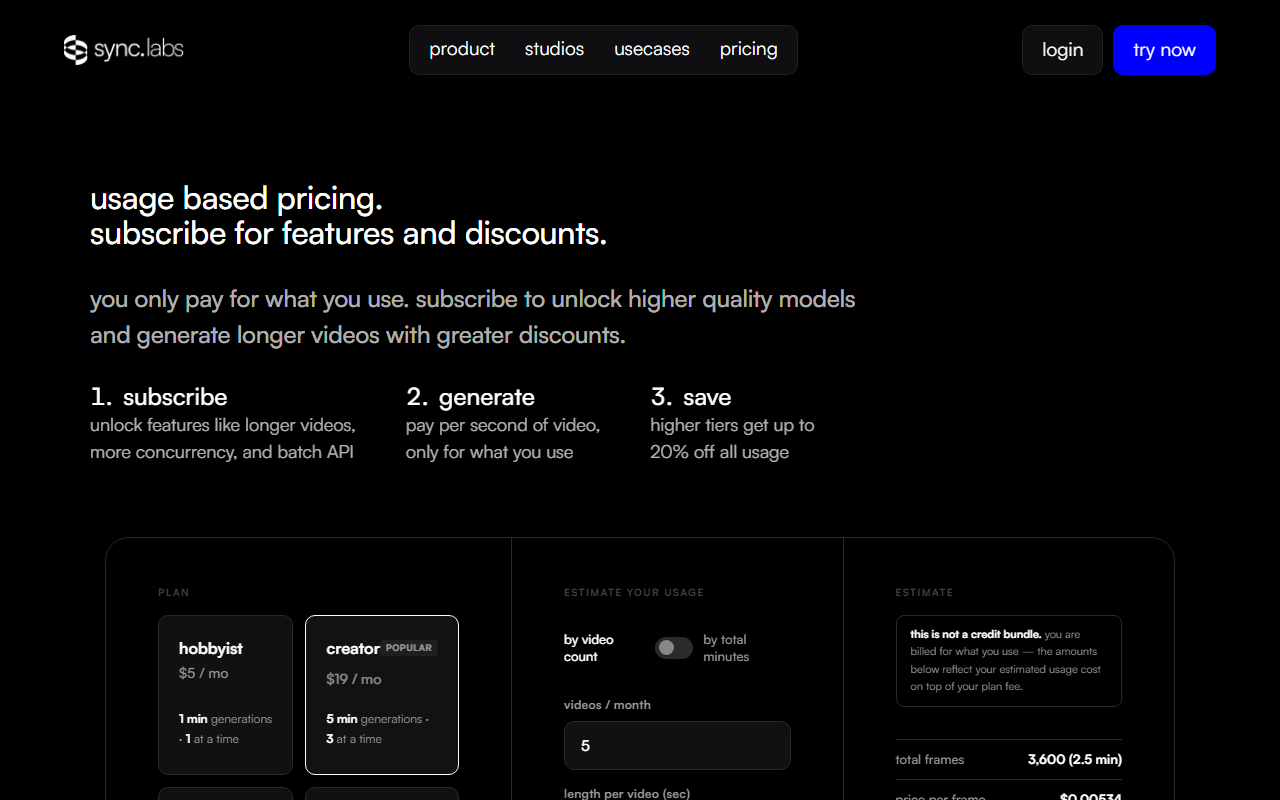 Sync Labs' own pricing page, captured 26 Sep 2026.
Paid usage on Sync Labs is not a simple per-minute rate. Billing works as subscription plus usage on top, where the subscription tier sets your per-second rate and usage is charged separately once you cross it.
The unit charged is the output frame, not the second, so a 30fps render costs roughly a fifth more than a 25fps render of the same length. That detail rarely appears in third-party pricing roundups, and it quietly changes the real cost of a longer clip.
D-ID's free trial stamps a full-screen watermark on everything
D-ID, founded in 2017 and backed by $48 million in funding, turns a photo into a talking avatar in 120 or more languages. Its March 2026 Version 4 update sharpened lip synchronization and added richer facial expressions for both scripted and real-time avatars.
There is no ongoing free plan, but D-ID does offer a free trial. Its own FAQ says why the output looks the way it does: "a full-screen watermark appears for trial users," a deliberate choice the company frames as transparency about which videos are AI-generated rather than a paywall trick. D-ID does not publish the exact trial credit count on its public pricing page, so confirm the current allowance before you start.
That makes D-ID a fine pick for confirming the technology works, but a poor one for producing anything you could publish without paying first. Its developer base, well past 280,000 accounts, and native integrations with PowerPoint, Canva, and Google Slides suggest the product is built for teams who already know they need it.
Shorz installs for free, but every generation costs a credit
Shorz is a Windows desktop app that turns a single photo into what it calls a lip-synced spokesperson, alongside script-to-video and podcast-style production modes. The app itself costs nothing to install, and every editing feature is unlocked from the start.
But Shorz's own product description is explicit: "there are no free AI credits to sample the workflow before buying a pack." Every single generation, lip sync included, draws from a one-time credit pack that never expires but never comes free either.
That is a meaningfully different model from a metered free tier. Sync Labs limits you to three generations a month and then asks you to pay. Shorz never gives you one to begin with. If your test of "is this app free" is whether you can produce a single lip-synced clip without spending money, Shorz fails it despite the free download.
What each free tier actually gives you
| App | What "free" gets you | Lip sync included free? | Cheapest paid unlock |
|---|---|---|---|
| Sync Labs | 3 generations/month, 20s cap, no card | Yes, limited | $5/mo + usage (Hobbyist) |
| VEED | Captions, basic editing, watermarked exports | No | $24/mo (Pro) |
| Translate.video | 0 minutes, trial shell only | No | $9/mo for dubbing (Basic) |
| Vmaker | AI credits, subtitle minutes | No | $18/mo (Starter) |
| D-ID | Trial only, full-screen watermark | Yes, watermarked | Paid Studio/API plans |
| Shorz | Free app install, zero free credits | No | One-time credit pack |
Sync Labs and D-ID are the only two rows where lip sync happens at all before you pay, and both come with a catch. Sync Labs caps you at three short clips a month. D-ID stamps every trial output with a watermark that makes it unusable for anything beyond a proof of concept.
Four more tools bundle lip sync into a bigger free trial
Kinovi builds on ByteDance's Seedance model and renders native audio with lip sync in several languages as a default part of every clip, typically finishing in under 60 seconds. Zorq AI, which reached public visibility in early 2026, bundles motion control and lip sync into its avatar production workflow, one subscription covering several third-party generation models instead of separate accounts.
Anijam runs lip-synced dialogue through its full animation pipeline, from scene breakdown to finished clip, billed through a monthly credit pool plus a daily top-up for active accounts. AdsMaker.ai packages lip-synced digital avatars into an ecommerce ad workflow aimed at Amazon and Shopify sellers testing creative variants.
All four list a free tier in HokAI's own tracked records, and none published an exact free lip sync quota on their pricing pages the way Sync Labs, VEED, Translate.video, and Vmaker do. Treat that gap honestly: it likely means a shared credit pool that covers lip sync alongside everything else in the app, not a dedicated free allowance you can count on.
Kinovi and Zorq AI both sit closer to general video generators than dedicated lip sync tools, similar to how the wider AI video generator category splits between raw generation, avatars, and editing rather than one job. Anijam's daily credit top-up is the one mechanic among these four that behaves like a true recurring free allowance rather than a one-time trial, though HokAI could not independently verify the exact daily amount from Anijam's public pricing page as of this guide's research.
AdsMaker.ai's free access, by contrast, is scoped around its ecommerce ad workflow specifically. It is a poor fit if your only need is a single lip-synced clip rather than an ongoing batch of ad variants. Confirm the current credit count on each of these four vendors' own pricing pages before you plan a project around any of them.
What this costs once you need it for real
A single test clip is not the same job as ten client deliverables a month. Once you move past the free tier, the cheapest real option depends on volume.
Sync Labs's Hobbyist plan starts at $5 a month and suits occasional short clips, since usage is billed at roughly $0.05 a second on top of that base fee.
Vmaker's $18-a-month Starter plan is a better fit if you also need the surrounding editor, auto-subtitles, and doc-to-video conversion rather than lip sync alone, and it bills a flat monthly rate with no per-second usage charge.
Translate.video's top Pro plan runs $99 a month and makes sense only if you specifically need multilingual dubbing across dozens of languages. Even there, its lip sync minutes cap at 10 a month, a small slice of the plan metered far more tightly than the dubbing minutes it advertises up front.
None of these numbers hold still. Vendors in this category change plan names and credit allotments several times a year, which is why every price in the table above is dated to this guide's publication rather than presented as permanent.
If lip sync is only one feature you need alongside captioning, background removal, or timeline editing, it is worth checking whether a full editor already covers it before adding a single-purpose subscription. HokAI's best AI for video editing and creation guide covers that broader editor category, where CapCut and Descript sit alongside VEED.
If the job is specifically translating a video into another language rather than lip syncing original audio, the best AI for translation guide covers dubbing tools beyond Translate.video, including how they handle the same problem from the language side rather than the video side.
Who should skip free lip sync entirely
- Agencies with a recurring client need. A metered free tier costs more in staff time chasing short limits than a paid plan saves.
- Anyone needing commercial rights. Free-tier output on every app checked here is scoped for personal testing, not licensed for client or ad use.
- Real-time or interactive avatars. D-ID's Agents product and similar real-time tools solve a different technical problem from pre-rendered lip sync, and none of the free tiers here cover it.
- Anyone syncing more than a few seconds regularly. At a 20-second monthly cap, Sync Labs' free tier covers a proof of concept, not a workflow.
Check each vendor's terms directly before you publish anything generated on a free plan, since none of the ten apps here license free output for commercial use by default.
Check data and language rights before you upload a face
Lip sync tools require a photo, video, or voice sample of a real person, which raises a different question than picture generation does. What happens to that biometric data after the render finishes?
D-ID discloses retention practices in its enterprise documentation. Sync Labs, Vmaker, Shorz, and Translate.video do not publish a clear data-retention window on their public pricing or FAQ pages as of this guide's research.
If you plan to upload a client's likeness or your own face for a paid deliverable, ask the vendor directly how long the source file and generated output are stored, and whether either is used to train future models. None of the apps in this guide disclosed a training-data policy on their public pages, so treat that as an open question rather than an assumed no.
The counterargument: a free trial isn't a broken promise
It is tempting to read Translate.video's zero-minute free plan or D-ID's watermarked-only trial as bait-and-switch marketing. That is not quite fair.
Lip sync inference is computationally expensive compared with text generation or basic editing. A vendor that gave away unlimited free renders would either burn cash or ration quality until the free product was worse than useless.
Sync Labs' three-generation cap and Vmaker's paid-only dubbing are both defensible ways to let you evaluate output quality without subsidizing production use. The complaint is not that these tiers are limited.
It is that most vendors do not say so clearly on the page where "free" is the headline word. That gap is exactly what this guide exists to close.
What would change this
A vendor moving lip sync into its base free tier, the way Pika currently keeps its no-watermark policy across every plan for video generation, would reshuffle this list immediately. Sync Labs raising its 20-second cap, or a competitor undercutting its usage rate, would change the cheapest-paid answer above.
None of that has happened as of 26 September 2026, and pricing pages in this category have already moved more than once this year. Treat this guide as a snapshot rather than a permanent ranking.
For a broader look at generative video pricing beyond lip sync specifically, HokAI's best AI video generators guide covers cost per second across Runway, Kling AI, and the wider category. The best free AI for making videos from photos guide covers a related but distinct job.
If your actual need is choosing among tools generally rather than lip sync specifically, Smart Match will ask what you are trying to make and narrow the list for you instead of leaving you to cross-reference several pricing pages by hand.
The next place this list will move is wherever a vendor decides free trials are a growth lever rather than a cost center. Watch Sync Labs' free tier first. It is the only one of these ten apps whose free allowance already works the way its marketing implies.
Frequently asked questions
Is there a truly free AI lip sync app?
Sync Labs is the closest: new accounts get three free lip sync generations a month, capped at 20 seconds each, with no credit card required. Most other apps checked for this guide, including VEED, Vmaker, and Translate.video, advertise a free plan but exclude lip sync from it entirely.
Does VEED's free plan include AI Lip Sync?
No. VEED's AI Lip Sync avatar tool requires the Pro plan at $24 a month; it is unavailable on both the free plan and the $12-a-month Lite plan.
What is the cheapest way to lip sync a video for ongoing use, not just a test?
Sync Labs' Hobbyist plan at $5 a month plus $0.05 per second of output suits occasional short clips. Vmaker's Starter plan at $18 a month fits better if you also need a full video editor around the lip sync feature.
Can I use a free-tier lip-synced video commercially?
Generally no. Free-tier output across the apps checked for this guide is scoped for personal testing, not licensed for client or advertising use, so confirm each vendor's terms before publishing anything made on a free plan.
Why do not more AI lip sync apps offer a real free tier?
Lip sync inference is computationally expensive compared with text generation or basic video editing. Most vendors treat it as a paid-only feature and reserve their free tiers for lower-cost functions such as captions or subtitle generation instead.
Covered in this guide
- Sync Labs: API-first lip sync and visual dubbing platform with five models (sync-3, lipsync-2-pro, lipsync-2, lipsync-1.9.0, react-1). Billed per output frame at rates from $0.02 to $0.167/sec, on top of subscriptions from $5/mo.
- AdsMaker.ai: AdsMaker.ai turns a script into a lip-synced avatar video ad in 60 seconds, plus ad copy and product photos for Meta, TikTok, and Google.
- Anijam: AI-native animation platform converting scripts into animated videos with AI agents handling production pipeline.
- D-ID: The leading digital human platform for creating AI avatar videos and real-time interactive agents at scale
- Kinovi: Kinovi is an AI video studio powered by Seedance 2.0 that generates 4-15 second cinematic clips from text, images, video, and audio. Free with 200 credits, paid packs from $17.99.
- Pika: AI creative platform by Pika Labs. Generates video, image and audio from prompts or photos using its own model plus outside AI engines. Free to start; paid plans scale up from there.
- Shorz: Shorz is a Windows app that turns scripts, footage, or a single photo into 4 video formats: auto-edited clips, text-to-video, talking avatars, and AI podcasts.
- Translate.video: AI video dubbing and translation tool with voice cloning and lip sync in 81 languages, from $9/mo, used by 250,000+ creators.
- VEED: Browser-based video editor with AI subtitles, avatars, voice cloning, and text-to-video: no download needed.
- Vmaker: AI screen recorder and video editor from Animaker, founded in 2014, with AI avatars, dubbing, and auto-subtitles for creators and support teams.
- Zorq AI: Multi-model AI video and image studio with Kling 3.0, Sora 2, and Veo 3.1 in one platform. Start free with 10 credits; paid plans from $9.99/month.
Sources
Still deciding?
This guide covers a handful of options. Smart Match checks every listing in the directory against how you actually work and what you can spend, then hands you the shortlist and the reason behind each pick.
Start Smart MatchRelated guides
- AdsMaker.ai vs Creatify: Creatify Tripled Its Price, AdsMaker Didn'tComparisonHead-to-head, with a verdict
- Best AI Content Creation Tools in 2026: Pick By the Job, Not the CategoryBuyer's guideHow to pick, across a category
- Best AI for Creating YouTube Videos in 2026: A Buyer's GuideBuyer's guideHow to pick, across a category
- The Best Free AI for Turning a Photo Into a Video in 2026Buyer's guideHow to pick, across a category
- Best AI for Translation in 2026: Four Jobs, Not One ToolBuyer's guideHow to pick, across a category
- Best AI for Video Editing and Content Creation in 2026: Pick the Job, Not the CategoryBuyer's guideHow to pick, across a category