Can ChatGPT Edit Videos? How to Edit Video with ChatGPT in 2026
Editing a video with ChatGPT means connecting an editor plugin, such as ChatCut or HeyGen, to the ChatGPT desktop app. ChatGPT interprets the request, and the plugin changes the media, builds an editable timeline and exports files. Without a connected editor, ChatGPT can only plan cuts, write captions or draft scripts.
The short version
ChatGPT cannot cut a video file by itself. With the ChatCut plugin installed in the ChatGPT desktop app, it can run a real edit: highlights, captions, vertical framing and export. ChatCut's own August 2026 test turned one podcast into three shorts in 19 minutes 40 seconds. Free-plan access is unconfirmed.
Want this decided for your own case? Find your tools with Smart Match, starting from this guide's question.
ChatGPT cannot trim a video file on its own, but in 2026 it can run a full edit through a connected editor such as ChatCut. That is why "can ChatGPT edit videos" has two honest answers, and why most guides sound confused.
In August 2026, ChatCut's team gave ChatGPT one rough prompt and a long podcast episode, with the ChatCut plugin installed. Nineteen minutes and 40 seconds later it had produced three vertical shorts with captions. That is a vendor test, not an independent one. This guide separates what it proves from what it does not, and gives you the steps, the costs and the plan limits we could verify on 11 October 2026.
If you make talking-head, podcast or tutorial video, you can try the route today. If your footage is visual first, read the section on who should skip it.
Can ChatGPT edit videos on its own?
No. A plain ChatGPT chat can read a transcript, suggest cut points, write a shot list and draft captions. It cannot open your file, move a clip on a timeline or render an MP4. ChatCut's own test write-up says the same: without an editor connection, ChatGPT can plan an edit but cannot change the project.
OpenAI's plugin troubleshooting page makes a related point. An app may find a video in a connected service without being able to analyze it, because finding a file is not the same as reading its contents.
That gives you a quick test for any claim that ChatGPT edits video. ChatCut's write-up proposes four checks, and they are fair:
- The connection can read your source media and the project state.
- It can write changes to a timeline or file, not just describe them.
- You can inspect and revise the result.
- You can export a finished file or an editable project.
Editors with built-in AI do not pass unless ChatGPT can reach them. According to ChatCut, Descript has Underlord, OpusClip has ClipAnything and CapCut has its own AI tools. All three edit inside their own apps. Our roundup of AI video editing tools compares them on their own terms.
What the ChatCut plugin adds, and what one test showed
ChatCut is a web video editor that also runs as a plugin inside the ChatGPT desktop app and inside Claude Code. OpenAI's developer documentation describes plugins as bundles of skills, MCP servers and optional interfaces that connect outside tools to ChatGPT and Codex, and ChatCut is one of them. Its plugin page lists conversational editing, text-based editing, auto-captions, motion graphics, AI voiceover, clip generation, noise removal and a multi-track timeline.
The test used an episode of Lenny's Podcast and a deliberately loose prompt: turn the video into shorts with highlights and quotes for YouTube Shorts, TikTok and Instagram. No timestamps, no chosen quotes, no clip count. The test ran on 22 August 2026 and returned three files, each 1080 by 1920 pixels at 30 frames per second in H.264.
| Short | Length |
|---|---|
| The Funnel of Doom | 48 seconds |
| The Worst Hiring Question | 38 seconds |
| A 10x Person Needs a Great Team | 44 seconds |
The full source and the editable timelines stayed in the ChatCut project, so nothing was locked into a flat export. That matters more than the speed.
The write-up is also candid about what it did not measure. It did not time the same job done by hand, record the source length, log the account cost or capture individual render times. So there is no percentage saving to quote. We will not invent one either.
How to edit a video with ChatGPT, step by step
These steps follow ChatCut's plugin page and its test write-up. We did not run the install ourselves.
- Open the ChatGPT desktop app on Mac or Windows. ChatCut says web and mobile ChatGPT cannot install plugins.
- Open Plugins from the sidebar, search for ChatCut and click Install.
- Approve the ChatCut sign-in when ChatGPT opens the authorization page. In the test, the first attempt stopped here and carried on in the same conversation after approval.
- Attach your video and say what it is for: the platform, the format and the goal.
- Wait for the run. The three-short job took 19 minutes and 40 seconds.
- Open the editable project, play every cut and fix names, numbers and timing in the captions.
- Export the MP4 files, or export an FCP7 XMEML file to continue in Premiere Pro or DaVinci Resolve. ChatCut warns that some visual elements do not travel in that file.
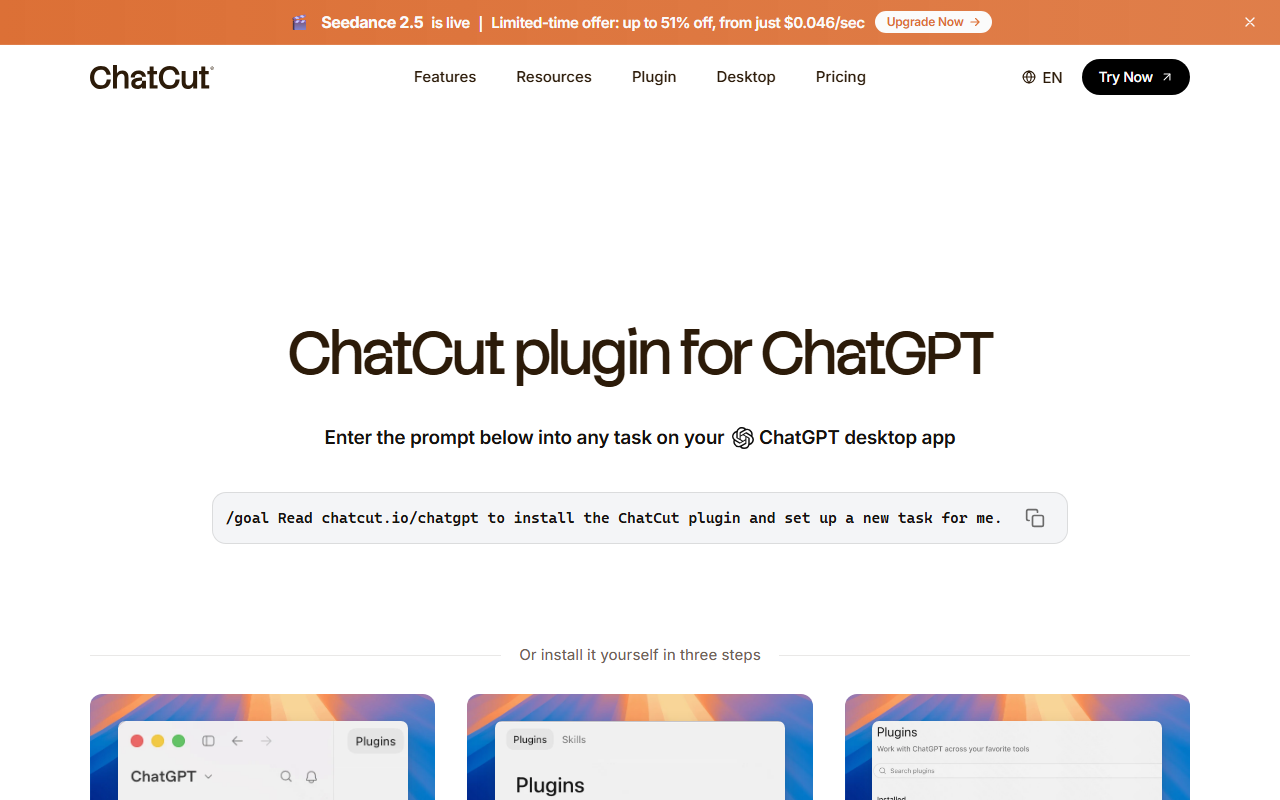 ChatCut's plugin page offers a paste-in install prompt and a manual three-step route, captured 11 October 2026.
Give the editor enough to work with. A prompt in this shape names the source, the output and the limits:
Turn this podcast episode into three vertical shorts for YouTube Shorts,
TikTok and Instagram Reels. Pick self-contained highlights, add captions,
keep each short under 60 seconds.
The "under 60 seconds" limit is our suggestion, not part of the vendor test. Without a limit, the editor decides the length for you.
Budget time for the review pass, because that is where the real cost hides. ChatCut tells readers to check names, numbers, product terms, caption timing and readability before export, and to play every finished file from start to end. A clip that opens on the wrong word or cuts a sentence in half is the likeliest miss. Fix it on the timeline, not by re-running the whole job.
Which ChatGPT plans and apps can run video plugins?
This is the part nobody states cleanly, and the two vendors disagree. ChatCut says its plugin works in the ChatGPT desktop app on every plan, including Free. OpenAI's help center says availability varies by plan, region, workspace, role, selected model and product surface.
It also says something narrower and more useful. Free and Go accounts can browse plugins in the directory, but plugin extensions are not available to those plans. We could not tell from either page whether the ChatCut install counts as an extension. So treat Free as unconfirmed, and check the Plugins sidebar on your own account before planning around it.
For managed workspaces, OpenAI lists several states that block a plugin even when it appears in the directory, including "Disabled by admin" and "Requires workspace setup". If you are on a work account, ask the administrator first.
Because plan rules, regions and workspace settings all interact, the only reliable test is to open the Plugins sidebar in the account you will actually use, search for ChatCut and see whether Install is offered, since a directory listing alone proves nothing about what your plan can run. It takes two minutes. Do it before you buy credits.
Where ChatCut runs also depends on which part of the app you use. ChatCut says the plugin works in both the Work and Codex tabs. OpenAI describes ChatGPT Work as an agent for multi-step projects that can use local files and desktop apps with your permission, and Codex as the view for software work. Our guide to ChatGPT plans covers what each tier includes.
What editing video with ChatGPT costs
You pay twice in principle: once for ChatGPT, and once for ChatCut if you want its generation models. ChatCut sells monthly credits. This grid comes from its plugin page in monthly billing view.
| Plan | Credits a month | Seedance 2.5 video | Kling 3.0 video |
|---|---|---|---|
| Free | 5 free credits | Not listed | Not listed |
| $25 a month | 100 | Up to 263 s | Up to 166 s |
| $45 a month | 200 | Up to 526 s | Up to 333 s |
| $88 a month | 400 | Up to 1,052 s | Up to 666 s |
The same grid lists Seedance 2.5 and Kling 3.0 for video, GPT Image 2 for stills and a motion graphics allowance. All paid tiers include every agent editing capability, according to the page.
Prices carry discount labels, and the two ChatCut pages we read do not agree. The pricing page shows the 200-credit tier at $42 billed annually. Treat every figure as a snapshot from 11 October 2026. A limited-time banner on the site also advertises cheaper Seedance generation, which we have not recorded as a price.
One gap remains. ChatCut says the plugin runs on the ChatGPT usage you already have, yet generation draws on credits. We found no page that says which jobs use which allowance. Editing existing footage is the safer bet for a first try, because it does not need generation at all. For a broader price comparison of generation models, see our AI video generator roundup.
HeyGen is the other plugin, and it does a different job
HeyGen also arrived inside ChatGPT. Its page describes a three-step flow: describe the video in ChatGPT, let HeyGen's Video Agent produce it with avatars, motion graphics, b-roll and narration, then refine by conversation.
The difference from ChatCut is the starting point, and it decides almost everything else about cost, output and review time, so it is worth settling before you open either plugin. HeyGen makes new video from a script or idea. ChatCut edits video you already shot.
| ChatCut | HeyGen | |
|---|---|---|
| Starts from | Your footage | A prompt or script |
| Produces | An edited cut | A new avatar video |
| Suits | Podcasts, tutorials | Explainers, pitches |
| Billing | ChatCut credits | HeyGen credits |
HeyGen says you need a free HeyGen account, that the ChatGPT app is free to try, and that generation uses your HeyGen credits, with free credits for new accounts. For advanced editing and branding it sends you to its own site. We did not read HeyGen's current plan prices, so there are none here.
If you want a presenter without filming one, Synthesia sits in the same avatar category, and the AI video generators directory lists the wider field.
How to choose a way to edit video with ChatGPT
Start with your footage, not the tool. Six questions decide most of it:
- What is the footage? Speech-led video (podcasts, courses, demos) gives an editor a transcript to cut against. Visual-first video does not.
- Where do you work? The plugin route needs the ChatGPT desktop app on Mac or Windows, and a plan that allows plugins.
- Edit or create? Cutting a recording and generating a new clip are different jobs with different bills.
- How will you pay? Credits for generation, a ChatGPT subscription for the chat, or both.
- How much review time do you have? Every cut needs a human pass, whatever the tool.
- What must you hand over? If a client wants a Premiere Pro or DaVinci Resolve project, check the XML export first.
Write your answers down before you install anything. Two of them usually rule out half the options. If you cannot answer the first one, spend ten minutes on a sample clip before paying for credits.
The shortlist: four routes compared
There are four realistic routes. Only the middle two put ChatGPT in charge of the edit.
| Route | Best for | Touches your file? | Needs |
|---|---|---|---|
| ChatGPT alone | Scripts, shot lists, caption drafts | No | Any ChatGPT plan |
| ChatGPT with ChatCut | Podcast clips, talking-head cuts | Yes | Desktop app, ChatCut account |
| ChatGPT with HeyGen | Avatar explainers, pitches | Makes new video | ChatGPT app, HeyGen account |
| A standalone AI editor | Full control, hard deadlines | Yes | That editor's own plan |
The last row covers editors with their own AI, such as VEED. CapCut belongs here too. They do not need ChatGPT at all, and for a deadline job they may be the sensible default. Our video editing roundup ranks them against each other.
If you want a generated clip instead of an edit, Runway and the models in our image and video creation guide fill that role. OpenAI's own video generation history is covered in our report on the Sora shutdown.
Our pick for a first try is the second row, applied to a recording you already own. It tests the idea on footage you can judge, and it keeps generation credits out of the first bill.
Can ChatGPT edit videos for YouTube?
For Shorts, yes, within the limits above. The test output was a 1080 by 1920 vertical file, which is the format those platforms use. For long-form YouTube, ChatCut's projects open at 1920 by 1080 and 30 frames per second, and the plugin lists filler-word cleanup, captions and motion graphics.
Ask for the format you need in the first prompt. A vertical short and a 16:9 episode need different framing, and the editor will guess if you do not say.
Speech-led YouTube formats suit this best: interviews, courses, tutorials and product demos. A transcript anchors every cut, so the editor can find a complete thought and start the clip there. That is why the Lenny's Podcast test produced three clips with distinct ideas rather than three arbitrary slices, and why a silent b-roll reel would give the same editor almost nothing to hold on to.
For the research and scripting side of channel work, our guide to AI tools for YouTube video creation covers the options. For pure clipping, our OpusClip and CapCut comparison shows how standalone clippers differ from a ChatGPT plugin.
Can ChatGPT edit videos for free?
Partly. ChatCut's Free plan costs $0, includes 5 free credits and carries a 60-minute total web export limit, according to its pricing page. That page also says some features are completely free in Codex, Claude and WorkBuddy, without saying which.
The harder question is the ChatGPT side. If your account cannot install the plugin, the free ChatCut plan only helps in its own browser editor, which is a fine tool but not the ChatGPT route. And ChatCut said in its own test write-up that it did not capture the account cost, so it makes no free-workflow claim. We follow that caution.
Cheap alternatives exist. Our ChatGPT use cases guide shows what the chatbot does well with no plugin at all, such as scripts, shot lists and caption drafts. You can paste those into any editor you already own.
For stills rather than video, ChatGPT Images 2.5 is OpenAI's image model, and it is a separate job from editing footage.
Who should skip this and open a normal editor?
Skip it if the best moment is visual. ChatCut says as much: a transcript explains what was said, not why a glance, a pause, a camera move or a beat matters. Films, music videos, sports and gaming montages sit in that group.
Skip it if you need a frame-exact result by a hard deadline. A 19 minute run followed by a review pass is fine for three shorts, and slow for a one-line fix that a normal editor handles in seconds.
Skip it if the footage is sensitive. The next section explains why.
The counterargument deserves a fair hearing. A conversational editor can be quicker than learning keyboard shortcuts, and the editable timeline means you are not stuck with its choices. But the review burden does not shrink. ChatCut itself says to review every cut and play every exported file.
If you already work in Claude Code, ChatCut ships a separate plugin that installs like any other Claude Code plugin, so the route is not limited to OpenAI. If you are unsure which assistant and editor fit your stack, Smart Match asks about your footage and budget before it recommends anything.
What happens to your footage and data?
Two parties handle it. OpenAI says messages and task context may be stored in the cloud even when Work runs locally, and that desktop Work reaches local files only with your permission. OpenAI also lets workspace admins restrict plugins.
ChatCut imports your source into its own project, transcribes it and keeps the timelines, as the test shows. We did not find a retention or training statement for uploaded footage on the pages we read. Until you have read one, keep client work, unreleased product footage and anything under an NDA out of the test run.
HeyGen requires an account and an authorization step, so the same check applies there.
What would change this advice
Four things would move the verdict:
- OpenAI confirming that the ChatCut install works on Free and Go accounts.
- An independent test of the same job, with a stopwatch on the manual route.
- ChatCut publishing which jobs spend credits and which spend ChatGPT usage.
- A published retention policy for uploaded footage.
Until then, the practical move is small. Open the Plugins sidebar in your own ChatGPT desktop app, look for ChatCut, and run one real talking-head edit against your usual workflow. The 19 minutes and 40 seconds from the vendor's test is the number to beat or lose to.
Frequently asked questions
Can ChatGPT edit videos for me?
Only through a connected editor. With the ChatCut plugin installed in the ChatGPT desktop app, ChatGPT can find highlights, cut them, add captions and export files. In a plain chat it can only plan the edit. ChatCut's August 2026 test took 19 minutes 40 seconds for three shorts.
How do I edit a video with ChatGPT?
Open the ChatGPT desktop app on Mac or Windows, open Plugins, search for ChatCut and install it. Approve the sign-in, attach your video and describe the platform, format and goal. Review the editable project, then export the MP4 files.
Can ChatGPT edit videos for YouTube?
Yes for Shorts and speech-led formats such as interviews and tutorials. The vendor test produced 1080 by 1920 vertical files, and ChatCut projects open at 1920 by 1080. Name the format in your first prompt, and review every cut before posting.
Can ChatGPT edit videos for free?
ChatCut has a Free plan with 5 credits and a 60-minute web export limit. OpenAI says Free and Go accounts cannot use plugin extensions, and neither vendor says whether this install counts as one. Treat free access as unconfirmed until you check your own Plugins sidebar.
Is the HeyGen plugin the same as an editor?
No. HeyGen's ChatGPT app generates new avatar videos from a prompt or script using HeyGen credits. ChatCut edits footage you already have. Pick HeyGen for explainers and pitches, and ChatCut for podcasts, tutorials and talking-head cuts.
Covered in this guide
- ChatCut: AI video editor you direct in plain language: a Skills library, a multi-track timeline, plugins for ChatGPT and Claude Code, and a free plan.
- ChatGPT: ChatGPT is OpenAI's AI assistant, with 1.2 billion weekly users by OpenAI's count, the GPT-6 model family and plans that run from a free tier to a premium Pro tier.
- CapCut: AI-powered video editor for creating trending content across all platforms
- ChatGPT Images 2.5: OpenAI's ChatGPT Images 2.5, released September 8, 2026, adds Sketch reference drawing and comment-based edits across two API snapshots, Flare and Sunburst.
- ChatGPT desktop app: OpenAI's ChatGPT Work agent plans and finishes multi-step projects across connected apps and files. It launched on 9 July 2026 and now reaches every ChatGPT plan, with limits.
- Descript: AI-powered video & audio editing as easy as editing text
- GPT Image 2: OpenAI's April 2026 image flagship integrates O-series reasoning for 99% text accuracy, natural language inpainting, and 2K resolution via a token-based API.
- HeyGen: Fast, simple AI video generator that creates professional videos with realistic avatars in 175+ languages.
- Kling 3.0: Kling 3.0 is Kuaishou Technology's proprietary AI video model, built for native 4K output with synchronized multilingual audio in one generation pass.
- OpenAI: OpenAI builds ChatGPT, the GPT-6 family (Astra, Sol, Luna), Codex and the OpenAI API. It reports 1.2B weekly ChatGPT users and an $852B valuation after its March 2026 round.
- Codex: Clones a GitHub repo into a sandbox, writes and tests code, then opens a pull request; OpenAI reported 20 million active users in August 2026.
- Runway: AI to simulate the world through generative video and world models
- Seedance 2.5: Seedance 2.5 is ByteDance's 2026 video generation model, producing one continuous multi-reference clip per pass with synchronized audio, launched inside Jimeng AI and Doubao Pro.
- Synthesia: AI video platform transforming text into professional, multilingual videos with realistic avatars
- VEED: Browser-based video editor with AI subtitles, avatars, voice cloning, and text-to-video: no download needed.
Sources
Still deciding?
This guide covers a handful of options. Smart Match checks every listing in the directory against how you actually work and what you can spend, then hands you the shortlist and the reason behind each pick.
Find your toolsRelated guides
- AdsMaker.ai vs Creatify: Creatify Tripled Its Price, AdsMaker Didn'tComparisonHead-to-head, with a verdict
- The AI 80s Photo Trend: How to Make Yours (and Turn It Into a Video) in 2026AnalysisWhat changed and who it affects
- AMD Buys World Labs for $8.2B: What It Means for Marble UsersAnalysisWhat changed and who it affects
- Best Agentic AI in 2026: Pick the Job, Not the GeneralistBuyer's guideHow to pick, across a category
- Best AI Assistant Apps for Android in 2026, Now That Google Assistant Is DeadBuyer's guideHow to pick, across a category
- Best AI Chatbots in 2026: Pick by the Job, Not the LeaderboardUpdatedRechecked against current sources