Which GPT Model Should You Use? Astra, Sol, Terra and Luna by Job in 2026
OpenAI sells four current GPT-6 models: Astra at $10 per million input tokens, Sol at $2, Terra at $1 and Luna at $0.10. Each has a 1.05M-token window, and prompts above 272K tokens cost more for the whole request. Sol and Terra are GPT-6.1 and sit outside ChatGPT chat.
The short version
Use GPT-6.1 Sol as your daily model in Codex and the API, and move one task to GPT-6 Astra only when Sol fails it twice. Choose Terra for writing and screenshots, and Luna for narrow, high-volume jobs. In ChatGPT chat you pick a thinking level, not these four models.
Want this decided for your own case? Find your tools with Smart Match, starting from this guide's question.
OpenAI now sells four current GPT-6 models, and the cheapest costs one hundredth of the dearest on both input and output. GPT-6 Astra lists at $10 per million input tokens. GPT-6 Luna lists at $0.10.
The names do not follow the version numbers. Astra and Luna are GPT-6. Sol and Terra are GPT-6.1. An older GPT-6 Sol still sits in the docs, and the "GPT-6" entry in the ChatGPT model menu is that older Sol, not Astra. Three surfaces, five names, two version numbers. Confusing, yes.
All four share a 1.05M-token window, and 922K tokens of it can be input. Three questions settle the choice. Where will you use it: the chat window, ChatGPT Work and Codex, or the API? What is the job? And what happens to the bill when volume grows? This guide answers them in that order, using OpenAI's own model catalog, pricing page and help centre, all read on November 6, 2026. Plan prices are not repeated here: they sit in ChatGPT Plans Compared.
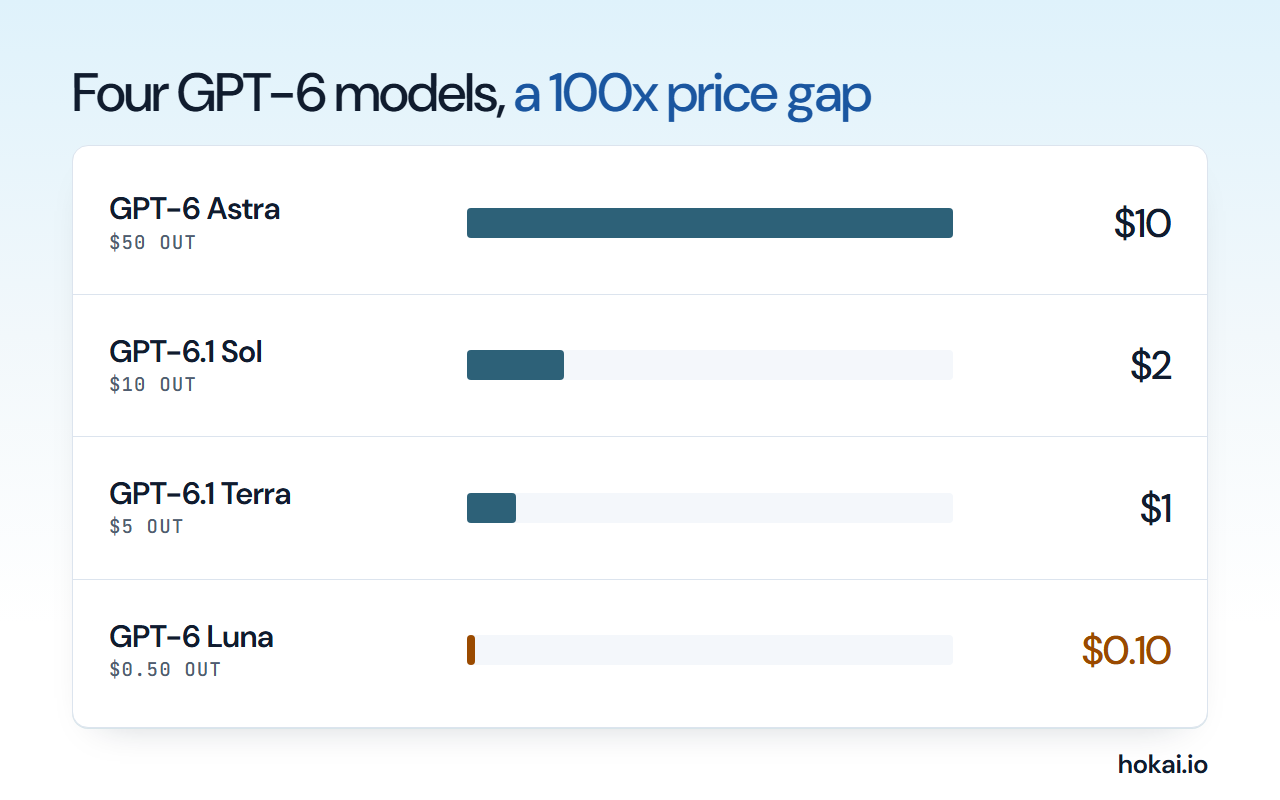 Hokai chart of OpenAI API list prices per million tokens, Standard processing, from OpenAI's pricing page as checked on November 6, 2026.
- Price gap, Astra to Luna
- 100x
- $10 against $0.10 input per 1M tokens
- Context window on all four
- 1.05M
- 922K tokens of it can be input
- Prompt size where the price doubles
- 272K
- Input 2x and output 1.5x on the whole request
- Ultrafast price multiplier
- 6x
- Astra and 6.1 Sol only
How to Choose Between the Four GPT-6 Models
Choose in three passes. Fix the surface first, because it removes options before price enters. Then pick the job. Then test the cheaper model on your own samples and move up only when it fails.
OpenAI's documents support that order. The catalog page says to use Astra if you are unsure where to start. The Work and Codex guide says to start Luna at High and Astra at Light, and to raise effort only when the task needs more planning.
Effort is the cheaper lever, because it changes cost inside one model without touching the prompt, the tools or the contract. So the sensible test compares two models at the same effort first, then compares one model at two efforts. Do it in that order.
Ranges differ. Astra and Sol accept low to max. Terra and Luna also accept none, which turns reasoning off for plain extraction and rewriting.
The Shortlist: All Four Models at a Glance, and What Changed From 6 to 6.1
The flagship is Astra. OpenAI calls it "our most capable model for the most demanding work". The middle tier is sold as "near-Astra performance for complex work at a lower cost". The third is a "fast, efficient model for visual reasoning, precise computer use, and clear, natural writing". The fourth is "our most efficient model for focused, high-volume tasks".
| Model | Version | Price per 1M in / out | OpenAI's pitch |
|---|---|---|---|
| GPT-6 Astra | GPT-6 | $10 / $50 | Hardest end-to-end work |
| GPT-6.1 Sol | GPT-6.1 | $2 / $10 | Near-Astra work, lower cost |
| GPT-6.1 Terra | GPT-6.1 | $1 / $5 | Writing, images, screens |
| GPT-6 Luna | GPT-6 | $0.10 / $0.50 | Focused, high-volume tasks |
All four take text and image input and return text. All four have a 1,050,000-token context window and a 128,000-token output cap. Knowledge cutoffs differ a little, and for most work the gap does not matter: April 30, 2026 for Astra and Sol, May 18 for Luna and June 1 for Terra.
The change from 6 to 6.1 is simple to state. It is also easy to miss, because the flagship list on the catalog page shows only the newer Sol. GPT-6.1 Sol replaced GPT-6 Sol, and OpenAI's page for the old one says "See GPT-6.1 Sol for the newer Sol model". The two share one list price. The newer one halves the cached-input rate, from $0.20 to $0.10 per million tokens.
There is one more difference. It drops the none reasoning setting, so code that sent none to the old Sol must send low to the new one.
Where each model lives: Chat, Work, Codex and the API
This is the part most guides skip, and it decides what you can pick. OpenAI's help article says GPT-6.1 Sol is "separate from the GPT-6, GPT-5.6, and GPT-6 Pro options" in Chat. It says Terra "is not available in Chat". Neither is a mistake. They are agent-and-API models.
| Surface | Plans | What you can pick | Catch |
|---|---|---|---|
| Chat, Free and Go | Free, Go | Luna only | Pages disagree on 5.6 or 6 |
| Chat, Plus | Plus | "GPT-6" (older Sol), Medium and High | No Extra High, no Pro |
| Chat, Pro and Business | Pro, Business, Enterprise | "GPT-6" to Extra High, plus GPT-6 Pro | Pro runs on Astra |
| Work and Codex | Plus and above | Astra, 6.1 Sol, 6.1 Terra, Luna | Terra needs Codex CLI 0.159.0 |
| API | Any key | All four, plus older Sol | Tools need the Responses API |
One conflict needs stating plainly. The pricing page headlines "Unlimited text chats with GPT-6" on the free plan and ticks GPT-6 Luna for Free and Go. The help article, updated six days before this check, still names GPT-5.6 Luna as the Free and Go default and says those plans have no GPT-5.6 Sol. Open the model picker on your own account before you trust either page.
The older 5.6 family has not gone. GPT-5.6 Sol, Terra and Luna stay selectable, and the help article says the rollout "does not retire older selectable models". Picking the older Sol by name keeps a chat on it.
Which model for everyday chat in ChatGPT
In the chat window you do not pick one of the four models. You pick a thinking level. The help article says "GPT-6 replaces Latest" in the menu, and that GPT-6 Sol powers Instant, Medium, High and Extra High. Pro effort is different. It runs GPT-6 Pro, "powered by GPT-6 Astra".
The Plus plan includes Medium and High, but not Extra High or Pro effort. The three higher plans include all of them. Pro effort has its own cap: the article says "A Pro subscription does not include unlimited use of the GPT-6 Pro model". Hit the weekly cap on the $200 tier and you drop to GPT-5.6 Thinking at Medium.
So the chat decision is short. Stay on Medium for questions and drafts. Simple. Move to High when an answer must be checked against several sources at once, such as a contract, a spreadsheet and an email thread that disagree with each other. Save the top setting for the one-off problem where you would otherwise ask a specialist, and expect it to run out before the month does.
Plus buyers do get the flagship. Just not in chat. The help article says "Plus plans include GPT-6 Astra in ChatGPT Work and Codex". If you pay for ChatGPT mainly to talk, that line is not for you. If you run agents, it is the best part of the plan. Pick the plan by the surface you use.
Which model for coding in Codex
Codex and ChatGPT Work draw on one usage pool, and that pool is where the four models differ most. The vendor's Codex pricing page estimates local messages per five hours on Plus: 5 to 45 on Astra, 15 to 160 on Sol, 35 to 285 on Terra and 350 to 3,000 on Luna. These are estimates, not fixed limits. Pro plans carry no five-hour cap at present.
The guidance for these surfaces is direct. The flagship is "for the hardest end-to-end work". The middle tier is "for repeated, long-running work" when cost matters. The same page says to keep the flagship "for your most demanding work", to start it at Light (low in config), and that most tasks do not need the Max or Ultra settings.
The case for paying the premium on code rests on one benchmark claim. On Terminal-Bench 4.0, OpenAI reports 57.9% for Astra, against 37.3% for GPT-5.6 Sol and 55.8% for Claude Fable 5.1. These are vendor-run figures at the best effort setting. They pit Astra against the older 5.6 model, so they do not show how far 6.1 Sol sits behind. The pages read for this guide never publish that gap.
Our recommendation for a small team in Codex: make 6.1 Sol the daily model. Move a single task up when it has failed the same job twice. For a head-to-head against other labs on real tasks, see Gemini 4 Argon vs GPT-6 Astra vs Claude Opus 5.5. For the agent itself, see Codex vs Claude Code.
Which model for research and long documents
Long context is the reason to look past the price table, because the cost curve bends in a place the headline rates never show. All four models take 1.05 million tokens, but OpenAI documents a cliff. Prompts above 272,000 input tokens are "priced at 2x input and cache rates and 1.5x output for the full request". The surcharge applies to the whole call, not only the tokens past the line. That is the trap.
The Astra launch post reports 100% on the 256K to 512K MRCR 8-needle test and 96.3% on the 512K to 1M version. The older 5.6 Sol scored 91.5% and 73.8% on the same two. That is the strongest evidence in the vendor's material for long inputs. It is one lab's test of one retrieval task. Check it against your own documents before you build on it.
For research, the practical rule has two halves. Keep prompts under 272K tokens whenever you can, by retrieving the relevant sections instead of pasting a whole archive. When you cannot, run the long pass on the flagship and the cheap passes around it on a smaller tier.
On a subscription, the surcharge is not a worry. The Codex pricing page says "GPT-6.1 Sol usage drawn from your subscription has no long-context surcharge", and that it runs a default 500K window in Codex and Work. API keys get no such exemption.
Which model for writing, screenshots and forms
The third tier is the one most people overlook. Its listed jobs: matching product photos to catalog entries, reading technical drawings, acting on application screens, and drafting or revising text. The Work and Codex guide adds "drafting proposals, reviewing visual materials, or filling out forms from source documents".
It also has the newest knowledge cutoff of the four, June 2026,, and it accepts none as a reasoning setting. At $1 and $5 per million tokens it costs half as much as the middle tier. The catch is reach. It is not in Chat, and it has no Ultrafast tier. If you want a cheap writer inside the chat window, you cannot have one. You get it through Work, Codex or the API.
The vendor's example is worth copying as a method. Give the model screenshots of a dashboard and ask it to flag chart labels and values it cannot read confidently. Its own advice is to check the result "against your source materials, especially names, numbers, and details taken from images". That is the right habit for any vision model. Trust, then check.
For prose that must sound like you, none of these is a strong default. Pick by price, then test a page of your own writing. If you are weighing OpenAI against Anthropic for writing, ChatGPT vs Claude covers the plan-level choice.
Which model for high-volume, narrow tasks
The smallest tier is for work where you already know what a good answer looks like. The vendor names extraction, classification, transformation and structured summaries. Think of turning 40,000 support emails into tags, or meeting notes into a table of owners and dates. A narrow, well-specified job is where the cheapest tier earns its place, because the sample answers are easy to grade, the failures are easy to count, and a ten-point drop in accuracy shows up before you have spent anything that matters.
Batch halves both rates, to $0.05 in and $0.25 out. OpenAI suggests High as the starting effort for this tier, and the API accepts none through max. One trap: in Chat Completions, it supports function calling only when reasoning_effort is none. Use the Responses API if you need reasoning and tools together. Plan for it.
The model page also lists EU data residency for Standard, Fast, Flex and Batch processing. That matters for teams in Europe who want a cheap tier and a legal reason to keep the data on the continent, since the other tiers differ on which speed modes qualify. Regional processing adds a 10% premium where it applies.
Other labs price in the same band. These figures come from Hokai's stored records, not from pages re-read for this guide, so confirm them before you switch.
| Model | Price per 1M in / out | Basis |
|---|---|---|
| DeepSeek-V4 Flash | $0.14 / $0.28 | DeepSeek API |
| Grok 4.3 | $1.25 / $2.50 | Prompts under 200K |
| Kimi K3.1 Pro | $2 / $10 | Flat to 1M tokens |
| Qwen3.8-Flash-Next | No vendor price | Open weights only |
The limit of Luna is judgment. If a wrong answer costs more than a rerun, test Terra on the same sample before you commit a pipeline to the cheapest tier. If you only care about the lowest price across all vendors, The Cheapest LLM APIs in 2026 sets Luna beside the other labs.
What each model costs on a real job, with a worked example
List prices are per million tokens. A job has two sizes. Take a document-review task with 100,000 tokens in and 20,000 tokens out, with no caching. This is arithmetic on published rates, not a measurement. The honest version of a cost comparison counts the whole job: the tokens in, the tokens out, the reasoning tokens spent before the answer, the retries when the first answer is wrong, and the hour a person spends fixing what comes back. Only the first two appear on any price list.
| Model | Standard | Batch | Fast |
|---|---|---|---|
| Astra | $2.00 | $1.00 | $4.00 |
| Sol | $0.40 | $0.20 | $0.80 |
| Terra | $0.20 | $0.10 | $0.40 |
| Luna | $0.02 | $0.01 | $0.04 |
Batch and Flex run at half the Standard rate. Fast mode costs twice as much. The table assumes every model uses the same number of tokens, which is the weakest part of any list-price comparison. OpenAI says Astra "achieved stronger results using substantially fewer output tokens" in several evaluations, and gives about 9% lower estimated cost per task than GPT-5.6 Sol on Terminal-Bench 4.0. A cheaper token does not always mean a cheaper task. Count tokens.
Read from OpenAI's API pricing page.
The 272K cliff is easy to underestimate. A Sol call with 272,000 tokens in and 20,000 out costs about $0.74. Push the prompt to 273,000 and the same call costs about $1.39, because the input rate doubles and the output rate rises by half on the whole request.
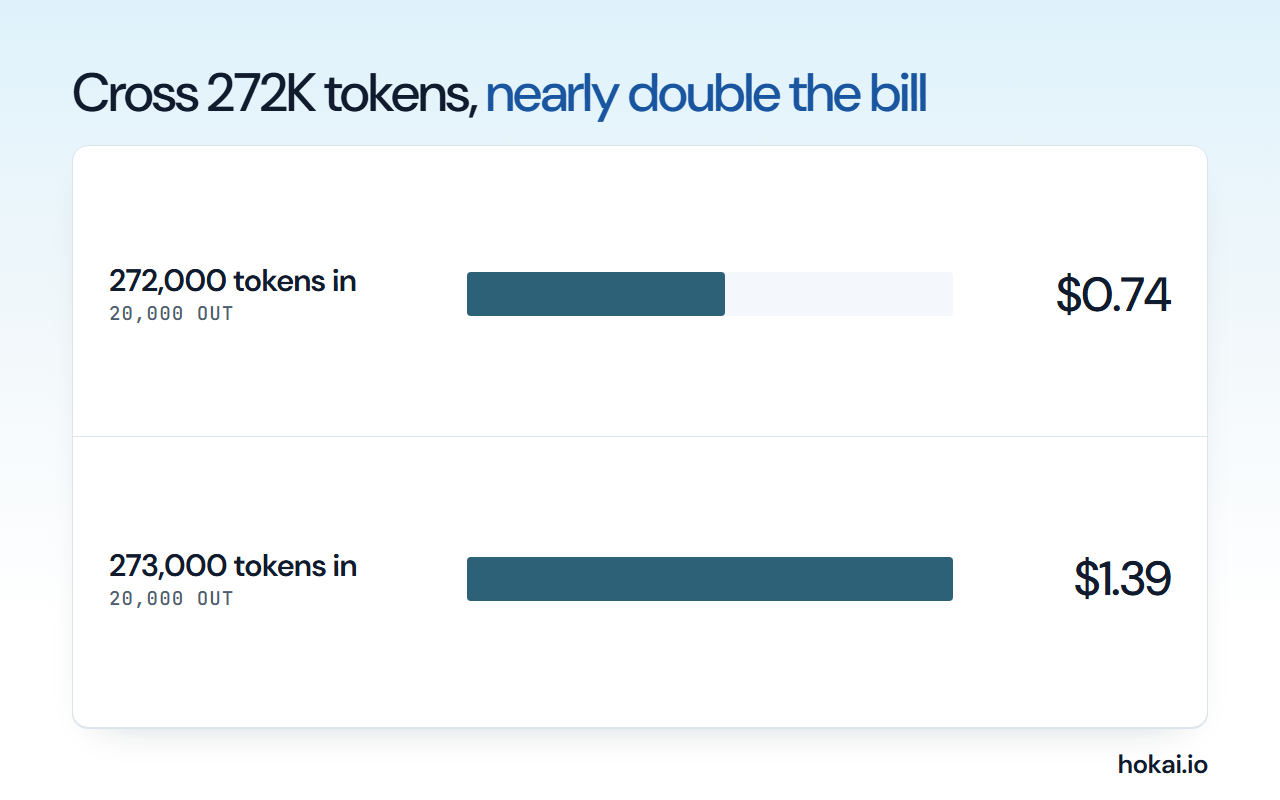 Hokai chart of one worked Sol call with 20,000 output tokens, computed from OpenAI's published long-context rule as checked on November 6, 2026.
What Ultrafast is, and who should skip it
Ultrafast is the fastest service tier in the API. OpenAI says it is "broadly available for GPT-6 Astra and GPT-6.1 Sol" and prices it at six times Standard. On the table above, Astra at Ultrafast costs $12.00 for the example job and Sol costs $2.40. Terra and Luna have no Ultrafast tier.
Speed is easy to want and hard to price, because the multiplier applies to every token in the call, so a long agent run with dozens of tool calls multiplies a large number by six while a short chat reply multiplies a small one. OpenAI recommends WebSockets for it, "especially for agentic applications that make many tool calls in quick succession". Without a persistent connection, network overhead can eat the speed gain. Ultrafast has separate rate limits from Standard and Fast.
On subscriptions, speed costs allowance. The Codex pricing page lists Fast at 2.5 times included usage, and Ultrafast on Astra or 6.1 Sol at 8 times. It also says Ultrafast access is on the $500 Pro plan. If you are not running an agent where a person waits on every step, you can skip this tier entirely.
A person watching a screen is the reader of that latency. An overnight job is not. Before paying a premium for speed, ask who is waiting, how often they wait, and what a saved minute is worth to them. If the answer is a few seconds a day, the multiplier will cost more than the time it saves.
Fast mode has a data catch. Per the GPT-6 guide, Fast supports EU data residency for 6.1 Sol, 6.1 Terra and Luna, but not for Astra or the older Sol. Astra Ultrafast supports US data residency and global processing only.
The case for starting with Astra anyway
OpenAI's own catalog page says "If you're not sure where to start, use GPT-6 Astra". That is a fair rule for anyone whose hours cost more than their tokens, because a flagship that finishes the job once is cheaper than a small model that needs three tries and an editor. A failed run that needs a person to rewrite it wipes out a saving of a few dollars. Time is the dear input. Always.
OpenAI also argues that Astra can be cheaper per finished task. It reports about 65% fewer output tokens than Claude Opus 5 at the best settings on Agents' Last Exam, and a 59.3% score there. If your jobs are long agent runs with many tool calls, a model that finishes in fewer steps can win on cost as well as quality.
Astra has one more limit. OpenAI says it "will refuse to comply with more advanced cybersecurity tasks such as creating proof-of-concept exploits", and that extra safety checks can pause legitimate work. Security teams get wider access through OpenAI Daybreak, which lists models such as GPT-5.6-Cyber.
Teams that run unattended agents overnight face a different calculation from teams that chat, since a run that stalls at step nine of twelve wastes the whole night and nobody learns of it until morning.
The answer is to measure, not to guess. A hunch about which tier is good enough costs real money when it is wrong in either direction. Run the same ten real tasks on Astra and on Sol at the same effort, and count tokens, retries and the minutes you spend fixing output. If Sol passes eight of ten, the five-times price gap is hard to defend. Stop there. If it passes five, Astra is the cheap option. A vendor chart cannot settle that, and neither can this guide.
- Collect ten real tasks 20 minutesPick jobs you did last week, with known good answers.
- Run both at one effort 1 hourSame prompt, same tools, same reasoning level.
- Count what you paid 30 minutesTokens in and out, retries, and your editing time.
- Keep the cheaper pass OngoingMove to the dearer model only for the failures.
How to read the benchmark claims
Every score in the launch post is "the maximum at any effort", according to its own footnote. That is a ceiling. It is not what you will see at the lowest setting, and it is not what a quick run at Light will give you.
The post also says the GPT evaluations ran in a research environment or through the API, which "may provide slightly different output from production ChatGPT". Cost claims need the same care. A figure such as "approximately 9% lower estimated API cost per task" is an estimate from one terminal suite. It is not a bill. Nobody invoices an estimate.
Rival scores deserve a second look too. A footnote says the Claude results on one CAD benchmark reflect three modifications to the eval, described in the rival's system card. Another says OpenAI evaluated the Claude models itself on a health test, with a fallback model standing in for refusals.
None of this makes the numbers wrong. It means they tell you which model to try first, not which one to buy. Your own ten tasks outrank every chart in this guide.
Five mistakes that inflate the bill
Most overspend comes from habit rather than from the price list, and the same five habits show up in team after team, usually in the order below. None needs a new tool to fix.
- Picking once. A tier chosen at launch and never retested keeps billing flagship rates.
- Raising effort before fixing the prompt. More thinking tokens will not rescue a vague request.
- Pasting a whole archive. One call past 272,000 tokens reprices everything.
- Paying for speed nobody waits on. A nightly job gains nothing from Fast, and Batch halves the price.
- Ignoring cached input. A stable system prompt belongs at the front of every call.
The cached-input point is checkable on the pricing page. Astra and Luna cache at one tenth of their uncached rate. Sol and Terra cache at one twentieth.
Data handling: what each surface does with your prompts
The surfaces differ on training, and the model name does not change that. For the API, OpenAI's data guide says "data sent to the OpenAI API is not used to train or improve OpenAI models" unless you opt in. Abuse-monitoring logs are kept up to 30 days by default. Zero Data Retention and Modified Abuse Monitoring need OpenAI's approval.
For individual ChatGPT plans, the pricing page marks content as used to train models, with an opt-out available. For Business, OpenAI's Codex pricing page lists "No training on your business data by default".
That split matters more than the model choice, and it is the first thing a security or legal reviewer will ask about before anyone on the team is allowed to paste a client document into any of these tools. Pasting a client contract into a personal Plus account is a different act from pasting it into a Business workspace or sending it through the API. If you handle client material on a personal plan, switch the training opt-out on first. For the plan side of this, see ChatGPT Plans Compared.
What Would Change This Verdict
Our verdict moves if any of four things happens. OpenAI could publish a head-to-head of 6.1 Sol against Astra, which would swap our judgment for a number. It could scrap the 272K rule, the main cost trap. It could open Terra to Chat, which would make Terra the obvious everyday writer. Or it could retire the older GPT-6 Sol and tidy the "GPT-6" menu entry.
OpenAI is also moving fast. GPT-5.5 left Codex with ChatGPT sign-in on October 14, 2026, and the GPT-5.6 Sol promotional price on the pricing page runs only until November 30, 2026. Re-check the catalog before you commit a pipeline. Prices move.
If you run more than one tool in a stack and want the model choice made against your own task list, Smart Match can help match tools to your own task list. To see how these four sit against every other model on price and speed, the model leaderboard is the place to look. For readers still choosing a vendor, ChatGPT vs Gemini and Which Claude Model Should You Use? are the two natural next reads.
Frequently asked questions
Which GPT model should I use for coding?
Start with GPT-6.1 Sol in Codex or the API. OpenAI describes it as near-Astra performance at a lower cost. Move a single task to GPT-6 Astra when Sol has failed it twice, because Astra costs five times as much per token on both input and output.
What is the difference between GPT-6 and GPT-6.1?
Astra and Luna are GPT-6. Sol and Terra are GPT-6.1. GPT-6.1 Sol replaced the older GPT-6 Sol at the same list price, with a cheaper cached-input rate, and it no longer accepts the none reasoning setting.
Which GPT model is cheapest?
GPT-6 Luna, at $0.10 per million input tokens and $0.50 per million output tokens on OpenAI's pricing page. Batch processing halves both. Luna suits narrow, repeated jobs such as extraction and classification, not open-ended judgment.
Can I use GPT-6.1 Terra or Sol inside ChatGPT chat?
No. OpenAI's help article lists both as options for ChatGPT Work and Codex only, and says Terra is not available in Chat. Chat uses a thinking slider: the GPT-6 entry runs the older GPT-6 Sol, and Pro effort runs Astra.
What happens when a GPT-6 prompt goes over 272,000 tokens?
In the API the whole request is priced at twice the input rate and 1.5 times the output rate, not only the tokens past the line. OpenAI says subscription usage of GPT-6.1 Sol in Codex and ChatGPT Work has no long-context surcharge.
Covered in this guide
- GPT-6 Astra: OpenAI's flagship model, launched September 2026 as the first ever rated at the Preparedness Framework's Critical cybersecurity level.
- GPT-6 Luna: GPT-6 Luna (Sept 2026) is OpenAI's lowest-cost GPT-6 model, tuned for high-volume chat, extraction and classification with six adjustable reasoning-effort levels.
- Sol: GPT-6.1 Sol is OpenAI's September 2026 mid-tier reasoning model for coding, computer use and document work, built to sit just below GPT-6 Astra.
- Terra: GPT-6.1 Terra is OpenAI's October 2026 model for computer use, image reading and writing, built for high-volume agent work.
- ChatGPT: ChatGPT is OpenAI's AI assistant, with 1.2 billion weekly users by OpenAI's count, the GPT-6 model family and plans that run from a free tier to a premium Pro tier.
- ChatGPT Work: OpenAI's ChatGPT Work agent plans and finishes multi-step projects across connected apps and files. It launched on 9 July 2026 and now reaches every ChatGPT plan, with limits.
- DeepSeek-V4 Flash: DeepSeek-V4 Flash: 284B-param MoE with 13B active (April 2026), 1M context, 79% SWE-bench, $0.14/M input. Open-source MIT license.
- Luna: GPT-5.6 Luna by OpenAI (July 2026): budget-tier pricing, fastest in family, high-volume workloads. 200K context, vision plus text, capped reasoning.
- GPT-5.6 Sol: GPT-5.6 Sol by OpenAI (July 2026): flagship-tier pricing, 2x token efficiency vs peers, ultra multi-agent coordination, programmatic tool calling. Microsoft 365 Copilot preferred model.
- Terra: GPT-5.6 Terra is OpenAI's balanced July 2026 model, taking images and up to 1,050,000 tokens of context, now followed by GPT-6.1 Terra.
- GPT-5.6-Cyber: OpenAI's gated cybersecurity fine-tune of GPT-5.6 Sol, released August 2026 for vetted Daybreak Red partners doing authorized exploit development and vulnerability research.
- GPT-6 Sol: OpenAI's mid-tier GPT-6 model (Sep 2026), 1.05M-token context, 68.8% on DeepSWE v1.1 coding, half GPT-5.6 Sol's price.
- Grok 4.3: Grok 4.3 is xAI's April 2026 flagship reasoning model, posting 94.2 tokens per second output and a 1 million token context carried over from Grok 4.20.
- Kimi K3.1 Pro: Moonshot AI's October 2026 reasoning model: a 1M-token window, always-on thinking, text and image input, and open weights on Hugging Face.
- Codex: Clones a GitHub repo into a sandbox, writes and tests code, then opens a pull request; OpenAI reported 20 million active users in August 2026.
- Qwen3.8-Flash-Next: Qwen3.8-Flash-Next is Alibaba's open-weight 125B-parameter MoE model (6B active per token) previewing Qwen4's architecture, with a 262,144-token context window.
Sources
Still deciding?
This guide covers a handful of options. Smart Match checks every listing in the directory against how you actually work and what you can spend, then hands you the shortlist and the reason behind each pick.
Find your toolsRelated guides
- Abacum Alternatives in 2026: FP&A Tools for Mid-Market Finance TeamsBuyer's guideHow to pick, across a category
- The AI 80s Photo Trend: How to Make Yours (and Turn It Into a Video) in 2026AnalysisWhat changed and who it affects
- What Happened When 7 AI Agents Got Real Bank Accounts and No SupervisionAnalysisWhat changed and who it affects
- Attio vs HubSpot in 2026: Which CRM for a Startup?ComparisonHead-to-head, with a verdict
- Best Agentic AI in 2026: Manus, Genspark and the Platforms That Finish Whole TasksBuyer's guideHow to pick, across a category
- Best AI Agent Builders in 2026: Automate, Build or Self-HostBuyer's guideHow to pick, across a category