CapCut Alternatives in 2026: Free Editors by Where and How You Edit
A CapCut alternative is any editor that takes over one of CapCut's jobs: phone edits, auto-captions, a desktop timeline or transcript editing. Edits, Clipchamp, DaVinci Resolve and Kdenlive export without a watermark for free, while Descript, Kapwing and VEED are paid replacements with watermarked or 720p free plans.
The short version
Use Edits on a phone if you post to Instagram, Clipchamp on a Windows PC, and DaVinci Resolve for a full free desktop timeline. Descript suits talking-head video, Kdenlive suits Linux. Four of the seven export with no watermark for free, so leaving CapCut Pro rarely means paying more.
Not sure which one fits you? Describe your situation and Smart Match names three tools.Find my AI tools
In this guide13 sections
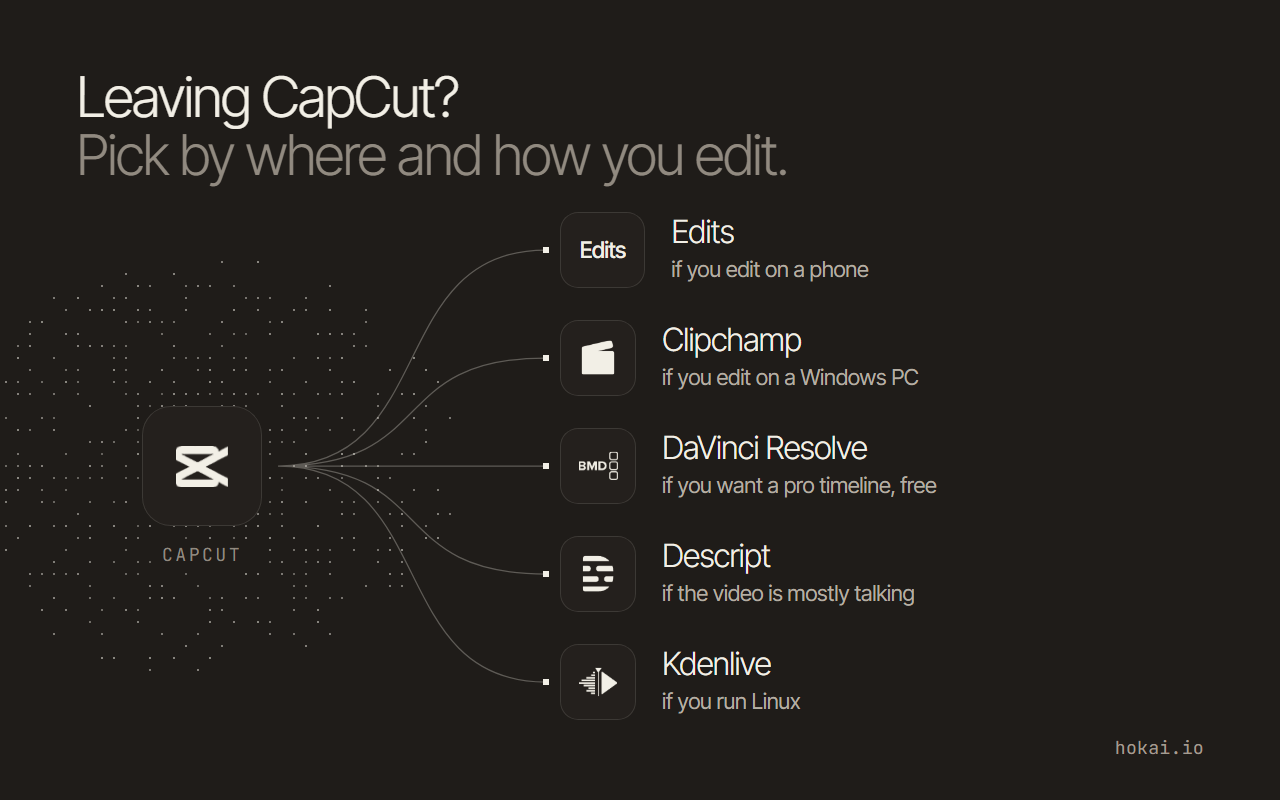 Hokai chart of which CapCut alternative fits which way of editing, drawn from the vendors' sites on 29 November 2026.
CapCut Pro lists at $19.99 a month in the US, and the terms CapCut updated on 15 April 2026 still give it a perpetual, sub-licensable licence to everything you upload. Those two facts drive most of the searches for a way out.
The good news is that almost every job CapCut does now has a free replacement; trend templates are the exception. The catch is that no single app replaces all of it. So the useful question is not "what is the best CapCut alternative" but which of CapCut's jobs you actually used: phone edits for Reels and TikTok, captions on a PC, a real timeline, or cutting talking-head video.
- Price of Edits, Clipchamp's free plan, DaVinci Resolve and Kdenlive
- $0
- Read 29 Nov 2026
- Languages Clipchamp's free auto-captions detect
- 80+
- Clipchamp
- DaVinci Resolve Studio, paid once
- $295
- Blackmagic Design
- Date of CapCut's current terms of service
- 15 Apr 2026
- CapCut
What CapCut costs now, and what its terms actually say
CapCut last published its US dollar prices in September 2026, and they are in the table below. Its pricing page now shows local currency instead, and on 29 November 2026 it led with credits: 500 monthly AI credits and 1 TB of storage on Pro, plus Seedance video generation billed per second. Our CapCut pricing guide tracks how those plans changed.
| CapCut plan | US price | What it adds |
|---|---|---|
| Free | $0 | 1080p exports, auto-captions, templates |
| Standard | $9.99/mo | Watermark-free export, mostly mobile |
| Pro | $19.99/mo or $179.99/yr | 4K, AI credits, 1 TB storage |
| Team | $24.99/user/mo | Collaboration and a commercial asset library |
The terms are the other reason people leave, and two of the three top-ranking alternatives lists we read on 29 November 2026 still describe the June 2025 wording. The current CapCut terms of service, last updated 15 April 2026, open the section on your uploads with "We don't own your User Content." Then they grant ByteDance a "non-exclusive, royalty-free, transferable, sub-licensable, perpetual and worldwide license" to it, limited to operating, developing and providing the services.
One more line matters for creators. The same terms give CapCut a licence to your username, image and likeness to identify you as the source of your content, "including for use in sponsored content." If that clause is your reason to leave, read the terms of the replacement too. CapCut belongs to ByteDance, the company behind TikTok.
How to choose: three questions settle it
Most people searching for an alternative really need two apps, not one: something on the phone and something on a computer. Answer these in order.
- Where do you edit? A phone, a Windows PC, a Mac, Linux, or a browser on a locked-down work laptop. This alone rules out several picks.
- Which CapCut job did you use most? Trend templates and music, auto-captions, a full timeline with keyframes, or cutting speech.
- Do you need it free forever? If yes, the watermark rules in the table further down matter more than any feature list.
If you want a second opinion on your own stack, Smart Match asks what you make and where, then suggests a shortlist.
The shortlist: seven CapCut alternatives by job
Five of these seven also appear on those rival lists. Edits and Kdenlive are added because they win the phone and Linux jobs on their own published facts. Prices are the lowest paid plan, read on each vendor's page on 29 November 2026 unless the row says otherwise.
| Pick | The job it takes over | Free plan | Lowest paid |
|---|---|---|---|
| Edits | Phone edits for Reels and TikTok | Everything, no watermark | None listed |
| Clipchamp | Captions and templates on Windows | 1080p, no watermark | Microsoft 365, $9.99/mo |
| DaVinci Resolve | A full desktop timeline | Up to Ultra HD | $295 once |
| Descript | Talking-head and podcast video | 60 media minutes, 720p | $16/mo yearly |
| Kapwing | Team editing in a browser | Watermarked, 720p | $16/mo yearly |
| VEED | Browser editing with captions | Watermarked, 720p | $12/mo yearly |
| Kdenlive | Linux and open source | Everything | None |
Edits: the closest swap on a phone
Edits is Instagram's answer to CapCut, and it launched worldwide on iOS and Android on 22 April 2025. PetaPixel's launch report listed the same core jobs: filters, transitions, green screen, voice effects, automatic captions in several languages, and exports with no added watermark. Its own site now adds keyframes, a teleprompter, AI image animation and a Reels insights tab.
It costs nothing, and the site lists no paid plan. A Mac app for Apple silicon (M1 or later) arrived later with a multi-track timeline, color grading, unlimited automatic captions and 4K export, according to the Edits desktop page.
The limits are real. You must log in with an Instagram account, and the desktop app is Mac only, with no Windows or web version. If you post mostly to TikTok, the free exports still work, but the insights and one-tap publishing only help on Instagram, run by Meta.
No Instagram account? InShot, on both phone platforms, generates auto-captions in several languages and has green screen tools, according to its own site; the site showed no prices on 29 November, so check the in-app Pro price before paying. Apple users can also start with iMovie, which the company supports on its computers, phones and tablets.
Clipchamp: the free pick on a Windows PC
Clipchamp is already in the Windows 11 Start menu, and its pricing page promises unlimited exports at up to 1080p with no watermark on the free plan. The AI tools a CapCut user misses are free too: subtitles that detect speech in over 80 languages, 400 text-to-speech voices and silence removal that finds pauses over 3 seconds, per Clipchamp's AI features page.
Premium is no longer sold on its own. It comes with a Microsoft 365 Personal or Family subscription, with Personal at $99.99 a year on Microsoft's plan page. That adds 4K exports, premium stock and a brand kit. If your household already pays for Microsoft 365, you have it.
Mac users can run it in a browser, but there is no Mac app. Its template library leans towards school and work videos rather than the trend edits CapCut is known for.
DaVinci Resolve: a professional editor that costs nothing
DaVinci Resolve is the answer when CapCut's desktop app started to feel small. Version 21 is free on Mac, Windows and Linux, and the maker's product page says the free version edits up to Ultra HD 3840 x 2160 at 60 frames per second, with multi-user collaboration and HDR grading included.
The paid licence is $295, once. The Studio page puts most of the AI tools a CapCut user expects there: magic mask, smart reframe, voice isolation, facial recognition and text-based editing. Against Pro's $179.99 a year, the licence pays for itself in under two years and is yours after that.
The learning curve is the cost. Digital Camera World's review said plainly that the free version "is not for beginners." TechRadar's review of version 21 still calls it its top free editing app. Both are right. Budget a few evenings.
Descript: when the video is mostly people talking
Descript replaces CapCut for podcasts, interviews, tutorials and anything where the words are the edit. You cut the transcript and the video follows. Its pricing page lists transcription in 25 languages on every plan, including free.
The free plan is a taster, and the paid plans are priced by media hours. Paid plans include Underlord, its AI video co-editor.
| Descript plan | Yearly billing | Monthly billing | Includes |
|---|---|---|---|
| Free | $0 | $0 | 60 media minutes, 720p |
| Hobbyist | $16/mo | $24/mo | 10 media hours, 1080p, no watermark |
| Creator | $24/mo | $35/mo | 30 media hours, 4K |
| Business | $50/mo | $65/mo | 40 media hours, team of 5 |
It is the wrong tool for music-driven short edits, which is the core of CapCut. For turning long recordings into vertical clips automatically, OpusClip is the specialist, and our OpusClip vs CapCut comparison covers that job.
Kapwing and VEED: browser editors for teams
Both run in a browser, so they work on school laptops and locked-down work machines where you cannot install a desktop editor. Neither is a free replacement: both watermark free exports and cap them at 720p.
Kapwing is the team pick. Its pricing page shows Pro at $24 a month billed monthly or $16 billed yearly, with 4K, two-hour exports, 1,000 minutes of auto-subtitling and 50 minutes of dubbing a month. Subtitles export as SRT or VTT files, which agencies need. Its free plan stops at 4-minute videos and 10 minutes of subtitling.
VEED is cheaper to enter. VEED's pricing, last read on 5 September 2026, listed Lite at $12 a month billed yearly or $19 monthly for 1080p with no watermark. Its pricing page did not display prices on 29 November, so treat that figure as about three months old.
Kdenlive: the open-source pick for Linux
"CapCut alternatives for Linux" and "open source" are among the most common follow-up searches, and this editor answers both. The project's own site describes it as a free and open-source editor for Linux, Windows, macOS and BSD, built by a small, mostly volunteer team. Version 26.08.3 is the current release.
It creates subtitles with automatic transcription, so the CapCut caption habit survives. There is no account, no cloud and no licence over your footage at all. What it lacks is polish: no trend templates, fewer one-tap effects, and help comes from the community rather than a support desk. It has no page on Hokai yet; one is queued.
Free CapCut alternatives with no watermark
This is the table most readers came for. Watermark rules decide whether a free plan is usable for publishing.
| Editor | Free export | Watermark | Free captions |
|---|---|---|---|
| Edits | 4K on Mac | No | Yes |
| Clipchamp | 1080p | No | Yes, 80+ languages |
| DaVinci Resolve | Ultra HD | No | Not stated for free |
| Kdenlive | No cap stated | No | Yes |
| Descript | 720p | Yes | Transcription only |
| Kapwing | 720p, 4 minutes | Yes | 10 minutes |
| VEED | 720p, 10 minutes | Yes | Not read |
Four of the seven export clean for free. For the Resolve free version, text-based editing and most AI tools sit in the paid licence, and the maker's pages do not say whether automatic captions are in the free version, so test that before you rely on it. Our best AI video editors guide compares more editors on the same axes, and the AI video tools directory lists the rest.
What a year costs: CapCut Pro against each paid alternative
If you are paying for CapCut Pro, here is the first-year cost of each alternative's cheapest paid plan, or $0 where none is sold, using yearly billing where it exists.
Read from each vendor's pricing page on 29 November 2026; CapCut at its last published US price. Studio is a one-time licence.
Descript Hobbyist and Kapwing Pro both come to $192 over a year at $16 a month each, slightly more than CapCut Pro. The lowest figure is the price of Microsoft's Personal plan, which also buys the Office apps. The one-time licence costs more in year one, then nothing.
Who should stay with CapCut
Stay if templates are the product. That is where CapCut is hardest to replace: of the picks here, only Edits is built for the same quick phone workflow, and its library dates only from April 2025.
Stay, too, if you use its AI generation. The pricing page now centres on credits for Seedance video generation, a different job from editing; our Viggle alternatives guide covers that kind of app. And if the April 2026 terms are acceptable to you, the price argument alone is thin: Pro at $179.99 a year is cheaper than Descript or Kapwing.
The case against staying is narrower than the headlines suggest. It comes down to two things: the licence clause, if you do client or private work, and paying for features a free app now does.
What would change these picks
Three things are worth watching. CapCut planned its last 2026 CapCut World event for London in November, and said in an October newsroom post that agentic editing pilots are coming to desktop, web and mobile within months; that could widen its lead on templates.
If Edits ships a Windows app, it would cover phone, Mac and Windows for free, leaving only Linux to Kdenlive. And if CapCut rewrites the sponsored-content line in its terms, the strongest reason to leave goes with it. Our guide to what CapCut is for covers what it still does best.
Until then, the move is simple. Install Edits on your phone, or InShot if you avoid Instagram. On a Windows PC, open Clipchamp; if you will put in the evenings, learn DaVinci Resolve instead. Keep paying for Pro only if trend templates are what you publish.
Frequently asked questions
Is CapCut still free?
Yes. CapCut's free plan still exports at 1080p with no watermark and includes auto-captions and templates. Pro adds 4K, monthly AI credits and 1 TB of storage, and its last published US price was $19.99 a month or $179.99 a year.
Is there a CapCut alternative for PC?
Yes. Clipchamp ships with Windows 11 and is the easiest switch for captions and templates. DaVinci Resolve is the stronger editor if you are willing to learn it, and Kdenlive is a free open-source option that also runs on Windows.
Does CapCut own the videos I upload?
No. CapCut's terms, last updated 15 April 2026, say it does not own your content. They do grant CapCut and its affiliates a perpetual, worldwide, sub-licensable licence to use it to run and develop the service, and a licence to your name and likeness, including for sponsored content.
What CapCut alternative works on Linux?
Kdenlive and DaVinci Resolve both run on Linux. Kdenlive is free and open source and creates subtitles with automatic transcription. DaVinci Resolve is a professional editor whose free version handles Ultra HD.
Which CapCut alternatives have no watermark on the free plan?
Edits, Clipchamp, DaVinci Resolve and Kdenlive all export without a watermark for free. Descript, Kapwing and VEED add a watermark or limit free exports to 720p, so they suit paid use.
Covered in this guide
- CapCut: AI-powered video editor for creating trending content across all platforms
- ByteDance: ByteDance is a Beijing-based consumer-internet group whose short-video apps and Seed AI models power the Doubao assistant.
- Clipchamp: Microsoft's browser and Windows video editor, with AI subtitles, text-to-speech and unlimited 1080p exports with no watermark on the free plan.
- DaVinci Resolve: Free desktop editor for Mac, Windows and Linux that edits, grades, mixes and exports up to Ultra HD at 60 fps, with AI tools in the Studio licence.
- Descript: AI-powered video & audio editing as easy as editing text
- Edits: Instagram's free video editor for iPhone, Android and Apple silicon Macs, with auto captions, green screen and exports that carry no watermark.
- Kapwing: Browser video editor for social teams, used by over 35 million creators, with AI subtitles, dubbing, resizing and a shared team workspace.
- Meta: Meta AI ships open-weight Llama (1B+ downloads) and the closed Muse models, led by Muse Wonder with a 1M-token context window.
- Microsoft: Microsoft, founded 1975, is a public company (NASDAQ: MSFT) and the Redmond maker of Windows, Azure, GitHub and the Copilot assistants, with $331.8B of fiscal 2026 revenue.
- OpusClip: AI-powered video editing tool that turns long videos into viral short clips in one click
- VEED: Browser-based video editor with AI subtitles, avatars, voice cloning, and text-to-video: no download needed.
Sources
Still deciding?
This guide covers a handful of options. Smart Match checks every listing in the directory against how you actually work and what you can spend, then hands you the shortlist and the reason behind each pick.
Find your tools