Best Free AI Image Generators in 2026: What the Free Tier Really Gives You
A free AI image generator is a plan that costs $0 and caps use per day through credits, tokens or units. Terms vary by vendor: some make output public, some withhold commercial rights, and some publish no limit. Read the plan page and the licence FAQ before using free output commercially.
The short version
Free AI image generators differ most on ownership, not volume. Leonardo makes free creations public, Recraft keeps ownership of free images, and Krea gives 100 daily units on selected models. We read seven free plans on 31 Oct 2026 and flag every number a vendor does not publish.
Want this decided for your own case? Find your tools with Smart Match, starting from this guide's question.
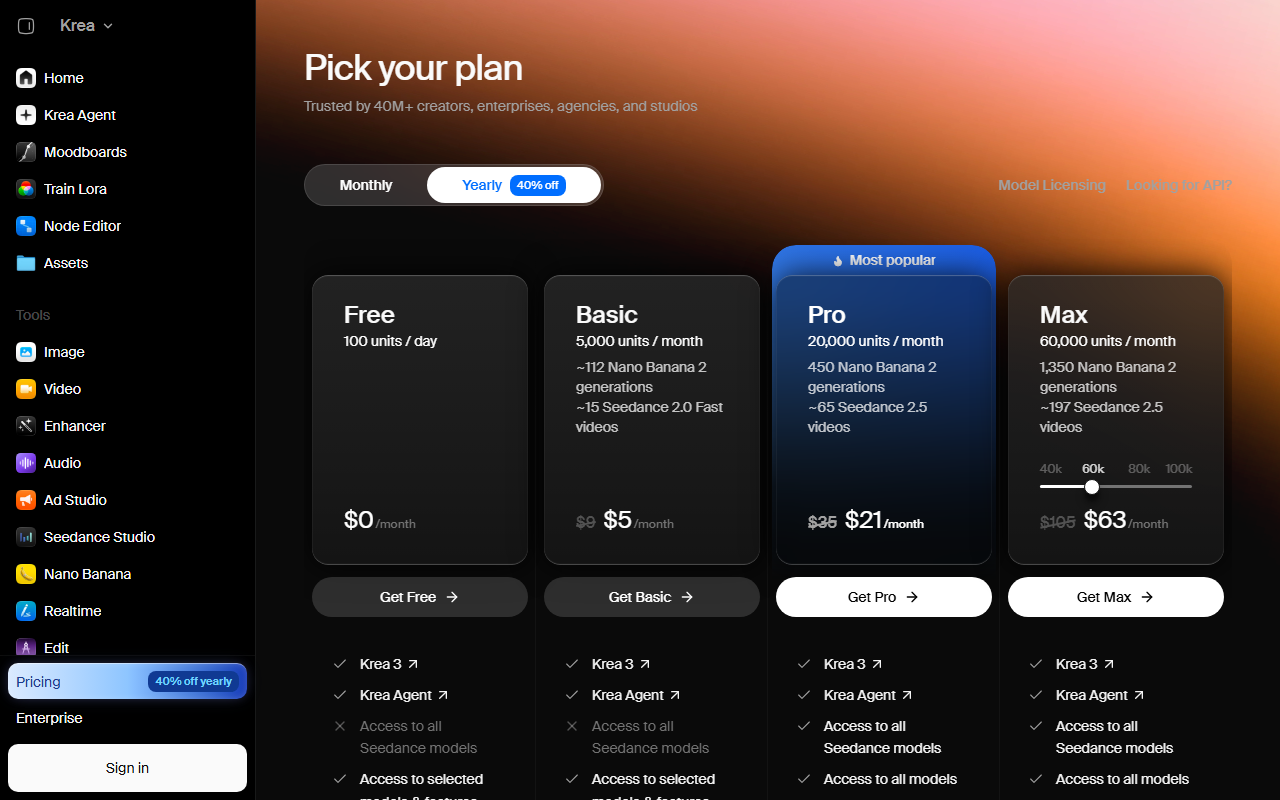 Krea's Free plan as listed on its pricing page, captured 31 Oct 2026.
Leonardo gives free users 150 fast tokens a day and puts every free creation in a public gallery. Krea gives 100 units a day but limits free accounts to selected models. Recraft says plainly that images from its free plan belong to Recraft and are not licensed for commercial use. Three vendors. Three different meanings of "free".
That spread is the real story behind the best free AI image generators search. The number of images you get matters less than who owns them, who can see them and whether you can sell what you make. A designer who ships client work on a free tier that forbids commercial use has a problem no credit count can fix. Even 150 tokens a day cannot buy back a licence.
This guide reads the free tier of each generator from the vendor's own page, dated, and says so when a page does not publish the number. It is for hobbyists, students and small teams who want to test before paying. If you already know you need team seats or per-image costs, the paid-inclusive roundup covers that ground.
How were these free tiers checked?
Every figure below was read from a vendor page, not from a review site. We read each page in a headless reader first, then in a real browser when that attempt failed, and we recorded the day each read happened beside every figure so you can judge how stale it might be. Dates sit in the table and in the captions.
Three tools on our shortlist could not be read this run. Ideogram and SeaArt both sit behind bot checks that blocked the reader and the browser. Microsoft Designer's pricing address returned a 404 on 30 Oct 2026. We list them with "not read" instead of guessing. A wrong free-tier number sends a reader to a signup that does not match, which is worse than a blank cell.
Where a vendor page names a limit without a number, such as Adobe's "free daily generations", the cell says "number not published". That is a finding, not a gap in our work.
What criteria matter before you choose a free tier?
Most people pick a free generator by the loudest headline number. That is the wrong filter. Six criteria separate a useful free tier from a frustrating one, and only the first is about volume.
- What the allowance is made of. Leonardo counts tokens, Krea counts units and Clipdrop counts uses per 24 hours. None of these is an image. The only vendor we read that priced an image was DeepAI, through its paid plan. Ask what one normal image costs in the vendor's currency before you compare two numbers.
- Ownership and licence. Who owns the output, and can you use it commercially? Recraft answers no. Krea ties the commercial licence to paid plans. Most pages leave the question unanswered, which means you assume the narrow reading.
- Visibility. Will other users see what you make? Leonardo's free creations are public, and Recraft shows free images in a public gallery.
- Model access. Leonardo's free plan is limited to its Auto model. Krea lists "selected models" on Free and "all models" from Pro. If you want to learn which engine suits your style, model access can matter more than raw volume.
- Reset cadence. Leonardo, Krea and Clipdrop reset on a daily basis. DeepAI describes its Pro allowances as refreshing monthly. Daily resets reward people who generate a little every day. Monthly pools reward bursts.
- Editing tools around the generator. Clipdrop lists background removal, upscaling, cleanup and relight beside text to image. If your work is finishing images, those count for more than a bigger generator cap.
A quick way to test any tool is to run one identical prompt in three of them and count how many attempts each allows before it stops you. Do it on a fresh day so the daily reset does not distort the result.
What is on the shortlist and what does each free plan give you?
The table below is the short version. Details and caveats follow in the sections after it.
| Tool | Free allowance | Commercial use on free | Read on |
|---|---|---|---|
| Leonardo.Ai | 150 fast tokens a day | Not stated, creations public | 30 Oct 2026 |
| Krea | 100 units a day, selected models | Paid plans only (Basic and up) | 30 Oct 2026 |
| Recraft | Credit amount not published | No, owned by Recraft | 30 Oct 2026 |
| Adobe Firefly | Free daily generations, number not published | Not stated on the page read | 30 Oct 2026 |
| Clipdrop | Text to image included, limit not shown | Not stated | 31 Oct 2026 |
| Canva | Limited access to Standard and Premium AI tools | Not stated | 31 Oct 2026 |
| DeepAI | Limited HD images | Not stated | 31 Oct 2026 |
Notice how many cells say "not stated". Of the seven tools in the table, only 2 give a clear commercial answer for free output. Free tiers are marketing, and vendors rarely print the commercial terms next to the free button.
Is Leonardo.Ai's free tier worth using?
Leonardo.Ai lists the most specific free plan of the group. The Free plan costs $0 and refreshes 150 fast tokens each day. It restricts you to the Auto model, so you cannot pick a specific engine, and it allows one collection.
The catch is privacy. Free creations are public. Anything you generate can be seen by other users. The cheapest paid plan, Essential at $12 a month, makes creations private.
For learning prompts, that trade is fine. For anything else, think twice. For a product mockup under NDA, it is not. Read the plan page again before you upload a reference image you would not want shown.
What does Krea give away for free?
Krea publishes the clearest daily number on this list. The pricing page lists Free at 100 units a day and $0 a month, and an earlier read recorded that signup needs no card. Free access covers selected models and features. The Pro column lists all models.
That split matters if you want to compare engines side by side. You can test some on Free, but not all. Paid entry is cheap: Basic shows $9 a month, or $5 a month on the yearly toggle.
The commercial licence is listed on paid plans, starting at Basic. The page does not extend it to Free, so treat free output as personal use until Krea says otherwise in writing.
Units are not images. A unit is Krea's internal currency, and different models and sizes cost different amounts. Expect fewer images from a heavy model than from a light one.
Can you use Recraft's free images commercially?
No. Recraft is the clearest of the group, and the answer is in its pricing FAQ. On the free plan, Recraft keeps ownership of the images, shows them in a public gallery and withholds a commercial licence. The page does not publish how many free credits you get.
That makes Recraft a testing tool on the free plan, not a production one. If vector output or brand-style work is what draws you, the paid plan is the real product. The company page for Recraft and the model entries for Recraft V4.1 and the older Recraft V3 show what the engine does once you pay.
What does Adobe Firefly include for free?
Adobe Firefly has a free plan with free daily generations. The FAQ we read does not say how many, and the plans page lists only trials. We cannot give you a number we did not see.
The pages we read do not say whether free output can be used commercially. Check the licence terms for your tier before you rely on it. The comparison with a dedicated enhancer in Adobe Firefly vs Topaz Photo AI shows where Firefly fits in an editing workflow.
What can you do with Clipdrop's free tier?
Clipdrop is built around small jobs. The free column lists text to image, uncrop, background removal, an x2 upscaler, cleanup, relight and text remover. Most of the editing tools carry a limit of 20 per 24 hours, and text remover gets 50.
Text to image appears in the free column without a number. The Pro column labels its text-to-image allowance "Skip Queue" at 1,000 per 24 hours, which suggests free requests wait in line. The page does not say how long.
Clipdrop suits you if the job is fixing and finishing images rather than generating from nothing. For a wider look at that workflow, see AI photo editing and restoration tools.
How good is Canva's free AI image generation?
Canva treats AI as one feature inside a design tool. Its pricing page says Canva Free gives limited access to Standard and Premium AI tools and no access to Ultra AI tools. Pro lifts the AI allowance to ten times the free level.
The page does not give a count of free images. If you already make posts, decks or flyers in Canva, the free tier is a convenience. If you want a standalone generator, it is the weakest fit on this list because the allowance is described only as "limited".
Canva's company page and our guide to AI for graphic design help you decide whether the design suite or a dedicated generator suits your work.
What does DeepAI offer without paying?
DeepAI has the plainest structure. The free plan includes limited HD images and editing, limited chat messages and a limited photo editor. The paid Pro plan lists 500 HD images each month.
That Pro figure is useful because it prices an image: Pro is $9.99 a month, so 500 images work out to about two cents each. The free tier gives no count, so you cannot compare it directly.
DeepAI is an easy first stop if you want to try text-to-image with no setup. Do not expect it to match the model choice of Krea or the daily volume of Leonardo.
Which free AI art generator should you pick?
Match the tool to the job, not to the biggest number.
- Learning prompts and comparing engines: Krea, for a clear daily number and a cheap step up to all models.
- Daily volume for casual use: Leonardo.Ai, with the public-gallery trade accepted.
- Fixing and finishing existing images: Clipdrop.
- Images inside a design you are already building: Canva.
- A first no-fuss try: DeepAI.
- Anything you plan to sell: none of the free plans, based on what we could read.
Three short examples show how the criteria play out.
A student making slide art needs volume, not licensing, so a daily allowance at Krea or Leonardo covers a week of slides. The public gallery matters little for a class deck.
A freelancer testing a style before a client project should use Krea's free daily units to try its selected models, then move to a paid plan before delivering anything. Free output is a sketchbook. It is not a deliverable.
A shop owner making weekly social posts already lives in a design tool. Canva's limited free AI is enough for the occasional generated background, and it avoids another account to manage.
If the right pick depends on your budget and use case, Smart Match narrows the field from your own requirements instead of a ranked list.
What should you check on a free AI face or portrait generator?
Searches for free AI face generators treat them as a separate product. We did not test a dedicated face tool for this guide, so we do not name a winner.
Check four things before you upload anything. First, whether the service stores your photo. Second, whether the output is licensed for the use you have in mind. Third, whether a real person's likeness is involved, which changes the legal picture. Fourth, whether a public gallery will show your result.
Our guide to AI for generating pictures of people goes through those checks tool by tool. For logos and brand marks, which have their own licensing traps, see AI for logo design.
How do free AI image generators handle your data and privacy?
The pages we read say little about data. Two of them say something important about visibility. Leonardo's free creations are public, and the Essential plan at $12 a month makes them private. Recraft puts free images in a public gallery. That is a privacy fact before it is a licensing one.
None of the seven pricing pages we read described whether prompts or uploaded images are used to train models. That information lives in privacy policies and terms documents, which we did not read for this guide, so we make no claim either way. Read the policy before you upload anything you care about.
A safe default on any free plan is simple. Upload nothing you would not post publicly. Skip client assets, photos of other people and anything covered by an NDA. Use text prompts and your own original reference images.
Check three account settings once you sign up. Look for a switch that hides your creations from the public feed, a way to delete individual generations, and a way to delete the account. If a free plan offers none of them, treat every output as public.
What does "free" really cost you?
The cost is rarely money. It is visibility, ownership and speed.
| Tool | What free costs you | Paid fix |
|---|---|---|
| Leonardo.Ai | Creations are public | Essential, $12 a month |
| Recraft | Recraft owns images, public gallery | Paid plan |
| Krea | No commercial licence listed | Basic and up |
| Clipdrop | Likely queue on text to image | Pro, skip queue |
The pattern is consistent. On the pages we read, free means a public gallery, no commercial licence or a queue. Paid plans remove that friction.
If you want a free engine without an app wrapper, the model pages for FLUX 3, Nano Banana 2.1 and GPT Image 2 show who builds each model. The companies behind them, including Black Forest Labs, OpenAI and Google, set their own terms for free access.
How do you get the most out of a free tier?
Free allowances reward a routine. A few habits stretch them without breaking any vendor's terms.
Spend the daily allowance on exploration, not finishing. Generate small, cheap variations of one idea, pick the best two, and only then spend units on a larger or heavier model. Daily resets mean unused allowance vanishes at midnight. Using some of it each day beats saving up.
Keep a prompt log. When a prompt works, paste it into a note with the tool and the date. Free tools change their models and limits without warning, so a log lets you reproduce a look elsewhere if a plan changes.
Use the editing tools where they are free. Clipdrop's cleanup, relight and upscaler carry their own daily counts, separate from text to image. A mediocre generation can often be rescued there instead of rerolled.
Decide your upgrade trigger in advance. Move to a paid plan the first time you need any of these: output for a client, privacy for a reference image, or a specific model your free plan hides. Paying earlier than that buys little.
Last, treat free output as provisional. If an image becomes part of a product, regenerate it on a plan whose terms you have read.
Who should skip free tiers entirely?
Skip them if any of these apply:
- You sell or publish what you generate.
- You work under a client NDA, since several free plans make output public.
- You need a consistent look across dozens of images, which free daily caps make slow.
- You need an audit trail of the licence at the time of creation.
For those cases, price the paid plan first. The umbrella pricing guide covers solo, team and per-image costs, and tools like Midjourney, Stability AI (see also its company page) and Microsoft Designer are listed in the image generator directory.
What would change this list?
The strongest objection is that free tiers change monthly, so a guide like this goes stale fast. True. Vendors edit these pages without announcement, and a number printed here can be wrong by next quarter.
Our answer is the date on every row, all inside a 2-day window of 30 and 31 Oct 2026. Treat the table as a snapshot and re-check the vendor page before you sign up. We will update the numbers each time the pages are re-read.
Two things would change the verdicts. If Ideogram or SeaArt publish a readable free-tier page, they join the table. If Recraft or Leonardo change the commercial terms on their free plans, the "who should skip free tiers" advice changes with them. Also watch Ideogram and SeaArt, which stay unread until their pages allow it.
Next to watch: whether Adobe and Clipdrop start printing a daily count on the free plan, so these cells can finally hold a number.
Frequently asked questions
Which free AI image generator gives the most images per day?
It depends on the unit. Leonardo.Ai lists 150 fast tokens a day and Krea lists 100 units a day, but tokens and units cost different amounts per image. Adobe, Clipdrop, Canva and DeepAI do not publish a daily image count on the pages we read.
Can I use free AI images commercially?
Often not. Recraft states that free-plan images belong to Recraft and are not licensed for commercial use. Krea lists its commercial licence on paid plans from Basic. Most other pages we read do not state the commercial terms for free output.
Are free AI image generations private?
Not always. Leonardo.Ai makes free-plan creations public, and its Essential plan at $12 a month makes them private. Recraft shows free images in a public gallery. Check the plan page before uploading reference images.
Do free AI image generators need a credit card?
Krea says its Free plan needs no card. The other pages we read do not state whether signup asks for one, so confirm at signup rather than assuming either way.
Why are some tools missing from the table?
Ideogram and SeaArt blocked both our reader and a real browser, and Microsoft Designer returned a 404 on its pricing address. We list them as not read instead of guessing a free-tier number.
Covered in this guide
- Black Forest Labs: Black Forest Labs builds FLUX 3, a multimodal image, video and audio model family, plus open-weights Klein and Action models. Freiburg, Germany.
- Canva: Helps everyone design anything and publish it anywhere
- company page: Canva is a Sydney-founded design platform with an in-house AI lab, Canva Research, and Free, Pro, Business and Enterprise plans. Private; no IPO filing found as of October 2026.
- Clipdrop: Web image editor from Jasper with 9 AI tools: background removal, upscaling, object cleanup and text-to-image, plus a free daily quota.
- DeepAI: The all-in-one creative AI platform for everyone
- FLUX 3: FLUX 3 is a video, image, and audio model from Black Forest Labs, launched July 2026, built on a shared Self-Flow architecture.
- GPT Image 2: OpenAI's April 2026 image flagship integrates O-series reasoning for 99% text accuracy, natural language inpainting, and 2K resolution via a token-based API.
- Ideogram: AI image generator that actually gets text right, useful for anything combining words and visuals.
- Krea: An AI suite for creatives that generates, enhances, and edits images, videos, and 3D assets in one browser-based platform.
- Leonardo.Ai: AI image, video, and 3D asset generation for creators and teams
- Microsoft Designer: AI-powered graphic design tool for creating professional visuals from text descriptions
- Nano Banana 2.1: Google's image generation and editing model in the Gemini API, with 1K to 4K output and multi-image reference mixing, generally available since October 2026.
- OpenAI: OpenAI builds ChatGPT, the GPT-6 family (Astra, Sol, Luna), Codex and the OpenAI API. It reports 1.2B weekly ChatGPT users and an $852B valuation after its March 2026 round.
- Recraft: Recraft is a browser-based AI design tool used by more than 4 million designers to generate editable vector graphics and raster images from text prompts.
- Recraft: Recraft is a London-based AI design platform founded in 2022, used by more than 4 million designers for on-brand vector and raster image generation.
- Recraft V3: Recraft V3 is Recraft's ~20-billion-parameter text-to-image and vector model that topped the Artificial Analysis Text-to-Image Leaderboard on release.
- Recraft V4.1: Recraft V4.1 is Recraft's May 2026 image model family: nine variants priced per image from a Flash tier to Pro vectors, raster or native SVG, all testable on the free plan.
- SeaArt: AI image, video and character studio for web, iOS and Android, with a free daily allowance and 5M+ Android installs.
- Stability AI: Enterprise-ready creative partner for multimodal AI media generation
- company page: Stability AI, a London-founded company, makes the open-weight Stable Diffusion models, the Stable Audio music family and the Brand Studio platform, sold through a credit-priced API.
Sources
Still deciding?
This guide covers a handful of options. Smart Match checks every listing in the directory against how you actually work and what you can spend, then hands you the shortlist and the reason behind each pick.
Find your toolsRelated guides
- Adobe Firefly or Gencraft: A 2026 Pricing and Feature ComparisonComparisonHead-to-head, with a verdict
- Adobe Firefly vs Topaz Photo AI: Which Should You Use in 2026?ComparisonHead-to-head, with a verdict
- Attio vs HubSpot in 2026: Which CRM for a Startup?ComparisonHead-to-head, with a verdict
- Best Agentic AI in 2026: Manus, Genspark and the Platforms That Finish Whole TasksBuyer's guideHow to pick, across a category
- Best AI Assistant for Office Work in 2026Buyer's guideHow to pick, across a category
- Best AI Chatbots in 2026: Free and Paid Picks for Everyday UseUpdatedRechecked against current sources