Best AI for Coding Machine Learning in 2026
The best AI for coding machine learning is one whose agent edits and runs notebook cells and reads their outputs, such as GitHub Copilot in VS Code, Claude Code or Runcell in JupyterLab. No source we read publishes an accuracy score for ML code, so the choice rests on notebook support, metering and data handling.
The short version
For machine learning code, pick the assistant that can run a notebook cell and read the output. GitHub Copilot in VS Code at $10 a month does this cheapest; Claude Code and Codex suit training scripts. No vendor publishes an ML accuracy score, so test on your own task.
Want this decided for your own case? Find your tools with Smart Match, starting from this guide's question.
On 25 October 2026, none of the 13 vendor and project pages we read published an accuracy score for machine learning code, so every "best AI for ML" ranking you have seen is opinion. What the vendors do publish is what their tools can touch: whether the agent can run a notebook cell, read the chart it produced and fix its own error. That is the dividing line that matters for ML work.
Machine learning code fails in ways that ordinary application code does not. A script can run clean and still train on the wrong split, and a plot is the only thing that shows it. An assistant that writes code but never sees the output is guessing about the part you care about.
Our pick for a four-person team writing PyTorch and pandas in notebooks: GitHub Copilot in VS Code at $10 a month, because its agent edits and runs cells and reads their outputs. Move to Claude Code or OpenAI Codex when the work lives in training scripts. We read every vendor page below on 25 October 2026, and prices come from those pages.
How to choose an AI for machine learning code
We leave out model rankings here, since no vendor we read publishes an ML-specific accuracy figure. Five questions separate the options instead.
- Can it run code and see the result? Reading output catches a shape error alone.
- Does it work where your code lives? Notebook and script users need different tools.
- What does an hour of work cost? Most plans meter credits, so sticker price says little.
- Where does your data go? Training sets are often a team's most sensitive files.
- Can you stop it? Code execution needs an approval step you control.
If you have not yet picked a general assistant, the broader roundup of AI coding assistants covers that question first, and the coding assistant category lists every tool HokAI tracks. If your work is analysis rather than model code, the guide on AI tools for data science draws that line, and the data science category holds the tools behind it.
The shortlist, compared
| Option | Where it runs | Notebook support we could cite |
|---|---|---|
| GitHub Copilot | VS Code | Agent edits and runs cells |
| Claude Code | Terminal, IDEs | Edits cells, reads outputs |
| OpenAI Codex | CLI, IDE, cloud | None cited in its docs |
| Runcell | JupyterLab | Built for notebooks |
| Colab Gemini | Colab | Plans and runs analysis |
| Jupyter AI + OpenCode | JupyterLab, terminal | Chat plus a notebook server |
Each row is explained below, and the sections follow the order of the table. Read the notebook column first if your work is exploratory, and the "where it runs" column first if your work is a codebase with tests and a CI pipeline. The last column says "we could cite" on purpose: where a vendor's docs say nothing about notebooks, we say so instead of guessing. Cursor is missing from the table for the same reason, and its section explains what we did find.
GitHub Copilot in VS Code: the cheapest agent that reads cell outputs
VS Code's own guide describes an agent that can "create a Jupyter notebook, edit and run cells, inspect outputs, and iterate on errors." That sentence is the whole case for it. You start from the outcome, for example a notebook that cleans a CSV and plots a price distribution, and the agent builds the cells and runs them.
The notebook-specific features are concrete:
- Type
#in the chat box and pick a kernel variable, such as a DataFrame, to give the agent live context. - Use Add Cell Output to Chat to attach a chart or a traceback and ask what went wrong.
- Press Ctrl+I in a cell for a focused edit, then choose Accept and Run to apply it and execute in one step.
- Start a prompt with
/newNotebookto request a fresh notebook.
The prerequisites are short: Copilot set up, the Jupyter extension installed and a workspace you trust. The guide itself warns that running a cell executes code in your kernel and can reach workspace files, so approvals matter. GitHub, owned by Microsoft, sells the plans.
GitHub's plans page lists four tiers:
| Plan | Price per month |
|---|---|
| Free | $0 |
| Pro | $10 |
| Pro+ | $39 |
| Max | $100 |
Agent mode, code review and the CLI draw on GitHub AI Credits. The Free plan supports the CLI and agent mode with limited usage.
Claude Code: strongest when ML work is a repository
Claude Code from Anthropic is a terminal and IDE agent, and its documentation is specific about notebooks. A dedicated NotebookEdit tool changes one cell at a time, by cell id, in three modes: replace, insert and delete. Reading an .ipynb file returns every cell with its outputs, including charts.
That helps on a real project, where a training run touches a data loader, a config file, a notebook and a test. The agent edits all four in one session and runs the tests.
There are limits worth knowing. A notebook whose cells exceed 256 KB, or the token limit, returns an error instead of loading, and files over 100 MB are refused outright. A notebook full of embedded images or long outputs can hit that wall. The agent also cannot edit a notebook that is not valid UTF-8.
Claude Code is included in Anthropic's Pro plan, listed at $20 a month with a lower rate on annual billing. Max starts at $100 a month. Free accounts do not include it, so a team that wants to trial it first has to pay for one month.
OpenAI Codex: the better fit for scripts and pull requests
OpenAI Codex from OpenAI works on the CLI, in an IDE extension and in the cloud. Its pricing page lists these individual plans:
| Plan | Price per month |
|---|---|
| Free | $0 |
| Go | $8 |
| Plus | $20 |
| Pro | From $100 |
Business is $20 per user per month.
We found no notebook-specific documentation for Codex, so we cannot say it edits cells. It makes sense where the ML code is a package: training loops, evaluation harnesses, data pipelines. Plus includes Codex on the web, in the CLI and in the IDE extension, plus cloud features such as automatic code review.
One detail matters for CI. The API key route pays API prices, and it drops the cloud integrations such as GitHub code review. If you plan to run Codex in a shared pipeline, price it that way.
Cursor: the price page changed shape
Cursor now sells its plans on a page shared with X and Grok. We read it twice, in two different readers, and both showed the same table:
| Plan | Price per month |
|---|---|
| Free | $0 |
| Plus | $8 |
| Premium | $30 |
| Super | $100 |
| Ultra | $200 |
| Teams | From $30 per user |
Two lines matter for ML work. Third-party models run inside Cursor but are "billed separately by usage" at API list price, so a heavy session on a frontier model costs more than the plan. And the Plus plan lists only Grok models, which is a real constraint if you want another vendor's model. xAI is behind the Grok side of the bundle.
We found no notebook-specific Cursor documentation to cite. If Cursor is your editor, test a notebook task on the free tier before paying.
Runcell: the agent built for JupyterLab
Runcell describes itself as a Jupyter-native agent for data analysis, data science and research. It runs inside JupyterLab, works on existing .ipynb files and reads tables, charts and statistics from cell outputs. Its page says no API key is required. The install is one line:
pip install runcellThe pricing page lists five tiers:
| Plan | Price | Credits per month |
|---|---|---|
| Hobby | $0 | 20 |
| Pro | $20 a month | 500 |
| Pro+ | $60 a month | 2,000 |
| Ultra | $200 a month | 10,000 |
| Teams | From $40 per seat | 500 per seat |
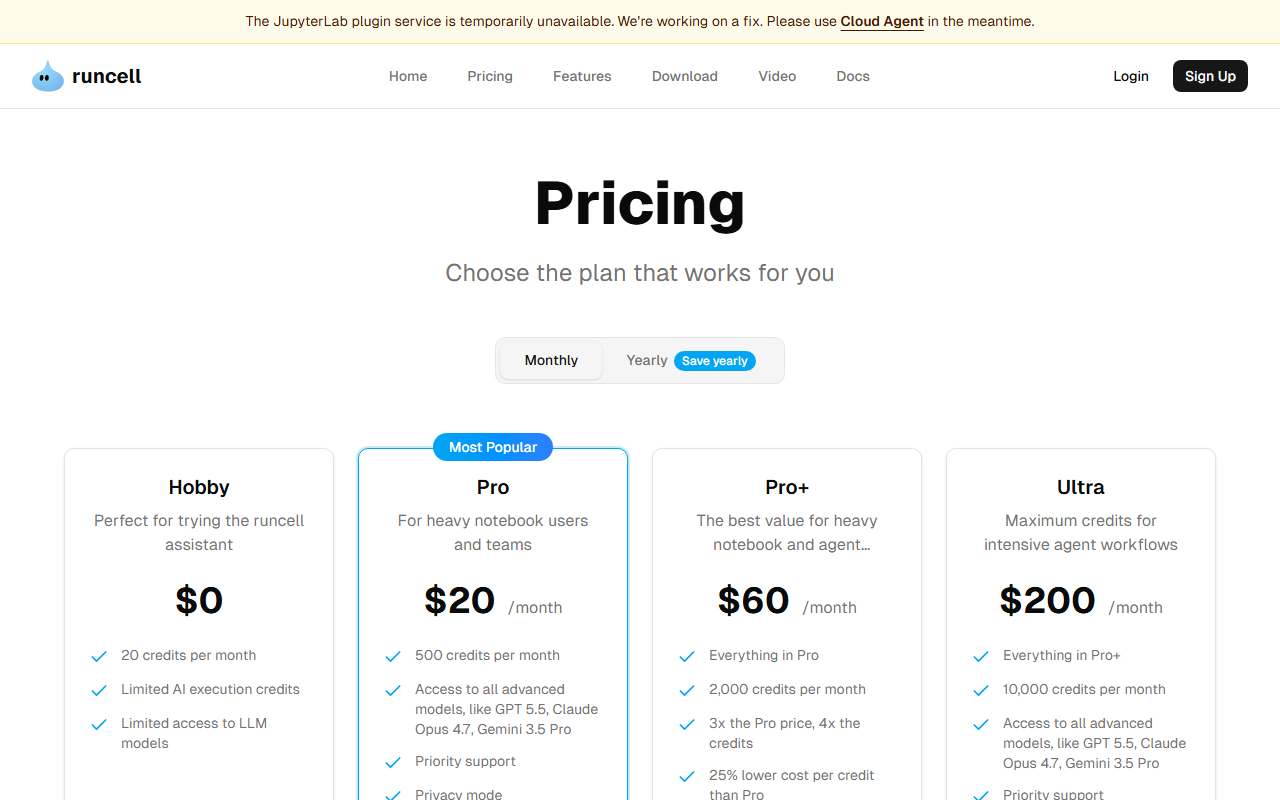 Runcell's pricing page, captured 25 Oct 2026, with the plugin-outage banner at the top. Credits, not seats, set the ceiling on the individual plans.
Privacy mode is listed on Pro and above, not on Hobby. The page names GPT 5.5, Claude Opus 4.7 and Gemini 3.5 Pro as example models on the paid tiers.
One caution, dated. On 25 October 2026 a banner on both the home and pricing pages said the JupyterLab plugin service was "temporarily unavailable" and pointed users to a Cloud Agent instead. Check that banner before you build a workflow on the plugin.
Google Colab's Gemini agent: no install, with a data catch
Colab's FAQ describes an "AI-First Colab" with a chat panel opened from a Gemini spark icon in the notebook footer, plus a Data Science Agent. Given a goal, that agent writes a plan, shows it for review, runs the code, and can "reason about results, self-correct errors, and adjust its plan." AI features are on by default for eligible users aged 18 or over.
The catch is in the data section. Google says it collects prompts, related code and generated output, and that human reviewers may read them. Its own advice is not to put confidential or personal information in prompts. For a team training on customer data, that is a stop sign for the free tool.
On runtime, Google's FAQ says free notebooks can run at most 12 hours, and that Pro+ supports continuous execution up to 24 hours given enough compute units. Subscribing to an eligible Google AI plan also unlocks a monthly allotment of Colab compute units. We could not read Colab's price page, which loads only after sign-in, so we publish no Colab price. Google also offers Google AI Studio for building with Gemini outside notebooks.
Jupyter AI and OpenCode: the open route
Jupyter AI is an open source extension that adds a chat panel to JupyterLab. It is still under incubation inside the JupyterLab organization. Its README lists agents it connects to through the Agent Client Protocol: Claude, Codex, GitHub Copilot, Gemini, Goose, Kiro, Mistral Vibe and OpenCode.
Agents can read and write files, run terminal commands and work with notebooks through a built-in Jupyter MCP server. A permission system asks for approval before the agent writes. That is the guardrail an ML team wants.
OpenCode is the one on that list worth a closer look. It is MIT licensed, runs as a terminal app, desktop app or IDE extension, and connects to 75-plus model providers, including local models. You can log in with a GitHub Copilot or ChatGPT Plus or Pro account instead of paying twice. OpenCode itself is free, and it bundles some free models. Its site says it stores no code or context data, except when you use its free models.
Pair it with a local runtime such as Ollama or LM Studio and your training data never leaves the machine. The trade-off is model quality, which the guide on AI models for local coding covers.
What happens to your training data
Training sets are often the most sensitive files a team holds, so check data terms before you check features. The pages we read say this much, and no more.
| Option | What the page says |
|---|---|
| Colab AI | Prompts and code collected; reviewers may read |
| OpenCode | No code stored, except on its free models |
| Runcell | Privacy mode on Pro and above |
| VS Code agent | Runs in your kernel; trust the workspace first |
| Jupyter AI | Approval asked before the agent writes |
Silence is not a guarantee. For Copilot, Claude Code, Codex and Cursor we did not read a data-handling page, so confirm retention and training terms for your plan before pointing any of them at regulated data. A local model through OpenCode or Jupyter AI is the only route on this list where the data provably stays on your machine, and only if you keep every call local.
A first-week test for any of these
Pick one finished project and give each candidate the same three jobs. First, a data-cleaning notebook from a raw CSV. Second, a bug you already fixed, such as a shape mismatch in a model's forward pass. Third, a request to add an evaluation metric to a training script.
Score each on whether it ran the code, whether it read the output, and whether you would merge the result unchanged. A tool that needs three corrections per job costs you more than its plan price.
What it costs
Sticker prices are close. Usage is where they split.
| Option | Entry price | What the price buys |
|---|---|---|
| GitHub Copilot | $0 / $10 | Credits, agent mode |
| Claude Code | From $20 | Included in Pro |
| OpenAI Codex | $0 / $8 / $20 | Credits, CLI, IDE |
| Cursor | $0 / $8 / $30 | Pool, models extra |
| Runcell | $0 / $20 | 20 / 500 credits |
| Colab, OpenCode | See text | Free tiers exist |
A cheap plan with a hard cap can cost more than an expensive one if you hit the cap mid-experiment. Read the metering line on each page, not the headline price. If you compare model price and speed before choosing, the model leaderboard shows the figures, and the recommend page filters by constraint.
Where AI help for ML code falls short
This is the part vendor pages skip, so it is our judgment, not a quoted finding.
An agent that makes a notebook run is not an agent that makes the experiment valid. Splitting data before fitting a scaler, keeping test rows out of tuning, fixing random seeds: these are choices the code can execute correctly and still get wrong. Read the cells that handle splits yourself, every time.
The fast.ai team has written about the same worry. Its blog carries a January 2026 post titled "Breaking the Spell of Vibe Coding," and its course list includes "How to Solve it With Code" next to "Practical Deep Learning for Coders." If you are learning, fast.ai is the corrective: use the agent to explain what a cell does, not to skip writing it.
Compute is the other cost. An agent that reruns a training cell after each fix burns GPU time on your account. Set a small subset and a short epoch count before you let it iterate.
Who should skip this
Skip an agent that executes code if your environment holds data you are not allowed to run through a third-party service. Skip the free Colab AI for the same reason. Skip any tool above for a one-off notebook you will run once: the free plan of any of them covers that.
If your real task is fine-tuning rather than writing training code, a training platform is the better category. Overmind turns an agent's production traces into datasets and fine-tunes open models you own, and it publishes its platform code under AGPL-3.0 for self-hosting with Docker Compose. That is a different job from the assistants above, but it is where teams who outgrow prompting often land. Teams working inside a data platform can also look at Databricks, and anyone pulling pretrained models will end up on Hugging Face.
The counterargument to our pick
The fair objection to our recommendation is that Copilot's notebook agent is just a general assistant with notebook hooks, while Runcell is built around the notebook and so should do better. That may be true on a hard analysis, and we cannot rule it out: no one publishes the comparison.
Our answer is cost and reach. Copilot at $10 covers scripts, notebooks and review in one place, and Runcell's free tier gives only 20 credits a month, so you can test it before committing. Try both on the same task and keep the one whose output you would defend in a code review. If you prefer terminal tools, Aider is a free, open source pair programmer that edits your git repo and commits each change, and Gemini CLI is another terminal option.
What would change this recommendation
Three things would move our pick:
- A vendor publishing a benchmark on real ML tasks, such as training-loop correctness or data-leak detection.
- Runcell restoring its JupyterLab plugin, which would make it a safer notebook default than it is today.
- Cursor documenting notebook support, since its pricing now bundles other products and the value has shifted.
If it still depends on your stack, Smart Match takes your constraints and answers with options drawn from HokAI's catalog. For other coding niches, the sibling guides on AI for Unity and free AI for coding questions follow the same format.
How we checked
We opened each page named in the sources on 25 October 2026. Prices, plan names and limits are copied from them. We did not run benchmarks, and nothing here is a measured quality ranking. Where a page was blocked or loaded only after sign-in, we say so and publish no figure.
Frequently asked questions
What is the best AI for coding machine learning?
For most teams, GitHub Copilot in VS Code, because its agent edits and runs notebook cells and reads outputs at $10 a month. Claude Code and OpenAI Codex suit training scripts. No source publishes an ML-specific accuracy comparison, so test on your own project.
Can AI run Jupyter notebook cells for me?
Yes. VS Code documents a Copilot agent that creates notebooks, edits and runs cells and iterates on errors. Claude Code has a cell-level notebook edit tool, and Runcell and Colab run cells inside their own notebook environments.
Is Google Colab's AI safe for confidential training data?
Not for confidential data. Google says it collects prompts, related code and generated output, and that human reviewers may read them. Its FAQ advises against putting confidential or personal information in prompts.
Is there a free AI for machine learning code?
Yes. GitHub Copilot, OpenAI Codex and Cursor each list a $0 plan with limits, Runcell gives 20 credits a month free, and OpenCode and Jupyter AI are open source. Colab's AI features are on by default for eligible accounts.
Does the AI check that my ML experiment is valid?
No. An agent can make a notebook run without catching leakage between train and test data or an unfixed random seed. Review the cells that split data and tune models yourself, and test on a small subset first.
Covered in this guide
- Aider: Free, open-source terminal pair programmer that edits your git repo and commits each change; bring your own LLM key. 49,000+ GitHub stars.
- Anthropic: Anthropic is a Public Benefit Corporation started by 7 ex-OpenAI researchers. It builds the Claude model family and counts Amazon and Google among its largest backers.
- Cursor: Cursor is an AI code editor built on VS Code, widely adopted across large enterprise engineering teams, with Agent Mode, Tab completion, and Cloud Agents.
- Databricks: Unified Lakehouse platform for data engineering, analytics, and AI, founded 2013, valued at $190B (Aug 2026), with consumption pricing from $0.08 per DBU on the published Premium tier.
- fast.ai: fast.ai is a free nonprofit deep learning course reaching 500,000+ students with practical top-down teaching and open-source fastai library.
- Gemini 3.5 Pro: Google named Gemini 3.5 Pro at its May 2026 developer conference, but the model has not been released. Google has published no context window, price or benchmarks for it.
- Gemini CLI: Google's open-source coding agent for the terminal, now limited to enterprise Code Assist licenses after its June 2026 consumer shutdown.
- GitHub: Founded in 2008, GitHub is the largest code repository and collaboration platform with 140M+ developers, now integrated into Microsoft's CoreAI division after CEO Thomas Dohmke departed end of 2025.
- GitHub Copilot: GitHub's AI coding assistant with agent mode and MCP support across 6 IDEs, plus a free plan with no credit card required.
- Google AI Studio: Free web-based IDE for building, testing, and deploying generative AI applications with Google's Gemini models
- Hugging Face: The AI community building the future. Platform for discovering, sharing and collaborating on machine learning models, datasets and applications.
- LM Studio: Free desktop app that runs open LLMs locally on llama.cpp and MLX, with an OpenAI-compatible local server and an optional $20 cloud plan.
- Microsoft: Microsoft, founded 1975, is a public company (NASDAQ: MSFT) and the Redmond maker of Windows, Azure, GitHub and the Copilot assistants, with $331.8B of fiscal 2026 revenue.
- Ollama: MIT-licensed runtime that runs open-weight LLMs on macOS, Windows and Linux with a local API, plus an optional paid cloud for larger models.
- OpenAI: OpenAI builds ChatGPT, the GPT-6 family (Astra, Sol, Luna), Codex and the OpenAI API. It reports 1.2B weekly ChatGPT users and an $852B valuation after its March 2026 round.
- OpenAI Codex: Clones a GitHub repo into a sandbox, writes and tests code, then opens a pull request; OpenAI reported 20 million active users in August 2026.
- OpenCode: MIT-licensed coding agent for terminal, desktop and IDE that works with any model provider, from 208K GitHub stars.
- Overmind: Open-source platform that turns AI agent traces into scored datasets and LoRA or full fine-tunes of open models from 230M parameters up, with weights you keep.
- Runcell: AI agent for Jupyter notebooks that writes, runs, and debugs code from natural-language prompts, with a free tier and a paid Pro plan for daily analytical work.
- xAI: Elon Musk's AI company (roughly 4,000 to 4,900 employees) builds the Grok models and merged into SpaceX, taking the combined business public on Nasdaq as the largest IPO on record.
Sources
Still deciding?
This guide covers a handful of options. Smart Match checks every listing in the directory against how you actually work and what you can spend, then hands you the shortlist and the reason behind each pick.
Find your toolsRelated guides
- AI Development Services in 2026: Which Layer You Actually NeedBuyer's guideHow to pick, across a category
- Attio vs HubSpot in 2026: Which CRM for a Startup?ComparisonHead-to-head, with a verdict
- Best Agentic AI in 2026: Pick the Job, Not the GeneralistBuyer's guideHow to pick, across a category
- Best AI Agent Builders in 2026: Automate, Build or Self-HostBuyer's guideHow to pick, across a category
- Best AI App Builder in 2026: Pick by What You're BuildingBuyer's guideHow to pick, across a category
- Best AI Assistant for Office Work in 2026Buyer's guideHow to pick, across a category