The Best Free AI for Turning a Photo Into a Video in 2026
As of 22 September 2026, CapCut's Dreamina gives the largest renewing free allowance (120 credits daily) for animating a photo, Kling AI pairs a smaller daily allowance with an eventual commercial-rights upgrade, and HeyGen offers the cleanest free tier for making a photo talk (3 videos monthly). Pika's free tier no longer includes recurring credits.
The short version
Free photo-to-video tools split into two jobs: making a photo move (Kling, CapCut's Dreamina, Luma, Runway, Vidu) and making a photo talk (HeyGen, Fliki, D-ID). Runway's free credits are a one-time grant, not monthly. Pika quietly dropped its recurring free credits to zero in the months since most roundups were written.
Pika's own pricing page listed 80 free credits a month as recently as June 2026. As of pika.art/pricing on 22 September 2026, the free plan gives zero monthly credits: packs only, purchased upfront. Half the "best free AI for photos to video" roundups still quote the old number.
That is the actual problem with this category. A dozen sites rank the same nine or ten tools by a headline credit figure copied from a review nobody re-checked this month, and the figure moves faster than the roundups do.
Two more traps sit underneath it. Runway hands out 125 credits once, not every month, so a plan that reads like a free tier is really a one-time trial with better branding. And "turning a photo into a video" is actually two different jobs: making a photo move, and making a photo talk. This guide splits them, and every number below was checked against the vendor's own page on 22 September 2026.
Two jobs, not one category
Search "AI photo to video" and you get Kling AI, Runway and Luma Dream Machine mixed in with HeyGen, D-ID and Fliki as if they compete for the same task. They do not.
Kling, Runway, Luma, Pika, Vidu and CapCut's Dreamina take a still image and add motion: camera movement, animated scene elements, a Ken Burns-style pan with AI-generated detail filled in. Browse the category page for AI video generators and every tool on it does some version of this job.
HeyGen and D-ID instead take a still portrait and add a synced, talking mouth reading a script you provide, the same avatar and media-generation category that talking-photo and digital-human tools sit in. Fliki is the one tool in this guide that does both from the same upload, because it licenses outside engines, including Kling and Veo, for the motion job and runs its own lip-sync pipeline for the talking one.
Neither job is harder to do badly. A motion tool asked to animate a face tends to produce a subtle, uncanny drift around the mouth and eyes, because it was trained on general scenes, not portraits. A talking-photo tool asked to animate a landscape or a product shot has nothing to lip-sync, so it either refuses the upload or produces a static image with a moving mouth pasted where a face should be. Match the tool to the photo, not just to the word "free."
Pick your job before you pick a tool. If you want a product photo to feel alive on a landing page, you want the motion category. If you want a photo of a real or synthetic person delivering lines, you want the talking category. Conflating the two is why so many "best of" lists read like a single undifferentiated grid of logos.
How to choose: four questions that actually matter
The tool names will keep changing. These four questions will not, and they apply to any photo-to-video tool that launches after this guide is published.
- Does the free credit allowance renew, or is it a one-time grant? Runway's free plan is a single 125-credit deposit that "doesn't expire," per Runway's own pricing page, accessed 22 September 2026: a trial with no clock, not a monthly free tier. Kling AI and CapCut's Dreamina both refresh daily; HeyGen and Fliki refresh monthly.
- What does one usable clip actually cost, not what the daily total is? Dreamina's own FAQ, accessed 22 September 2026, states that "the exact number of image-to-video clips you can create... depends on the settings you use," because cost scales with model, duration and resolution. A tool advertising 120 credits a day is not promising 120 clips a day.
- Is free output watermarked, and does that rule it out for your use case? Pika's current free plan carries no watermark, per Pika's own pricing page checked today, but Kling's free output is watermarked on every export, per a Kling pricing breakdown reviewed 22 September 2026. A watermark is a non-issue for a private test and a dealbreaker for a client deliverable.
- Does the free tier allow commercial use at all? Most do not. Kling's free tier is personal and experimental use only; commercial rights start at its paid Standard tier. Pika's free tier explicitly excludes commercial licensing too. If the output is going in front of customers, budget for a paid month instead.
The shortlist: seven tools, checked today
The table below is not a ranking. It maps a specific bottleneck to the tool that solves it, with the free tier's real limit and the one thing that will surprise you.
| Your bottleneck | Pick | Free tier, checked 22 Sept 2026 | The one caveat |
|---|---|---|---|
| Want the photo to move, refreshed daily, no plan to think about | CapCut's Dreamina | 120 credits every 24 hours | Cost per clip varies by model and resolution, not a fixed video count |
| Want the strongest free plan with a clear upgrade path to commercial rights | Kling AI | 66 credits every 24 hours | Watermarked and personal-use only until you pay |
| Want the highest-quality single test before committing to a subscription | Luma Dream Machine | Limited monthly credits at 720p | Draft-quality, watermarked, personal use only |
| Have a big one-time project and don't mind a hard stop | Runway | 125 credits, once, non-renewing | It is a trial, not an ongoing free tier, however it reads |
| Want a script-driven talking photo, cleanest free entry | HeyGen | 3 videos/month, up to 1 minute each | Watermarked; removing it needs the $29/mo Creator plan |
| Want both jobs (move and talk) from one upload | Fliki | 5 minutes of output a month | The 5 minutes is shared across every Fliki feature, not photo-specific |
| Want to dodge queue times without paying | Vidu | Starter credit bonus plus unlimited off-peak generation | Off-peak windows are not guaranteed at any specific hour |
Vidu is the one entry here that trades a hard credit ceiling for a schedule instead. Once the starter bonus runs out, generation during off-peak hours does not draw down credits at all, so a photo you are not in a hurry to animate can effectively run free indefinitely, provided you are willing to queue and wait rather than get an instant result.
What a credit actually buys
Credits are also not comparable across tools at face value, because each vendor prices a second of footage differently. Where the vendor publishes a rate, here is what a clip actually costs on the motion side:
| Tool | Cost per second of output | What that buys on the free daily/monthly allowance |
|---|---|---|
| Kling AI | 6 credits/sec (720p, no audio) to 12 credits/sec (1080p, native audio) | Roughly 5-11 seconds of footage a day at 66 credits |
| Pika | About 8 credits/sec at 1080p (a 10-second clip runs about 80 credits) | Zero, on the current free plan, since there is no monthly allowance to spend |
| Runway | 5 credits/sec on Gen-4 Turbo, 12 on Gen-4, 15 on Gen-4 Aleph | Roughly 8-25 seconds total, once, from the 125-credit grant |
Read that table against the shortlist above and the ranking most roundups publish falls apart. Kling looks stingy at 66 credits a day next to Dreamina's 120, until you notice Dreamina's rate is unpublished and variable while Kling's is fixed and disclosed: 66 credits is a known 5 to 11 seconds, not an unknown "creative budget." A published, fixed rate is worth more to a planner than a bigger, vaguer number.
Two more names come up in every roundup and deserve a direct correction.
Pika's free plan is widely reported at 80 credits a month; as of Pika's own pricing page on 22 September 2026, that is gone, replaced by "0 credits/month, packs only," meaning even the first generation requires buying a credit pack.
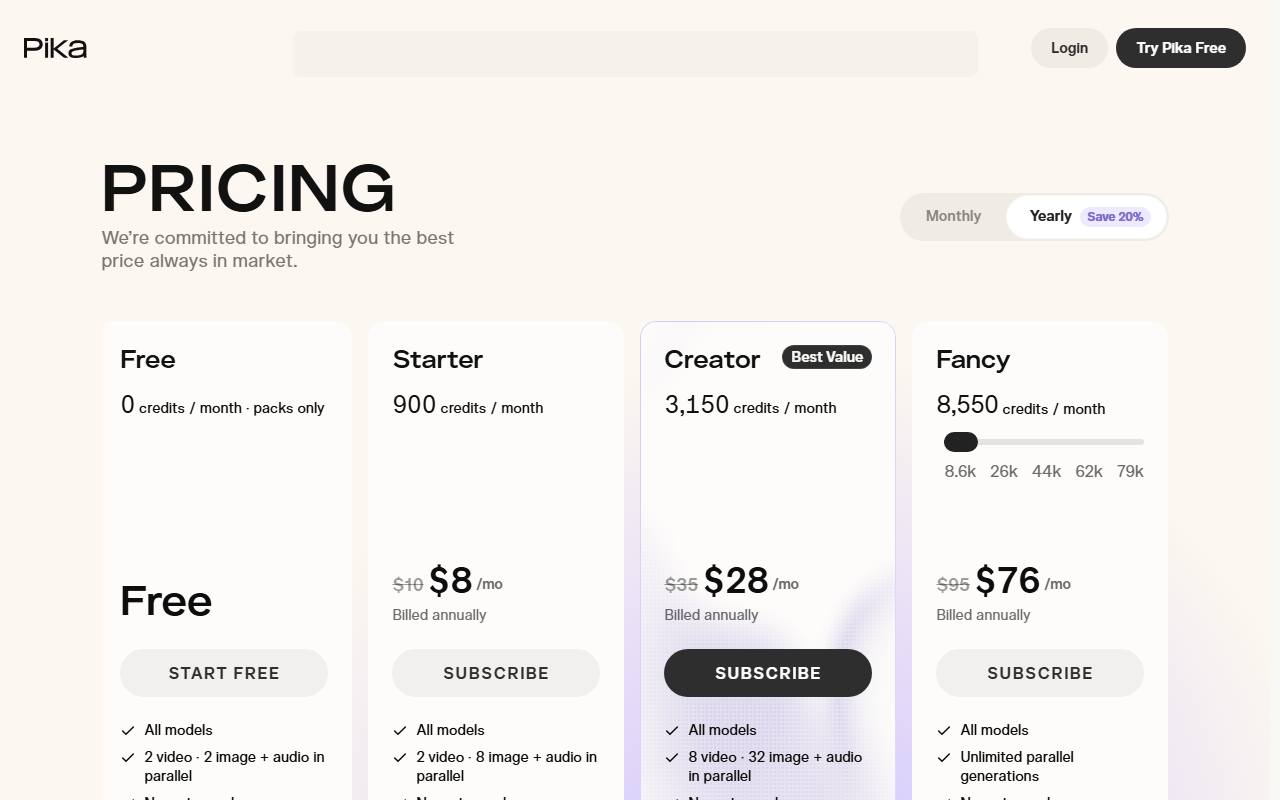 Pika's free plan, captured 22 Sept 2026. Older reviews still describe roughly 80 free credits a month; the current page shows none.
And D-ID's Creative Reality Studio has no recurring free tier at all: it is a 14-day trial capped at 3 minutes total across every feature, after which the cheapest paid plan starts at $4.70 a month billed annually, per D-ID's own pricing page verified 3 September 2026. Neither belongs on a "free tools" list without that context.
Kling AI vs CapCut's Dreamina: the two strongest free motion tools
Most people choosing a free photo-animation tool end up deciding between these two.
Kling wins on ceiling: its free tier caps at 1080p, with 4K reserved for a paid plan, and moving to the $6.99 Standard tier unlocks commercial rights, according to a Kling pricing breakdown checked 22 September 2026. Standard also removes the personal-use restriction entirely, so a single $6.99 month is enough to license one client clip if that is all you need.
Dreamina wins on daily budget: 120 credits refresh every day inside CapCut's desktop app, which most people creating social clips already have installed for editing. Because Dreamina bundles several models under one credit pool, the app's own FAQ frames the number as "a creative budget" rather than a fixed clip count, so two people with the same 120 credits can walk away with very different amounts of usable footage depending on the model and resolution they pick.
The deciding factor is usually where you already work. If you are already cutting footage in CapCut, Dreamina's image-to-video tool sits one click away and never asks you to learn a second interface. If you need commercial rights on a specific clip and are willing to pay $6.99 for one month to get them, Kling's paid tier is cheaper than any of the alternatives that gate commercial use behind a $25-plus plan.
HeyGen vs Fliki: the two ways to make a photo talk
HeyGen is the narrower, more polished tool. Upload a photo, get up to 3 full videos a month at up to 1 minute each, with support for 30-plus languages and up to 3 photo avatars on the free plan, according to HeyGen's own pricing page checked 22 September 2026.
Fliki does the same job with a smaller monthly ceiling, 5 minutes total, shared with every other Fliki feature, but adds a second capability HeyGen's free tier does not: the same uploaded photo can also be animated with a motion engine like Kling or Veo, not just made to talk. That makes Fliki closer to a general-purpose entry point than a talking-photo specialist.
Pick HeyGen if talking-photo output is the only thing you need and you want the cleanest, most dedicated free allowance. Pick Fliki if you want to test both jobs, talking and moving, on the same photo without signing up for two separate free accounts.
Language support is where the two genuinely diverge rather than just trading limits. HeyGen's free tier covers 30-plus languages on the same photo avatar, which matters if the video needs to ship in more than one market from a single upload.
Fliki leans the other way: its value is the choice of engine underneath, not a language count. A script written once can come back as a subtle camera pan through Kling or Veo one day and a lip-synced talking clip the next, using the same free monthly minutes either way. That flexibility costs Fliki the polish HeyGen puts into a single, dedicated avatar pipeline, so a photo that just needs to talk, cleanly, in one language, still comes out better from HeyGen's narrower tool.
What your free upload actually costs you in data
A photo of a real person is not the same upload as a product shot, and free tiers are not required to treat it the same way either.
- Kling stores data on servers in Singapore and is operated by Kuaishou, a China-based company. Its privacy policy, reviewed 22 September 2026, does not explicitly state whether uploaded images are used for model training; it only confirms use for "special video effects" and content moderation.
- HeyGen trains and improves its models on non-enterprise account data by default, according to HeyGen's own privacy documentation checked 22 September 2026. Opting out requires emailing privacy@heygen.com; there is no in-app toggle. Enterprise accounts are excluded from training by default, but the free tier is not an enterprise account.
- Luma advertises "zero-retention data privacy, no training on user content" as a named benefit of its Enterprise plan, which implies the free and personal tiers do not carry that same guarantee by default, though Luma's public materials do not state the free-tier policy outright.
Free plans are not automatically unsafe to use. A face uploaded on a free account is simply more likely to end up training a model than the same face on a paid or enterprise account, and the only way to know for certain, for any of these tools, is to read that specific tier's current terms before uploading rather than assume the word "free" settles the question.
Who should skip free tools entirely
Free tiers are built for evaluation, not production. Skip straight to a paid plan if any of these are true.
- You need the output watermark-free and commercial-use cleared on the same clip. Very few free tiers clear both at once; Pika drops the watermark but keeps the commercial restriction, Kling does the reverse only once you pay.
- You need more than a handful of clips a week. At 66 to 120 credits a day and roughly 6 to 15 credits per second of footage, a daily free allowance covers a handful of short clips, not a content calendar.
- The photo is of an identifiable person who has not agreed to appear in AI-generated video, talking or moving. That is a consent question a free trial does not resolve, and it applies at any price.
- You are testing for a client deliverable with a deadline. A one-time grant like Runway's 125 credits, or a hard 3-minute trial like D-ID's, will not survive a round of revisions.
The turn: is "highest daily credits" even the right comparison?
Here is the strongest case against everything above: CapCut's Dreamina, at 120 credits a day, is simply the best free option by the numbers, full stop, and the rest of this guide is overthinking a simple ranking.
That is true only if credits translated to clips at a fixed rate, and Dreamina's own FAQ says they do not: cost per generation moves with model, duration and resolution, so 120 credits could be two ambitious clips or a dozen short ones depending on settings. A flat credit count is not a comparable unit across tools, and treating it as one is exactly how the "best free" rankings drift out of date the way Pika's did.
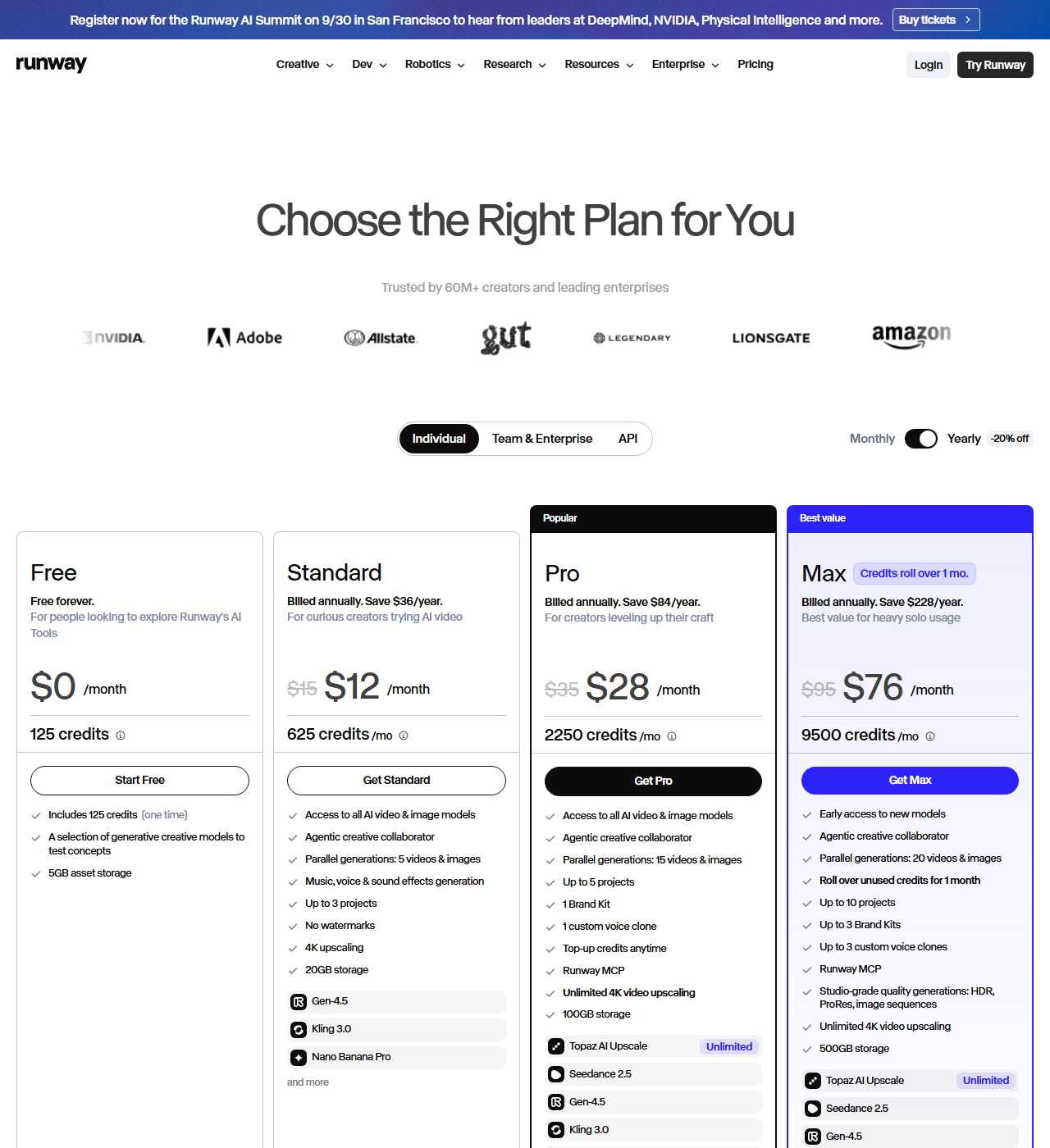 Runway's free plan, captured 22 Sept 2026. The page describes it as a one-time deposit, not a monthly allowance like Kling's or CapCut Dreamina's.
The more useful comparison is the one this guide actually ran: what does the free tier explicitly allow on resolution, watermark, commercial use and renewal, verified against the vendor's own current page, not a review from three months ago.
What would change this
Watch two things. First, whether Pika reintroduces a recurring free credit allowance, since a pack-only free tier is a meaningfully weaker offer than what most existing coverage still describes.
Second, whether any of the motion tools, Kling, Runway, Luma or Vidu, add a free commercial-use allowance to compete with Pika's no-watermark free plan. Right now no tool in this guide offers both a no-watermark and a commercial-cleared clip for free at the same time. That gap is the single easiest way for a challenger to take share in this category.
If your own workflow doesn't fit neatly into "test it for free" versus "pay for production," Smart Match will ask about your budget, output volume and whether you need commercial rights, and narrow this same list to the two or three that actually fit.
For a photo that needs cleanup, not animation, before it goes anywhere, our guide to AI photo editing and restoration covers that step first.
For text-to-video with no starting photo at all, the general AI video generator roundup picks up where this guide leaves off, and our comparison of Creatify and Kling AI goes deeper on Kling specifically for ad-style output.
If CapCut is already your editor, CapCut EditPilot against OpusClip covers the repurposing side once your animated clip exists. And if the all-in-one image-plus-video workflow matters more than picking specialist tools, see our roundup of AI tools that create both images and video or the broader video editing and content creation guide.
The next tool worth watching is whichever one publishes a free tier that survives being quoted six months from now. Until then, the safest move is the least exciting one: open the vendor's own pricing page yourself before you upload anything, and treat every roundup, including this one, as a starting point rather than the final word.
Frequently asked questions
What is the best free AI to turn a photo into a video?
It depends on the job. For a photo that should move (pan, camera motion, animated scene), CapCut's Dreamina gives the largest renewing free allowance at 120 credits a day, and Kling AI offers 66 daily credits with a clearer path to commercial rights once you pay. For a photo that should talk, with a synced voice reading a script, HeyGen's free tier gives 3 videos a month up to 1 minute each.
Is Runway actually free to turn photos into video?
Only once. Runway's free plan is a single deposit of 125 credits that does not expire but also does not renew, according to Runway's own pricing page. That is a one-time trial, not an ongoing free tier like Kling's or CapCut Dreamina's daily credit refresh.
Does Pika still have a free plan for image to video?
Not a recurring one. Pika's pricing page, checked 22 September 2026, lists the free plan at zero monthly credits with packs available for purchase, a change from the roughly 80 monthly credits many older reviews still describe. Pika's free plan does not add a watermark, but it excludes commercial use.
Will a free AI video tool train on the photo I upload?
It depends on the tool and the tier, and it is worth checking before uploading a photo of a real person. HeyGen trains on non-enterprise account data by default and requires an email to privacy@heygen.com to opt out, with no in-app toggle. Kling's privacy policy does not explicitly confirm or deny training use of uploaded images. Enterprise and paid-tier guarantees are usually stronger than free-tier ones.
Can I use a free AI-generated video from a photo commercially?
Rarely, on the free tier specifically. Kling's free plan is personal and experimental use only, with commercial rights starting at its paid Standard tier. Pika's free plan also excludes commercial licensing. If the video is going in front of customers or clients, budget for at least one paid month rather than assuming the free tier covers it.
Covered in this guide
- HeyGen: Fast, simple AI video generator that creates professional videos with realistic avatars in 175+ languages.
- Kling AI: Kuaishou's text-to-video platform with native 4K, lip-synced audio in 5 languages, and free daily credits. Used by 60M+ creators; plans from $6.99/month.
- CapCut's Dreamina: AI-powered video editor for creating trending content across all platforms
- Fliki: Transform text into professional videos with AI voiceovers in minutes
- Luma Dream Machine: Creative agents that make you prolific: AI video and image generation for creators
- Pika: AI video generator by Pika Labs. Converts text and images into 1080p short-form clips in 30-40 seconds. Used by 500,000+ creators. Plans from $8/month.
- Runway: AI to simulate the world through generative video and world models
- D-ID's Creative Reality Studio: The leading digital human platform for creating AI avatar videos and real-time interactive agents at scale
- Vidu: AI video generator with text-to-video, image-to-video, and reference-to-video modes, native audio-video co-generation up to 16 seconds, and multi-subject consistency: starting free with paid plans.
Sources
Still deciding?
This guide covers a handful of options. Smart Match checks every listing in the directory against how you actually work and what you can spend, then hands you the shortlist and the reason behind each pick.
Start Smart MatchRelated guides
- AdsMaker.ai vs Creatify: Creatify Tripled Its Price, AdsMaker Didn'tComparisonHead-to-head, with a verdict
- Best AI Content Creation Tools in 2026: Pick By the Job, Not the CategoryBuyer's guideHow to pick, across a category
- Best AI for Video Editing and Content Creation in 2026: Pick the Job, Not the CategoryBuyer's guideHow to pick, across a category
- Best AI Tools to Create Images and Videos in 2026: All-in-One vs. SpecialistsBuyer's guideHow to pick, across a category
- Best AI Video Generators in 2026: Pick the Category Before You Pick the ToolBuyer's guideHow to pick, across a category
- Creatify vs Kling AI: Which Is Better for AI Video Ads in 2026?ComparisonHead-to-head, with a verdict