monday.com vs Notion: Which Should You Use in 2026?
monday.com is a board-based Work OS priced in seat buckets starting at $9 a month annually, best for task-and-pipeline tracking. Notion is a per-seat, page-based workspace starting at $10 a month, best for docs and wikis that need cross-linking. Choose by which unit, a task or a page, matches daily work.
The short version
monday.com sells seats in buckets of 3+ and organizes work around structured boards; Notion sells single seats and organizes work around connected pages. monday.com now lets external AI agents like Claude and OpenAI join a workspace directly; Notion built its own Workers runtime instead, with credit billing just pushed from August 11 to October 15, 2026.
monday.com sells its cheapest paid seat in a bucket of three; Notion sells single seats starting at $10 a month.
That gap is not a rounding error. It is the shape of two products built to solve different problems: monday.com is a Work OS organized around structured boards, while Notion is an open canvas of connected databases. An operations lead picking a stack for a 15-person team needs to know which shape their work already fits, because migrating a year of accumulated boards or pages later is its own project, not a weekend task.
What each product actually is
monday.com started in 2012 as a visual project tracker and went public on the NASDAQ in June 2021 under the ticker MNDY, posting $268 million in FY2024 revenue. It now ships four connected products (Work Management, CRM, Service, and Dev) on one shared data layer, with boards that support more than 30 column types: Kanban, Gantt, Timeline, Calendar, and Map among them. More than 152,000 customers run some part of their operation through it.
Notion launched in 2016 as a note-taking app and has since grown past 100 million users, including 62% of Fortune 100 companies. Its core unit is the database block: any page can become a table, board, calendar, or timeline, and all of them stay connected to the same underlying data. There is no dedicated Gantt or resource-load view the way monday.com builds them; a team assembles those out of the same generic blocks it uses for a wiki page.
Pricing: what you actually pay
Both companies publish self-serve tiers, unlike some SaaS vendors that have quietly moved to quote-only pricing this year. But the seat math works differently enough to change what a small team actually owes.
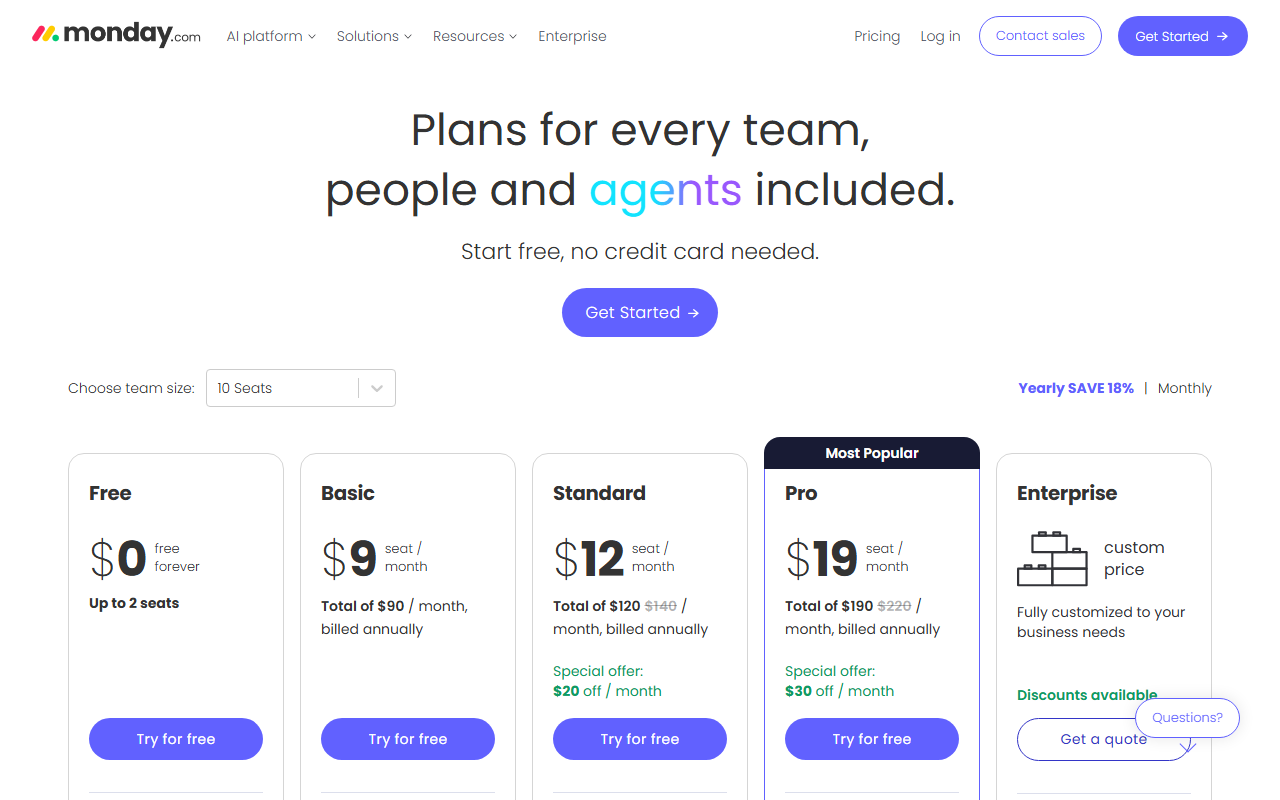 monday.com prices in seat buckets, shown here at a 10-seat team size. Captured 26 Aug 2026.
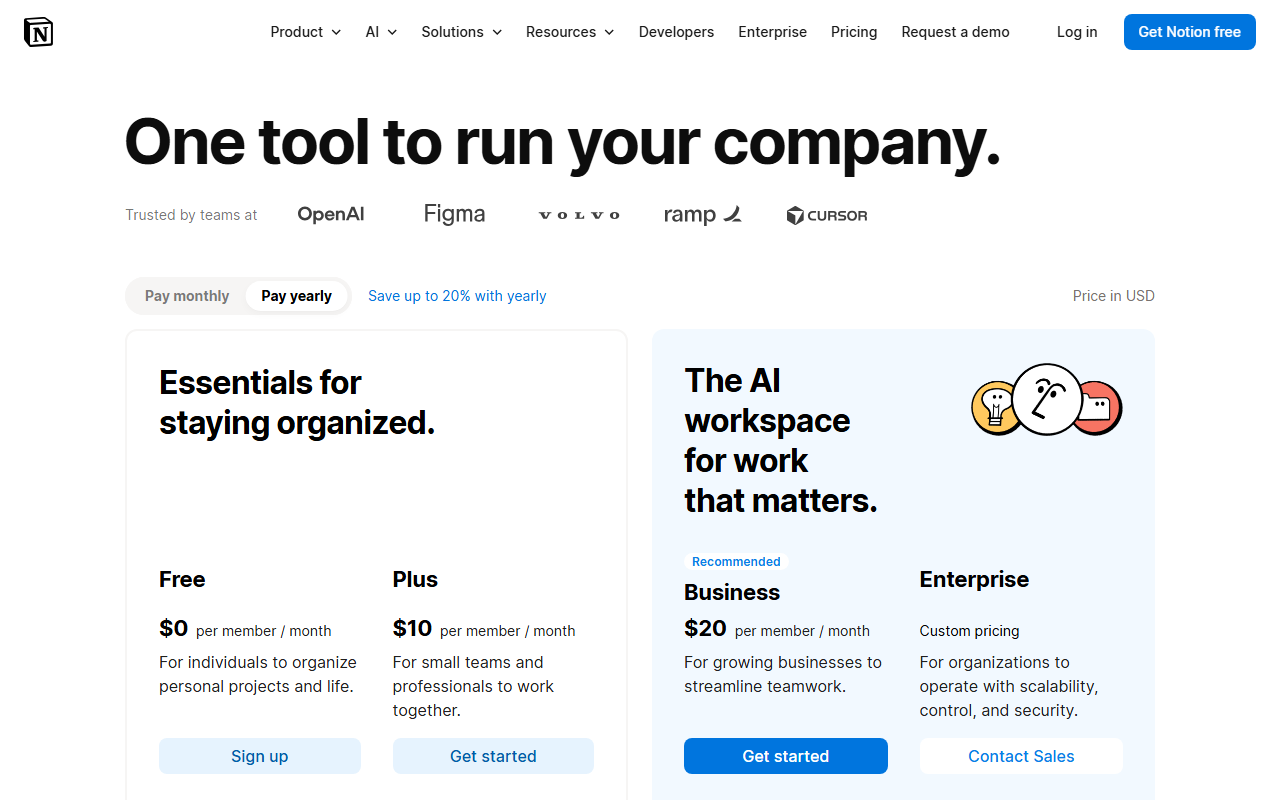 Notion prices per member with no seat minimum. Captured 26 Aug 2026.
monday.com's Free plan caps out at two users, full stop. The next tier up, Basic, is sold in a bucket: a 3-seat minimum, then increments of 5, at $9 per seat per month on annual billing (about $108 a year for 10 seats) or $12 monthly. Standard runs $12 per seat annually, and Pro runs $19. A 4-person team hits the free-tier wall at its third hire and has to buy a 5-seat Basic bucket it cannot fully use, because there is no plan sized for exactly four people.
Notion charges per seat with no bucket: Free is unlimited for a single user, Plus is $10 a month annually ($12 monthly) per seat, and Business is $20 annually ($24 monthly) per seat. A 4-person team on Notion pays for 4 seats, not 5. Notion's catch sits in the AI column instead of the seat count: full AI Agents and unlimited Notion AI require the $20 Business tier, and Custom Agents cost an extra $10 per 1,000 monthly credits on top of that.
The AI agent divide: built-in versus bring-your-own
Here is where the two 2026 roadmaps actually diverge, and where most existing comparisons stop short.
monday.com opened its platform to outside AI agents in 2026 rather than only building its own. Per its own support documentation and an investor press release, external agents from Claude, OpenAI, Azure AI Foundry, Microsoft Copilot Studio, Mistral AI, Cursor, and Amazon Bedrock can now join a monday.com workspace with their own login identity and permission set, sitting alongside human teammates and monday's native AI agents on the same board. You can assign one a task the same way you would assign a coworker.
Notion's Workers took the opposite route: a serverless runtime for custom code, launched in May 2026, that lets a team extend the workspace without managing separate infrastructure. Workers ran free through the beta, and the billing date for that beta has already moved once.
Notion's own pricing page, checked on 26 August 2026, now reads "starts using credits on October 15," pushed back from the August 11 date the company had originally set. Teams testing Workers today are still on the free clock, and that clock has more runway than the company first promised.
On the built-in side, Notion's own AI draws on GPT-4.1 and Claude Opus 4.7 or Sonnet 4.6 depending on the task, bundled into the Business tier at no extra per-query charge once a workspace pays the $20 seat price. monday.com bundles a smaller AI credit allotment directly into every paid tier instead: 1,000 credits a month on Basic, rising to 3,000 on Pro, before a team needs the external-agent route at all.
Neither approach is strictly better. monday.com's model means a team keeps using whatever AI product it already pays for elsewhere, rather than budgeting for a second AI subscription inside the work tool. Notion's model means one more system to build inside a workspace a team already maintains, but no separate agent subscriptions to reconcile once the Business tier is paid for.
Integrations: how wide each net is
monday.com lists more than 200 native integrations, including Slack, Salesforce, HubSpot, Jira, GitHub, and Microsoft Teams, plus Zapier and Make for anything not built in directly. Notion's native gallery covers roughly 150 tools, thinner on the CRM side: there is no native HubSpot or Salesforce sync, so a team needs Zapier or a paid connector like Unito to move deal data in and out.
Notion answers that gap with Zapier's own 5,000-plus app catalog and n8n support for teams that want a self-hosted automation layer instead. Neither gap is fatal on its own. It just means a RevOps-heavy team leans toward monday.com's native CRM connections, while a team whose real bottleneck is documentation and cross-tool search leans toward Notion, whose 300-millisecond enterprise search already reaches into Slack, GitHub, and Google Drive without an extra integration step.
Where each one breaks
monday.com's board-first structure fights teams that mostly need to write and organize, not track discrete tasks. A wiki, a knowledge base, or freeform meeting notes end up wedged into a board type that was not designed for prose. Its own comparison notes on this point are blunt: pick Notion when the job is one flexible workspace of docs and databases, not project boards.
monday.com also locks Single Sign-On behind its Enterprise tier, a real problem for any mid-market IT team that treats SSO as non-negotiable rather than a nice-to-have. Its mobile apps lag the desktop version closely enough that field teams should test on an actual phone before buying seats.
Notion runs into the opposite wall. There is no offline mode; every edit needs a live connection. Data retention on anything below the Enterprise plan runs 30 days, which matters for a compliance team weighing Notion against a vendor with longer or configurable retention. And nothing in Notion replaces a dedicated calendar-scheduling tool. If the actual daily friction is finding focus time or auto-blocking meetings, that is a job for something like Reclaim.ai or Clockwise, not a database rebuilt to imitate a calendar.
The turn: when flexible is the wrong answer
The strongest case against this whole comparison is that flexibility itself can be the cost. Notion's open blocks mean a workspace can drift into a dozen half-structured systems built by different people, with no enforced template holding it together. monday.com's rigid boards prevent that drift by design, at the price of needing monday's own column types for anything unusual.
A team that has already burned a quarter rebuilding the same Notion database three times is better served by monday.com's constraints than by more flexibility. The reverse is also true: a team drowning in monday.com automations it never asked for is often better served by Notion's blank page.
Verdict: which should you use in 2026
Pick monday.com if the daily unit of work is a task moving through stages: a sales pipeline, a support queue, a sprint board, something with a clear before-and-after state that its 30-plus column types and Gantt views were built to track. A 6-person sales team standardizing a pipeline, or an ops team that needs SLA tracking across support tickets, gets more out of monday.com in the first week than out of a blank Notion workspace.
Pick Notion when the unit that matters is a page instead: a spec, a wiki entry, a meeting note that needs to link to a dozen other pages without a rigid schema forcing the shape early. A product team documenting decisions, or a founder consolidating docs that currently live across five disconnected apps, gets more value from Notion's database blocks than from monday's structured boards.
Teams that are not sure which shape fits, or that are already running five other point tools alongside whichever one they pick, are usually better off mapping the actual workflow first. HokAI's Smart Match runs that comparison against a live directory rather than a hunch, which matters more here than in most tool categories: the wrong pick costs a rebuild, not just a subscription.
Frequently asked questions
Is monday.com or Notion cheaper for a small team?
It depends on team size, not just the sticker price. Notion charges per seat with no minimum, so a 4-person team pays for exactly 4 seats at $10 each annually. monday.com's Free plan caps at 2 users, and its cheapest paid tier is sold in a bucket starting at 3 seats, so that same 4-person team has to buy a 5-seat bucket at $9 per seat and leave one unused.
Can Notion and monday.com use the same AI models?
Not the same way. Notion builds AI directly into its own interface, drawing on models including GPT-4.1 and Claude, but a team cannot bring an outside AI agent in with its own login. monday.com went the other direction in 2026: agents from Claude, OpenAI, Microsoft Copilot Studio, Mistral AI, and Amazon Bedrock can now join a monday.com workspace with their own identity and be assigned work directly.
Does Notion work offline?
No. Notion requires a live internet connection for both editing and syncing, with no offline mode as of 2026. monday.com has the same limitation: both are cloud-only, so a team that needs offline access should treat that as a shared blocker rather than a reason to pick one over the other.
What is Notion Workers and when does it start costing money?
Workers is a serverless runtime Notion launched in May 2026 that lets a team run custom code inside its workspace without managing separate infrastructure. It has been free during the beta, and the date it starts consuming paid Notion credits has already moved once: Notion's own pricing page, checked 26 August 2026, now lists October 15, 2026, pushed back from the August 11 date the company originally set.
Which tool fits a task-tracking workflow better?
monday.com, in most cases. Its boards ship more than 30 column types plus dedicated Gantt, Timeline, and Kanban views built specifically for tracking a task through defined stages. Notion can replicate a basic version of the same thing with its database blocks, but there is no purpose-built pipeline or sprint view, so teams end up configuring one from scratch.
Covered in this guide
- monday.com: The AI work platform that outpaces everyone with exponential execution
- Notion: Your AI everything app: All your tools and work in one unified workspace.
- Clockwise: AI-powered calendar assistant that creates focus time and optimizes team schedules
- Reclaim.ai: AI calendar app that automatically schedules tasks, meetings, and focus time to reclaim your workweek.
Sources
Still deciding?
This guide covers a handful of options. Smart Match checks every listing in the directory against how you actually work and what you can spend, then hands you the shortlist and the reason behind each pick.
Start Smart MatchRelated guides
- Best AI Agents for Business Ops in 2026: Buy the Job, Not the PlatformBuyer's guideHow to pick, across a category
- Best AI for Writing a Business Plan in 2026: Tested Picks and a VerdictBuyer's guideHow to pick, across a category
- Best AI Note-Taking Tools in 2026: Brain2, Glasp, Mem, and Gemini Notebook ComparedBuyer's guideHow to pick, across a category
- Is Budy Worth It If You Already Pay for Notion?ComparisonHead-to-head, with a verdict
- HokAI vs Insidr.ai: The Sponsorship Price Insidr Never PublishesInside HokAIHow the directory works, verified in the open
- How to Automate Repetitive Work With AI (Without Writing Code)Buyer's guideHow to pick, across a category