The Best AI for Designing UI in 2026, and When Figma Still Wins
In 2026 the AI UI/UX design category splits into two distinct products: interface assistants that speed up an existing Figma-based workflow, and interface generators that build a working screen from a text prompt with no design software installed. Figma AI and Framer represent the first group; Google Stitch, Vercel's v0, and Bolt.new represent the second.
The short version
Most teams don't need a new design tool: they need to know which of the two camps fits their situation. A Figma-fluent designer should add Figma AI's First Draft and AI Grid rather than switch platforms. A founder with no designer will ship a working screen faster starting from Google Stitch or v0 than from a blank Figma file.
Want this decided for your own case? Find your tools with Smart Match, starting from this guide's question.
Figma shipped 3,000 monthly AI credits to every Professional seat in March 2026, and four months later Google put a free, credit-free rival called Stitch in the same market. That timing is not a coincidence. It marks the moment "AI design tool" stopped meaning one kind of product.
Ask ten people what an AI UI/UX design tool does and you will get two different answers, and both are right. One camp adds AI on top of a design workflow a team already runs in Figma: better first drafts, faster placeholder content, fewer manual layer names.
The other camp skips the design step entirely and turns a text prompt into a working screen, sometimes working code, with no design software open at all. A four-person startup deciding between these two answers is really deciding something bigger: whether it needs a designer's tool at all this year.
The AI design market split into two camps in 2026
Figma is the incumbent here, and its AI features assume you already have a file open. First Draft generates a starting screen from a prompt, and AI Grid fills mockups with realistic placeholder content: ask for "product cards in an electronics store" and it writes names, prices and descriptions that belong to the same category. Framer sits in the same camp for marketing sites specifically, using AI agents to generate editable pages and copy that a human then adjusts on its visual canvas.
Google Stitch, announced by Google Labs and built on Gemini 2.5 Pro, belongs to the other camp. Type a description or upload a sketch and Stitch returns a full interface, then exports it straight into Figma or as frontend code. Vercel's v0 works the same way for developers already committed to a code base: it produces working components, not mockups, and bills by the token rather than the seat. Bolt.new goes one step further and builds the whole application, backend included, from the same kind of prompt.
Neither camp is winning outright. What is actually happening is a market realizing that "design the screen" and "build the screen" used to be two jobs, and in 2026 a single prompt can sometimes do both.
That split did not exist eighteen months earlier, when "AI design tool" mostly meant a plugin that renamed layers or suggested a color palette inside a file a human had already built. First Draft, AI Grid, Stitch and v0 all shipped or matured inside a single year, which is why so many roundups still describe them as one undifferentiated category instead of two products solving different problems.
How to choose between them
Five questions settle it faster than any feature comparison:
Do you already have a Figma-based design system? If yes, adding AI to it costs less than switching. If no, starting a design system from scratch to use Figma AI is backwards: start from a prompt tool instead.
Do you have a designer on the team, or not? First Draft and AI Grid assume someone will clean up the output. A non-designer founder gets more out of a tool that produces something usable on the first try.
Are you designing screens, or building the whole product? Stitch and v0 stop at the interface. Bolt.new keeps going into the backend, which matters if "the app" is the actual deliverable, not just its screens.
Do you need the output as a file you own, or as code? Stitch and Figma both hand off to a Figma file for further editing. v0 and Bolt.new hand off Git-syncable code instead, which matters if the next step is a pull request rather than a handoff meeting.
How much does a wrong guess cost you? Figma's AI credits are gated by seat type: Starter gets 500 credits a month with a 150-per-day cap, Professional Full seats get 3,000. Bolt.new's free tier caps at 1 million tokens a month and 300,000 a day. Both run out mid-project if you guessed the wrong tier, and neither refunds the seat you already bought.
Answer those five and the shortlist below mostly picks itself. A designer at an eight-person startup with an existing component library answers "yes, yes, screens only, file, low risk" and lands on Figma AI without reading another paragraph. A solo founder with no design background answers the opposite four times and lands on Stitch or Bolt.new instead. The tools rarely overlap in practice; the confusion in most roundups comes from listing them as if they compete for the same reader.
The shortlist: five tools and what each one replaces
| If you're... | Pick | Price | Watch for |
|---|---|---|---|
| Running a Figma-based design system already | Figma AI | $16/month per Full seat (Professional), 3,000 AI credits | First Draft needs manual cleanup across multiple screens |
| A non-designer who needs a working screen today | Google Stitch | Free, via Google Labs | Google has not published a permanent price |
| Building a marketing or landing page, not an app | Framer | $29/month (Starter) | Copy and brand judgment still need a human |
| Already shipping in Next.js or a component library | v0 | $30/user/month (Plus), plus token-metered model costs | Credits are consumed by tokens, not by generation count |
| Building the whole app, not just its interface | Bolt.new | $25/month (Pro), 10 million tokens | Token usage scales with project size, not prompt count |
Figma earns its spot because it is where most product teams' design files already live: Professional seats include 3,000 AI credits a month, and First Draft or AI Grid slot into that file without anyone learning a new tool. Stitch earns its spot for the opposite reason: it assumes nothing exists yet, and a prompt gets you a screen you can hand to a developer the same afternoon.
Framer is the pick specifically for a site that needs to convert visitors, not an internal dashboard. v0 fits a team that has already chosen its stack and wants the interface to arrive as code, not a picture of code. Bolt.new is the only tool on this list that will also stand up your database and your backend routes from the same prompt.
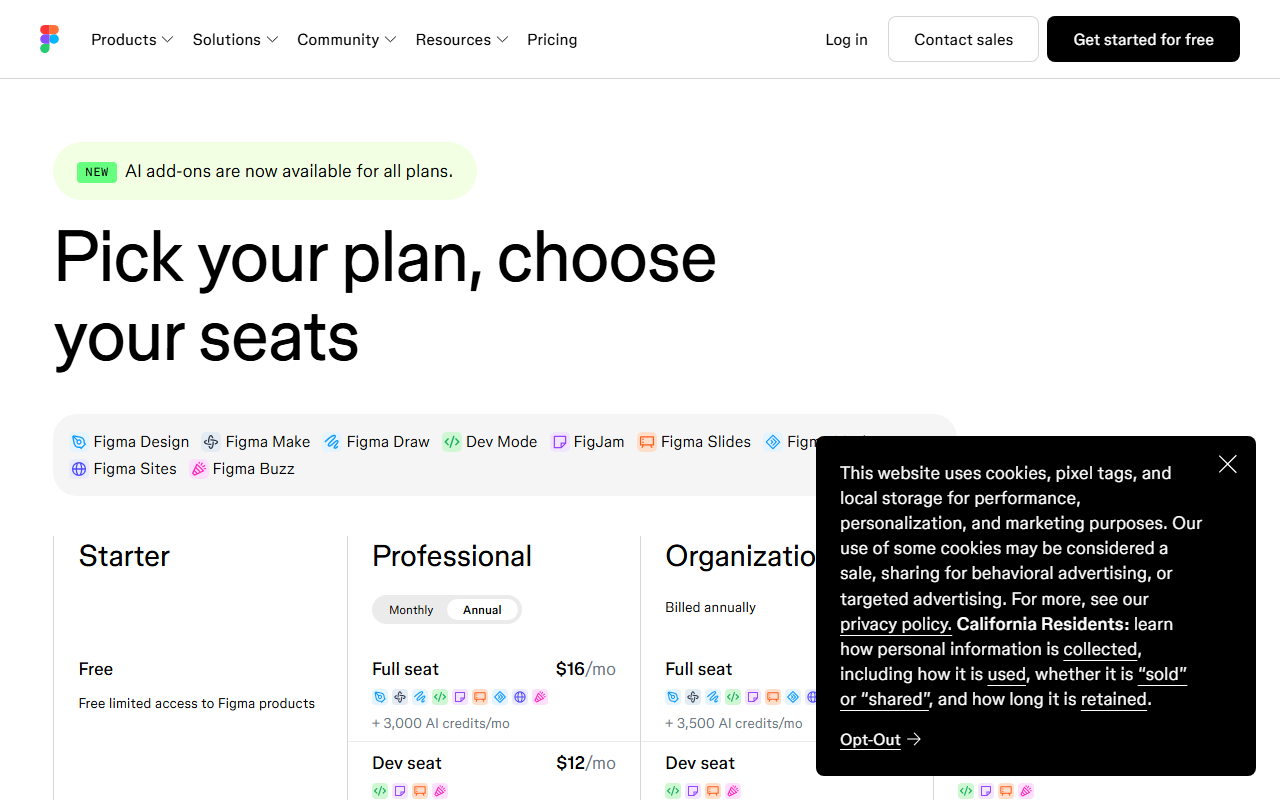 Figma's Professional plan at $16/month per Full seat, with 3,000 AI credits included. Captured 1 September 2026.
Figma AI vs Google Stitch: the head-to-head most teams actually face
This is the real decision for a small team, because the other three tools solve narrower problems. Figma AI's First Draft can generate a screen inside an existing file in seconds, but designer Anurag Verma tested it across a five-screen mobile flow and found each screen "look like it was designed independently," meaning spacing and component choices drift between screens and someone has to reconcile them by hand.
AI Grid is the feature Figma teams report using the most consistently, because filling a mockup with believable sample content used to be the most tedious five minutes of any file.
Stitch does not have that consistency problem in the same way, because it generates the full flow from one prompt rather than one screen at a time, and it can iterate through chat and theme selection before you export anything. What it does not have is a track record: Google has not published official pricing, and third-party testing puts its free-tier limits somewhere around 350 standard and 200 experimental generations a month, a number Google itself has not confirmed.
Export is the other real difference. Stitch's "Paste to Figma" feature drops a generated design directly into a Figma file, so a team that lives in Figma can adopt Stitch for the first draft and Figma AI for everything after it, rather than treating the two as competitors. For a team of four choosing today, Figma AI is the safer bet if the design file already exists; Stitch is the faster bet if it does not.
Where "AI design tool" stops meaning UI/UX
Microsoft Designer shows up on nearly every "best AI UI/UX tool" list published in 2026, and it should not. It generates images using OpenAI's DALL-E 3 model: social graphics, marketing banners, presentation visuals. It does not lay out an app screen, define a component hierarchy, or export a design file a developer can build from.
Microsoft folded the standalone $20-a-month Copilot Pro tier that powered it into Microsoft 365 Premium at $19.99 a month in 2026, which is a graphic-design bundle change, not a UI/UX one. If the deliverable is a Figma file or a working screen, Designer is not a candidate regardless of how often it appears next to Figma in a roundup.
Who should skip AI design tools entirely this year
None of the five tools above are the right pick for every team, and saying so plainly is more useful than padding the list to ten. A design team already running a mature, accessibility-audited component library has more to lose than gain from letting First Draft or Stitch generate new screens: the inconsistency that costs a solo founder an afternoon of cleanup costs a regulated product team a compliance review.
That is the gap Figma's Enterprise tier, at $90 a month per Full seat, is built to manage with governance controls rather than more generation, and it is worth knowing that tier exists before assuming the answer is always "add more AI."
A team of one non-technical founder with no engineering resource at all is the other edge case. Bolt.new can generate a working app, but someone still has to maintain the databases and hosting it stands up, and a no-code builder built around fixed templates may be the safer starting point than an AI that writes infrastructure nobody on the team can read.
The turn: free and cheap get expensive at the exact moment you need them
The obvious case against Figma AI is that Stitch is free and v0's free tier includes $5 of monthly credits before its Plus plan even starts, so paying $16 a month per seat for AI on top of a design tool you already pay for looks unnecessary. That case holds for a single screen.
It stops holding once a project has more than a handful of screens, because both free and cheap tools meter by usage that scales with the work itself rather than by seat: v0 prices its models from $0.20 per million input tokens on its smallest model up to $10 per million on its fastest, and Bolt.new's token consumption is driven mostly by syncing the project's file system to the AI, which grows as the codebase grows.
A team that outgrows Stitch's Labs-era free tier or burns through v0's $30-a-month Plus credits mid-sprint has no seat-based ceiling protecting the budget the way Figma's per-seat credit allocation does.
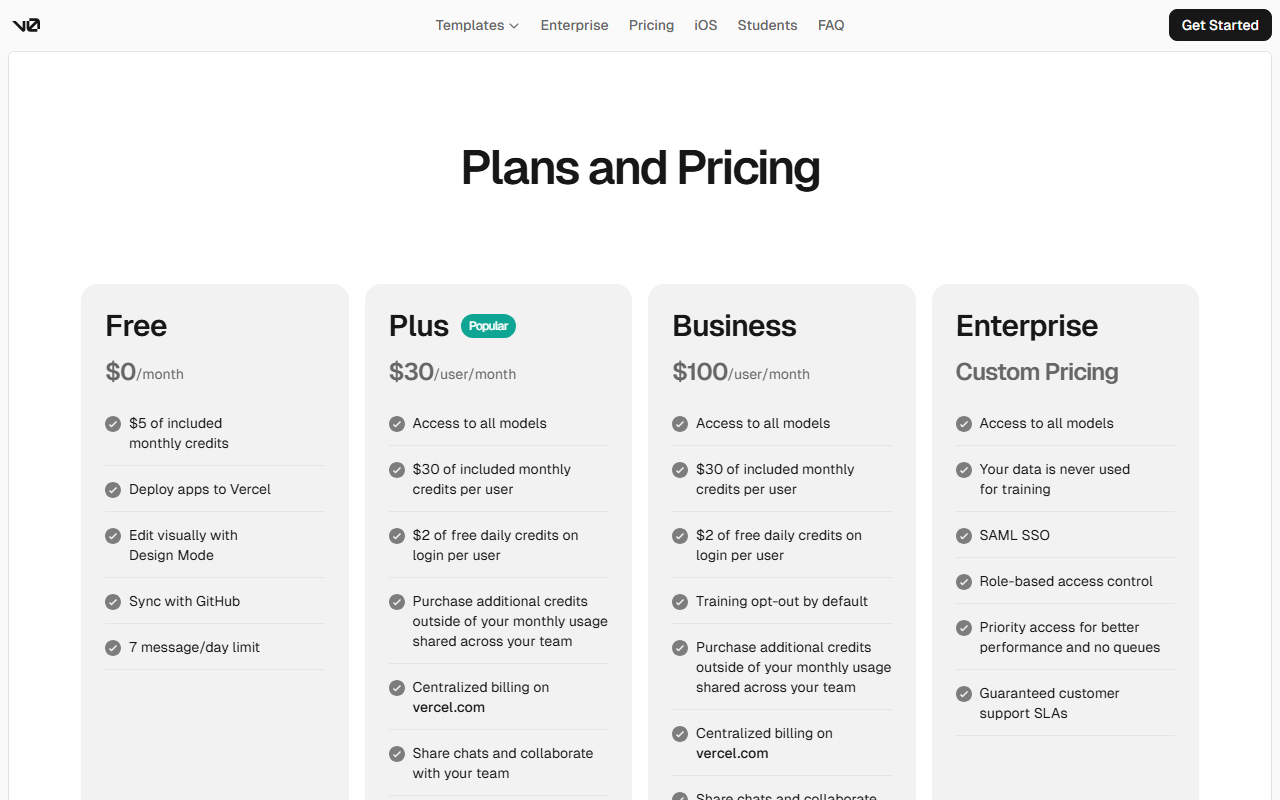 v0's Free plan caps out at seven messages a day before the $30-a-month Plus tier removes that limit. Captured 1 September 2026.
That does not make Figma AI the universal right answer. It makes the free options a genuine bargain for a first prototype and a less predictable one for ongoing production work, which is exactly the tradeoff a four-person team needs stated plainly before they pick.
The same logic applies to v0's tier structure. Its Free plan gives seven messages a day and $5 of credits, its Plus plan raises that to $30 of credits per user for $30 a month, and its Business plan charges $100 a user for the same model access with data-training opt-out added on top. None of those numbers describe how many screens you can actually generate, because that depends on how large the project already is by the time you ask.
What would change this shortlist
If none of these five map cleanly onto what you are actually building, that mismatch is common enough that Smart Match exists specifically to line up a stack against a real project instead of a generic list.
Google has not announced what Stitch will cost once it leaves Google Labs. The moment it does, half of this shortlist gets reordered.
Frequently asked questions
What's the difference between Figma AI and Google Stitch?
Figma AI adds features like First Draft and AI Grid on top of a design file you already have open in Figma. Google Stitch skips that step and generates a complete interface, then exports it into Figma or as frontend code, from a single prompt with no existing file required.
Is there a free AI tool for UI/UX design?
Google Stitch is currently free through Google Labs, using Gemini 2.5 Pro to turn prompts and sketches into interfaces. Google has not published official pricing or usage limits, though third-party testing suggests roughly 350 standard and 200 experimental generations a month. Figma's Starter plan is also free but caps AI use at 500 credits a month with a 150-per-day limit.
Can AI actually replace a UI/UX designer in 2026?
Not reliably yet. Independent testing of Figma AI's First Draft found that generating five screens for one mobile flow produced five inconsistent designs, each needing manual cleanup to match spacing and component choices. AI in 2026 speeds up the first version of a screen, but it does not yet replace the judgment that keeps a multi-screen product consistent.
Should I use v0 or Bolt.new to design my app's interface?
Pick v0 if you already have a codebase, such as Next.js with a component library, and just want the interface generated as code you can drop in. Pick Bolt.new if you want the whole application, including the database and backend routes, built from the same prompt. Both meter usage by AI tokens rather than by a fixed number of generations, so cost scales with project size.
Is Microsoft Designer a UI/UX design tool?
No. Microsoft Designer generates images with OpenAI's DALL-E 3 model for things like social graphics and marketing banners, but it does not lay out app screens or produce a design file a developer can build from. It belongs in the graphic-design category, not the UI/UX category, despite frequently appearing on the same lists as Figma and Stitch.
Covered in this guide
- Figma: Collaborative design platform used by 13M+ monthly users, now with AI-native Motion, Make, and Code Layers for turning prompts into working prototypes.
- Google Stitch: Google Labs' free AI tool that turns prompts, sketches, or voice into 5 linked UI screens, exporting to Figma or code.
- Bolt.new: Bolt.new turns text prompts into full-stack web apps in your browser, with a free 1M-token monthly plan and Pro from $25/month.
- Framer: Design and publish stunning websites without code
- Microsoft Designer: AI-powered graphic design tool for creating professional visuals from text descriptions
- v0: AI-powered full-stack app builder that turns natural language prompts into production-ready code
Sources
Still deciding?
This guide covers a handful of options. Smart Match checks every listing in the directory against how you actually work and what you can spend, then hands you the shortlist and the reason behind each pick.
Find your toolsRelated guides
- Adobe Firefly vs Topaz Photo AI: Which Should You Use in 2026?ComparisonHead-to-head, with a verdict
- AI App Builders That Actually Publish Their Prices (2026)Buyer's guideHow to pick, across a category
- Best AI App Builder in 2026: Pick by What You're BuildingBuyer's guideHow to pick, across a category
- Best AI for Creating Logos in 2026: Tested Picks & VerdictBuyer's guideHow to pick, across a category
- Best AI Website Design Tools in 2026: Framer, Durable, 10Web and the Line Between ThemBuyer's guideHow to pick, across a category
- Blink vs Chattee: Which Should You Use in 2026?ComparisonHead-to-head, with a verdict