
Last updated: 2026-10-08
Collov AI spends 1 photo credit per virtual staging generation and bundles staging, multi-angle sets, chat edits, twilight and season changes, virtual tours and an API under four plans. Built by Collov, Inc., it runs in a browser and reaches San Francisco Realtors through their MLS platform.
About Collov AI
Collov AI is a virtual staging and listing-photo editor from Collov, Inc. The company also runs Collov Labs, which announced a $23 million round in April 2026 led by Brightway Future Capital, with Taihill Venture and MindWorks Capital also named in trade coverage, alongside a new visual AI research lab. Xiao Zhang is the CEO. The staging product is a hosted web app; Collov, Inc. also publishes a separate consumer app called CozyAI.
You upload a photo of an empty room, pick a room type and a design style, and the tool returns furnished renders. The site lists styles such as Scandinavian, Modern, Industrial and Luxury, and room types that include living room, bedroom, dining room and home office. The vendor claims a ten second turnaround and unlimited regeneration of an uploaded photo, with four renders per version. Higher plans add multi-angle staging for rooms shot from several viewpoints, chat-based edits, and an editing suite for twilight, seasons, rain removal, pool water, lawns and wall or floor materials.
It is aimed first at listing agents and brokerages, with interior designers and homeowners as secondary audiences on the vendor's own site. Next to Virtual Staging AI and REimagineHome, the two closest staging records on HokAI, it competes mainly on credit price and on the listing extras bundled into one plan. A general editor such as Adobe Firefly from Adobe can add or remove objects in a single photo, but it is not built around listing workflows. The rest of the field sits on the virtual staging category page, and for a listing-prep job that starts before photos exist, FloorAI redraws a sketch into a labeled floor plan.
Independent evidence is mixed. HousingWire's 2026 roundup named it best for affordable AI virtual staging and found its image quality on par with REimagineHome, with more furniture removal mistakes in the same test. Trustpilot reviewers are harsher: the profile averages 2.8 from 41 reviews, and a September 2026 reviewer says quality is getting worse and rooms come back distorted. The refund policy excludes dissatisfaction based only on subjective style or layout preferences, so the first generations on a new plan are the real test window. The privacy policy, effective 21 October 2024, lists uploaded photos among collected content and allows use for research and product development, but it does not say whether photos train Collov's models.
Screenshots
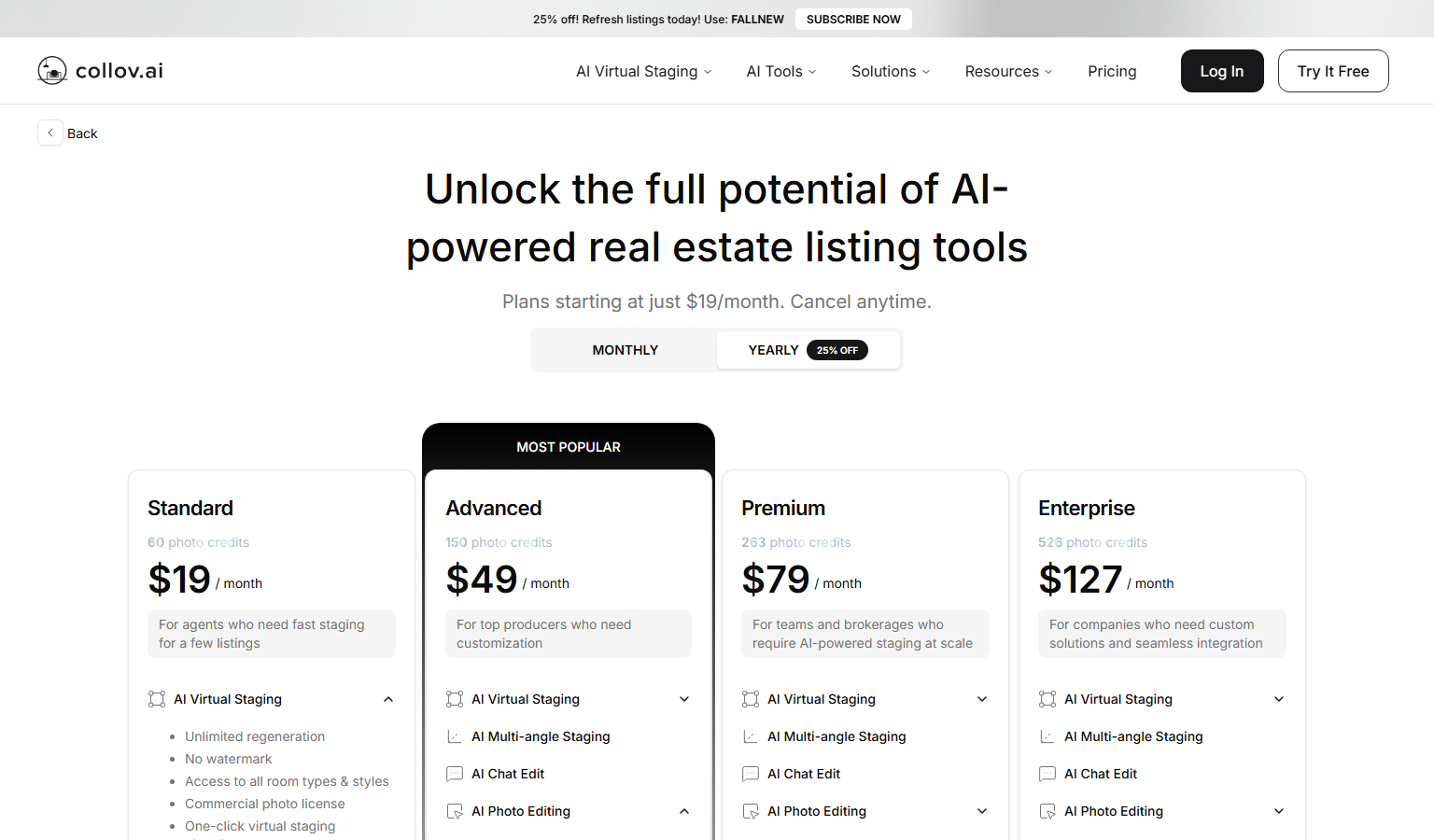
Pricing
Four plans, each with a monthly photo credit pool that resets and does not roll over: Standard 60 credits, Advanced 150, Premium 263 and Enterprise 526. Yearly billing is charged up front as $228, $588, $948 and $1,524. A first purchase is refundable for 7 calendar days while usage stays at or under 10 images, 2 videos and 2 panoramas, and a plan upgrade is refundable for 3 days under the same limits.
Credits per use: staging 1, multi-angle 1 per image, virtual tour 5 per image, 360 panorama and 3D tour 20 each, human-assisted multi-angle 20 per image. REimagineHome also prices by credit, while Virtual Staging AI sells fixed photo allowances.
| Tier | Monthly price | What it includes |
|---|---|---|
| Standard | $27/mo | 60 photo credits a month, Yearly billing: $19 a month, charged $228 a year, AI virtual staging at 1 credit per generation, Unlimited regeneration, no watermark, all room types and styles, Commercial photo license, one-click virtual staging disclaimer, furniture removal tool, 10 second turnaround (vendor claim) and high-resolution downloads |
| Advanced | $59/mo | 150 photo credits a month, Yearly billing: $49 a month, charged $588 a year, Adds AI multi-angle staging, AI chat edit and AI photo editing, Add, edit or remove furniture, photo enhancement, material overlay, Twilight conversion plus weather, season, pool and lawn edits |
| Premium | $99/mo | 263 photo credits a month, Yearly billing: $79 a month, charged $948 a year, Adds AI listing agent and AI virtual tour (up to 20 images per video), Adds AI 360 panorama and AI 3D tour, Adds human-assisted multi-angle staging |
| Enterprise | $170/mo | 526 photo credits a month, Yearly billing: $127 a month, charged $1,524 a year, Adds API access and dedicated customer support, Optional add-on photos listed at $0.32 each on monthly billing, $0.24 on yearly |
Feature Comparison by Tier
| Feature | Standard | Advanced | Premium | Enterprise |
|---|---|---|---|---|
| Monthly price (billed monthly) | $27 | $59 | $99 | $170 |
| Monthly price (billed yearly) | $19 | $49 | $79 | $127 |
| Photo credits a month | 60 | 150 | 263 | 526 |
| Cost per credit (billed monthly) | $0.45 | $0.39 | $0.38 | $0.32 |
| Cost per credit (billed yearly) | $0.32 | $0.33 | $0.30 | $0.24 |
| AI virtual staging | Yes | Yes | Yes | Yes |
| Multi-angle staging | No | Yes | Yes | Yes |
| Chat edit and photo editing | No | Yes | Yes | Yes |
| Listing agent | No | No | Yes | Yes |
| Virtual tour, 360 panorama, 3D tour | No | No | Yes | Yes |
| Human-assisted multi-angle staging | No | No | Yes | Yes |
| API access | No | No | No | Yes |
| Dedicated customer support | No | No | No | Yes |
Key Features
- AI virtual staging: Furnishes an empty room photo in the room type and style you pick, at 1 photo credit per generation, and the pricing FAQ says each uploaded photo can be regenerated without limit, four renders per version.
- Multi-angle staging: Keeps one furniture set consistent across several photos of the same room, at 1 credit per image from the Advanced plan, with a human-assisted version at 20 credits per image from Premium.
- Chat edit and photo editing: Edits by instruction and covers adding, editing or removing furniture, material overlay on walls, floors, ceilings, countertops and cabinets, photo enhancement, day to dusk, rain and cloud removal, seasons, pool water and lawn replacement, at 1 credit per generation from Advanced.
- Virtual tours, 360 panoramas and 3D tours: Premium turns up to 20 staged images into a tour video at 5 credits per image, and prices 360 panoramas and 3D tours at 20 credits per generation.
- Disclaimer, license and downloads: The Standard plan lists a one-click virtual staging disclaimer, a commercial photo license, no watermark and high-resolution downloads.
- Virtual Staging API and Object Masking API: The API suite stages rooms by style and room type and returns masks that segment furniture, walls and floors; the Enterprise plan includes API access and the API page offers white-label output with custom pricing by consultation.
Pros
- HousingWire's 2026 roundup gave it the affordability pick and rated its image quality on par with REimagineHome and Apply Design in the publication's own test.
- Refund terms are written with numeric limits (days, images, videos, panoramas), so a buyer knows exactly how long the test window lasts.
- Distribution beyond the web app: San Francisco Association of Realtors members can reach it through the association's MLS platform as an optional benefit.
Cons
- Reviewer sentiment is weak: Trustpilot reviewers describe distorted rooms, furniture that ignores the reference images, inconsistent support and, in one case, a refused refund, and the profile shows no replies to negative reviews.
- Premium features burn credits quickly: a maximum-length virtual tour costs 100 credits, over a third of the Premium monthly pool, and human-assisted multi-angle sets draw far more credits per image than a plain staging.
- Unused credits expire each month, and refunds stop once usage passes the stated limits, so an unhappy month is hard to recover.
- We found no iOS or Android app for the staging tool, no published SOC 2 or ISO 27001 attestation, and no statement on whether uploaded photos train its models.
Product Information
- Cloud
- Yes
- Self-Hosted
- No
- On-Premise
- No
- Training
- API overview, Blog
Data Handling
- Training-data policy
- Privacy policy effective 2024-10-21: uploaded photos count as collected content, and research and product development are listed uses. The policy is silent on training Collov image models with those photos.
Frequently Asked Questions
How much does Collov AI cost in 2026?
As listed on 8 October 2026, Standard is $27 a month for 60 credits, Advanced $59 for 150, Premium $99 for 263 and Enterprise $170 for 526; yearly billing cuts those to $19, $49, $79 and $127 a month. The 25% badge on the yearly toggle only fits Enterprise: yearly billing saves about 30% on Standard, 17% on Advanced, 20% on Premium and 25% on Enterprise. Per credit that works out to roughly $0.45, $0.39, $0.38 and $0.32 on monthly billing, or $0.32, $0.33, $0.30 and $0.24 yearly. The Enterprise card also lists extra photos at $0.32 each on monthly billing and $0.24 on yearly.
Can you use Collov AI without paying?
There is no free plan; all four plans are paid. The Try It Free button links to the staging design center, but the pricing page does not state how many staged renders a new account gets. Its comparison table lists watermarked trials of locked features instead: 5 generations each of multi-angle staging, chat edit and photo editing on Standard, plus 2 listing agent trials and 1 trial each of the tour, panorama and 3D products on Standard and Advanced.
Which tools compete with Collov AI in 2026?
Virtual Staging AI is a single-purpose stager owned by Zillow Group and priced by photo allowance, the plainer choice when staged images are all you need. REimagineHome from Styldod adds real-product furniture sets that end in a retailer cart, and its HokAI record lists a stated opt-out for model training. If the job is retouching a few photos by hand rather than staging in volume, Adobe Firefly's Generative Fill inside Photoshop is the general editor to compare.
What separates Collov AI from REimagineHome?
Collov AI charges about 29% less per credit than REimagineHome's entry plan on monthly billing, and it bundles tours and panoramas that REimagineHome's record does not list. HousingWire's 2026 roundup named REimagineHome best overall, rated Collov's image quality on par, and found more furniture removal mistakes from Collov. Pick REimagineHome when removal accuracy and priced furniture sets matter, and Collov AI when credit price, multi-angle sets or tours do.
How do you get started with Collov AI?
Create an account on collov.ai, upload a JPEG, PNG or TIFF image of a vacant room (high resolution recommended), choose a room type and a style, and download the render, which the vendor says arrives in about ten seconds. No desktop or mobile app is listed, so a browser is the only requirement. Run one room from two angles before committing, since multi-angle consistency is where reviewers report problems, and check your MLS's required wording before publishing staged photos.
Top Alternatives
- Virtual Staging AI: Pick Collov AI for a larger monthly allowance and listing extras such as multi-angle sets and tours; pick Virtual Staging AI when plain staging from a stager owned by Zillow Group is enough.
- REimagineHome: Pick REimagineHome when real-product furniture sets, batch listing passes and a stated training opt-out matter; pick Collov AI when lower credit prices, tours and panoramas matter more.
- Adobe Firefly: Pick Adobe Firefly for one-off retouching inside Photoshop; pick Collov AI for staged room sets and listing tools in a browser.