Best HeyClicky Alternatives in 2026: Free, Private and Windows Options
The main alternatives to HeyClicky are ChatGPT for Mac, Raycast, Microsoft Copilot Vision, Siri AI and Wispr Flow. None copies its hotkey screenshot, spoken answer and drawn pointer together. Raycast with a local model keeps processing on your machine, and Copilot Vision and Raycast both run on Windows.
The short version
HeyClicky is free, Mac-only and cloud-only. ChatGPT for Mac reads code and notes, Raycast adds agents and local models, Copilot Vision guides screens on Windows with a Microsoft 365 plan, Siri AI is the private built-in, and Wispr Flow covers dictation. Pick by platform and data rules first.
HeyClicky costs $0 and can look at anything on your Mac screen, yet its own trust page says that nothing is processed on your computer and that it holds no SOC 2 or ISO 27001 report. That mix of free and cloud-only is why people go looking for something else, and it is the first filter to apply to every option below.
Searchers already ask for alternatives by name. The question behind the query is rarely "which app is best". It is "which app does the part of HeyClicky I need, on the computer I own, with the data handling my employer accepts". This guide sorts five real alternatives by that question, using each vendor's own pricing, help and trust pages as read on 4 October 2026, and flagging every figure we could not confirm so that you do not budget around a number that only looks solid.
The short version: no single app copies HeyClicky's mix of a screenshot on a hotkey, a spoken answer and a pointer drawn on your screen. ChatGPT for Mac and Raycast get closest on context. Microsoft Copilot gets closest on guided screen help. Siri AI is the privacy-first built-in. Wispr Flow solves a different problem that many HeyClicky users turn out to have.
What HeyClicky does, and what it costs
HeyClicky is a menu bar app for macOS 14.2 (Sonoma) or later. You press a hotkey, it captures the screen at that moment, and you ask a question out loud. It answers in speech and draws on your screen to show where to click. Say "heyclicky agent" and the same request is handed to a background agent that does the task, using accounts you connect such as Gmail or Notion.
The vendor's pricing page lists three monthly plans, all cancellable at any time:
- Free: $0, no card, "free forever".
- Pro: $20 a month, for everyday use.
- Max: $100 a month, with 1,000 agent messages a month.
Talk, meaning the spoken conversation, keeps working when you run out of agent messages. Agent messages pause until the next billing cycle. The page also offers students 50% off the first month of Pro. The monthly allowances on the Free and Pro plans did not render in the copy we could read, so this guide does not quote them. Our HeyClicky record carries the figures from the last full check.
Two limits matter for everything that follows. HeyClicky runs on Mac only, with a waitlist for Windows and no date. And the trust page states that every request is forwarded to Anthropic or OpenAI in the cloud.
How to choose a HeyClicky alternative
Pick the job first. HeyClicky bundles four jobs into one hotkey, a design that feels effortless on the day you try it, and most alternatives cover only one or two of those jobs well, which is why a single swap rarely works.
- Teach me this app. You are stuck in an unfamiliar tool and want step-by-step help with a pointer. Copilot Vision and HeyClicky do this.
- Read my work. You want the assistant to see your code, notes or terminal without pasting. ChatGPT for Mac and Raycast do this.
- Do the task for me. You want an agent that runs in the background. Raycast and HeyClicky do this.
- Let me talk instead of type. You want dictation that works in every app. Wispr Flow does this.
Then apply three filters. Which computers must it run on? Where is the processing allowed to happen? What will you pay if you use it daily? The sections below answer each in turn. To skip the shortlisting, answer a few questions in the Smart Match tool and it ranks the catalog for you.
The shortlist at a glance
| App | Runs on | Best at | Starts at |
|---|---|---|---|
| ChatGPT for Mac | Mac | Reading code and notes | See plans guide |
| Raycast | Mac, Windows, iOS | Agents and local models | $8 a month, yearly |
| Microsoft Copilot Vision | Windows, Edge, phone | Guided screen help | Microsoft 365 plan |
| Siri AI | Apple devices | On-device privacy | Not stated on page |
| Wispr Flow | Mac, Windows, iOS, Android | Dictation everywhere | $0 |
The "starts at" column is the cheapest route to the feature, not the cheapest plan. Each row is explained below, with the catch that the table cannot fit.
ChatGPT for Mac: the closest match if you already pay OpenAI
ChatGPT is a product of OpenAI, and its Mac app has a feature called Work with Apps. Open the chat bar with Option+Space and it can read the app you are in. OpenAI's help page lists the supported apps: Apple Notes, Notion, TextEdit, Quip, Xcode, Script Editor, VS Code and its forks, the JetBrains editors, and the terminals Terminal, iTerm, Warp and Prompt.
That list is the catch, and it is a long way from "anything on your screen". ChatGPT reads text from those apps through the macOS Accessibility API. It does not take a screenshot of whatever is on screen, so a design tool, a video editor or a spreadsheet is outside what the help page describes. For terminals it includes the last 200 lines of the open pane. For code editors it can propose a diff you review before it is applied, which HeyClicky does not do.
You can use Advanced Voice while working with apps. OpenAI notes that voice does not yet support code edits. There is no on-screen pointer.
Data handling is spelled out. Content pulled in from your apps becomes part of your chat history and stays in your account until you delete it. It may be used to improve models unless you switch off the "Improve the model for everyone" setting, and a Temporary Chat keeps it out of your history. Enterprise admins can turn the feature off for a workspace.
Choose it if your screen is mostly code and text, and you already have an account. Quick win. For what the plans cost, read our ChatGPT plans comparison. Skip it if you wanted help inside a creative tool.
Raycast: the pick if you want agents and local models
Raycast began as a launcher and now sells an AI layer on top of it. Its AI page describes Screen Awareness, which gives an agent "context from what's on your screen", along with custom agents, scheduled automations, and AI Extensions that connect your other tools. Pricing sits on the Raycast pricing page the vendor publishes.
The plan structure is simple. Raycast Free has no AI at all. Raycast Pro shows $8 a month on yearly billing, and includes 500 AI credits a month, Screen Awareness, Memory, dictation, and bring-your-own-key support. The Plus and Max tiers raise the monthly credits to 3,000 and 7,500, and include the top-tier models. We did not capture those two prices.
Raycast is the only option here that lets processing stay on your machine. Its privacy section says data is stored locally, that its agreements with providers prohibit training on your interactions, and that you can run a local model through Ollama for "complete privacy". If you turn on Cloud Sync, AI chats are stored on its servers, encrypted at rest and in transit.
It also works beyond the Mac. The download links on its site cover Windows, and Pro syncs notes and chats across Mac, Windows and iOS. The pages we read do not describe spoken answers with a drawn pointer, so it suits people who type or dictate more than they talk. Pair it with Claude or ChatGPT through your own key if you already pay for one.
Microsoft Copilot Vision: screen help that needs a Microsoft 365 plan
Microsoft Copilot comes from Microsoft, and its Vision feature is the closest thing to HeyClicky's "teach me this app" job. You start a Voice session, choose Share screen, and pick the screen or app. Copilot answers out loud and can highlight parts of the screen, and you can share up to two apps at a time.
Microsoft's support page sets firm limits. Vision does not click, type or scroll for you. It cannot analyse DRM-protected or harmful content. Access requires a Microsoft 365 Personal, Family or Premium subscription. And the step-by-step instructions cover Windows, Edge and the phone apps, with the overview mentioning Mac, so confirm the Mac experience yourself before you plan around it.
On data, Microsoft states that Vision session data is not used to train its models and may be kept for up to 47 hours to support feedback before automatic deletion. A transcript of the conversation is saved to your chat history until you delete it. That is a shorter and more precisely stated retention window than most vendors give.
Choose it if you live in Windows or Edge and already pay for Microsoft 365. Our write-up of what Copilot is actually for separates the several products that share the name.
Siri AI: the built-in option, with the caveats
Apple's Apple Intelligence overview introduces Siri AI as "rolling out in English" and describes it as grounded in your context and private at every step. The same page says Visual Intelligence, which lets you search and act on what is on screen, now reaches iPad, Mac and Apple Vision Pro. It also says Write with Siri works wherever you type.
Apple frames the privacy design in two layers: on-device processing for personal context, and Private Cloud Compute for larger server-based models, which Apple says does not make your data accessible to Apple or anyone else. Of everything here, Siri AI has the strongest stated privacy design and the least friction, because it ships with the operating system.
The caveats are about scope. The page we read describes features, not plans or prices, and it does not give a device-by-device availability list for the Mac. It also describes assistance on request rather than an agent that works through a task in the background. Treat it as the first thing to try, not a drop-in replacement for HeyClicky's walkthroughs.
Wispr Flow: not an alternative, but the part many people actually want
Wispr Flow does not look at your screen. It turns speech into text in any app, in more than 100 languages, on Mac, Windows, iOS and Android. If what you liked about HeyClicky was talking instead of typing, this is the cleaner fix.
The vendor's pricing page lists a free plan and a Pro plan. Pro adds unlimited dictations, and it costs $15 a month or $12 when billed yearly. The free plan's dictation cap is not published as a number, so expect a limit and check it before you rely on it. A Notetaker feature is bundled, with full access free through 31 October for teams that choose it.
It sits alongside the others rather than replacing them. Use it with ChatGPT or Raycast so that you speak your prompts and the other app supplies the context. If meetings are your real pain point, our meeting assistants guide covers tools built for that, such as Granola.
What each option costs
HeyClicky is the only app here with a free tier that includes the full screen-reading feature set. Every alternative either charges for the screen feature or keeps it narrower.
| App | Free tier | Paid entry |
|---|---|---|
| HeyClicky | Yes, no card | $20 a month |
| ChatGPT for Mac | Account needed | Plan-dependent |
| Raycast | No AI | $8 a month, yearly |
| Copilot Vision | No | Microsoft 365 plan |
| Wispr Flow | Yes, capped | $15 a month |
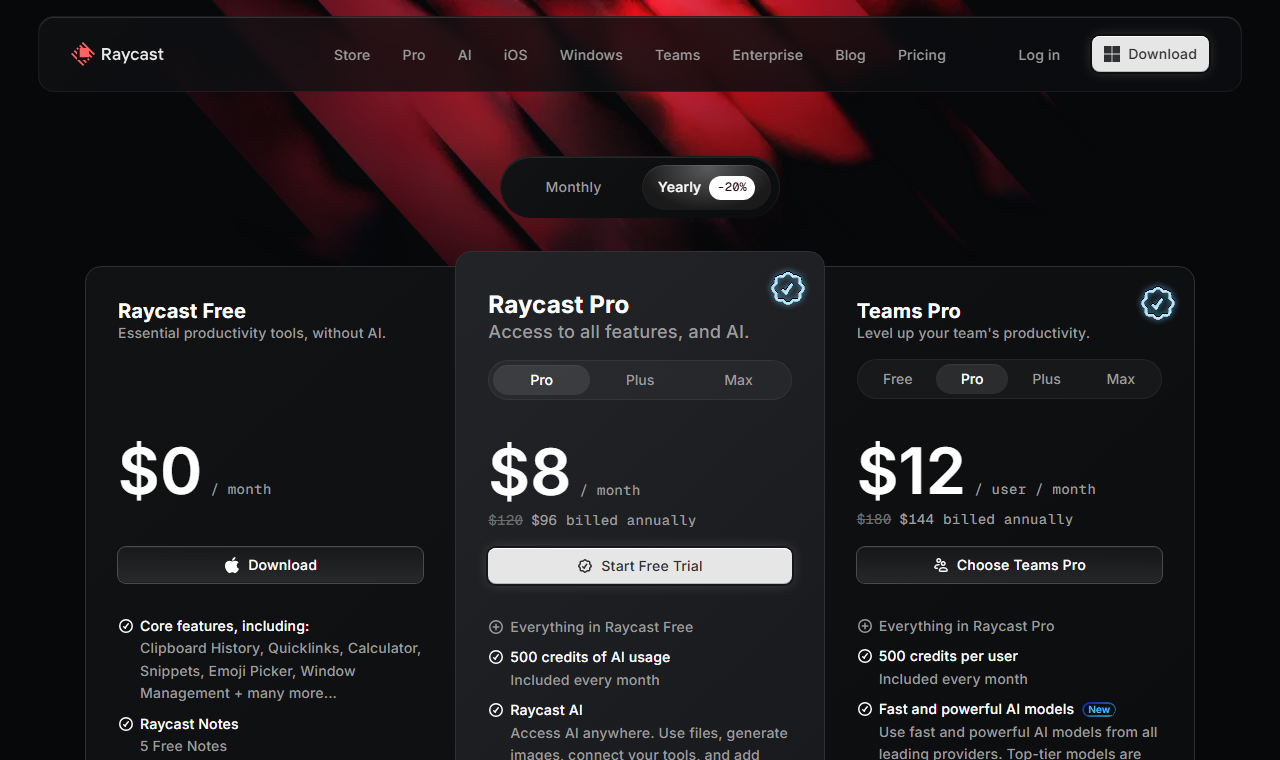 Raycast's plan page, captured 4 Oct 2026 on the yearly toggle: AI starts on Pro at $8 a month with 500 credits.
Read the price column with care. ChatGPT's cost depends on which plan unlocks the voice and app features you want, and that moves. Raycast's headline price buys 500 credits, and heavy agent use will burn through them. HeyClicky's Max plan is the only place where agent volume is stated as a number, at 1,000 a month.
Where your screen data goes
Data handling is where the five options differ most, so it deserves its own comparison. All figures come from the vendors' own pages.
| App | Processing | Retention |
|---|---|---|
| HeyClicky | Cloud only | Analysis kept, screenshots not |
| ChatGPT for Mac | Cloud | In chat history until deleted |
| Raycast | Local or cloud | Local by default |
| Copilot Vision | Cloud | Up to 47 hours |
| Siri AI | On-device and Private Cloud Compute | Not stated on page |
Two patterns stand out, and they point in opposite directions for different readers. HeyClicky and Copilot both state how long raw content survives, which is more than most do. And only Raycast with a local model and Apple's design keep the work on hardware you control.
HeyClicky's trust page adds details worth knowing. It says it never trains on your data, and neither do its providers, whose terms forbid it. It shares usage analytics with PostHog and crash reports with Sentry, and says those never see your screen. It reads your connected accounts once a day to build morning suggestions, read-only, and you can turn that off. If you need a compliance report, it says plainly that it has no SOC 2 or ISO 27001 yet.
Who should skip HeyClicky entirely
Skip it if you need Windows or Linux today. The Windows build is a waitlist with no date, and Linux is not on the page at all, so a team with mixed laptops would end up running two different assistants and writing two sets of internal guidance.
Skip it if a security review applies to you. Without a SOC 2 or ISO 27001 report, most procurement teams will not approve an app that sends screenshots to a model provider, whatever the vendor promises.
Skip it if you want an offline or local-model setup. Nothing in HeyClicky runs locally. Raycast with Ollama, or Siri AI, fits better. And skip it if you use agents every day, since the plan that raises the agent allowance to 1,000 a month costs $100.
A ten-minute test before you pay
Reviews only go so far. Your own screen is the real test, and every app here lets you try something before it asks for money, except Copilot Vision, which needs the Microsoft 365 plan first. Run the same three tasks in each app you shortlist:
- Open the app you struggle with most and ask how to do one specific thing. Note whether the answer names the right button.
- Ask it to explain an error message that sits in a terminal or a document. Note whether it needed a paste.
- Ask for one background task, such as drafting a reply from a thread. Note what it could reach and what it could not.
Score each run on three counts: was the answer right, how long did it take, and did you have to leave the app to get it. Two wrong answers out of three is a sign to move on. Do it on a day with real work, not a demo file, because the gap between a vendor demo and your cluttered desktop is where these tools differ.
Check one more thing while you are in there: what the app asks permission to do. macOS will prompt for screen recording or Accessibility access. Both are broad grants. Read what you are approving, and revoke it in System Settings if you stop using the app.
Windows, Linux and the rest of the field
HeyClicky's Mac-only status is the sharpest limit, so it helps to know who fills the gap. On Windows, Copilot Vision, Raycast and Wispr Flow all have a route. On Linux, none of the five pages we read mention a native app. A browser-based assistant, such as the ones in our guide to choosing an AI assistant, is the practical fallback there.
Mobile is a separate question. Wispr Flow lists iOS and Android. Copilot's Vision works through its phone apps. HeyClicky has no phone app mentioned on its pages. If you want one assistant across a Mac, a Windows laptop and a phone, Raycast and Wispr Flow come closest, and neither does the screen-pointing trick.
One name that often comes up is worth a note. Cursor is a code editor with its own assistant, so it only helps if your stuck moments happen inside code.
The case for staying with HeyClicky
The strongest argument against switching is that none of the alternatives replicates the experience. HeyClicky reads any app, including creative tools that ChatGPT's help page does not list. It answers by voice and points at the control you need. It costs nothing to start. No plugins. No setup beyond the download. The vendor says more than 25,000 people use it.
That is a fair argument, and it is the right answer for one kind of user: someone on a personal Mac, learning an unfamiliar app, who accepts cloud processing. For that person, switching to a text-only context reader would be a step backward. The alternatives win only when one of the filters above, platform, data handling or agent volume, rules HeyClicky out.
What would change my mind
Three developments would shift the order. A Windows release from HeyClicky would remove the biggest reason to look elsewhere. A SOC 2 report would remove the second. And if Apple confirms Mac-wide screen understanding for Siri AI with a stated retention policy, it would become the default recommendation for anyone on a recent Mac.
Prices here will drift, so recheck the directory category for Mac apps and the voice AI category before you commit. For a wider view of the field, see the best AI voice assistants and the guide to choosing an AI assistant. Browse dictation tools, voice assistants, chatbots and productivity apps in the directory.
The next thing to watch is how fast Apple widens Siri AI beyond English, because that decides whether the built-in route is a real option outside the US this year.
Frequently asked questions
Is HeyClicky free?
Yes. HeyClicky has a free plan at $0 with no card needed. Pro costs $20 a month and Max costs $100 a month with 1,000 agent messages. Talk keeps working when agent messages run out, according to the vendor pricing page read on 4 October 2026.
Is there a HeyClicky alternative for Windows?
Yes. Raycast offers a Windows download, Microsoft Copilot Vision works on Windows with a Microsoft 365 plan, and Wispr Flow dictates on Windows. HeyClicky itself only has a Windows waitlist with no announced date.
Which HeyClicky alternative keeps data on my computer?
Raycast, when paired with a local model through Ollama, is the one option here that can keep processing on your machine. Apple describes Siri AI as using on-device processing plus Private Cloud Compute. HeyClicky forwards every request to Anthropic or OpenAI.
Can ChatGPT for Mac see my whole screen?
No. OpenAI help page describes Work with Apps, which reads text from supported apps such as Xcode, VS Code, Terminal and Apple Notes through the Accessibility API. It does not describe capturing arbitrary apps.
Does Wispr Flow replace HeyClicky?
No. Wispr Flow turns speech into text in any app but does not look at your screen. It suits people who liked talking instead of typing, and it pairs well with an assistant that supplies the screen context.
Covered in this guide
- HeyClicky: Open-source macOS AI buddy with screen awareness, push-to-talk voice and background agents. Y Combinator Spring 2026. Free tier, plus paid Pro and Max plans.
- ChatGPT for Mac: ChatGPT is OpenAI's AI assistant, with 1.2 billion weekly users by OpenAI's count, the GPT-6 model family and plans that run from a free tier to a premium Pro tier.
- Claude: Claude API with Sonnet 5 (agentic, near-Opus performance at half the cost) and Claude Science (auditable research workbench). Free to Pro.
- Cursor: Cursor is an AI code editor built on VS Code, widely adopted across large enterprise engineering teams, with Agent Mode, Tab completion, and Cloud Agents.
- Granola: Bot-free AI notepad that merges your typed notes with a device-audio transcript, with apps for Mac, Windows, iPhone and Android and a free plan.
- Microsoft: Microsoft, founded 1975, is a $2.77T public company (NASDAQ: MSFT) with 228,000 employees and $245.3B FY2025 revenue. Copilot AI business run rate exceeded $37B in Q3 FY2026.
- Microsoft Copilot: Your everyday AI companion powered by GPT-5.6 (preferred model July 2026), GPT-4o, and GPT-5 for productivity, creativity, and intelligent assistance
- OpenAI: OpenAI builds ChatGPT, the GPT-6 family (Astra, Sol, Luna), Codex and the OpenAI API. It reports 1.2B weekly ChatGPT users and an $852B valuation after its March 2026 round.
- Raycast: One hotkey for apps, files, clipboard history and multi-model AI on Mac, Windows and iPhone, from a London team founded in 2020.
- Siri AI: Apple's free, rebuilt conversational assistant runs a custom 1.2 trillion-parameter Google Gemini model and ships with iOS 27 in fall 2026.
- Wispr Flow: AI voice dictation app that dictates at up to 220 words per minute and reformats it for whichever app you're typing into, on Mac, Windows, iOS, and Android.
Sources
Still deciding?
This guide covers a handful of options. Smart Match checks every listing in the directory against how you actually work and what you can spend, then hands you the shortlist and the reason behind each pick.
Start Smart MatchRelated guides
- The AI 80s Photo Trend: How to Make Yours (and Turn It Into a Video) in 2026AnalysisWhat changed and who it affects
- AI Development Services in 2026: Which Layer You Actually NeedBuyer's guideHow to pick, across a category
- The AI Tools That Do One Microsoft Copilot Job, CheaperBuyer's guideHow to pick, across a category
- Best Agentic AI in 2026: Pick the Job, Not the GeneralistBuyer's guideHow to pick, across a category
- Best AI Assistant Apps for Android in 2026, Now That Google Assistant Is DeadBuyer's guideHow to pick, across a category
- Best AI Assistant for Small Business in 2026Buyer's guideHow to pick, across a category