Best AI Code Review Tools in 2026 (Including Open Source)
An AI code reviewer reads a pull request, comments on risky lines and often suggests a fix. Tools differ in context depth, billing unit and hosting. In 2026 the main choices are Greptile, Qodo, CodeRabbit, GitHub Copilot, Augment Code, Cursor Bugbot and the open-source PR-Agent.
The short version
Choose an AI code reviewer by how it bills. Greptile and Qodo charge by credit, CodeRabbit by hourly cap, Copilot by AI credits plus Actions minutes. Trial two tools on your own pull requests, and use PR-Agent if code cannot leave your network.
Greptile charges $30 per seat, Qodo works out to about $1.67 a review, and GitHub Copilot bills somewhere between five cents and five dollars, so the headline price of an AI code reviewer tells you very little. Most of the tools below charge in credits, hourly caps or usage, so a busy team can pay several times the sticker price. The accuracy contest is murkier still: at least three vendors publish posts saying they top the same public benchmark.
This guide is for a team of 5 to 30 engineers that already merges through pull requests and wants a machine to read every diff before a human does. It covers what each reviewer costs per review, where each one runs (from Greptile to GitHub Copilot), which ones can be self-hosted or run free on open source, and where the advice stops being reliable. Every price comes from the vendor's own page, opened on 8 October 2026.
What does an AI code reviewer actually do?
An AI code reviewer reads a pull request, comments on the lines it distrusts and, in most products, offers a fix you can apply with a click. The difference between products is context. A diff-only reviewer sees the changed lines. A codebase-aware reviewer also pulls in call sites, type definitions and tests, which is what lets it say "this function is used in six other places and one of them breaks".
Three things separate the tools in practice:
- Context depth. Whether the reviewer indexes the whole repository or only the diff.
- Billing unit. Per seat, per review, per credit, or per reviewed file.
- Where it runs. Hosted only, hosted with an enterprise self-host option, or fully open source.
None of them replaces a human approval. GitHub's own documentation says Copilot is "not guaranteed to spot all problems or issues in a pull request" and tells teams to supplement it with human review. Treat every reviewer here as a second pair of eyes that is fast and sometimes wrong. For agent-style tools that also write code, the Cursor comparison below is a fair starting point.
If you are still choosing the assistant that writes the code, start with our guide to the best AI coding assistants and the coding assistants category. This article only covers the reading side.
Which AI code review tools are worth shortlisting?
Six hosted products and one open-source project cover most real choices. CodeRabbit is the one name here that is not in the HokAI directory yet, so it has no profile page to link; the rest do.
| Tool | Entry price | Free option | Self-host |
|---|---|---|---|
| Greptile | $30 per seat per month | 50 credits, 1 developer | Enterprise only |
| Qodo | $30 per month, up to 30 users | 14-day trial | Enterprise only |
| CodeRabbit | $24 per developer per month, billed annually | Public repos | Enterprise only |
| GitHub Copilot | Plan price plus AI credits | Not on Copilot Free | No |
| Augment Code | $20 per month flat | Open source projects | Not stated |
| Cursor Bugbot | Usage-based | Not stated | Git host self-hosted |
| PR-Agent | Your own LLM bill | Fully open source | Yes, MIT license |
The table shows entry points, not the cost of your team's real week. The per-review table further down does that arithmetic.
Greptile: the deepest context, billed by the credit
Greptile is built around indexing the whole repository before it reviews, and its pricing page counts that work in credits. The Pro plan is $30 per seat per month with a 14-day trial, and it includes 50 credits per seat plus unlimited users and custom rules. Extra credits cost $1 each.
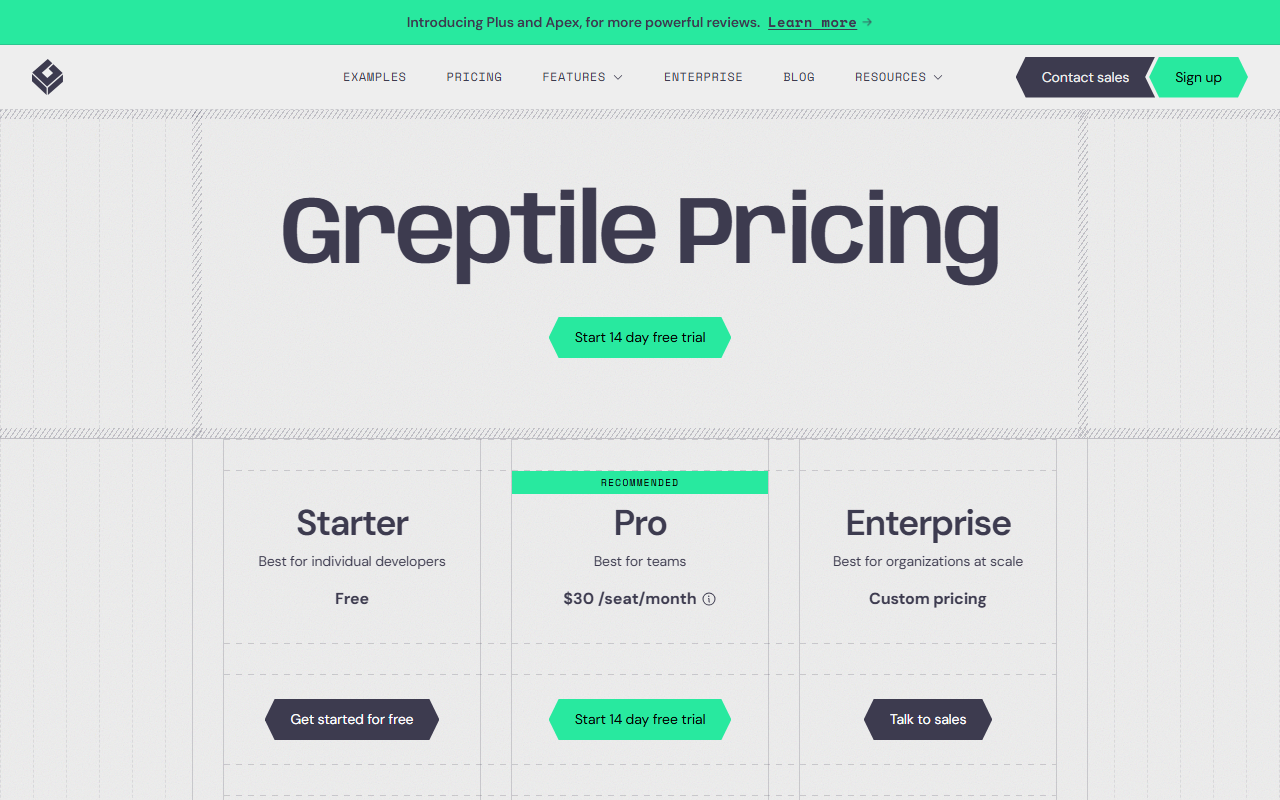 Greptile's pricing page, captured 8 Oct 2026: three plans, with credits explained further down the page.
The credit math matters. A base review costs 1 credit, a Plus review costs 3 and an Apex review costs 10. A developer who requests Apex reviews on every pull request burns the 50 included credits in five PRs. Greptile defines a seat as any developer who received a review in the billing period, so a bot-heavy repository with many small contributors can add seats quickly.
The free Starter plan gives 1 active developer and 50 credits a month, which suits a solo maintainer. Qualified non-commercial projects under an OSI-approved license can apply for free use, and pre-Series A startups with under $2M in trailing revenue can apply for 50% off. Self-hosting sits on the custom Enterprise plan only.
Browse the Greptile profile for its feature list. Choose it when your repositories are large and interconnected, so cross-file context is worth paying for. Skip it if you want predictable monthly spend without watching a credit meter.
Qodo: cheap per month, priced per review underneath
Qodo lists Pro Team at $30 for up to 30 users, with a pooled credit system underneath. Credits cost $0.012 each and are shared across the team. The page translates that into reviews: 2,500 credits buy about 18 reviews a month, 5,000 buy about 36, and 20,000 buy about 144.
Do the division yourself. At the entry tier that is roughly $1.67 per review, and a team opening 60 pull requests a month needs the largest pool, about $240. Credits expire at the end of each cycle, and overage is billed at the same rate up to a cap you set. The page does not say whether that price is per user or per team, so confirm that with sales before you budget.
There is no permanent free tier, only a 14-day trial with no card. Qualified open source projects can apply for free access. On-prem and air-gapped deployment appear on the Enterprise plan and not on Pro Team.
Qodo is the one to price carefully. It is good value for a team with a steady, modest PR rate and poor value for one with bursts.
CodeRabbit: the default trial for most teams
CodeRabbit is not yet profiled in our directory, so there is no link, but it belongs on any shortlist because of its pricing shape. It sells four plans, with the annual and monthly prices below.
| Plan | Annual, per developer | Monthly, per developer |
|---|---|---|
| Essentials | $24 | $30 |
| Team | $48 | $60 |
| Advanced | $72 | Not listed |
| Enterprise | Custom | Custom |
The limit to understand is per hour, not per month. Essentials allows 5 pull request reviews per developer per hour, Team 8, Advanced 10 and Enterprise 12. Beyond that, reviews bill at $0.25 per reviewed file with an optional monthly cap. Public repositories get free reviews indefinitely, and self-hosting is Enterprise only.
A 14-day trial with no credit card is available on all plans, which makes it the cheapest tool to test first. The hourly cap rarely bites a team that merges steadily and sometimes bites one that batches pull requests on Friday afternoon.
GitHub Copilot code review: already on the invoice
GitHub Copilot reviews pull requests on GitHub.com, in the GitHub CLI, in several IDEs and, in public preview, on Azure DevOps. If your code lives on GitHub, setup is a policy toggle, not a new vendor.
The billing is the catch. Each review consumes AI credits and also GitHub Actions minutes, and GitHub publishes an estimate for the credit half only:
- Lite effort: about $0.05 to $1 per review.
- Balanced effort (the default): about $0.25 to $5 per review.
- Actions minutes: extra, and larger hosted runners cost more per minute. Self-hosted runners use none.
The Copilot Free plan does not include code review.
Some behavior surprises teams:
- Copilot reviews a pull request once unless you configure it to review every push.
- Dependency manifests such as package.json and Gemfile.lock are excluded, as are logs and SVG files.
- Copilot reviews do not count toward required approvals by default.
- Model switching is not supported.
- If hosted runners are disabled, reviews fall back to a more limited version.
The company behind it, Microsoft, sells it as part of the wider Copilot bundle, so the real question is whether the credit pool you already pay for covers your review volume.
Augment Code Review and Cursor Bugbot: reviewers from the coding tools
Two products come from editors you may already use. Augment Code launched its review product on 11 December 2025, and the launch post was last updated 17 September 2026. It aims to post only comments likely to change a merge decision and skips style nits. The post gives an average review cost of 2,400 credits, about $1.50, and offers free access to open source projects.
One warning on that number. Augment's current pricing page lists a Standard plan and a Business plan, flat with no per-seat charge, each including the same amount in dollars of usage and covering up to 50 seats. It measures usage in dollars, not credits, and gives no per-review cost. The $1.50 figure may be stale, so ask before you rely on it. The launch post mentions GitHub Cloud setup only.
Cursor ships Bugbot, which reviews pull request diffs on each update or when someone comments cursor review or bugbot run. Its platform list is the widest here: GitHub including Enterprise Server, GitLab including self-hosted, Bitbucket including Data Center, and Azure DevOps. Rules live in a .cursor/BUGBOT.md file. Billing is usage-based, and Cursor's pricing page lists the Teams plan at $40 per user per month without publishing Bugbot rates, so you cannot pre-compute a bill.
Two related pieces help here: the Cursor versus Claude Code comparison covers the editors that author the code, and Windsurf's move into Devin Desktop explains one more change in that space.
What are the open source and self-hosted options?
Qodo's original open-source reviewer lives on as PR-Agent, now described as a community-maintained legacy project of Qodo under the MIT license. It is not Qodo's free tier, and the maintainers say it is a separate project from the hosted Qodo product.
You run it as a GitHub Action (the-pr-agent/pr-agent@main), from the command line, or as a self-hosted webhook service. It supports GitHub, GitLab, Bitbucket, Azure DevOps and Gitea, and it works with OpenAI, Anthropic Claude, Google Gemini, DeepSeek and Mistral models, plus anything reachable through LiteLLM such as Ollama, Bedrock or OpenRouter.
A second open-source route comes from OpenHands, whose documentation describes an automated review workflow. A workflow file runs a reviewer agent when a non-draft pull request opens, when a draft is marked ready, when someone adds the review-this label, or when openhands-agent is requested as reviewer. Comments carry Critical, Important, Suggestion or Nit labels, and the docs say reviews typically arrive within 2 to 3 minutes. You supply your own LLM key as a repository secret.
To try PR-Agent from a terminal:
pip install "pr-agent[github]"
export OPENAI_KEY=<your key>
pr-agent --pr_url <pull request URL> review
That last point is the real appeal. If code cannot leave your network, pair PR-Agent with a local model. Our local coding models guide covers which models are worth that job. The trade is engineering time: you maintain the workflow, the prompts and the model, and no one hands you a dashboard.
For security review specifically, Nullify takes a different shape. It describes itself as an autonomous product-security platform that opens merge-ready remediation pull requests and prices on work done, not seats. It is a security tool first and a general reviewer second, and the vendor-reported results on its homepage are unverified, so we do not repeat them.
How much does one review cost?
Per-review cost is the number that scales, so here are the published figures side by side.
| Tool | Billing unit | Published per-review cost |
|---|---|---|
| Greptile | Credit, $1 over the allowance | 1 credit base, 3 Plus, 10 Apex |
| Qodo | Pooled credit, $0.012 each | About $1.67 at the 18-review tier |
| CodeRabbit | Hourly cap, then per file | $0.25 per file over the cap |
| GitHub Copilot | AI credits plus Actions | $0.05 to $5 plus minutes |
| Augment Code | Usage in dollars | About $1.50 (launch post) |
| Cursor Bugbot | Usage-based | Not published |
For a 20-developer team opening 120 pull requests a month, the arithmetic splits in a useful way:
- Greptile Pro: 20 seats at $30 is $600, and the 1,000 included credits cover 1,000 base reviews.
- Qodo: the 144-review pool costs about $240.
- CodeRabbit Essentials: 20 developers on annual billing is $480, with no per-review meter until the hourly cap.
- Augment Code: at the launch-post average it lands near the Qodo figure.
- GitHub Copilot: anywhere from near zero to several hundred dollars, depending on review effort and PR size.
Those totals are our arithmetic from published rates, not quotes. Run the same sum with your own pull request count. Our Smart Match tool can narrow the shortlist if you tell it your stack and budget.
How do the benchmarks compare these tools?
They do not settle it. Martian's Code Review Bench, hosted at codereview.withmartian.com, analyzes thousands of real GitHub pull requests where AI reviewers took part, then scores precision, recall and F1 by whether the bot's suggestions led to real code changes. That is a sound idea, since it measures adoption rather than opinion.
The trouble is the way vendors then use it. Qodo and CodeRabbit each publish posts claiming first place, and Greptile publishes its own benchmark write-up. Each picks the date, the configuration and the metric that flatters its product.
Read those posts as marketing with a real data source behind them. A tool that comments on everything scores high recall and low precision; a quiet tool does the reverse. Which one you want depends on whether your team ignores noisy bots, and no public leaderboard measures that on your repositories. For model-level comparisons that do publish absolute figures, see the model leaderboard, though it ranks models and not review products.
Where does this advice break?
The best case against this guide is that credit-based pricing is too uncertain to compare, and a flat-fee tool is simply safer. That is partly right. A fixed seat price removes surprises, and CodeRabbit's hourly caps are easier to forecast than Greptile's credit burn.
The reply is that predictability costs you the cheapest cases. A team with five engineers and a quiet repository pays less on a pooled credit plan than on 5 full seats. The answer changes at roughly the point where monthly reviews pass the pooled tier you would buy, so count your pull requests for four weeks before you sign.
A second objection is that AI review mostly flags style and misses the bugs that matter. Augment explicitly designs against style nits and Greptile argues for repository context, which tells you the vendors agree this is the failure mode. None of the public benchmarks prove any of them has solved it.
Who should skip AI code review?
Skip it, or delay it, in these cases. If you are still picking the model that writes the code, the coding assistants directory is the better place to start.
- Tiny teams with tiny diffs. If two people review every change together in minutes, a bot adds review cost without catching more.
- Regulated code that cannot leave your network. Hosted tools are out, and self-hosting means Enterprise contracts or running PR-Agent yourself.
- Teams that already ignore bot comments. A noisy reviewer trains people to dismiss all automation, including the useful kind.
- Repositories dominated by generated code or dependency manifests. Copilot excludes manifests entirely, and any tool wastes credits on lockfile churn.
If you want a code quality scan for security alone, a dedicated tool such as Nullify fits better than a general reviewer. Also check the software testing category, which lists tools that generate tests, a different job from review.
Data handling: what happens to your code?
Every hosted reviewer reads your diffs and, for the codebase-aware ones, an index of your repository. Before you install any of them, check four things on the vendor's trust page:
- Whether code is stored after the review and for how long.
- Whether your code trains any model.
- Whether a single-tenant or self-hosted option exists, and on which plan.
- Which permissions the GitHub or GitLab app asks for.
Self-hosting is an Enterprise feature at Greptile, Qodo and CodeRabbit, and a Copilot review runs inside GitHub's own boundary. PR-Agent with a local model keeps everything on your hardware. For editor-side tools like Sourcegraph and Tabnine, the same questions apply to their own products.
How to choose: run a two-week trial
Pick two candidates, not five, and test them on your own pull requests.
- List your last 30 merged pull requests and note which had bugs found after merge.
- Install the first tool on a single repository for one week, with no changes to review rules.
- Count comments that led to a code change, comments ignored and comments you disliked.
- Repeat with the second tool on the same kind of repository.
- Compare cost per accepted comment, not cost per review.
Use the free trials where they exist: Greptile and CodeRabbit offer 14 days, Qodo offers 14 days with no card, and Augment offers free access to open source projects. Anything you can pay for per use, like Bugbot, you can sample cheaply.
What would change this recommendation?
Three things would move our view. First, a benchmark that publishes the same metric, date and configuration for every tool, run by someone with no product to sell. Second, any vendor publishing a per-review cost where it is currently hidden, as Cursor does for Bugbot. Third, Copilot moving from credits to a flat per-seat review allowance, which would make it the default for GitHub shops overnight.
Until then, the safe path is the boring one: trial two tools, measure accepted comments, and let your own repositories decide.
Frequently asked questions
What is the cheapest AI code review tool?
PR-Agent is free software under the MIT license, so you pay only for the model you connect. Among hosted tools, CodeRabbit gives free reviews on public repositories, Greptile has a free Starter plan with 50 credits a month, and CodeRabbit Essentials starts at $24 per developer on annual billing.
Can I self-host an AI code reviewer?
Yes. PR-Agent is open source and runs as a GitHub Action, command line tool or webhook service. Greptile, Qodo and CodeRabbit offer self-hosting only on their Enterprise plans. Cursor Bugbot supports self-hosted GitLab and Bitbucket Data Center, but the review service itself is hosted by Cursor.
Does GitHub Copilot code review cost extra?
Each review uses AI credits and GitHub Actions minutes. GitHub estimates about $0.05 to $1 per review at Lite effort and $0.25 to $5 at Balanced, before Actions minutes. The Copilot Free plan does not include code review.
Are AI code review benchmarks reliable?
Treat them as one input. Martian's Code Review Bench measures whether suggestions led to real code changes, but several vendors each publish posts claiming first place using their own dates and configurations. Trial two tools on your own pull requests instead.
Will an AI reviewer replace human code review?
No. GitHub states that Copilot is not guaranteed to spot all problems in a pull request and recommends human review alongside it. Use the tool to catch routine issues first so reviewers spend time on design and risk.
Covered in this guide
- Greptile: AI code review agent that indexes your whole codebase, not just the diff, to catch cross-file bugs before merge; used by 22,000+ engineering teams.
- Qodo: AI code review and test generation platform with a multi-agent architecture that scores highest for real-bug detection among independently benchmarked code review tools.
- Augment Code: Augment Code is an AI coding agent for enterprise teams, running up to 10 autonomous Remote Agents in parallel inside isolated cloud sandboxes.
- Cursor: Cursor is an AI code editor built on VS Code, widely adopted across large enterprise engineering teams, with Agent Mode, Tab completion, and Cloud Agents.
- GitHub: Founded in 2008, GitHub is the largest code repository and collaboration platform with 140M+ developers, now integrated into Microsoft's CoreAI division after CEO Thomas Dohmke departed end of 2025.
- GitHub Copilot: GitHub's AI coding assistant with agent mode and MCP support across 6 IDEs, plus a free plan with no credit card required.
- Microsoft: Microsoft, founded 1975, is a $2.77T public company (NASDAQ: MSFT) with 228,000 employees and $245.3B FY2025 revenue. Copilot AI business run rate exceeded $37B in Q3 FY2026.
- Nullify: AI-powered AppSec automation that finds, prioritizes, and fixes vulnerabilities in code. Detects secrets, vulnerable code, IaC flaws, and container misconfigurations, then opens merge-ready pull requests. Built for small security teams without a dedicated AppSec engineer.
- OpenHands: Open-source, model-agnostic coding agent with 9 million+ downloads that plans, writes, tests, and opens pull requests without per-step approval.
- Sourcegraph: Enterprise-only code intelligence platform for cross-repository semantic search and AI-assisted code understanding across large, multi-repo codebases, after free and Pro self-serve plans were discontinued.
- Tabnine: Enterprise AI coding assistant with privacy-first architecture, agentic workflows, and flexible deployment
Sources
Still deciding?
This guide covers a handful of options. Smart Match checks every listing in the directory against how you actually work and what you can spend, then hands you the shortlist and the reason behind each pick.
Start Smart MatchRelated guides
- AI Development Services in 2026: Which Layer You Actually NeedBuyer's guideHow to pick, across a category
- The AI Tool Ecosystem in 2026: Buy the Meter, Not the CategoryBuyer's guideHow to pick, across a category
- Best AI Chatbots in 2026: Pick by the Job, Not the LeaderboardUpdatedRechecked against current sources
- Best AI Coding Assistants in 2026: Pick the Job, Not the BrandBuyer's guideHow to pick, across a category
- The Best AI for Qualitative Data Analysis in 2026 Depends on What You Already HaveBuyer's guideHow to pick, across a category
- ChatGPT Plans Compared (2026): Free, Go, Plus, Pro and BusinessBuyer's guideHow to pick, across a category