
Last updated: 2026-10-02
LoraAI is a LoRA training and AI image and video generation web app whose update log dates its launch at loraai.pro to May 2026. A LoRA (Low-Rank Adaptation) is a small add-on file that teaches a base model one face, product or style. Its differentiator is a browsable adapter library that shows each LoRA's trigger word and base model.
About LoraAI
LoraAI is an online LoRA studio at loraai.pro. Its public update log dates version 1.0.0 to 11 May 2026, when it launched as a text-to-image and image-to-image generator. That launch entry covers only those two modes; video generation, a LoRA model library and hosted training are on the site today. The site does not name a company, founders or funding, and support runs through a loraai.pro email address and a Telegram account.
The problem it targets is that a prompt alone rarely keeps a face or a product identical from one picture to the next. LoraAI offers two routes to an adapter that pins that subject down: borrow a ready-made one from its library, or train your own. The video trainer is built on Wan 2.2, the open video model from Alibaba Cloud, whose Qwen Image model also backs one of the image trainers. Other image trainers target FLUX.1 Dev from Black Forest Labs (the company behind FLUX) and Z-Image. The library also holds adapters for SDXL, the open model from Stability AI, and the video training pages list LTX-2 from Lightricks. The prompt enhancer is labelled WaveSpeed Prompt Optimizer, the only third-party provider named in the interface copy.
It suits creators who need one recurring subject across a lot of output: an AI influencer posting daily, a product shown in many settings for a shop, or a house illustration style for a small brand. People who already train adapters locally in Kohya or ComfyUI will find little here beyond convenience and a hosted GPU.
Everything is paid for in credits, with one-time packs for generation and monthly or annual plans for heavier use; the cost question below works out what a single image and a single training run cost on each option.
For a broader creative suite, look at Leonardo.Ai or the multi-model studio Krea. When the trained character mainly has to move on video, the stronger rival is Higgsfield (the trade-offs are laid out in our Higgsfield alternatives guide), and developers who want training behind an API tend to pick Replicate instead. The wider field sits in the AI image generators category and the broader media generation group, while the AI video generator guide sorts the video side by job type.
Screenshots
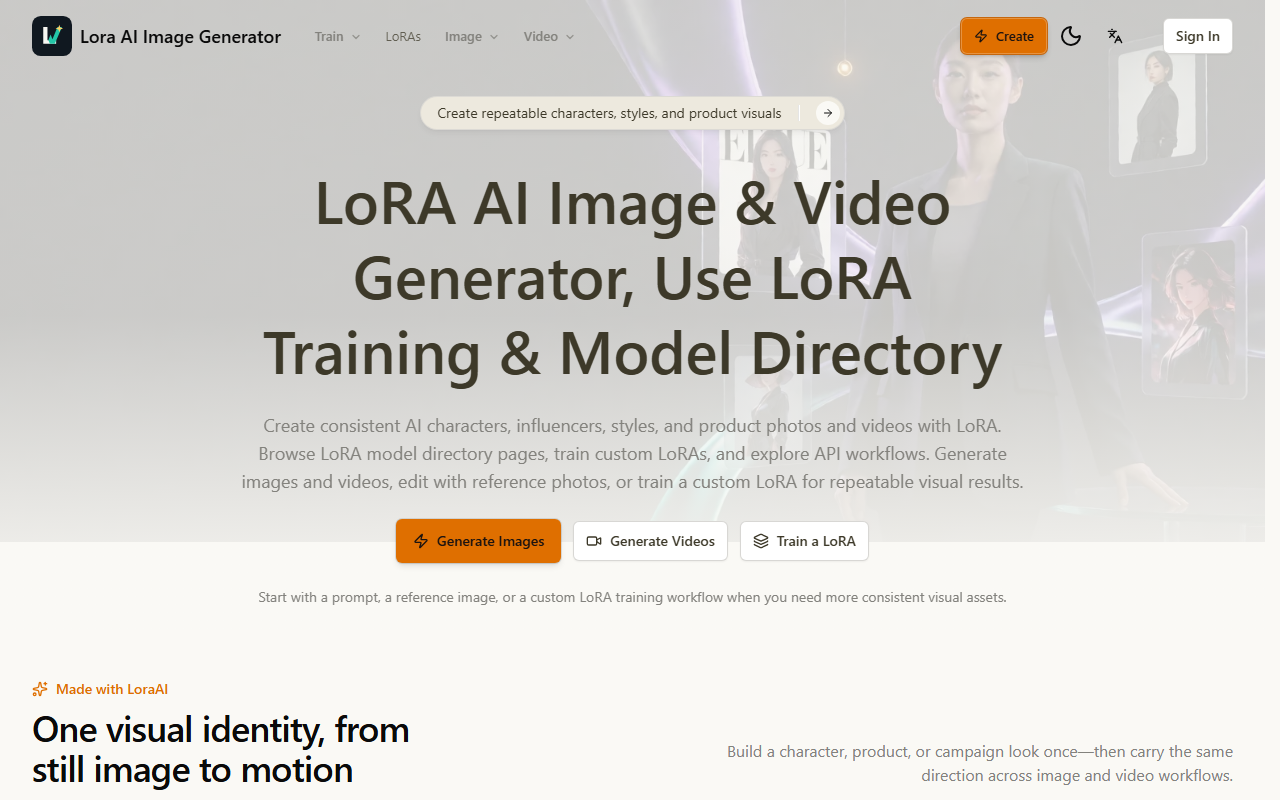
Pricing
Credit-based, web only. New accounts get 6 free credits, plus one free 720P video per eligible account. Credit cost per job: text-to-image 4, image edit or image-to-image 6, text-to-video 6, image-to-video 8, video-to-video 10, Wan video LoRA training 380 (image trainer costs are shown only inside the training form).
90, includes watermark-free downloads). 90 a month for 600 credits, 1 concurrent training job, 10 private LoRAs. 90 a month for 1,300 credits, 3 concurrent jobs, priority queue and support.
40 a year, with credits released monthly. To set these per-job costs against other generators, see the AI image generator guide, which works out the cost per image across the category.
| Tier | Monthly price | What it includes |
|---|---|---|
| Free | Free | 6 free credits on sign-up, One free 720P video per eligible account, Account required, Watermarked previews and downloads |
| Starter | $24.90/mo | 600 credits a month, All image and video generators, All LoRA trainers, 1 concurrent training job, Up to 10 private LoRAs, 30-day training history |
| Pro | $49.90/mo | 1,300 credits a month, All image and video workflows, All LoRA trainers, Up to 3 concurrent training jobs, Up to 50 private LoRAs, Priority queue, 180-day history, priority support |
| Image & Video Credits | $14.99 one-time | 260 credits, valid 1 year, Image generation and editing, Video generation, No video LoRA training, No auto-renewal |
| Credits Package | $29.90 one-time | 500 credits, valid 1 year, Image and video generation, Watermark-free downloads, No video LoRA training, No auto-renewal |
Key Features
- LoRA model library: Each library entry lists its base model (FLUX.1 Dev or SDXL, for example), its trigger word and a sample prompt, with a one-click Use this LoRA button that opens a generator.
- Wan video LoRA trainer: Upload 10-20 stills of one subject, set a trigger word and a validation prompt, and the Wan 2.2 trainer returns a high-noise and low-noise LoRA pair for image-to-video work.
- Four image LoRA trainers: Qwen Image, FLUX.1 Dev, Z-Image and P-Image trainers each return one LoRA file for their own generator, and the Z-Image trainer can start from about four photos.
- Five generation modes on one balance: Text-to-image, image-to-image editing, text-to-video, image-to-video and video-to-video all draw on the same credit balance, and the last mode accepts a reference video URL.
- Prompt enhancer that respects trigger words: An optional WaveSpeed Prompt Optimizer adds lighting, composition and motion detail to a prompt, and it switches off for library LoRAs so their trigger words stay intact.
- Preset use-case workflows: Ready pages cover consistent characters, AI influencers, product photos, clothing, fashion models, hairstyles and couple photos, alongside an image upscaler and motion transfer.
Pros
- Trained image LoRAs can be downloaded as a single file from My LoRAs, so the work you pay for can leave the platform instead of staying locked to it.
- Every generation mode has one fixed credit price on the pricing page, which makes a monthly budget easier to plan than rivals that price each model separately.
- The library is the friendliest entry point for beginners: you can test a borrowed style adapter in the generator before deciding whether a paid training run is worth it.
- Yearly billing at half the monthly price, with credits still granted month by month, is clearly the better deal than one-time packs for anyone generating every week.
Cons
- No company, founder or legal jurisdiction is named in the terms of service or the privacy policy, and purchases are non-refundable, which is a real risk on a prepaid annual plan.
- The homepage advertises API workflows, but the site publishes no API reference; its /docs page is a single introductory paragraph.
- The image trainers are described as live, yet their credit cost appears only inside the training form, not on the pricing page.
- Video LoRA training requires a monthly or yearly plan, so the one-time packs cannot pay for it.
- The privacy policy gives no retention period and says prompts, uploads and outputs may be used to improve the service, with no opt-out described.
- Adult and NSFW content is banned outright, including through LoRA inputs, so creators who rely on open model hubs for that work should look elsewhere.
Data Handling
- Training-data policy
- Privacy policy (dated 9 Nov 2025) says prompts, uploads and generated outputs are used to deliver, moderate and improve the service; no opt-out and no retention period are stated.
Frequently Asked Questions
What does LoraAI actually cost?
On the one-time packs a credit costs about 6 cents, so a 4-credit text-to-image picture comes to roughly $0.23 to $0.24, and the $14.99 pack (260 credits) is slightly cheaper per credit than the $29.90 pack (500 credits) even though its listing leaves out watermark-free downloads. Starter at $24.90 a month (600 credits) brings an image down to about $0.17 and covers one 380-credit video LoRA training run with 220 credits left over, while Pro at $49.90 (1,300 credits) covers three runs. Paying yearly ($149.40 or $299.40) roughly halves every figure, to about $0.08 per image and $7 to $8 per training run.
Can you use LoraAI without paying?
Just for a short test. Every new account receives 6 free credits, enough for one text-to-image picture, and each eligible account also gets one free 720P video on selected text-to-video and image-to-video models (video-to-video is excluded). You need to sign in first, and according to the site's own upgrade prompt, images on an account that has not paid are previewed and downloaded with a LoraAI watermark.
What should you use instead of LoraAI?
Higgsfield trains a reusable face it calls Soul ID and carries it into premium video models such as Seedance, so it fits polished short-form video better. Leonardo.Ai and Krea are broader creative suites that also train custom models and hand out free daily allowances, a better start when LoRA work is only occasional. If you have your own GPU, open trainers such as Kohya or AI Toolkit avoid credits altogether.
LoraAI or Leonardo.Ai: which should you pick?
Pick LoraAI only if LoRA consistency is the whole job. It lets you choose the open model your adapter is trained on (Qwen Image, FLUX.1 Dev, Z-Image or Wan) and shows trigger words for every library adapter, while Leonardo.Ai trains custom models inside its own suite. Leonardo.Ai is ahead on nearly everything else: in-house foundation models, team plans, a documented pay-as-you-go API and a known company behind it.
What does it take to start using LoraAI?
Generation can start right after sign-in: open the Create page or a library LoRA, write a prompt and spend the free credits. A first custom LoRA takes more preparation, because you need a focused set of ten to twenty stills of one subject and a trigger word you will reuse in every prompt. The vendor says a Wan training run usually takes 15 to 25 minutes, and My LoRAs tracks the progress, then plays a 5-second preview video when the job finishes.
Top Alternatives
- Higgsfield: Pick Higgsfield if a trained character has to appear in high-end video models; pick LoraAI if you want a portable LoRA file and a choice of open base models.
- Leonardo.Ai: Pick Leonardo.Ai for an all-round creative suite with team plans; pick LoraAI if browsing and training LoRAs with visible trigger words is the main task.
- Krea: Pick Krea for dozens of image and video models plus upscaling on one plan; pick LoraAI if you want fixed credit prices per mode and a Wan video trainer.
- Replicate: Pick Replicate if you are a developer who needs LoRA training and inference behind an API; pick LoraAI if you want the same outcome from a browser with no code.