Suno vs Udio in 2026: Only One Still Lets You Download Your Songs
Suno and Udio are AI song generators with opposite export rules in 2026. Suno's paid plans allow monthly downloads (20 on Pro, 60 on Premier) and give you the songs. Udio disabled downloads of audio, video and stems after its label settlements, keeping songs inside its own player and sharing links.
The short version
Suno wins for anything you must download, release or deliver: Pro gives 20 downloads a month with commercial rights. Udio has blocked all downloads since 29 October 2025 after its Universal and Warner deals, so it works only as a listening service until its licensed relaunch arrives.
Udio has not let a paying subscriber download a song since 29 October 2025, while Suno's Pro plan hands back 20 downloads a month with commercial rights attached.
That one difference now outweighs every sound-quality argument in the old Suno vs Udio debate. Udio's settlements with Universal Music Group and Warner Music Group turned it into a walled garden: songs play inside the service and nowhere else. If you make music for YouTube, a client, a game or a release, only one of these two is a tool you can use today.
We did not run a blind listening test, and this guide does not rank how the two sound. It compares what each vendor documents: plans, limits, rights, and what the label deals changed. We opened each vendor's pricing and help pages on 1 October 2026 for the plan figures below. Where a page stayed silent, the text says so.
Udio went into a walled garden on 29 October 2025
On 29 October 2025, Udio's CEO Andrew Sanchez announced a partnership with Universal Music Group. His announcement post is blunt about the cost: "Starting today, downloads from the platform will be unavailable." He framed it as a transition of "the next several months" while the team prepares newer models.
Warner Music Group followed on 19 November 2025. Udio's Warner post says the deal licenses model training on Warner data and ends the copyright lawsuit. It also says the labels did not buy Udio and do not own it.
The help article on the Universal changes, dated 18 February 2026, states that downloading of audio, video and stems "has been disabled". We found no later notice. The newest post on Udio's blog is still the November 2025 Warner announcement.
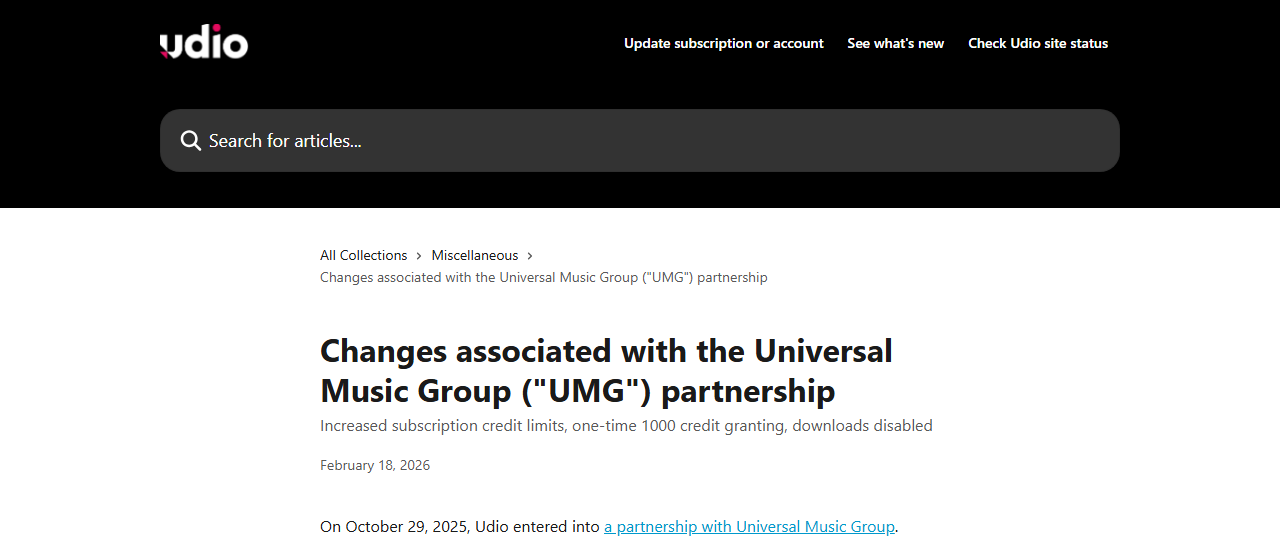 Udio's help article on the Universal partnership, captured 1 October 2026.
Here is what a Udio user can and cannot do during the transition, according to those two posts:
- Use the v1, v1.5 and v1.5 Allegro models, and nothing newer.
- Keep using extend, remix and Styles.
- Share songs through udio.com links that anyone can open, account or not.
- Not export audio, video or stems on any plan.
Udio's own changelog, last updated 28 January 2026, still lists Voices as launched on 11 September 2025. No dated release of a licensed model appears there. That absence is the main reason this guide treats Udio as a listening service for now.
Suno stayed open, shipped v6, and signed Warner
Suno Inc. took a different path. Its v6 launch post says the new model generation was developed with Warner Music Group, BMG and Believe. It comes in three versions: v6 for Pro and Premier subscribers, v6-wild for exploratory output, and v6-mini for everyone, free accounts included. Suno says it will retire its older models and move entirely to v6.
The feature list is where Suno pulls ahead on control. Per the same post, you can edit one section of a finished song in plain language, rebuild a single lyric line without regenerating the track, and build a mashup from several of your own songs in one request. You can also start from text, audio, an image or a video.
The label picture is less settled. Digital Music News reported in April 2026 that Universal and Sony had hit an impasse in settlement talks with Suno. The reported sticking point is whether generated tracks may be shared and distributed beyond the service. We found no newer public update on either talk.
Suno has also been tightening exports. In its post on building the future of music responsibly, it promised a new downloads policy "designed to limit the ability to mass distribute songs on streaming platforms". The live pricing page now shows monthly download caps, which the next section lays out.
What each plan costs and allows
Credits are not comparable across the two services. Neither pricing page we read states how many credits one song costs, so a bigger credit number does not mean more songs.
Udio's pricing page showed US dollars when we loaded it:
| Plan | Monthly price | Credits per month | Songs at once |
|---|---|---|---|
| Free | $0 | 100 (10 a day) | 4 |
| Standard | $10 ($8 yearly) | 2,400 | 6 |
| Pro | $30 ($24 yearly) | 6,000 | 10 |
Two details matter. Free accounts are capped at 3 full-length songs a day, and paid plans lift that cap. The credit totals also changed: the Universal help article says Standard rose from 1,200 to 2,400 credits and Pro from 4,800 to 6,000, so any older comparison quoting the lower figures is stale. Top-ups run $3 for 100 credits or $25 for 1,000.
Suno's pricing page is the one that limits exports:
| Plan | Credits | Song downloads | Commercial rights |
|---|---|---|---|
| Free | 50 a day | None | No |
| Pro | 2,500 a month | 20 a month | Yes |
| Premier | 10,000 a month | 60 a month | Yes |
Free accounts also get only the v6-mini model and a shared queue. Pro and Premier open up v6 and v6-wild, a priority queue of up to 10 songs at once, custom models, and recording with your own voice. Premier adds Suno Studio, the editing environment with MIDI, effects and automation, plus a third stem-separation type.
One gap to flag. Our connection was served prices in Indonesian rupiah, so we could not reconfirm US dollar prices on Suno's page. HokAI's Suno record lists $10 a month for Pro and $30 for Premier, last verified on 30 June 2026. Check the live page for your region before paying.
Where Suno is the better pick
Suno wins whenever a file has to leave the app. A Pro plan gives you downloads, commercial rights and stems, and Premier raises the monthly download cap to 60.
- Release and client work. Paid Suno accounts carry commercial rights. Udio's pages state no equivalent grant.
- Editing control. Section edits, single-lyric changes and mashups are documented on Suno's v6 page. Udio's equivalents are extend, remix and inpainting on older models.
- A free tier that still produces. The v6-mini model is available without paying, though free output is non-commercial and cannot be downloaded.
- Stems and a studio. Pro offers two stem-separation types and Premier three, plus Studio. Udio disabled stem export.
The cost is a hard ceiling. Sixty downloads a month on Premier is plenty for a hobbyist or a podcaster, and far short of what a catalog-scale operation needs. That ceiling is the point of the policy Suno announced.
Where Udio still earns a look
Udio is not a dead product. Paid plans have no daily cap on full-length songs, Pro runs 10 songs at once, and the style tooling is deep. Styles let you steer a song with a musical reference, and Voices lets you save and reuse your own voices.
Its legal posture is also the cleanest of the two on paper. Udio has signed licensing deals with Universal and Warner, and its announcement says artists will set permissions for how their voice and style can be used. If you care less about owning an output file and more about working with a service that has settled its biggest lawsuits, Udio's position is stronger than Suno's today.
For three jobs Udio is a reasonable choice:
- Private experimentation, where you only need to listen.
- Songs you plan to share by link, since udio.com pages open for anyone.
- Waiting out the transition, with a month-to-month plan you can cancel.
Anything that needs an audio file does not belong on this list.
Which one fits your job?
Match the tool to the output you need. The table assumes you are on a paid plan and care about getting a file out.
| Your job | Pick | Why | The catch |
|---|---|---|---|
| YouTube or podcast soundtrack | Suno Pro | Downloads and commercial rights | 20 downloads a month |
| Client or ad work | Suno Premier | 60 downloads, more stems | Check copyright status |
| Streaming release | Neither, yet | Distributors may reject AI-only songs | Write your own lyrics |
| Private song sketches | Udio Standard | 2,400 credits, 6 at once | Nothing leaves the app |
| Sharing a demo link | Udio | Public udio.com pages | Older v1.5 models |
| A video with a soundtrack | Suno plus an editor | You need the audio file | Two subscriptions |
Notice how often the answer is Suno. That is not a verdict on musical taste. A tool that cannot export audio fails the first requirement of almost every job on the list, whatever it sounds like.
Teams that need a full video out of a song face the same wall. Udio cannot hand a track to a video editor, so a soundtrack workflow starts with a service that can. The lip sync guide shows where a downloaded song goes next.
What each service does with your uploads and data
Both services analyse what you upload, and both say so. Suno states that it works with Audible Magic, Musixmatch and other providers to screen uploaded audio and lyrics for unauthorized use. An upload of someone else's recording can be flagged or refused.
Udio's pricing page carries a cookie notice that is just as direct. It says Udio and its vendors may collect search data, and that sharing it with advertising vendors may count as "targeted advertising" or "selling" under privacy law. The notice offers a "Decline All" button, so use it.
Neither page we read describes training on your own prompts or uploads. We found no statement either way, and we will not guess. If you handle client material or unreleased songs, ask each vendor's support team in writing before you upload it.
One compliance point favours neither side. Because the status of AI-only songs is unsettled in the US, keep your lyrics, prompts and drafts as evidence of human authorship. That record costs nothing and helps if a distributor asks.
What about voices and cloning?
Both services now let you sing in your own voice, and both treat that feature differently. Suno's Pro and Premier plans include recording, uploading and creating with your own voice, per the pricing page. Udio's Standard plan adds Voice Control, and its comparison table lists saving and reusing your own Voices as a feature.
The difference is again the export. A cloned voice on Suno ends up in a song you can download within your cap. On Udio it ends up in a song you can only play inside the app.
Voice work outside music is a separate market. If what you need is narration, dubbing or an agent that speaks, ElevenLabs is built for that, and its speech models are not a song generator. Keep the two jobs apart when you budget, because a music subscription will not cover them.
Do not build a workflow around uploading other people's songs, because the screening described above will catch many of them.
How to test either service in one afternoon
You can answer the fit question yourself in about an hour, without spending more than one month's plan fee. Follow these steps in order.
- Open the Suno free tier and make a song with v6-mini. Confirm the download button is missing, which is the free-plan rule.
- Write a three-line lyric you own, so any song you keep has a human author.
- Subscribe to Pro for one month only if you plan to publish, and check the 20-download cap against your real output.
The second half tests Udio.
- Open a free Udio account, make two songs, and try to find a download option. You will not find one.
- Keep your prompts and lyrics in your own notes file, since the audio cannot leave Udio.
- Compare the two results by listening, because we did not rank them for you.
- Write down the date, then recheck both pricing pages in a month. Udio changed its credit limits within the last year.
If the fourth step ever shows a download button, rerun this guide's verdict. That one change matters more than any model update.
Who owns the song, and can you release it?
Ownership is where the two services differ most, and where a wrong assumption costs real money. Suno publishes a clear rule in its help article on copyright, edited on 4 September 2026:
| Suno plan | Who owns the song | Commercial use |
|---|---|---|
| Free | Suno | Non-commercial only |
| Pro or Premier | You | Allowed |
Suno adds a caveat that applies to every AI-made song, on any service. US copyright law protects human authorship, so music made entirely by AI may not qualify, and writing a prompt does not count as creating the song. If you wrote the lyrics, you own those lyrics, and some registrars let you register them on their own. Some distributors also refuse songs that cannot be copyrighted, so read a distributor's terms before you upload.
Udio's pages that we read do not state who owns a song or whether commercial use is allowed during the transition. The service is governed by a transition terms of service that its Warner post references and we could not retrieve in full. Until Udio publishes a plain statement, assume nothing, and expect the missing download button to settle the question for you.
Switching costs, in both directions
Moving from Udio to Suno means starting over. Udio's downloads are disabled, so a library of tracks cannot be exported, and you would be regenerating songs from prompts and lyrics rather than moving files. Save your prompts and lyrics now, because those you can copy.
Moving the other way is cheap, and the free song generators give you a third place to test. Suno's downloads work within your monthly cap, and the lyrics you write are yours. The thing you lose is the Udio-only toolset, mainly Styles and Voices.
Cancel before a billing date, because the credits included in Suno's subscriptions do not carry over from month to month, and Udio's monthly credit limit has no rollover either.
The best case for Udio, and why it falls short today
The strongest objection to this verdict is legal. Suno has Warner, BMG and Believe on side but not Universal or Sony, and the reported impasse is about exactly the sharing rights that creators care about. A cautious reader could argue that Udio's licensed relaunch will be the safe place to build a catalog, and that waiting is smarter than committing to a service still negotiating.
That argument has force, and it points at a future product. The Udio you can pay for today is the pre-relaunch service on 2025 models, with no date for the licensed platform and no way to take your output with you. Suno carries legal uncertainty, but it also carries a documented ownership rule and an export path. For work you must deliver, an imperfect option you can use beats a cleaner option you cannot download.
Other tools worth comparing
Two services are a narrow field. HokAI's song generator roundup covers the wider set, and the content creation directory lists the rest. The records below are HokAI's own listings, with the review date each page shows.
- Google Flow Music: generates songs on Lyria 3.5 and lists free unlimited downloads, reviewed 4 September 2026. It also absorbed Riffusion during 2026.
- Stable Audio: small and medium models can run offline for free, which suits teams that need to self-host.
- Lalals: bundles a song generator, stem splitter and voice changer in one dashboard.
- AirMusic, Beatoki and CraftMusic AI: background-music generators for creators who want royalty-free tracks without production work.
- Freebeat: turns a finished song into a music video.
If you are still undecided, Smart Match can narrow the list from your use case and budget. A song is only half a video, so the video editing guide is the next stop for soundtrack work.
What would change this verdict
Three events would flip the recommendation.
First, Udio re-enabling downloads on its licensed platform. That removes the one disqualifying gap, and Udio's licensed training data would then count in its favour for commercial users. The company says only that a new platform is coming, with no date.
Second, a Suno settlement with Universal and Sony on terms that restrict sharing. That could narrow the very exports that make Suno useful. Watch the reporting on that standoff, not Suno's marketing, and browse the AI content creation directory for tools that stay out of it.
Third, Suno's promised downloads policy landing with caps below the current 20 and 60 a month. If you plan to publish at volume, ask Suno support for the exact limit before you subscribe.
For now, the order is simple: Suno for anything that leaves the app, Udio only if you never need the file. The next date to watch is whenever Udio names a launch day.
Frequently asked questions
Can you download songs from Udio in 2026?
No. Udio's help article on its Universal partnership, dated 18 February 2026, says downloading of audio, video and stems has been disabled. Songs stay in the app and can be shared through udio.com links. Udio has not given a date for its licensed relaunch.
Is Suno free to use commercially?
No. Per Suno's help centre, songs made on the free plan belong to Suno and are for non-commercial use. Pro and Premier subscribers own the songs they make. Copyright protection can still depend on how much human authorship, such as your own lyrics, went into the song.
How many songs can you download from Suno each month?
Suno's pricing page lists 20 song downloads a month on Pro and 60 on Premier. The free plan has none. Suno has also said it will introduce a new downloads policy aimed at mass distribution, so recheck the page before you plan a high-volume release.
Why did Udio's credit limits change?
The Universal partnership changed them. Udio's help article says Standard rose from 1,200 to 2,400 monthly credits and Pro from 4,800 to 6,000, with a one-time 1,000 credit grant for subscribers. Older comparisons that quote the lower numbers are out of date.
Which is safer legally, Suno or Udio?
Udio holds licensing deals with Universal and Warner, so its position is cleaner on paper. Suno has partnered with Warner, BMG and Believe, but Digital Music News reported an impasse with Universal and Sony in April 2026. Neither vendor guarantees copyright protection for AI-made songs.
Covered in this guide
- Suno: AI music generator with 100M+ users that creates complete songs with vocals from text prompts. Includes a limited free tier; paid plans add commercial rights and voice cloning.
- Udio: Create professional music with AI from simple text prompts in seconds
- AirMusic: AI music generator creating royalty-free tracks, covers, and vocal remover with voice cloning in minutes.
- Beatoki: AI music and audio creation platform for content creators. Generate original tracks for video, podcasts, and social media. Free tier available on web.
- CraftMusic AI: Text-to-song AI music generator with vocals across 40+ genres and 10 languages, songs up to 8 minutes, free tier included.
- ElevenLabs: The leading AI voice platform for text-to-speech, voice cloning, and conversational AI agents
- Freebeat: AI music video generator that converts songs into rhythm-synced visuals, dance videos, and lyric videos. Free plan, Pro at $24.99/month. Built by Random Motion Technology.
- Google Flow Music: Google's AI music platform, now on Lyria 3.5, with a conversational Producer agent, Veo-powered music videos and free unlimited downloads. Free tier plus Starter $6, Plus $18 and Member $48 per month billed yearly.
- Lalals: All-in-one AI audio platform for music creators: 1,000+ voice models, stem splitting, voice cloning, AI mastering, music/sound generation, and audio cleanup (de-noise, de-reverb, de-echo): credit-based subscription pricing.
- Riffusion: Free AI music generator that creates instrumental tracks from text prompts in 30–45 seconds, no login required.
- Stable Audio: Stability AI's generative audio model family (Stable Audio 3.0): full tracks up to 6+ minutes, open-weights (Small/Medium), SFX, on-device generation, API, Enterprise license with indemnification.
- Suno Inc.: Suno is a Cambridge, MA AI music company founded in 2022, now employing roughly 450 people and shipping its licensed-catalog v6 models in September 2026.
Sources
Still deciding?
This guide covers a handful of options. Smart Match checks every listing in the directory against how you actually work and what you can spend, then hands you the shortlist and the reason behind each pick.
Start Smart MatchRelated guides
- Best AI Content Creation Tools in 2026: Pick By the Job, Not the CategoryBuyer's guideHow to pick, across a category
- Best AI for Creating YouTube Videos in 2026: A Buyer's GuideBuyer's guideHow to pick, across a category
- Best AI Song Generators in 2026: Suno v6, Udio and What Actually Ships a FileBuyer's guideHow to pick, across a category
- Best AI Voice Assistants in 2026: A Buyer's Guide to Synthesis, Transcription and AgentsBuyer's guideHow to pick, across a category
- Fully Autonomous vs. Assisted AI Content Tools: How to ChooseBuyer's guideHow to pick, across a category
- HokAI vs Insidr.ai: The Sponsorship Price Insidr Never PublishesInside HokAIHow the directory works, verified in the open