Gemini vs ChatGPT on Android (2026): Can ChatGPT Replace Gemini?
Yes. Since an OpenAI beta release, ChatGPT can be set as Android's default digital assistant under Settings, Apps, Default apps, and opens in voice mode on a long-press. It does not get the hotword or on-screen context Gemini has, while Google moves the older Google Assistant to Gemini through 2026.
The short version
ChatGPT can take Android's default assistant slot in four taps, but Android keeps the wake word and screen reading for Gemini, its preinstalled app. Keep Gemini for anything that touches your phone, and open ChatGPT by hand when you want GPT-Live's voice or a specific model.
Want this decided for your own case? Find your tools with Smart Match, starting from this guide's question.
Long-press the power button on an Android phone with Gemini set as the default assistant, and it already knows what app you were just in, what is on the screen, and what you circled a second ago. Switch that same setting to ChatGPT and the identical long-press opens a voice bubble with no idea what you were doing a moment earlier.
Both apps can now sit in the same settings menu, the one Android calls the default digital assistant app, ever since OpenAI added support for it in a March 2025 beta. That parity is cosmetic.
The phone still reserves the wake word, on-screen content reading, and a set of privileged system hooks for whichever app it trusts by default, and in 2026 that is Gemini, not whatever you installed from the Play Store. If you are about to flip that toggle, the honest answer depends on what you actually want a long-press to do.
What changed since 14 September 2026
Re-checked 22 October 2026: the verdict holds, and the two apps keep their roles. Three facts moved underneath it.
- Google's paid plans now include Gemini 4 Argon, which the subscriptions page offers on AI Pro and AI Ultra, read 22 October 2026.
- OpenAI's flagship is now GPT-6 Astra, launched in September 2026, per HokAI's model record.
- ChatGPT's price list grew a third Pro plan at $500 a month, and its team seat is now called Business, per the ChatGPT record checked 1 October 2026.
Challengers considered for the default slot: Perplexity, Claude, Copilot and Meta AI. None displaces either app for the job this guide covers.
Pick Gemini for anything that touches your phone, ChatGPT for actual conversation
Set Gemini as your default if you want the power button, or a spoken wake phrase, to read your screen, act inside other apps, or select anything on-screen without opening a separate layer first. Set the other app as your default only once you have decided you prefer talking to it more than you value those hooks, because switching the toggle does not hand you an equivalent version of them.
Neither choice is permanent. You can switch back through your phone's default-apps settings in under a minute, and nothing about your history moves with the toggle, since both companies keep it in the cloud rather than on the device.
How to replace Gemini with ChatGPT on Android
Yes, you can replace Gemini with ChatGPT as the default assistant, and it takes about a minute. Install the ChatGPT app from the Play Store first, then follow these steps:
- Open Settings, then Apps.
- Tap Default apps, then Digital assistant app.
- Tap Default digital assistant app and choose ChatGPT.
- Long-press the power button, or swipe up from a bottom corner on gesture navigation, to test it.
Menu names vary slightly by phone maker, so a Samsung or Pixel may word step 2 differently. The option first appeared in ChatGPT beta version 1.2025.070, as 9to5Google reported on 14 March 2025, and the long-press opens voice mode in a floating bubble overlay.
What you give up the moment you switch:
- the "Hey Google" wake phrase, which ChatGPT cannot replace with its own;
- one-tap "Ask about this screen" and circle-to-select context;
- Gemini's actions inside other Google apps on the phone.
Your Gemini app and its history stay installed and intact. Switching back is the same four steps with Gemini picked in step 3.
Keeping Gemini as default but reaching ChatGPT fast
You do not have to pick one slot to use both. The 9to5Google report from March 2025 noted that ChatGPT's floating voice overlay can also be opened from a Quick Settings tile, which arrived at the start of 2025.
That gives a workable split for most people:
- keep Gemini in the default slot, so the power button and "Hey Google" stay system-aware;
- add the ChatGPT tile to Quick Settings for a long voice conversation;
- open the ChatGPT app itself when you want a saved project or a specific model.
The cost of this split is one extra swipe for ChatGPT, against losing screen context and the wake word if you swap the slot instead.
Where Google Assistant fits now
The older Google Assistant is being retired on phones, so a three-way choice is really a two-way one. On 14 March 2025, Google said it would move mobile users from Assistant to Gemini and that classic Assistant would stop being accessible on most phones later that year.
That deadline slipped. A Gemini Apps community manager posted on 20 December 2025 that the upgrade would continue into 2026, as ppc.land reported, and Google gave no new end date.
The phone is only the first stop. Google's March 2025 post said tablets, cars, and devices that connect to your phone, such as headphones and watches, would also move to Gemini, while speakers, displays and TVs would get a new Gemini-powered experience. Until then, Assistant keeps running on those devices.
If your phone still offers Google Assistant, it is a legacy option on its way out. Comparing it with ChatGPT today means comparing ChatGPT with the thing Gemini is replacing.
| Assistant | Status on phones | Wake word | Reads your screen |
|---|---|---|---|
| Google Assistant | Being retired | Yes | Limited |
| Gemini | Default on most phones | Yes | Yes |
| ChatGPT | Optional default | No | No |
What each one actually costs
Both apps have a free tier, and both charge about $20 a month for the plan most people buy. The rest of the ladder differs, as the plan list below shows.
| Plan | Gemini (US) | ChatGPT (US) |
|---|---|---|
| Free | $0 | $0 |
| Entry | $4.99 AI Plus | $8 Go |
| Main paid | $19.99 AI Pro | $20 Plus |
| Top tiers | $99.99 or $199.99 | $100, $200, $500 |
| Team seat | from $21 | from $25 |
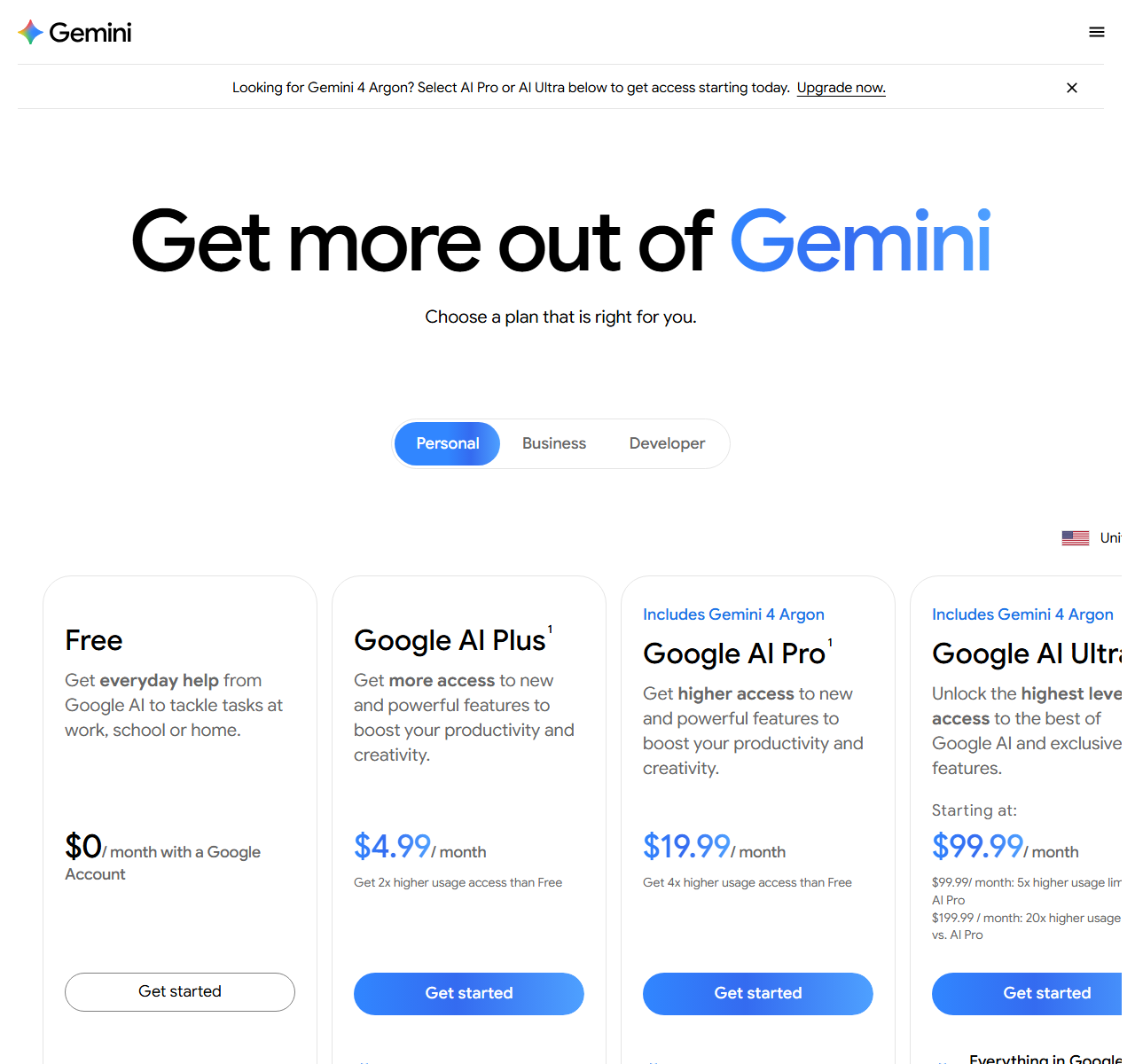 Gemini's US plan page, the source for the Gemini column, captured 22 October 2026.
The Gemini column comes from Google's US subscriptions page, read 22 October 2026, which lists AI Plus with 2x the free usage and AI Pro with 4x. Ultra's two prices carry 5x and 20x the AI Pro limits. Engadget covered the cut from a single $250 Ultra plan on 19 May 2026.
The ChatGPT column comes from the ChatGPT record, checked against OpenAI on 1 October 2026. The free tier shows ads to some US users, a change our explainer on ChatGPT ads walks through. Every plan, limit and regional price sits in the ChatGPT plans comparison.
Underneath both apps, the model actually answering your question changes faster than either price list. Google shipped Gemini 3.8 Flash on 2 September 2026 as its newest low-cost option. Google also announced Gemini 3.5 Pro at I/O in May, and HokAI's record still lists that model as unreleased, so no phone answers with it yet.
OpenAI sells two smaller siblings, GPT-5.6 Terra and GPT-5.6 Luna, to developers at a fraction of the flagship's cost. Neither company says which exact version answers a free query on a given day, and this guide will not guess at it.
The screen-reading feature that used to be a separate app
Gemini on Android used to require opening a dedicated layer for anything beyond typed chat. Through 2026, the selection tool once known as Circle to Search folded directly into that same overlay. Hold the gesture, circle or highlight anything visible, and the assistant answers using that selection as context, no app switch required, per a 9to5Google report on 11 May 2026.
The camera side of that lineage still lives in Google Lens, which answers questions about what the camera sees rather than what the screen shows.
A second mode goes further than selection. It hands the assistant the whole visible screen, a file, or a webpage as context in one tap, described in Beebom's rundown of the feature as pulling in summaries and translations of whatever is on screen.
A connected-apps layer, successor to what Google originally shipped as extensions back in 2023, lets that context reach into a wider set of your own linked accounts with permission. That is the real value sitting behind the default slot: not a smarter model underneath, but standing access to whatever is already open.
The mechanic ChatGPT cannot buy its way into
Here is the part most reviews skip. Setting ChatGPT as the default really works: long-pressing the power button, or swiping from a bottom corner, launches it straight into voice mode with a moving bubble.
What it cannot do is answer a spoken wake phrase. Continuous listening for a hotword needs a privileged microphone permission that the platform only grants to software preinstalled on the device, not to something downloaded afterward.
A request for exactly this feature, titled "Hey ChatGPT" wake-word support, was posted on OpenAI's developer forum on 23 November 2025 and is still unresolved. That is not a bug anyone can quietly patch. It is a permission decided one level up, by whoever built the operating system.
Two more apps sit in that same settings screen. Perplexity lets you point a phone's camera at anything and ask about it live, plus summarize or act on whatever is already on your display, and it is settable the same way. Yahoo Tech dated that assistant to the app's 2.37.0 build. Its maker, Perplexity AI, also lists reminders, messages, calls and music among the jobs it handles from the default slot.
Claude can register for the identical role too, though a platform-wide bug clears that registration on every reinstall. A developer filed the issue against Anthropic's public repository, and it was closed as not planned.
Voice quality still favors the challenger
If the decision were purely about talking to the thing, the challenger's voice mode would win. OpenAI replaced Advanced Voice Mode on 8 July 2026 with GPT-Live-1, a full-duplex model that listens and speaks at once instead of trading turns, as TechCrunch reported that day.
Paid plans get GPT-Live-1; the free tier defaults to GPT-Live-1 mini. OpenAI told TechCrunch that more than 150 million people talk to ChatGPT through Voice and Dictation, and the voice model hands harder questions to text models like GPT-5.5 mid-conversation.
Gemini Live has the opposite tradeoff. It is free to use and runs inside the operating system rather than as a separate app, but its tone reads as more functional than expressive. Neither maker has published a head-to-head naturalness score. Treat that comparison as subjective until someone measures it.
Where Gemini wins
Gemini wins for one specific, common case. You are looking at a confusing screen, an email, a receipt, a form, and you want an answer about exactly what is in front of you, without switching apps or retyping anything.
That is the screen-reading privilege at work, and the challenger has no equivalent shortcut this year. Gemini also wins on price at the bottom of the ladder: AI Plus costs $4.99 against $8 for Go.
Where ChatGPT wins
The challenger wins for a different, equally specific case. You already pay for a higher tier, you want a particular model or a saved custom setup for a repeated task, and you spend more time in genuine back-and-forth than issuing single commands.
Long talks are the clearest example. ChatGPT Voice's product lead told TechCrunch he has held 30- to 40-minute conversations with GPT-Live on walks, a session length the voice model was built for.
Neither of those is a system integration. They are reasons to prefer the app you are already inside once you have opened it by hand. If you mostly want a chatbot rather than a phone assistant, our guide to the best AI chatbots ranks the field on that job.
The obvious objection is that sharing the settings slot should have closed this gap by now. It has not. The toggle only decides which app answers a long-press. It does not touch the separate allowlist that grants hotword listening and screen-content access, which the platform maker controls for its own software.
What switching costs you, and what you keep
The switch itself is free and reversible, and that is the main reason to try it for a week rather than agonise. Your chats stay in each company's cloud account, not on the phone, so nothing is lost when you flip back.
The real cost is habits. Routines built on "Hey Google", screen questions and quick actions inside Google apps stop working while the other app holds the slot. If you already pay for Google AI Pro for its 5 TB of storage, leaving Gemini as default costs nothing extra. Paying for ChatGPT Plus on top doubles your bill to about $40 a month.
A fair test is one normal week. Each time you reach for the power button, note what you wanted from it: an answer about the screen, a timer, a message, or a long conversation. If most of those presses wanted the screen or a quick action, the slot belongs with the preinstalled app. If most wanted a long answer or a back-and-forth, keep the switch, because that is the job it does well.
If you want neither lock-in, Microsoft Copilot and Meta AI are the other mainstream apps, and our Android assistant roundup compares the wider field.
How each one handles your data
Both apps store chats in your account by default and both let you stop them being used for training, but the defaults and timers differ.
| Setting | Gemini | ChatGPT |
|---|---|---|
| Default history | Auto-delete at 18 months | Stays in history |
| Training control | Keep Activity | Improve the model |
| Temporary chats kept | Up to 72 hours | Up to 30 days |
| Feedback after opt-out | May train models | May train models |
Google's safety page for Gemini, read 22 October 2026, says your activity auto-deletes after 18 months by default, and that you can shorten it, lengthen it or turn activity off at any time.
Google's blog post of 13 August 2025 added Temporary Chats, which skip your history and are not used to train its models, but are kept for up to 72 hours. The same post renamed the Gemini Apps Activity setting to Keep Activity. When it is on, a sample of uploads made from 2 September 2025 onward can be used to improve Google's services.
OpenAI's Data controls page, read 22 October 2026, puts the training switch under Settings, then Data controls, on Android. Temporary chats skip history and training but may be kept up to 30 days for safety. OpenAI says it does not train on Business or Enterprise workspace content by default.
Leaving either service is also self-serve. Free, Go, Plus and Pro users of ChatGPT can export their data or delete the account from settings, per that same page, while Gemini chats can be deleted one at a time or through the activity page.
The practical difference on a phone is reach, not policy. Gemini sees whatever you hand it from the screen or an app it is connected to; ChatGPT sees only what you type, say or attach inside its own window.
What would actually change this
The verdict flips the moment the operating system opens hotword access, or the on-screen-content permission, to any registered assistant rather than just the preinstalled one. Nothing a rival lab ships on its own side of that line moves it.
Until the platform rule changes, this is a decision about what the phone lets an app do, not about which chatbot answers better. Picking between them for the reasons most model-quality reviews give is answering the wrong question. If the bigger decision is which AI tools are worth paying for across your whole setup, Smart Match can answer a few questions about your use and return a shortlist that fits it.
Frequently asked questions
Can ChatGPT be set as the default assistant on Android?
Yes. Go to Settings, then Apps, then Default apps, then Digital assistant app, and choose ChatGPT. A long-press on the power button, or a corner swipe on gesture navigation, then opens its voice mode in a floating bubble, the behaviour OpenAI first shipped in a beta build. It still cannot answer a wake word.
Why can't ChatGPT respond to a spoken wake word like Gemini does?
Android reserves continuous hotword listening for apps that ship preinstalled on the device, because it needs a privileged microphone permission Play Store downloads do not get. Users have asked OpenAI for a "Hey ChatGPT" wake word on its community forum since November 2025, and the request is still open as of 22 October 2026.
Is Gemini's screen-reading feature the same as Circle to Search?
They have merged. In May 2026 Google folded Circle to Search style selection into the Gemini overlay, so circling anything on screen adds it as context for a prompt without opening another app. "Ask about this screen" goes further and hands Gemini the whole visible screen, file or webpage at once.
What is GPT-Live and how is it different from Advanced Voice Mode?
GPT-Live is the full-duplex voice model OpenAI launched on July 8, 2026 to replace Advanced Voice Mode. It listens and speaks at the same time instead of trading turns. Paid ChatGPT plans get GPT-Live-1, while the free tier defaults to the smaller GPT-Live-1 mini.
Are Gemini and ChatGPT the only apps that can be Android's default assistant?
No. Perplexity ships an Android assistant with Live View camera queries and On-Screen Context, and it can be set as the default the same way. Claude's Android app can register for the role too, though an Android bug clears the setting on every reinstall.
Covered in this guide
- Gemini: Google's multimodal AI assistant and model family, sold as a free app, tiered subscriptions and a pay-per-token API
- ChatGPT: ChatGPT is OpenAI's AI assistant, with 1.2 billion weekly users by OpenAI's count, the GPT-6 model family and plans that run from a free tier to a premium Pro tier.
- Anthropic: Anthropic is a Public Benefit Corporation started by 7 ex-OpenAI researchers. It builds the Claude model family and counts Amazon and Google among its largest backers.
- Claude: Claude is Anthropic's AI assistant, with a free tier, paid personal plans, and Team and Enterprise seats. Opus access starts at the first paid plan.
- Gemini 3.5 Pro: Google named Gemini 3.5 Pro at its May 2026 developer conference, but the model has not been released. Google has published no context window, price or benchmarks for it.
- Gemini 3.8 Flash: Google DeepMind shipped Gemini 3.8 Flash on September 2, 2026, a multimodal Gemini 3 model tuned for long-horizon coding and agentic enterprise work.
- Gemini 4 Argon: Google DeepMind's Gemini 4 frontier model, generally available on the paid Gemini API: 1M-token context and output, text, image, video, audio and PDF input.
- Google: Google (Alphabet, NASDAQ: GOOGL) runs Search, Cloud and the Gemini models, including Gemini 4 Argon (October 2026).
- Google Lens: Google's AI-powered visual search tool that identifies objects, translates text in 100+ languages, matches products against the Shopping Graph, and provides homework help. Free on Android, iOS, and Chrome, with a Windows desktop app that launched in 2026.
- GPT-5.5: GPT-5.5 is OpenAI's April 2026 flagship model for agentic coding and knowledge work, with a 1.05M-token API context window and text and image input.
- GPT-5.6 Luna: GPT-5.6 Luna by OpenAI (July 2026): budget-tier pricing, fastest in family, high-volume workloads. 200K context, vision plus text, capped reasoning.
- GPT-5.6 Terra: GPT-5.6 Terra is OpenAI's balanced-tier model, released July 2026 with strong reasoning, a 200K context window, and no ultra mode.
- GPT-6 Astra: OpenAI's flagship model, launched September 2026 as the first ever rated at the Preparedness Framework's Critical cybersecurity level.
- Meta AI: Meta's free assistant inside Facebook, Instagram, WhatsApp and Messenger, powered by Muse Spark, with Meta One bundles for heavier image and video generation.
- Microsoft Copilot: Your everyday AI companion powered by GPT-5.6 (preferred model July 2026), GPT-4o, and GPT-5 for productivity, creativity, and intelligent assistance
- OpenAI: OpenAI builds ChatGPT, the GPT-6 family (Astra, Sol, Luna), Codex and the OpenAI API. It reports 1.2B weekly ChatGPT users and an $852B valuation after its March 2026 round.
- Perplexity: Perplexity AI answers from the live web with numbered citations and lets paid users pick among models from 6 AI labs; a limited free plan exists.
- Perplexity AI: Perplexity AI makes a cited answer engine, the Computer agent and an Agent API, and routes work across models from several vendors.
Sources
Still deciding?
This guide covers a handful of options. Smart Match checks every listing in the directory against how you actually work and what you can spend, then hands you the shortlist and the reason behind each pick.
Find your toolsRelated guides
- The AI 80s Photo Trend: How to Make Yours (and Turn It Into a Video) in 2026AnalysisWhat changed and who it affects
- The AI Tools That Do One Microsoft Copilot Job, CheaperBuyer's guideHow to pick, across a category
- AIML API vs OpenRouter: Which AI Gateway Should You Use in 2026?ComparisonHead-to-head, with a verdict
- Algolia and You.com Both Call Themselves AI Search Infrastructure. They Aren't Rivals.ComparisonHead-to-head, with a verdict
- Arc Browser Hasn't Shipped a Feature in 449 Days. Cloudflare Just Showed Why.AnalysisWhat changed and who it affects
- Attio vs HubSpot in 2026: Which CRM for a Startup?ComparisonHead-to-head, with a verdict