Six Questions, Three Tools: Inside a Smart Match Run
Smart Match is HokAI's free tool finder. It asks a handful of bounded questions, shows the constraints it inferred in a visible panel, then returns three ranked products with fit percentages. Its answers are drawn only from 443 verified tool listings, and no account or email is needed to see them.
The short version
A Smart Match run on 19 August 2026 took six short questions and returned three ranked tools, each with a fit score and a reason. Every pick resolves to a listing carrying a vendor, pricing notes and a free-tier flag, so a reader can open the record and dispute it.
On 19 August 2026 we typed one paragraph into Smart Match about a four-person marketing team, then answered six short questions. It returned three tools.
Not thirty. Not a filter rail sitting over 443 listings. Three of them, ranked, each carrying a percentage and one sentence explaining its place. What follows is that run, screen by screen. The useful question about a recommendation is not whether it sounds right: it is whether a stranger can check it.
Disclosure: HokAI wrote this about HokAI.
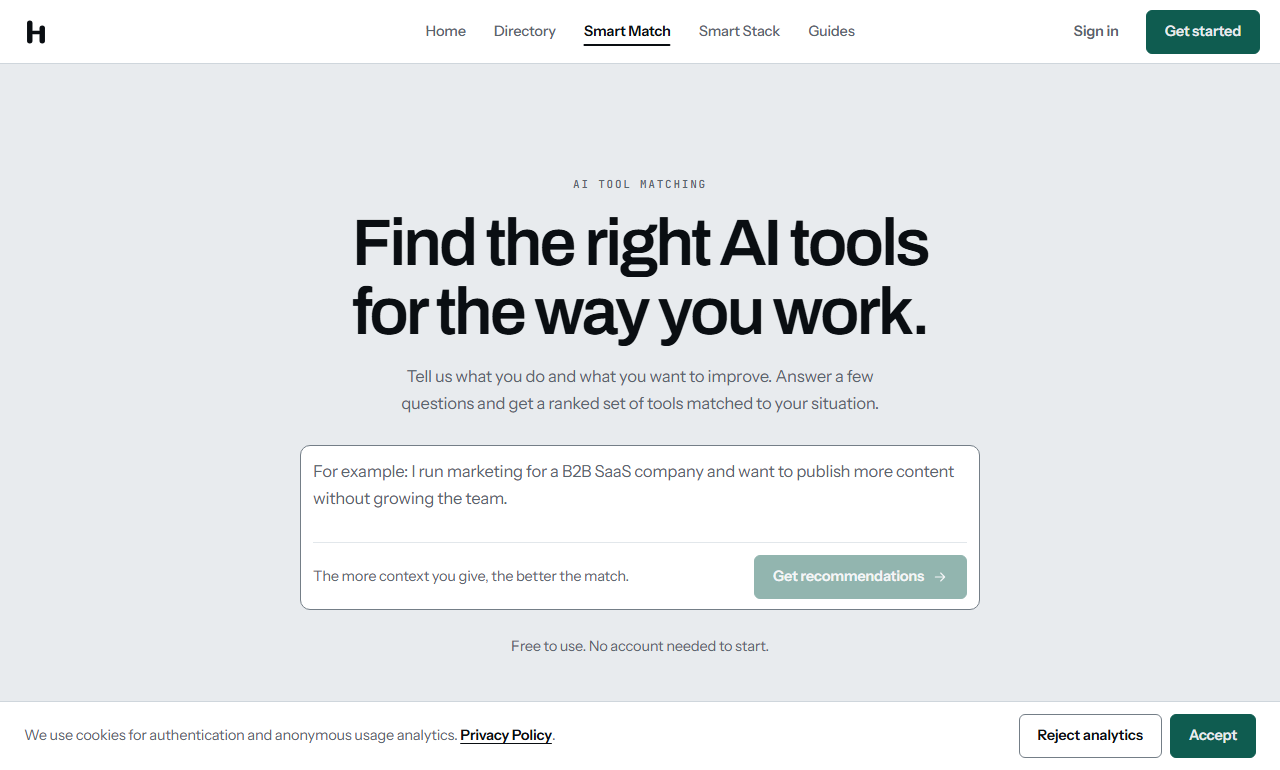
The opening screen, 19 August 2026. One box, one example, no sign-in.
The six questions, in order
The opening screen is one box with an example already sitting in it, about a marketer who wants to publish more without growing the team. Under the button is the promise the rest of the flow has to keep: free to use, no account needed to start.
We described four people, a HubSpot dependency and a modest budget.
Then the questions arrived one at a time, each labelled with its number in the corner of the screen. Whether the work was for one person or several. Whether we had used AI tools before. What bugs us about how the job gets done today. Free tool or willing to pay. Starting now or exploring. Finally, which of four things matters most when picking between products, from ease of learning to raw capability.
None of them asked for a company name. None asked for a work email. They are the questions a good shopkeeper asks before reaching for a shelf.
The panel that shows its working
By the fourth question a context panel had appeared beside the thread. It filled in as we talked. Budget: free tools only. Priority: speed and volume. Start: right away.
That panel is the honest part of the design. It shows the constraints being carried forward, in plain words, before anything is built from them. When we called the budget modest, the panel wrote "free tools only" and the following question tested it: free, or willing to pay if the product earns it? We said up to 100 dollars a month, and two more lines appeared in the panel as the conversation ran on.
Two controls sit above the thread. One starts over. The other skips the remaining questions and goes straight to matches, and it appears from the second question onward. Nobody is held to the script.
What comes back
The result is headed "Your AI stack is ready" and opens with a brief written in prose: a marketer prioritising cost, already using ChatGPT, so the picks extend coverage rather than repeat it. Three figures sit beneath it. Three tools matched, roughly 59 dollars a month per seat, 70 per cent average fit.
Then the ranked list. Jasper, from Jasper AI, Inc., at 76 per cent fit and 59 dollars a month on its Pro tier, badged as the top pick. Monica, from Stack Network Limited, at 70 per cent on a free tier. A third at 65 per cent, described on its own card as a fallback if the first two do not land. Under the list, a table of three columns: tool, fit, starting price.
The shortlist rendered without an account and without an email. We checked that in the page rather than trusting it: the results heading sits 134 pixels down the document with the fit scores in the text below, and no fixed overlay taller than 400 pixels covers them. An email panel is offered further down, for a longer report. It asks. It does not block.
What sits under each pick
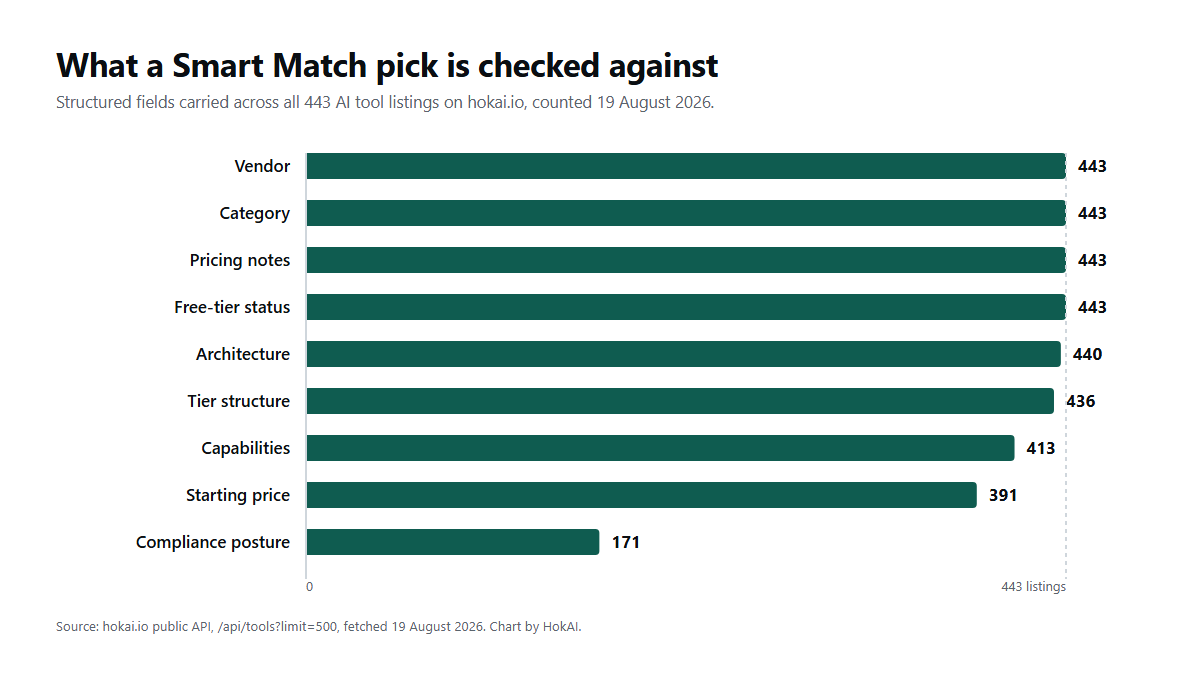
Field coverage across the tool catalogue, counted through the public API on 19 August 2026.
A percentage is only worth as much as the record it came from. So the rest of this run went on the 443 tool listings the shortlist was drawn from, counted through the public interface the same day.
All 443 carry a vendor, a category, pricing notes and a free-tier flag. 440 carry an architecture, 436 a tier structure, 413 a capability list, 391 a starting price. 171 record a compliance posture, and inside that group 123 name SOC 2, 99 name GDPR and 60 name HIPAA. Those are the fields a fit score can be built from. They are also the fields a reader can open and argue with.
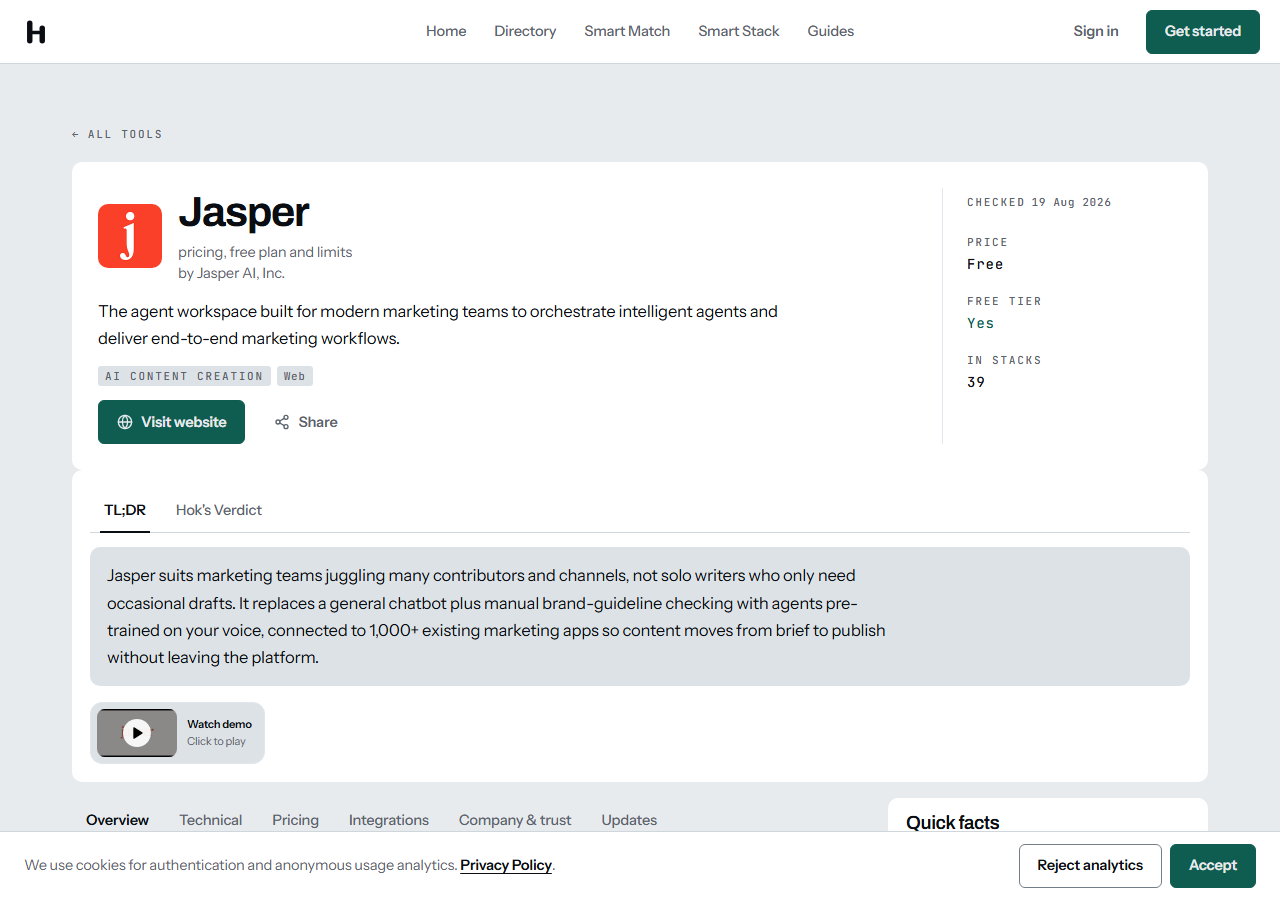
The record behind the top pick, 19 August 2026, with its verification date in the corner.
Open the Jasper listing and the corner of the header carries a date: checked 19 Aug 2026. Free tier, yes. The record behind the recommendation is the same page a reader reaches from a search engine, with the same tabs for pricing, integrations and company detail. Nothing is scored in a place you cannot visit. How those values are established in the first place is the subject of an earlier piece on the verification routine.
Why three and not three hundred
The case for a short answer is not that readers are lazy. Stack Overflow's 2025 developer survey put 84 per cent of respondents on AI tools or planning to be, while 45.7 per cent said they distrust the accuracy of what those tools return, against 32.7 per cent who trust it. The most common complaint, from 66 per cent, was output that is almost right but not quite. A system that confidently lists twenty products has produced exactly that.
Choice overload describes what happens next. Faced with too many options, people take the default or decide nothing. The answer is not to hide the catalogue. It is to make the narrowing legible. Nielsen Norman Group reached the same place from the other side of the problem, arguing that filters and results belong on screen together so a person sees at once when a choice cut too deep. The context panel is that idea moved into a conversation.
The catalogue stays one click away. The tools directory holds all 443 across 58 categories and 424 separate vendors, with facets for free tools and for SOC 2. Smart Match is a door, not a fence.
The strongest case against a short list
Here is the objection worth taking seriously. The choice-overload finding is not settled. Dean, Ravindran and Stoye, testing it more carefully in 2022, argue the effect is weaker and far more dependent on context than the popular version claims. If extra options rarely hurt, then three is simply less.
The reply is that a shortlist is not defended by psychology. It is defended by what each line resolves to. A wall of cards leaves the reader to do the field comparison alone, across vendor pages that change without notice. Three cards, each backed by a dated record carrying a tier structure and a compliance posture, move that work somewhere it can be audited.
If three is too few, carry them into a stack and set the fields against each other. The number is a starting point rather than a verdict.
Who Smart Match isn't for
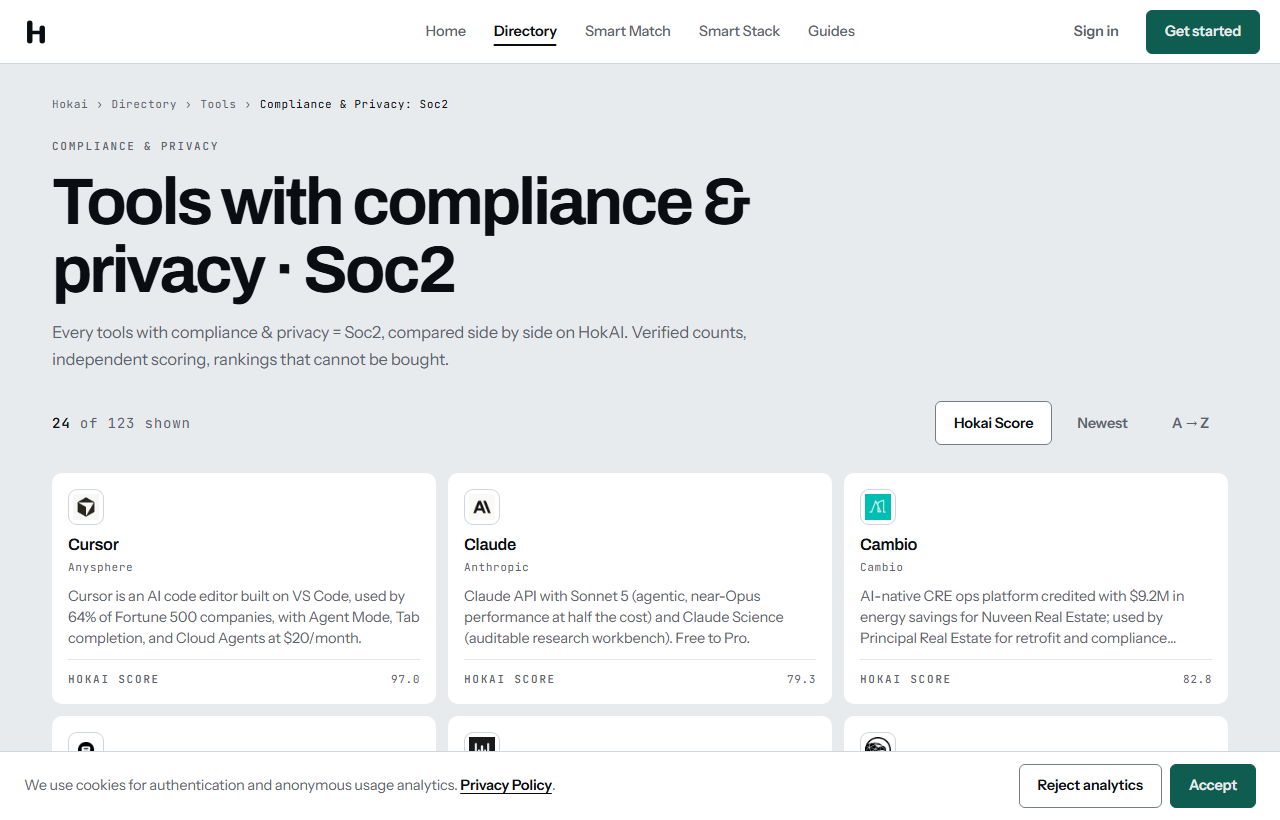
The SOC 2 facet, 19 August 2026: 123 listings, a better door for procurement-led buying.
Smart Match suits someone with a decision to make and a budget to defend. It is a poor fit for browsing, and browsing is a legitimate way to shop. If you would rather read a whole category and form your own view, the directory is the better door and always will be.
It is the wrong instrument for procurement-led buying too. When a shortlist has to survive a security review before anyone opens a trial, start from the SOC 2 facet and work inward, or from a record like Anyword, which lists SOC 2, HIPAA, GDPR and ISO 27001 on its page.
And if you already know the two products you are choosing between, a conversation is a detour. Open both records and read the tabs.
What would change our own mind about the shape of this? A run whose picks could not be traced back to fields a reader can open. That is the test we would put to any other recommendation engine, so it is the one we ran against ours, and it is the one we publish our sources against. Every number above came from a public address on 19 August 2026. Go and pull them.
Frequently asked questions
How many questions does Smart Match ask?
Our run on 19 August 2026 reached a sixth question before we asked for the results. The questions cover who the tool is for, what you use today, your budget, your timing and what you weigh most when choosing. A skip control appears from the second question onward, so you can stop and see matches whenever you want.
Do I need an account to use Smart Match?
No. The opening screen states that it is free to use with no account needed to start, and our run confirmed it. The ranked shortlist and its fit scores rendered on the page with no sign-in and no email, with an optional panel further down offering a longer report.
Why does Smart Match return only three tools?
A short list is easier to check than a long one, and checking is the point. Each of the three resolves to a listing carrying pricing notes, a tier structure and a verification date, so you can open the record behind the score. The full catalogue of 443 tools stays one click away in the directory if you would rather browse.
Is Smart Match better than just asking ChatGPT?
It depends on what you need. A general assistant knows far more products and will answer about anything, while Smart Match states that it draws only from its 443 editor-verified listings rather than from model memory. If you want breadth and conversation, use the assistant; if you want picks whose prices and tiers you can open and audit on a dated page, use Smart Match.
What can I do with the shortlist afterwards?
Each pick links to its full listing and can be added to a stack. From there the fields sit side by side, which is the faster route when three results feel too narrow. The compliance facets are the better starting point if a security review comes before any trial.
Covered in this guide
- HokAI: HokAI is an editor-curated, AI-only directory at hokai.io. Listing requires a flat submission fee; rankings cannot be bought. Every Pulse update is verified against a primary source.
- Abridge: Enterprise ambient AI clinical scribe used at 300+ health systems. Converts doctor visits to Epic EHR notes in real time, saving 70+ hours/month per clinician.
- Ada: Enterprise AI customer service platform that autonomously resolves support interactions across chat, voice, email, and social channels, built for large Zendesk and Salesforce deployments.
- Anyword: AI Content Platform with A/B-Tested Data for Performance-Driven Marketing
- Jasper: Jasper is the agent workspace built for marketing teams, now expanded with a GEO Agent for AI-search visibility, an IQ Agent for automated brand setup, and MCP support for running its agents from other systems.
- Monica: All-in-one AI assistant browser extension and app that combines GPT, Claude, and Gemini in a sidebar for chat, writing, search, and summarization. Free tier available, with paid plans for heavier use.
Sources
Still deciding?
This guide covers a handful of options. Smart Match checks every listing in the directory against how you actually work and what you can spend, then hands you the shortlist and the reason behind each pick.
Start Smart MatchRelated guides
- 41 of 100 HokAI Guides Carry a Screenshot. All 106 Still Load.Inside HokAIHow the directory works, verified in the open
- Best AI Assistant Apps for Android in 2026, Now That Google Assistant Is DeadBuyer's guideHow to pick, across a category
- Best AI Content Creation Tools in 2026: Pick By the Job, Not the CategoryBuyer's guideHow to pick, across a category
- Best AI Customer Support Software in 2026: What Per-Resolution Pricing Actually CostsBuyer's guideHow to pick, across a category
- Best AI for Writing a Business Plan in 2026: Tested Picks and a VerdictBuyer's guideHow to pick, across a category
- Best AI for Creating YouTube Videos in 2026: A Buyer's GuideBuyer's guideHow to pick, across a category