Adalo vs Fenado (2026): One Is a Tool, the Other a Team
Adalo and Fenado are both AI-assisted no-code app builders that generate native iOS and Android apps, but they serve different buyers. Adalo is a self-serve visual canvas priced $0 to $160 a month. Fenado is a managed, chat-driven build service priced from $1,999 to $9,999 a month on its own published tiers.
The short version
Adalo is a self-serve, drag-and-drop app builder starting at $36 a month with clear published limits. Fenado is a chat-driven full-stack generator whose own materials disagree on where pricing starts: $199 in one case study, $1,999 on its documentation. Either way, it's priced like a managed service, not a DIY tool.
Want this decided for your own case? Find your tools with Smart Match, starting from this guide's question.
Adalo's cheapest paid plan costs $36 a month, and Fenado's own pricing page lists nothing under $1,999.
Both tools sell the same pitch: describe an app in plain English and get a working native build for iOS and Android, no developer required. Adalo has sold that pitch since 2018 as a drag-and-drop canvas with a published price list down to the storage tier.
Fenado sells a version of the same pitch as a managed build, and its own materials cannot agree on where that managed price actually starts. For a founder deciding this month, that gap is the real question, not which tool ships more integrations.
Where Adalo and Fenado Actually Disagree
Pick Adalo if you are building the app yourself and want the price in writing before you start anything. Its Professional tier costs $52 a month billed annually, or $62.40 month to month, and includes two published apps, five app editors and 25GB of shared storage, according to Adalo's own pricing page.
Pick Fenado if you have a few thousand dollars a month set aside and want an actual team assembling the app while you describe changes in a chat window. Fenado's documentation lists its cheapest published tier, Business Plus, at $1,999 a month for up to 100 hours of dedicated support.
A separate build case study that Fenado published through an agency partner cites a $199-a-month entry tier that does not appear anywhere on that same documentation page. Neither figure is wrong exactly, but they do not agree, and nobody at Fenado has reconciled them publicly.
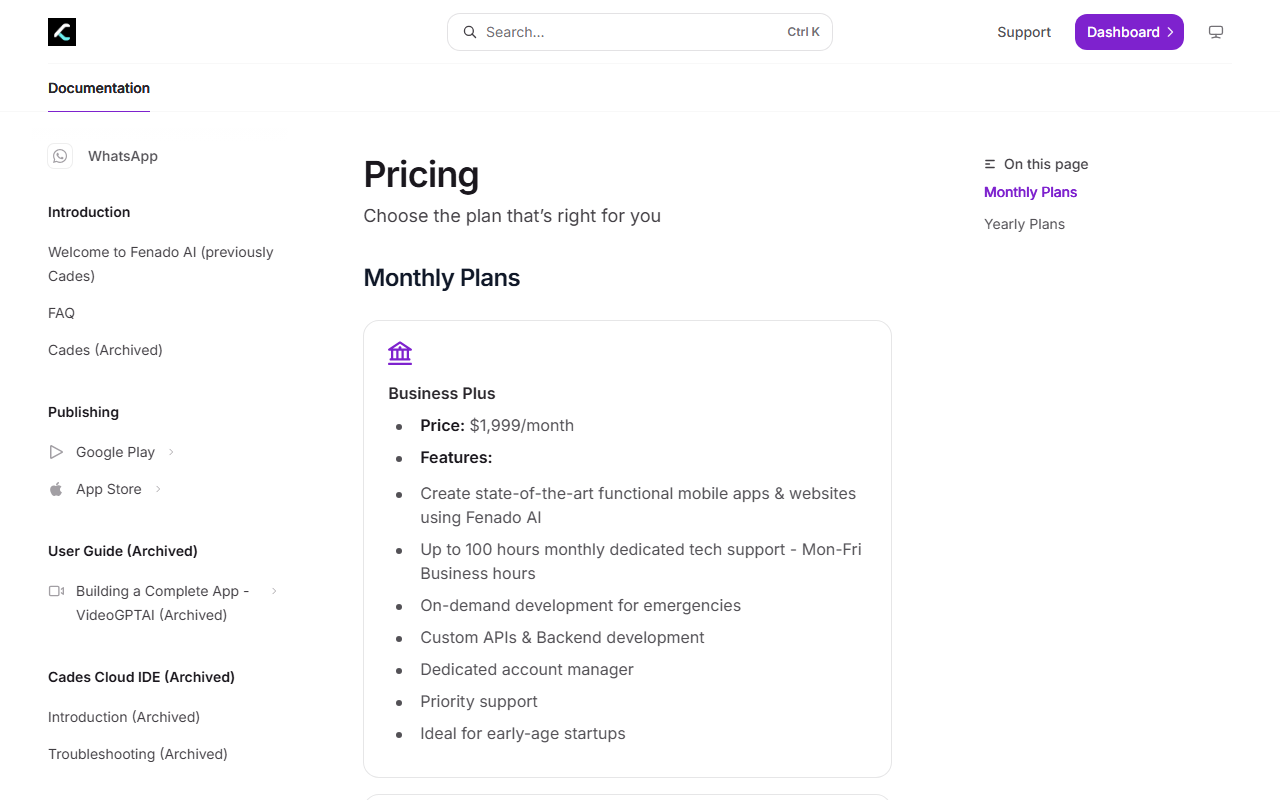 Fenado's documentation site, captured 5 September 2026. This is the only pricing Fenado publishes outside third-party case studies, and it starts at $1,999.
What Each One Actually Costs
Adalo's free plan caps a project at 500 records and ships with no publishing option at all. Starter, at $36 a month annually, adds web publishing plus automated submission to the Apple App Store and Google Play, though Apple still charges its own $99-a-year developer fee and Google its own $25 one-time fee on top of whatever Adalo bills. Team, the highest published tier, runs $160 a month annually for five published apps, ten editors and 125GB of storage.
A team on that Team plan spends $1,920 a year in total. That is less than one month of Fenado's documented Business Plus tier.
Fenado's own two tiers scale differently from Adalo's four. Business Plus targets what its copy calls early-stage startups, and Business Express, at $9,999 a month, adds up to 720 hours of support plus a dedicated engineering team, not just an account manager. That is not a pricing ladder for the same kind of product. It is two different purchases wearing the same category label. That distinction rarely shows up on either homepage, so it is worth stating plainly before comparing a single feature between them.
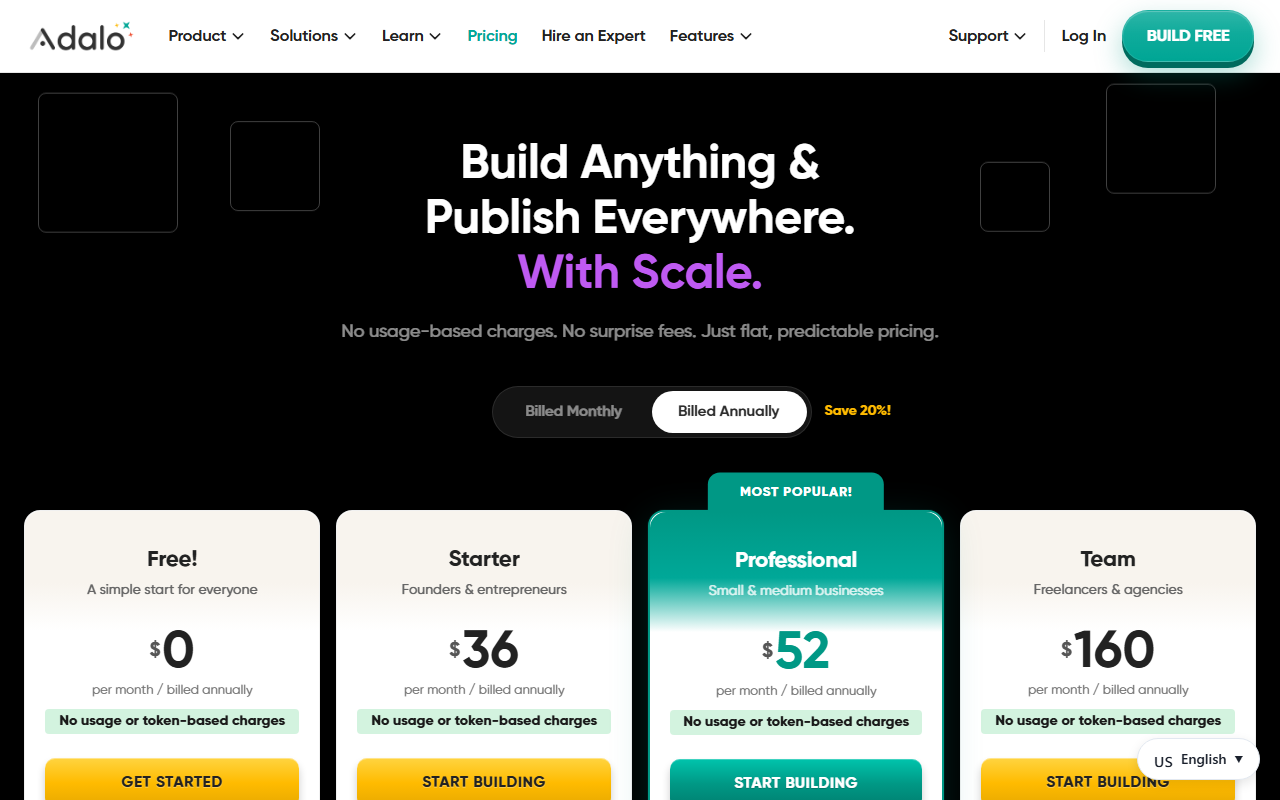 Adalo's pricing page, captured 5 September 2026. Every tier and its exact monthly price is public, with no quote request required.
How They Build the App: Canvas vs Chat
Adalo's editor is a visual canvas. You drag screens, wire actions between them by clicking, and connect a hosted Postgres database without writing a query.
A beta assistant called Ada now sits inside that canvas too: describe a concept in plain language and Ada generates a starting structure of screens and database collections, then an "X-Ray" pass scans the finished app for performance issues and broken links before publish, according to Adalo's own help documentation. The line between Adalo and a chat-driven builder is thinner than it used to be, and Ada is free for as long as it stays in beta.
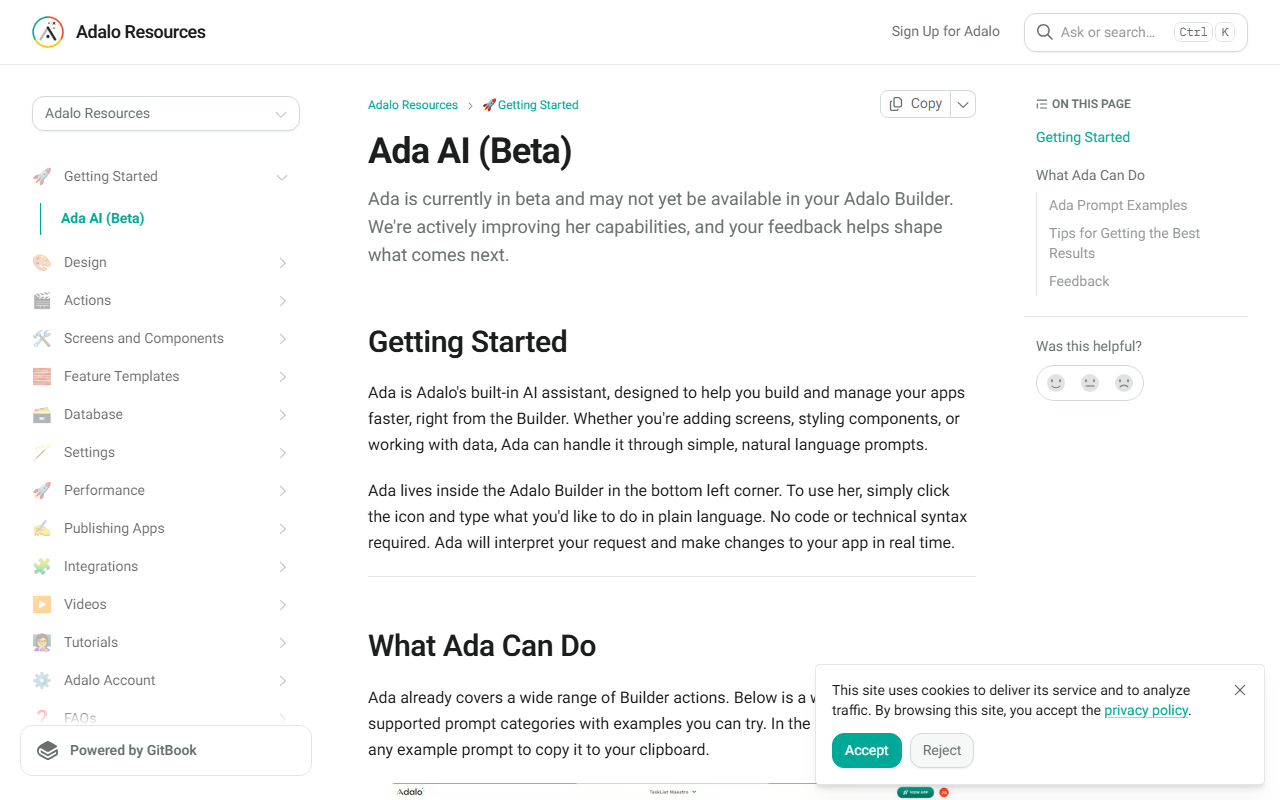 Adalo's own documentation for Ada AI (Beta), captured 5 September 2026. It sits inside the same canvas described above, not a replacement for it.
Fenado skips the canvas entirely. You type what you want, something like "build me an inventory system with logins," and the platform generates a full stack in response: a React frontend built with shadcn/ui components, a FastAPI backend, a MongoDB database and JWT authentication, wired together and streamed back over a live WebSocket connection. The same case study puts a number on adoption: 50,000 users generating applications through Fenado as of its publication.
If you already expect to hand the result to a developer eventually, Fenado's generated codebase gives that developer something real to open. Adalo's screens do not export. They live inside Adalo, permanently.
Once either tool's ceiling arrives, the next stop for most teams is not the other tool in this comparison. It is OutSystems, an enterprise low-code platform that has raised $803 million and been named a Gartner Magic Quadrant leader nine times running, built for the governed, at-scale development that neither Adalo nor Fenado is aimed at.
Where Adalo Wins
Adalo is the cheaper, more transparent purchase for a first app that stays modest in scope. An independent hands-on review found that list views start slowing once a screen holds more than roughly 1,000 items, and that overall performance degrades further past 10,000 to 20,000 records in a table or beyond 50 to 100 simultaneous users. Under that ceiling, it is fast.
A first app, a client-facing prototype, an internal tool for a small team: those fit comfortably inside the numbers above. Product Hunt reviewers rate Adalo 3.3 out of 5 across 22 reviews, and the complaints cluster almost entirely around what happens once a project outgrows that range, not around the free-to-$160 experience itself. Below those numbers, the choice is not close.
Where Fenado Wins, and Where Its Story Gets Thin
Fenado wins when the buyer genuinely does not want to operate a builder at all. Its higher tier bundles a dedicated engineering team for $9,999 a month, which is closer to hiring a contractor who happens to use AI internally than to buying software off a shelf. A prompt-to-full-stack generator also carries less lock-in risk in theory, since a real React and FastAPI project can be opened by any engineer, not just inside one vendor's editor.
Weigh that against a real gap. Independent review coverage of Fenado is thin next to Adalo's presence on Product Hunt, Capterra and Trustpilot, and Fenado's own marketing site renders almost nothing to a reader who is not executing its JavaScript, unlike Adalo's static, fully readable pricing page. A product this new is not automatically worse. It is, for now, harder to check from the outside than its $1,999 asking price would suggest it should be.
The Best Case Against This Verdict
The obvious rebuttal: at $199 to $1,999 a month, Fenado could still be cheaper than paying a contract developer for one project, so calling it "priced for funded teams" undersells it for a solo founder spending a few thousand dollars once. That is fair, for exactly one project.
But Adalo's ceiling is a data problem, not a money problem. Its cheapest self-serve tier costs less in a full year than one month of even Fenado's disputed low tier, and it comfortably covers the sub-1,000-monthly-active-user range where most first apps actually live. This guide is written for a founder deciding how to spend the next year, not the next month.
That math changes for a team that already has ten or more engineers on payroll. At that scale, either platform is redundant next to building in-house, and the real question becomes build versus buy, not Adalo versus Fenado.
What Switching Actually Costs
Moving off Adalo later means rebuilding inside a new tool. Its screens, actions and data model do not export into a codebase a developer can pick up.
Moving off Fenado should, on paper, cost less. A generated React and FastAPI project is something an engineer can actually continue, assuming the export terms on its lower tiers hold up the way its case study implies. Neither Fenado's docs site nor this research pass could confirm that directly.
Neither tool is the only answer if the underlying need looks different. A team whose data already lives in Airtable or Google Sheets and does not need a native mobile shell at all has a simpler option in Softr, which turns that spreadsheet into a client portal without touching either builder covered here.
A team building web-first, with no App Store listing in the plan at all, usually lands on something like Bubble instead of either product in this comparison. And a team that has not decided native mobile is the right form factor at all should answer that question before comparing builders, since the choice between a canvas and a chat window is wasted effort if the app should have been a website.
None of that replaces the actual decision in front of you. Describing the same app idea to enough tools through HokAI's Smart Match tends to surface the honest fit, canvas or chat, faster than reading four pricing pages back to back does.
Fenado's own site does not yet agree with itself on what its first tier costs. Check docs.fenado.ai/pricing on the day you are actually paying, not the day you read this.
Frequently asked questions
Is Adalo or Fenado cheaper?
Adalo, by a wide margin at every published tier. Its priciest published plan, Team at $160 a month billed annually, costs less per year than a single month of Fenado's cheapest documented tier, Business Plus at $1,999 a month.
Does Fenado have a free or low-cost plan?
Not according to its own pricing documentation, which lists only $1,999 and $9,999 monthly tiers. A separate case study Fenado itself published references a $199-a-month tier that does not appear on that documentation page, an inconsistency this guide could not resolve.
What happens when an Adalo app gets too big?
An independent review found performance issues starting around 10,000 to 20,000 records in a table or 50 to 100 simultaneous users. Teams that outgrow those numbers typically move to an enterprise low-code platform like OutSystems rather than to Fenado.
Can you export the code from Adalo or Fenado?
Adalo's screens do not export; the app lives inside Adalo permanently. Fenado generates an actual React and FastAPI codebase according to its own case study, though its export terms on lower tiers could not be independently verified during this research.
Is Adalo or Fenado better for a first app?
For a solo founder or small team building it themselves on a fixed budget, Adalo's Starter tier at $36 a month is the more transparent starting point. Fenado suits a team that wants a service to build the app for them, not a tool to build it with.
Covered in this guide
- Adalo: Visual AI-powered no-code app builder for native iOS, Android, and web apps
- Fenado: Fenado AI is a chat-driven no-code builder that generates native iOS, Android, and web apps, built by former Inshorts leadership with $2M in seed funding.
- OutSystems: Enterprise low-code platform with 200+ integrations and an Agent Workbench for agentic AI. Gartner Magic Quadrant Leader 9 years running, used by 1,500+ enterprises. Developer Cloud pricing is now fully custom-quoted.
- Softr: Build business software with AI, no code required
Sources
Still deciding?
This guide covers a handful of options. Smart Match checks every listing in the directory against how you actually work and what you can spend, then hands you the shortlist and the reason behind each pick.
Find your tools